A question....

Forum dedicated to Microsoft FS2004 - "A Century of Flight".

Re: A question....

Postby Souichiro » Tue Nov 08, 2005 4:45 pm

Maybe I shouldn't tell you this as it might give people ideas but if you leave the file extension off there's no way of checking the file size without downloading the image. This could lead to unscrupulous people posting oversized images.

It must be in JPEG format. That's either .jpg or .JPG. That's the forum rules. You must use the correct case or the image won't show up.


I remember a little discussion about filesizes and it seemed that some CAN see the filesizes and some CAN't. It's really weird and I don't know how and why that is..

Image
User avatar
Souichiro
Ground hog
Ground hog
 
Posts: 0
Joined: Tue Aug 28, 2007 11:34 am

Re: A question....

Postby cspyro21 » Tue Nov 08, 2005 4:48 pm

I remember a little discussion about filesizes and it seemed that some CAN see the filesizes and some CAN't. It's really weird and I don't know how and why that is..


I know, that is an odd one.....
User avatar
cspyro21
Major
Major
 
Posts: 4987
Joined: Sun Aug 28, 2005 6:11 am

Re: A question....

Postby Hagar » Tue Nov 08, 2005 5:00 pm

I remember a little discussion about filesizes and it seemed that some CAN see the filesizes and some CAN't. It's really weird and I don't know how and why that is..

I obviously missed that discussion. It's probably because some of the images don't have file extensions in the path. Try it on the two examples you posted. Right-click on the top image & select Properties. Now try it on the bottom one.
Image

Founder & Sole Member - Grumpy's Over the Hill Club for Veteran Virtual Aviators
Member of the Fox Four Group
My Google Photos albums
My Flickr albums
User avatar
Hagar
Colonel
Colonel
 
Posts: 30869
Joined: Wed Jun 19, 2002 7:15 am
Location: Costa Geriatrica

Re: A question....

Postby cspyro21 » Tue Nov 08, 2005 5:02 pm

Oh yes by the way Soui....your RA Spit shots are 40 pixels too tall!!!  ;D
User avatar
cspyro21
Major
Major
 
Posts: 4987
Joined: Sun Aug 28, 2005 6:11 am

Re: A question....

Postby Souichiro » Tue Nov 08, 2005 5:04 pm

I obviously missed that discussion. It's probably because some of the images don't have file extensions in the path. Try it on the two examples you posted. Right-click on the top image & select Properties. Now try it on the bottom one.


I know I can't see it either but others can....Don't know why either....

and 800X640 is also allowed just max 800 wide....
Image
User avatar
Souichiro
Ground hog
Ground hog
 
Posts: 0
Joined: Tue Aug 28, 2007 11:34 am

Re: A question....

Postby Hagar » Tue Nov 08, 2005 5:11 pm

I know I can't see it either but others can....Don't know why either....

Maybe it depends on the browser. I use IE for browsing the forum. I'll try it in Firefox.*

and 800X640 is also allowed just max 800 wide....

Quite correct providing the file size is no more than 100k.

[quote]Oh yes by the way Soui....your RA Spit shots are 40 pixels too tall!!!
Last edited by Hagar on Tue Nov 08, 2005 5:15 pm, edited 1 time in total.
Image

Founder & Sole Member - Grumpy's Over the Hill Club for Veteran Virtual Aviators
Member of the Fox Four Group
My Google Photos albums
My Flickr albums
User avatar
Hagar
Colonel
Colonel
 
Posts: 30869
Joined: Wed Jun 19, 2002 7:15 am
Location: Costa Geriatrica

Re: A question....

Postby cspyro21 » Wed Nov 09, 2005 2:44 am

and 800X640 is also allowed just max 800 wide....


Oh! I thought 800x600 applied to all shots as well as contset shots!
User avatar
cspyro21
Major
Major
 
Posts: 4987
Joined: Sun Aug 28, 2005 6:11 am

Re: A question....

Postby Hagar » Wed Nov 09, 2005 6:05 am


Oh! I thought 800x600 applied to all shots as well as contset shots!

Read the rules. http://www.simviation.com/yabbupload.html

Rules for posting images on Simviation's forums

Please keep all screenshots/images in JPG format & less than 100K.
Please keep all images within 800 pixels wide
Please keep PERSONAL avatars (logo under your name) less than 10K & 100 pixels wide
Please keep SIGNATURE images within 30K max.
Please do not post more than 500K total of files in any one thread.


Images not complying with these guidelines will be deleted.

Important : Do not link to these images from other sites. Members found doing this may be banned & images deleted.

Your co-operation is appreciated. Thanks.
Image

Founder & Sole Member - Grumpy's Over the Hill Club for Veteran Virtual Aviators
Member of the Fox Four Group
My Google Photos albums
My Flickr albums
User avatar
Hagar
Colonel
Colonel
 
Posts: 30869
Joined: Wed Jun 19, 2002 7:15 am
Location: Costa Geriatrica

Re: A question....

Postby TacitBlue » Wed Nov 09, 2005 9:55 am

Is it just the contest that requires 800x600? because I entered one that was 800x640 thinking that it only needed to be 800 wide and under 100k, but I was told to resize to 800x600.
(edit) Nevermind, I just looked at the rules like I should have in the first place. Entries MUST be 800x600.
Last edited by TacitBlue on Wed Nov 09, 2005 9:58 am, edited 1 time in total.
Image
A&P Mechanic, Rankin Aircraft 78Y

Aircraft are naturally beautiful because form follows function. -TB
User avatar
TacitBlue
Major
Major
 
Posts: 3856
Joined: Mon Nov 08, 2004 12:33 pm
Location: Saint Joseph, Missouri, USA

Re: A question....

Postby Hagar » Wed Nov 09, 2005 11:00 am

Is it just the contest that requires 800x600? because I entered one that was 800x640 thinking that it only needed to be 800 wide and under 100k, but I was told to resize to 800x600.
(edit) Nevermind, I just looked at the rules like I should have in the first place. Entries MUST be 800x600.

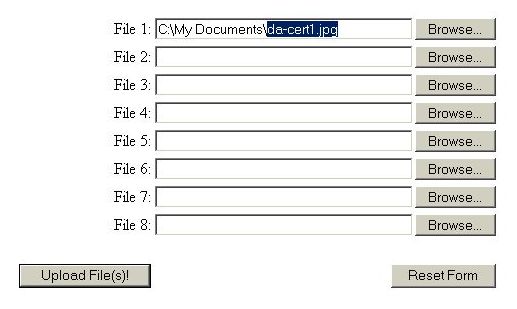
I wouldn't know about contests as I never visit that part of the forum. The question was about posting images. I think we've established that you can do this without using the .jpg or .JPG file extension if you wish. I never understood the problems that so many people seem to have as I always copy the image file name complete with extension from the selection box when I upload the images & paste it on the end of the path in my post. This makes it virtually impossible to make a mistake.

Image

If you intend posting more than one image in a single topic it's a good idea to do all this in a Notepad text file first, then Copy/Paste the whole thing into your topic.
Image

Founder & Sole Member - Grumpy's Over the Hill Club for Veteran Virtual Aviators
Member of the Fox Four Group
My Google Photos albums
My Flickr albums
User avatar
Hagar
Colonel
Colonel
 
Posts: 30869
Joined: Wed Jun 19, 2002 7:15 am
Location: Costa Geriatrica

Re: A question....

Postby cspyro21 » Wed Nov 09, 2005 1:29 pm

Ok then Hagar, thanks for summing it all up! and I will try your 'notepad' idea, that seems very good indeed.
Thanks  ;)
User avatar
cspyro21
Major
Major
 
Posts: 4987
Joined: Sun Aug 28, 2005 6:11 am

Previous

Return to FS 2004 - A Century of Flight

Who is online

Users browsing this forum: No registered users and 357 guests