automatic direction finder

Forum dedicated to Microsoft FS2004 - "A Century of Flight".

automatic direction finder

Postby lim » Wed Nov 02, 2005 4:04 am

I just wanted to know, the radio stack has something called ADF right? What's that and how do we use it? Any idea?

ThankS :)
lim
Ground hog
Ground hog
 
Posts: 25
Joined: Fri Jun 17, 2005 6:07 am

Re: automatic direction finder

Postby Fozzer » Wed Nov 02, 2005 4:27 am

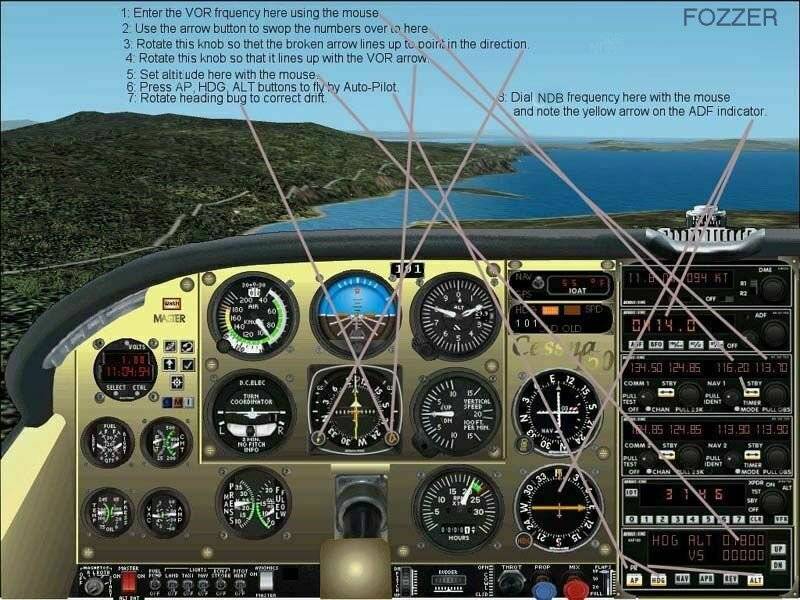
Look on your map and locate the NDB stations.
Note the frequency and dial it into your ADF radio.
The yellow arrow on the dial in your ADF instrument will point in the direction of the NDB station.

It works in a similar fashion to locating the VOR stations for navigation purposes....

Cheers...!

Paul.

Try FS Navigator...to locate the stations....>>>

http://www.fsnavigator.com.

...and you may find this of help...;D....>>>

Image
Last edited by Fozzer on Wed Nov 02, 2005 4:36 am, edited 1 time in total.
Win 8.1 64-bit. DX11. Advent Tower. Intel i7-3770 3.9 GHz 8-core. 8 GB System RAM. AMD Radeon HD 7700 1GB RAM. DVD ROM. 2 Terra Byte SATA Hard Drive. Philips 17" LCD Monitor. Saitek Cyborg X Fly-5 Joystick. ...and a Briggs and Stratton Petrol Lawn Mower.
User avatar
Fozzer
Colonel
Colonel
 
Posts: 27370
Joined: Thu Jan 31, 2002 3:11 pm
Location: Hereford. England. EGBS.

Re: automatic direction finder

Postby garymbuska » Wed Nov 02, 2005 3:24 pm

Boy Fozzer You hit it right on the head.
Just one word of caution here, while you would turn the OBS knob on the vor gauge to find out which direction you need to fly to intersect a VOR, You would not do this when landing on a ILS runway instead you set the obs to the direction of the runway and fly till the lines line up, then follow the glide slope down till you land Safely I hope.
Oh in case you did not know NDB stands for NON DIRECTIONAL BEACON
Not all aircrat have a ADF gauge but most do.

A NDB placed at the start of a ILS runway makes finding the glide slope a whole lot easier it will tell you when and in which direction to turn. 8)
Gary M Buska
SYSTEM Specs ASUS P8Z68 V/GEN 3 mother board: INTELL I7 2600k 3.48 ghz Quad core CPU with Sandy bridge: 12 Gigs of 1800hz ram:
GTX 950 OVER CLOCKED: 2 Gigs Ram Windows 10 Home 64 bit Operating system. 750W Dedicated modular power supply. Two Internal 1TB hard drives 1 External 1TB 3.2 USB hard drive. SAITEK Cessna flight Yoke with throttles.
CH Rudder Peddles 27 inch Wide screen Monitor
User avatar
garymbuska
Major
Major
 
Posts: 4415
Joined: Tue Dec 30, 2003 11:10 am
Location: Jacksonville, Florida

Re: automatic direction finder

Postby wji » Wed Nov 02, 2005 6:55 pm

Tha ADF simply points to the station. Realworld ADF will receive local AM radio station signals 9and point to them) as well. Lots of fun.
Image PhotoShop 7 user
User avatar
wji
Major
Major
 
Posts: 1644
Joined: Tue May 04, 2004 11:27 am

Re: automatic direction finder

Postby beaky » Wed Nov 02, 2005 9:37 pm

A lot of talk about VORs here, and Fozzer's tangled web...!  ::) ;) Nice-looking panel, though- which 150 is that?  ;D

All the above is true and correct, but the part about the ADF always pointing toward the station is the most important. If nothing else, you can just keep that arrow centered, and eventually you will fly right over the station.
As for the dial around the ADF with the markings: there are two types: fixed-card and movable. I have yet to see a fixed card in FS, so...
You can use the movable card for a few different things. Set it so zero or 360 is at the top, and it tells you the position of the station, in degrees, relative to the nose of the airplane. Forces you to do a little math to decide what heading to fly, but you don't have to remember to change it every time you turn, which is part of the other function: finding out what heading will take you to the station. If you keep the card aligned with your DG and/or compass, the needle will point to the heading you want to fly if going to the station.
 I also use them ocasionally to get a rough position fix: even in FS9's flight planner, it's pretty easy to guess 90 or 45 degrees by eye alone... you can mark the passing of an NDB station that's not actually on your course by watching the needle deflect as you pass it. This can be useful.... saves the trouble of flying all the way to the station then turning to find the airport or whatever ("I've just passed the NDB; the airport should be just over that hill").
Image
User avatar
beaky
Global Moderator
Global Moderator
 
Posts: 12877
Joined: Thu Dec 16, 2004 8:00 am
Location: Shenandoah, PA USA

Re: automatic direction finder

Postby Calb » Thu Nov 03, 2005 1:11 am

It should be pointed out that some ADF indicators have the compass card slaved to the Gyro Compass.

Secondly, reception range is far less than VORs. Range depends on two things: the power level of the NDB (low, medium & high) and to a lesser extend, your altitude.

Typically, NDBs associated with instrument approaches are lower power while those used for naviation are high or medium.

Cal (CYXX)
Calb
1st Lieutenant
1st Lieutenant
 
Posts: 343
Joined: Thu May 16, 2002 5:34 am

Re: automatic direction finder

Postby Fozzer » Thu Nov 03, 2005 5:10 am

I love my ADF indicator... ;D...!

Having a rather isolated airfield with no VOR's for many miles around it's comforting to know that the NDB located by the tower at my local airfield will always guide me back home when all else fails in my Cessna 152... 8)... ;D...!
It's very satisfying watching the little yellow needle swinging round, always pointing to "Home"... ;D...!

It really is a dream watching the needle spinning round the dial as I bank and turn...LOL...!

It's a simple system, and I find it works very well.

The same application works equally well in the Flight Simulator, in conjunction with the VOR stations... 8)....!

Cheers all...!

Paul.
Win 8.1 64-bit. DX11. Advent Tower. Intel i7-3770 3.9 GHz 8-core. 8 GB System RAM. AMD Radeon HD 7700 1GB RAM. DVD ROM. 2 Terra Byte SATA Hard Drive. Philips 17" LCD Monitor. Saitek Cyborg X Fly-5 Joystick. ...and a Briggs and Stratton Petrol Lawn Mower.
User avatar
Fozzer
Colonel
Colonel
 
Posts: 27370
Joined: Thu Jan 31, 2002 3:11 pm
Location: Hereford. England. EGBS.

Re: automatic direction finder

Postby Mobayrasta1 » Thu Nov 03, 2005 9:59 am

Fozzer that screenie was the most helpful thing I have seen in a while. Thanks.
Mobayrasta1
1st Lieutenant
1st Lieutenant
 
Posts: 388
Joined: Fri Jul 08, 2005 10:10 am
Location: NAS PATUXENT RIVER

Re: automatic direction finder

Postby Fozzer » Thu Nov 03, 2005 11:29 am

Fozzer that screenie was the most helpful thing I have seen in a while. Thanks.


Ta, Mate....!

I pop it into the Threads every now and again, it saves a lot of explanations, and many folks find it useful....
...I hope... ;)...!

Cheers all...;D...!

Paul.
Win 8.1 64-bit. DX11. Advent Tower. Intel i7-3770 3.9 GHz 8-core. 8 GB System RAM. AMD Radeon HD 7700 1GB RAM. DVD ROM. 2 Terra Byte SATA Hard Drive. Philips 17" LCD Monitor. Saitek Cyborg X Fly-5 Joystick. ...and a Briggs and Stratton Petrol Lawn Mower.
User avatar
Fozzer
Colonel
Colonel
 
Posts: 27370
Joined: Thu Jan 31, 2002 3:11 pm
Location: Hereford. England. EGBS.

Re: automatic direction finder

Postby BFMF » Thu Nov 03, 2005 11:32 am

Havn't seen that screenshot it a long time ;)
BFMF
Colonel
Colonel
 
Posts: 16266
Joined: Mon Feb 25, 2002 6:06 pm
Location: Pacific Northwest

Re: automatic direction finder

Postby Fozzer » Thu Nov 03, 2005 12:31 pm

Havn't seen that screenshot it a long time ;)


There you go then, Andrew... ;)...!

Today is your lucky day... ;D... ;D... ;D...!

LOL...!

Paul.... 8)...!
Win 8.1 64-bit. DX11. Advent Tower. Intel i7-3770 3.9 GHz 8-core. 8 GB System RAM. AMD Radeon HD 7700 1GB RAM. DVD ROM. 2 Terra Byte SATA Hard Drive. Philips 17" LCD Monitor. Saitek Cyborg X Fly-5 Joystick. ...and a Briggs and Stratton Petrol Lawn Mower.
User avatar
Fozzer
Colonel
Colonel
 
Posts: 27370
Joined: Thu Jan 31, 2002 3:11 pm
Location: Hereford. England. EGBS.

Re: automatic direction finder

Postby BFMF » Thu Nov 03, 2005 12:38 pm

When did you make that Paul? It seems that it wasn't long after FS2002 was released....
BFMF
Colonel
Colonel
 
Posts: 16266
Joined: Mon Feb 25, 2002 6:06 pm
Location: Pacific Northwest

Re: automatic direction finder

Postby Fozzer » Thu Nov 03, 2005 1:22 pm

When did you make that Paul? It seems that it wasn't long after FS2002 was released....


Hi Andrew... ;D...!

I knocked it up during a spot of leave from the Crusades... ;)... ;D...!

LOL...!

Paul.... 8)...!

P.S. You are probably right, it contains a nice little FS 2000/2002 Cessna 150 panel which I have long lost... :'(...!
Win 8.1 64-bit. DX11. Advent Tower. Intel i7-3770 3.9 GHz 8-core. 8 GB System RAM. AMD Radeon HD 7700 1GB RAM. DVD ROM. 2 Terra Byte SATA Hard Drive. Philips 17" LCD Monitor. Saitek Cyborg X Fly-5 Joystick. ...and a Briggs and Stratton Petrol Lawn Mower.
User avatar
Fozzer
Colonel
Colonel
 
Posts: 27370
Joined: Thu Jan 31, 2002 3:11 pm
Location: Hereford. England. EGBS.

Re: automatic direction finder

Postby Gringo6 » Fri Nov 04, 2005 5:52 pm

If you would like to find out more than you really want to know about ADF then you should visit:

http://www.navfltsim.addr.com/ndb-nav-adf-1.htm?

In fact this site is the best I've ever seen on flight sim. navagation. And it covers it all, including approaches, charts, ILS etc. Also the author has a C-182 that you can download that is specific for instrument training.

Give the site a visit - you are never too old or experienced to learn something.

BillA (AKA Gringo6)
Gringo6
1st Lieutenant
1st Lieutenant
 
Posts: 417
Joined: Sun Jun 13, 2004 2:17 pm

Re: automatic direction finder

Postby Gringo6 » Fri Nov 04, 2005 5:54 pm

Well, that isn't a good URL. I just tried it after posting and it seems that it is down or something.

Sorry,


BillA (AKA Gringo6)
Gringo6
1st Lieutenant
1st Lieutenant
 
Posts: 417
Joined: Sun Jun 13, 2004 2:17 pm

Next

Return to FS 2004 - A Century of Flight

Who is online

Users browsing this forum: No registered users and 183 guests