
Increase your FPS!!! (in flightsim)

Forum dedicated to Microsoft FS2004 - "A Century of Flight".

Increase your FPS!!! (in flightsim)

Postby FrodoFraggins » Mon Oct 31, 2005 8:56 am

Hey all
I saw this on another Forum, it really worked,

"Hey all
I felt my flightsim was running quiet bad. So i begain fiddling with drivers and fs9 cfg. Heres how I did it.
It may only work on ATI cards though
READ IT ALL FIRST
Open up fs9.cfg
Find the lines
[DISPLAY]
TEXTURE_BANDWIDTH_MULT=40 --- change the 40 to around 400

Open your fs9.cfg file, and modify the following lines to
TERRAIN_DEFAULT_RADIUS=9.500000
TERRAIN_EXTENDED_RADIUS=4.50000

Now, go into the ATI display Settings page by
Right  on desktop, click properties.
on the tab click Settings
Then Click Advanced
A window like this should appear:
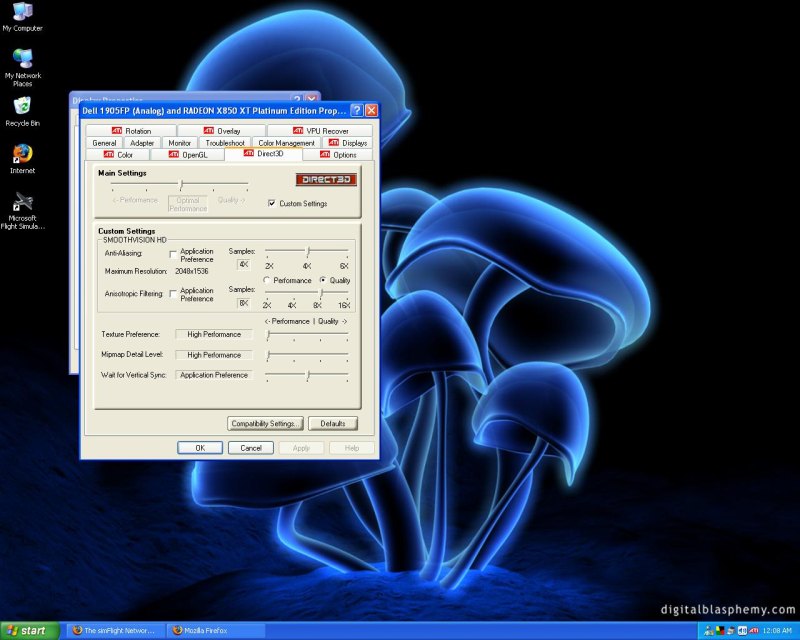
Image
Work your display settings to rouphly match mine.

DONE, click apply and then fly!
The sim should run better while flying. However, when on the ground, some textures might look blurry.
Before I did this, I got around 13-15 fps. Now I get 23.6 average

I AM NOT RESPONSIBLE FOR ANY DAMAGE TO YOUR SYSTEM!!!!!!!111

More tricks here http://members.lycos.nl/vairkennis/FS9tips.txt
( i didnt write them though)


cya

P.S comments welcome"

Comments welcome

cya
FrodoFraggins
Ground hog
Ground hog
 
Posts: 42
Joined: Mon Oct 17, 2005 4:54 am
Location: Melbourne, Australia

Re: Increase your FPS!!! (in flightsim)

Postby Saitek » Mon Oct 31, 2005 11:33 am

Haven't tried it because I doubt it wouold work. I have seen a number of these things over my time here and I never felt they ever worked. ::)
I believe better computer specs = better performance and although there is a bit of leeway for different things it all goes back to this.
Windows 7 Pro 64bit
Intel Core 2 Duo E2180 2GHz
GA-P35-DS3L Intel P35
Kingston HyperX 4GB (2x2) DDR2 6400C4 800Mhz
GeForce 8800 GT 512MB
2 x 22" monitors
200GB Sata
Be Quiet! Straight Power 650W

Flying FS
Saitek
Lieutenant Colonel
Lieutenant Colonel
 
Posts: 5274
Joined: Thu Jun 19, 2003 3:04 pm
Location: UK

Re: Increase your FPS!!! (in flightsim)

Postby Tweek » Mon Oct 31, 2005 11:37 am

However, when on the ground, some textures might look blurry


The idea of tweaking your system/sim to get higher FPS, is to keep the visual quality aswell :P Thing's like clouds can be sacrificed to a certain degree, due to their extreme hit on frame rates, and the fact that they look blurry already! But ground textures really can make a sim come alive.
Tweek
 

Re: Increase your FPS!!! (in flightsim)

Postby elite marksman » Mon Oct 31, 2005 5:17 pm

I'm quite wary of things like these, the only way I manually ajdust performance is by trimming the hog(XP) down to size.
elite marksman
Captain
Captain
 
Posts: 854
Joined: Tue Oct 04, 2005 7:35 pm

Re: Increase your FPS!!! (in flightsim)

Postby RollerBall » Mon Oct 31, 2005 5:38 pm

Don't worry, these are pretty standard settings. But nothing to increase FR though. The only reason why you will have got a FR increase is because you've reduced your graphics card 'quality' settings to the minimum in favour of 'performance'.

Everyone should control anti-aliasing and anisotropic filtering through their card controls so nothing new there - no real effect on FR but image quality will benefit.

Increasing the texture_bandwidth_mult setting increases the speed at which terrain textures load - so you'll only notice in spot view or if you are 'looking out of the window'. And only higher end cards will be able to deliver the textures more quickly any way. 200 is a more usual setting I think - 400 is what was being proposed a while ago, but someone like Nick might be able to shed more light on it.

Terrain_default_radius is also to do with ground texture resolution and how far into the distance textures remain 'clear'. Again Nick might be able to explain but as with most of this stuff, don't expect any miracles (let alone any improvement) unless you have a pretty high end card.

And if you have, you should have spent time setting it up right anyway  ;)
RollerBall
 

Re: Increase your FPS!!! (in flightsim)

Postby Jakemaster » Mon Oct 31, 2005 5:41 pm

I don't even bother anymore.  I have gotten my computer to run with 20fps locked, always at around 17 and up, and the sim looks great.  I am not going to touch my settings until I get a new card.  I think that some of the fun in fs comes from tweaking your settings until you get what YOU want.  
Jakemaster
 

Re: Increase your FPS!!! (in flightsim)

Postby RollerBall » Mon Oct 31, 2005 5:45 pm

Your right there Jake. You can spend so long fiddlin with the thing that you never get time to fly - no fun in that.

Keep away from the hardware forum- it's almost their total life down there. Shine a flashlight on em and they all blink back at you like rabbits - haven't seen daylight for so long, see  :D
RollerBall
 

Re: Increase your FPS!!! (in flightsim)

Postby Jakemaster » Mon Oct 31, 2005 7:11 pm

See, the thing is, I have a tendency to screw things up.  So now that I have everything right, I don't want to touch it or else itll break.  Once I get a new card, I will spend a month getting it perfect, but never tweak it after that.
Jakemaster
 

Re: Increase your FPS!!! (in flightsim)

Postby cavity » Mon Oct 31, 2005 7:27 pm

Changing the values for the default radius made a huge difference in the textures.  Not only were they sharper, they stayed sharp for a much greater distance.  I do recommend this change if your going to try something.  I was really amazed at the difference, especially in spot view.  Todd
cavity
1st Lieutenant
1st Lieutenant
 
Posts: 388
Joined: Tue Aug 05, 2003 8:17 am

Re: Increase your FPS!!! (in flightsim)

Postby FrodoFraggins » Mon Oct 31, 2005 8:15 pm

It decreases ground texture loading time.
It also makes extended terrain textures further.
If all your settings are maxed. It will stop wild flickering on the ground while still having MIP mapping at full.

So, the textures are sharp on your plane. The ground looks better unless bellow 500feet, and dosn't flicker.Not to mention higher fps. :D

Cya guys
FrodoFraggins
Ground hog
Ground hog
 
Posts: 42
Joined: Mon Oct 17, 2005 4:54 am
Location: Melbourne, Australia

Re: Increase your FPS!!! (in flightsim)

Postby Midnight_LS1 » Mon Oct 31, 2005 11:18 pm

I have 3.2 GHz Pent 4, 1 GB of RAM, 10,000 RPM WD Raptor 74GB HD, and a Nvidia GeForce 6800Ultra and this mod worked well, improved the graphics at the same time too.  Suttering is less.

I wonder why by default were these settings?

Terrain_default_radius=0.000000
Terrain_Extended_radius=0.000000
Terrain_extended_Levels=0

I changed them to:

Texture_Bandwidth_Mult=400
Terrain_default_radius=9.500000
Terrain_Extended_radius=4.500000
Terrain_Extended_Levels=4
-Chris
Active Camera Pro
MegaScenery NY
PSS 777-200LR
Aerosoft Scenery Manhattan
TrackIR3 Pro with Vector
ActiveSky 6
PMDG 747 'Queen of the Skies'
AlphaSim F-117
Midnight_LS1
1st Lieutenant
1st Lieutenant
 
Posts: 394
Joined: Mon Apr 05, 2004 2:30 pm

Re: Increase your FPS!!! (in flightsim)

Postby Midnight_LS1 » Mon Oct 31, 2005 11:19 pm

[quote]See, the thing is, I have a tendency to screw things up.
-Chris
Active Camera Pro
MegaScenery NY
PSS 777-200LR
Aerosoft Scenery Manhattan
TrackIR3 Pro with Vector
ActiveSky 6
PMDG 747 'Queen of the Skies'
AlphaSim F-117
Midnight_LS1
1st Lieutenant
1st Lieutenant
 
Posts: 394
Joined: Mon Apr 05, 2004 2:30 pm

Re: Increase your FPS!!! (in flightsim)

Postby FrodoFraggins » Mon Oct 31, 2005 11:40 pm

Also, it is HUGELLY unlikely you will mess up your cmputer by adjusting some sliders in the drivers page.
FrodoFraggins
Ground hog
Ground hog
 
Posts: 42
Joined: Mon Oct 17, 2005 4:54 am
Location: Melbourne, Australia

Re: Increase your FPS!!! (in flightsim)

Postby Katahu » Mon Oct 31, 2005 11:57 pm

My computer is due for another windows reinstall early next year, so I'm not gonna fiddle with the settings.
User avatar
Katahu
Lieutenant Colonel
Lieutenant Colonel
 
Posts: 5993
Joined: Mon Jul 22, 2002 10:29 pm

Re: Increase your FPS!!! (in flightsim)

Postby FrodoFraggins » Tue Nov 01, 2005 12:18 am

Looks like I'll be one of the only people with get 25 no stutters.
To prove me wrong, Try it. Or you will loose to a looser :P  ;D

LOL

cya
FrodoFraggins
Ground hog
Ground hog
 
Posts: 42
Joined: Mon Oct 17, 2005 4:54 am
Location: Melbourne, Australia

Next

Return to FS 2004 - A Century of Flight

Who is online

Users browsing this forum: No registered users and 280 guests