Mystery of the Vanishing Maule

Forum dedicated to Microsoft FS2004 - "A Century of Flight".

Mystery of the Vanishing Maule

Postby Phiz » Sat Oct 08, 2005 11:51 am

The Maule, long one of my favourites, is a must for my new computer.  So I download the latest version, carefully follow install instructions, fire up fs9 - and no trace of the Maule  in the aircraft selection list.  Rush back to the fs9 aircraft folder, and there it is, a perfect install of the entire bunch of files. So how do I kick-start it into action?
Phiz
2nd Lieutenant
2nd Lieutenant
 
Posts: 71
Joined: Wed Sep 28, 2005 2:09 pm

Re: Mystery of the Vanishing Maule

Postby Hagar » Sat Oct 08, 2005 4:06 pm

Well, if it's not listed on the selection menu it's obviously not a perfect install. If you're certain it's installed correctly & not hidden inside another folder the first thing I would do is to open Aircraft.cfg in Notepad to find out how it's actually listed on the menu.
ui_manufacturer=
Image

Founder & Sole Member - Grumpy's Over the Hill Club for Veteran Virtual Aviators
Member of the Fox Four Group
My Google Photos albums
My Flickr albums
User avatar
Hagar
Colonel
Colonel
 
Posts: 30869
Joined: Wed Jun 19, 2002 7:15 am
Location: Costa Geriatrica

Re: Mystery of the Vanishing Maule

Postby Midnight_LS1 » Sat Oct 08, 2005 4:21 pm

I noticed the same thing when I tried to install additional textures for the Meljet 777 series.

Open up the aircraft CFG file, under [flight.0], [flight.1], [flight.2]...etc

Make sure the "title=" is not the same as the another texture of aircraft in the FS9.

Like if it was this:

[Flight.0]
sim= blah blah blah
title=Meljet 777 MKIII
texture=MJ

and the next entry is like this:

[flight.1]
sim= blah blah blah
title=Meljet 777 MKIII
texture=WT

it won't show the next aircraft because both titles are the same!

If I took the [flight.1] section and added or changed the title name like this:

[flight.1]
sim= blah blah blah
title=Meljet 777 World Tour
texture=WT

it shows up!
Last edited by Midnight_LS1 on Sat Oct 08, 2005 4:22 pm, edited 1 time in total.
-Chris
Active Camera Pro
MegaScenery NY
PSS 777-200LR
Aerosoft Scenery Manhattan
TrackIR3 Pro with Vector
ActiveSky 6
PMDG 747 'Queen of the Skies'
AlphaSim F-117
Midnight_LS1
1st Lieutenant
1st Lieutenant
 
Posts: 394
Joined: Mon Apr 05, 2004 2:30 pm

Re: Mystery of the Vanishing Maule

Postby commoner » Sun Oct 09, 2005 12:42 am

Almost certain to be a typo somewhere...... ;)
Image"In theory, there is no difference between theory and practice. But, in practice, there is."
User avatar
commoner
Major
Major
 
Posts: 3221
Joined: Sat Aug 28, 2004 2:26 am
Location: Yorkshire. England. UK.

Re: Mystery of the Vanishing Maule

Postby Phiz » Sun Oct 09, 2005 5:18 am

Thanks folks. I've checked for typos, and none there. Reinstalled, no difference. Maddening, because I've installed the Maule several times over the years with no problem. One thing strikes me: usually with a multi-purpose aircraft like the Maule [taildragger, tricycle, tundra, wheel-ski] you have a master folder in the  fs9 aircraft list, ie
                   Maule
which contains the variants. But not with this one.  Simply

Maule taildragger
Maule tricycle
Maule tundra
Maule wheel-ski

Could it be that without a master folder, fs9 gets confused?

Usually I'd contact the plane's creator for advice, but the Maule ReadMe offers no contacts.
Phiz
2nd Lieutenant
2nd Lieutenant
 
Posts: 71
Joined: Wed Sep 28, 2005 2:09 pm

Re: Mystery of the Vanishing Maule

Postby commoner » Sun Oct 09, 2005 1:03 pm

mmmm.....mine are all in the seperate folders too and it works fine, so maybe better look elsewhere for the problem..................commoner ;)
Last edited by commoner on Mon Oct 10, 2005 2:47 am, edited 1 time in total.
Image"In theory, there is no difference between theory and practice. But, in practice, there is."
User avatar
commoner
Major
Major
 
Posts: 3221
Joined: Sat Aug 28, 2004 2:26 am
Location: Yorkshire. England. UK.

Re: Mystery of the Vanishing Maule

Postby TSC. » Sun Oct 09, 2005 1:21 pm

Hi Phiz,

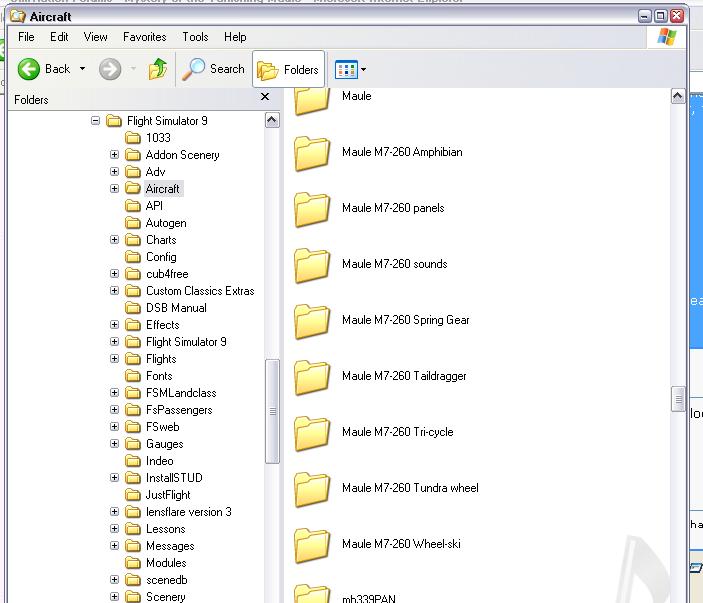
This is how the Maules look in my Aircraft folder, hope it may help:
Image
Cheers,

TSC.
Image

'Only two things are infinite.......The Universe and Human stupidity........and I'm not too sure about the Universe' - Einstein
User avatar
TSC.
Major
Major
 
Posts: 4273
Joined: Wed Nov 03, 2004 11:11 am
Location: Torquay, Devon, England.

Re: Mystery of the Vanishing Maule

Postby RollerBall » Sun Oct 09, 2005 3:39 pm

Hmmmmm, strange........extracted zip to a temporary folder, copied the contects of the sound, effects and gauges sub-folders to the respective FS2004 folders, copied all of the folders contained in the aircrfat sub-folder to the FS2004 folder, fired up the sim, found the Maule with a large range of variants, chose the tricycle version and flew it away. No problems whatsoever.

I spose you are talking about MauleM7_260.zip?
RollerBall
 

Re: Mystery of the Vanishing Maule

Postby Phiz » Mon Oct 10, 2005 4:21 am

Cracked it!  The troublesome download came from Flightsim.com and was allegedly an updated version. I looked for the original version, and found it right here, in Simviation. This time, no problem...[and yes, there is a master folder!] Thanks, everyone.
Phiz
2nd Lieutenant
2nd Lieutenant
 
Posts: 71
Joined: Wed Sep 28, 2005 2:09 pm

Re: Mystery of the Vanishing Maule

Postby commoner » Mon Oct 10, 2005 7:15 am

...glad you found an answer but strange that you have a master folder.............mine has no master folder and my readme installing instuctions  say they will all be in seperate ones...mm..... ???
Image"In theory, there is no difference between theory and practice. But, in practice, there is."
User avatar
commoner
Major
Major
 
Posts: 3221
Joined: Sat Aug 28, 2004 2:26 am
Location: Yorkshire. England. UK.

Re: Mystery of the Vanishing Maule

Postby Phiz » Mon Oct 10, 2005 8:35 am

Master folder? Look at theysellcoke's shot of his files, above. That's what I have now. Instructions? Mine are 'use Winzip and extract to fs9 root folder.'
Phiz
2nd Lieutenant
2nd Lieutenant
 
Posts: 71
Joined: Wed Sep 28, 2005 2:09 pm

Re: Mystery of the Vanishing Maule

Postby Hagar » Mon Oct 10, 2005 11:25 am

Instructions? Mine are 'use Winzip and extract to fs9 root folder.'

I wouldn't advise that either. In my experience with troubleshooting installation problems (which I've been doing on a daily basis for several years, both on this forum & by E-mail) this is the most common cause of all problems people have with installing addons to any M$ sim.
Image

Founder & Sole Member - Grumpy's Over the Hill Club for Veteran Virtual Aviators
Member of the Fox Four Group
My Google Photos albums
My Flickr albums
User avatar
Hagar
Colonel
Colonel
 
Posts: 30869
Joined: Wed Jun 19, 2002 7:15 am
Location: Costa Geriatrica

Re: Mystery of the Vanishing Maule

Postby Phiz » Mon Oct 10, 2005 2:10 pm

That's really interesting, and could explain many of my hassles over the years. Merci beaucoup.
Phiz
2nd Lieutenant
2nd Lieutenant
 
Posts: 71
Joined: Wed Sep 28, 2005 2:09 pm

Re: Mystery of the Vanishing Maule

Postby Hagar » Mon Oct 10, 2005 2:29 pm

You're welcome. ;)
Read RollerBall's reply. This is the way to do it.

Hmmmmm, strange........extracted zip to a temporary folder, copied the contects of the sound, effects and gauges sub-folders to the respective FS2004 folders, copied all of the folders contained in the aircrfat sub-folder to the FS2004 folder, fired up the sim, found the Maule with a large range of variants, chose the tricycle version and flew it away. No problems whatsoever.
Image

Founder & Sole Member - Grumpy's Over the Hill Club for Veteran Virtual Aviators
Member of the Fox Four Group
My Google Photos albums
My Flickr albums
User avatar
Hagar
Colonel
Colonel
 
Posts: 30869
Joined: Wed Jun 19, 2002 7:15 am
Location: Costa Geriatrica


Return to FS 2004 - A Century of Flight

Who is online

Users browsing this forum: No registered users and 192 guests