Kneeboard Shutdown/Solved!

Forum dedicated to Microsoft FS2004 - "A Century of Flight".

Kneeboard Shutdown/Solved!

Postby Clipper » Sun Sep 11, 2005 10:23 am

I find that whenever I open the kneeboard on the aircraft panel, it displays for about 5 seconds, then shuts down FS9 completely. The "Send Microsoft Error Report?" message shows up on desktop, I click no, then FS9 re-starts automatically. Any ideas as to what could be wrong? It's been doing this, every time, for months.
Last edited by Clipper on Sat Sep 17, 2005 11:12 am, edited 1 time in total.
Image
User avatar
Clipper
Global Moderator
Global Moderator
 
Posts: 8420
Joined: Tue Aug 23, 2005 5:40 am

Re: Kneeboard Shutdown

Postby Carlo » Sun Sep 11, 2005 10:42 am

By any change you downloaded something like an internet browser for your kneeboard? I installed one last week, just finished re-installing FS completely. It kept crashing to desktop every time I exit a flight.

Crash ;)
Carlo
 

Re: Kneeboard Shutdown

Postby Fozzer » Sun Sep 11, 2005 11:27 am

No Problemo, Clip...

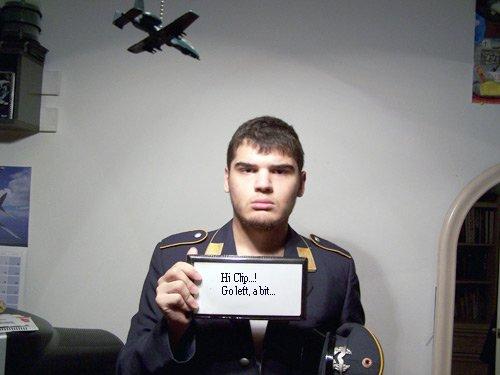
Just call on our old friend, Scorp to display his special kneeboard... ;)...!
Lots of good tips, and no fear of getting lost...>>>

Trust 'im...!

Image

LOL...!

Paul... ;D...!
Win 8.1 64-bit. DX11. Advent Tower. Intel i7-3770 3.9 GHz 8-core. 8 GB System RAM. AMD Radeon HD 7700 1GB RAM. DVD ROM. 2 Terra Byte SATA Hard Drive. Philips 17" LCD Monitor. Saitek Cyborg X Fly-5 Joystick. ...and a Briggs and Stratton Petrol Lawn Mower.
User avatar
Fozzer
Colonel
Colonel
 
Posts: 27370
Joined: Thu Jan 31, 2002 3:11 pm
Location: Hereford. England. EGBS.

Re: Kneeboard Shutdown

Postby Clipper » Sun Sep 11, 2005 11:40 am

Crash, I haven't added anything to my kneeboard....

Now Fozzer...I would never have imagined you could be so helpful. If I had only known all I had to do was go left, I'd never be in this pickle. I'd have no hesitation taking live instructions from the scorpion, it's just that I find the uniform a little distracting. (not to mention disturbing.) Left.....where do you think I would end up?....O.K., I'll give it a try, but you must know I may end up in the land of fur, feathers and sweat. That's a place you must have dreamt of many a time. If not..you will my friend, you will..... ;)
Image
User avatar
Clipper
Global Moderator
Global Moderator
 
Posts: 8420
Joined: Tue Aug 23, 2005 5:40 am

Re: Kneeboard Shutdown

Postby wji » Sun Sep 11, 2005 12:10 pm

For the umpteenth millionth time . . . (but patience is a virtue) delete your fs9.cfg -- which has become corrupted -- and restart FS9 (it will create a new fs9.cfg). Reset everything (takes about four-minutes) and go flying.
P.S. fs9.cfg is located here:
"C:\Documents and Settings\YourName\Application Data\Microsoft\FS9\fs9.CFG"
Image PhotoShop 7 user
User avatar
wji
Major
Major
 
Posts: 1644
Joined: Tue May 04, 2004 11:27 am

Re: Kneeboard Shutdown

Postby Clipper » Sun Sep 11, 2005 3:24 pm

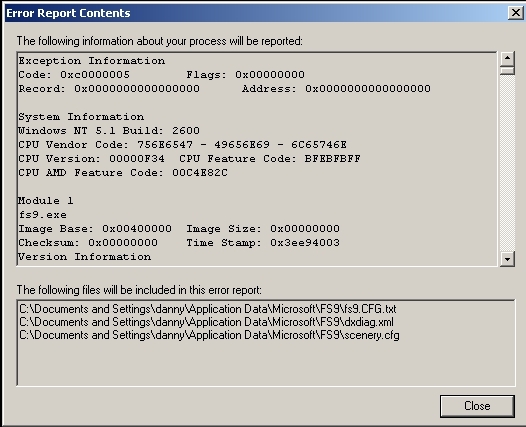
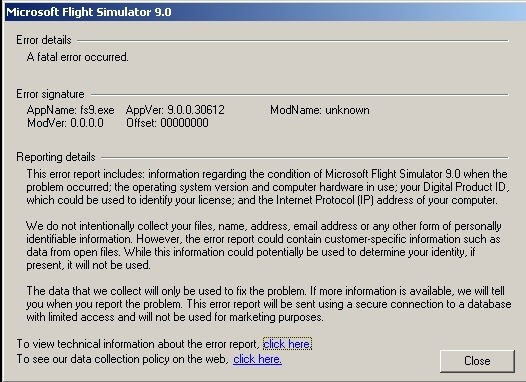
wji, thanks for trying to help. Unfortunately, I did exactly as you suggested (for the umpteenth millionth time), but I still have exactly the same problem. Here are the error reports...

Image

Image

Any help additional help would be appreciated... :)
Image
User avatar
Clipper
Global Moderator
Global Moderator
 
Posts: 8420
Joined: Tue Aug 23, 2005 5:40 am

Re: Kneeboard Shutdown

Postby dgcx50x » Tue Sep 13, 2005 10:47 am

Search your C drive for a file called Viewmgr.exe. If you find it delete it and you will not have any more trouble with the kneeboard crashing. It should fix you right up. If you can not find that file then I am not sure what else will work. Good luck.
dgcx50x
Ground hog
Ground hog
 
Posts: 18
Joined: Sat Nov 20, 2004 10:07 pm

Re: Kneeboard Shutdown

Postby commoner » Tue Sep 13, 2005 12:28 pm

...mmm..if you have Viewmgr.exe it should show on the Add/Remove programs list..........or do contr/alt/del and look under the processes tab.... ;)
Image"In theory, there is no difference between theory and practice. But, in practice, there is."
User avatar
commoner
Major
Major
 
Posts: 3221
Joined: Sat Aug 28, 2004 2:26 am
Location: Yorkshire. England. UK.

Re: Kneeboard Shutdown

Postby dgcx50x » Tue Sep 13, 2005 12:39 pm

You should be right about that commoner but in my case I was not that lucky. I had to search the little evil file out and rip it out by the roots lol. Any way it can be found just look for it and do away with it.
dgcx50x
Ground hog
Ground hog
 
Posts: 18
Joined: Sat Nov 20, 2004 10:07 pm

Re: Kneeboard Shutdown

Postby Fozzer » Tue Sep 13, 2005 12:43 pm

Hi Clip... ;D...!

It's all much too complicated now, getting errors with Win XP...

In good-old Win '98SE we just used to get the "Blue Screen of Death"...
...much more simple and relaxing...  8)...!

LOL...!

Sorry clip...(not much help there..as usual...)... ;)...!

Paul.
Win 8.1 64-bit. DX11. Advent Tower. Intel i7-3770 3.9 GHz 8-core. 8 GB System RAM. AMD Radeon HD 7700 1GB RAM. DVD ROM. 2 Terra Byte SATA Hard Drive. Philips 17" LCD Monitor. Saitek Cyborg X Fly-5 Joystick. ...and a Briggs and Stratton Petrol Lawn Mower.
User avatar
Fozzer
Colonel
Colonel
 
Posts: 27370
Joined: Thu Jan 31, 2002 3:11 pm
Location: Hereford. England. EGBS.

Re: Kneeboard Shutdown

Postby Clipper » Wed Sep 14, 2005 9:36 am

Thanks all, I'll try this evening!  :)
Image
User avatar
Clipper
Global Moderator
Global Moderator
 
Posts: 8420
Joined: Tue Aug 23, 2005 5:40 am

Re: Kneeboard Shutdown

Postby Katahu » Wed Sep 14, 2005 11:33 pm

Ah, Windos 98 and the BSD [Blue Screen of Death].

Back in the days, when I had Win98, the only thing I ever learned from my previous friend [win98] was how to perform a proper salute... The Three-Finger Salute that is. ;) ;D

Present Arms!

*Ctrl+Alt+Del*

Order Arms!

*Ctrl+Alt+Del again*

Ah, the good old days. ;D
User avatar
Katahu
Lieutenant Colonel
Lieutenant Colonel
 
Posts: 5993
Joined: Mon Jul 22, 2002 10:29 pm

Re: Kneeboard Shutdown

Postby hatter » Fri Sep 16, 2005 5:52 pm

clipper:

I also had this problem for the past two reinstalls of FS9. Whenever I scrolled down on the kneeboard, FS would crash.

I was running XP SP2 both times, with updated everything.
Last edited by hatter on Fri Sep 16, 2005 5:53 pm, edited 1 time in total.
hatter
2nd Lieutenant
2nd Lieutenant
 
Posts: 162
Joined: Mon Jul 18, 2005 2:13 pm
Location: Chicago, IL

Re: Kneeboard Shutdown

Postby commoner » Sat Sep 17, 2005 6:07 am

The problem could be  an app you are running called RoboForm. The solution would thenbe  either to kill it, or to download a version later than AiRoboForm5-4-1. WindowBlinds is another common cause of this problem...try that...commoner
Image"In theory, there is no difference between theory and practice. But, in practice, there is."
User avatar
commoner
Major
Major
 
Posts: 3221
Joined: Sat Aug 28, 2004 2:26 am
Location: Yorkshire. England. UK.

Re: Kneeboard Shutdown

Postby Clipper » Sat Sep 17, 2005 11:11 am

Many sincere thanks for all your helpful suggestions. I tried dgcx's idea to delete the viewmgr.exe although I found it with commoner's suggestion in the add remove programs. Worked perfectly! Kneeboard is running 100%!  You guys are invaluable... :)
Image
User avatar
Clipper
Global Moderator
Global Moderator
 
Posts: 8420
Joined: Tue Aug 23, 2005 5:40 am

Next

Return to FS 2004 - A Century of Flight

Who is online

Users browsing this forum: No registered users and 266 guests