Always On Runway

Forum dedicated to Microsoft FS2004 - "A Century of Flight".

Always On Runway

Postby local1 » Wed Sep 14, 2005 1:53 pm

Hello,
Everytime i start a flight i'm already on the runway for take off and sometimes i have to taxi to another departure is there away that i can change so i'm already parked and have to taxi to the runway?? Thanks

User avatar
local1
Ground hog
Ground hog
 
Posts: 5
Joined: Sat Jun 18, 2005 2:15 pm

Re: Always On Runway

Postby jrpilot » Wed Sep 14, 2005 2:00 pm

Did you go to "Create a Flight", airport, then at the left corner screen and select runway, gate, or parking area you want?
jrpilot
Major
Major
 
Posts: 2178
Joined: Fri Sep 26, 2003 3:04 pm

Re: Always On Runway

Postby local1 » Wed Sep 14, 2005 2:19 pm

i dont see that im in create a flight i loaded what i want to fly but i dont see parked?

I think i found it its a drop down menu giving me different runways to choose from Runway/Starting Position but its not giving me a parked one?
Last edited by local1 on Wed Sep 14, 2005 2:26 pm, edited 1 time in total.
User avatar
local1
Ground hog
Ground hog
 
Posts: 5
Joined: Sat Jun 18, 2005 2:15 pm

Re: Always On Runway

Postby pc8775 » Wed Sep 14, 2005 4:48 pm

What airport are you trying to start from? I noticed at some places it doesn't offer a parking area.  But I think this is mainly on private airfields and not major airports.  Might look at that and see if that helps.
pc8775
Ground hog
Ground hog
 
Posts: 40
Joined: Mon Jul 04, 2005 4:37 pm
Location: Kansas

Re: Always On Runway

Postby Saitek » Wed Sep 14, 2005 5:56 pm

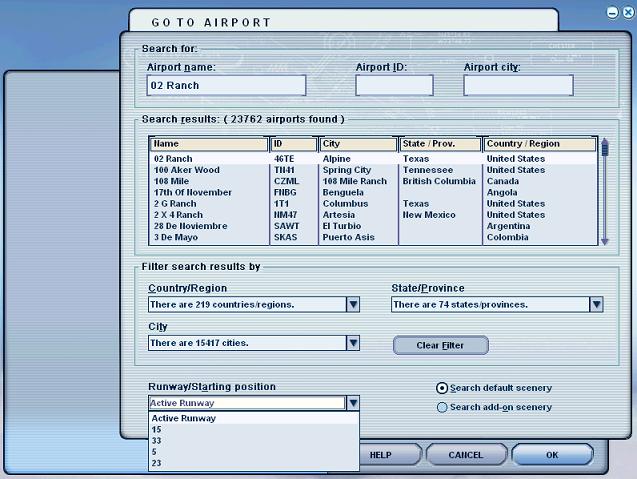
Here is an example of the default airport.

Go to Create Flight, location and then you'll see this page:

Image
Windows 7 Pro 64bit
Intel Core 2 Duo E2180 2GHz
GA-P35-DS3L Intel P35
Kingston HyperX 4GB (2x2) DDR2 6400C4 800Mhz
GeForce 8800 GT 512MB
2 x 22" monitors
200GB Sata
Be Quiet! Straight Power 650W

Flying FS
Saitek
Lieutenant Colonel
Lieutenant Colonel
 
Posts: 5274
Joined: Thu Jun 19, 2003 3:04 pm
Location: UK

Re: Always On Runway

Postby Nav » Wed Sep 14, 2005 9:58 pm

local1, further to Saitek's screenshot, at bottom left (the list of runways) just scroll down and you'll come to the parking options.
Nav
Captain
Captain
 
Posts: 717
Joined: Thu Sep 30, 2004 11:29 pm

Re: Always On Runway

Postby JBaymore » Thu Sep 15, 2005 8:39 am

local1,

Boy... I have always found that those little check boxes are SO easy to miss.  Been there MANY times.  I'd SWEAR that they weren't there before someone told me about them  :).

BTW......... If you fly out of a specific airport that does not have any parking in the default AFCAD file... you can get the AFCAD program and ADD yourself a series of parking spaces.

best,

..................john
Image ImageIntel i7 960 quad 3.2G LGA 1366, Asus P6X58D Premium, 750W Corsair, 6 gig 1600 DDR3, Spinpoint 1TB 720

User avatar
JBaymore
Global Moderator
Global Moderator
 
Posts: 10020
Joined: Sat May 24, 2003 9:15 am
Location: New Hampshire

Re: Always On Runway

Postby legoalex2000 » Thu Sep 15, 2005 9:16 am

like if you hate the flyting tips, it's top right in the realism settings... stuff like that is easy to miss. took me a week to find that checkbox.

:)Ramos
legoalex2000


Return to FS 2004 - A Century of Flight

Who is online

Users browsing this forum: No registered users and 253 guests