PORBALEM SORTED PLZ DELETE

Forum dedicated to Microsoft FS2004 - "A Century of Flight".

PORBALEM SORTED PLZ DELETE

Postby machineman9 » Sat Aug 27, 2005 8:36 am

this is what my planes look like


Image


how do i sort this out. the MIp is on high. all settings are on high quality. i haven't d/l the update frm microsoft yet. will this sort out the problem or what will ? thx

Last edited by machineman9 on Sat Aug 27, 2005 3:32 pm, edited 1 time in total.
User avatar
machineman9
Major
Major
 
Posts: 4816
Joined: Fri Sep 17, 2004 9:05 am

Re: awful plane graphs. *pic*

Postby TSC. » Sat Aug 27, 2005 9:11 am

you could try changing your 'anti-aliasing' setting in FS9.

Cheers,

TSC.
Image

'Only two things are infinite.......The Universe and Human stupidity........and I'm not too sure about the Universe' - Einstein
User avatar
TSC.
Major
Major
 
Posts: 4273
Joined: Wed Nov 03, 2004 11:11 am
Location: Torquay, Devon, England.

Re: awful plane graphs. *pic*

Postby machineman9 » Sat Aug 27, 2005 9:27 am

nope with or without anti alaising. it still looks crappy
User avatar
machineman9
Major
Major
 
Posts: 4816
Joined: Fri Sep 17, 2004 9:05 am

Re: awful plane graphs. *pic*

Postby C » Sat Aug 27, 2005 9:38 am

I used to get this on the old PC. Generally I sorted it by opening the graphics cards settings outside the sim and even if they appeared correct, reset them and re-adjusted them to my normal settings...
User avatar
C
Colonel
Colonel
 
Posts: 11977
Joined: Mon May 19, 2003 1:04 pm
Location: Earth

Re: awful plane graphs. *pic*

Postby jrpilot » Sat Aug 27, 2005 9:45 am

Before I could barely read the guages on my aircraft so I thought I would suggest this to you, maybe it will work maybe it won't or maybe you have already tried this.

Anyways try reducing your screen from full screen to full screen with the border (with all your options) around it.

jrpilot
Major
Major
 
Posts: 2178
Joined: Fri Sep 26, 2003 3:04 pm

Re: awful plane graphs. *pic*

Postby Hagar » Sat Aug 27, 2005 10:15 am

Anyways try reducing your screen from full screen to full screen with the border (with all your options) around it.

I think you mean Windows mode. Hit Alt + Enter to toggle between Full Screen & Windows mode.
Image

Founder & Sole Member - Grumpy's Over the Hill Club for Veteran Virtual Aviators
Member of the Fox Four Group
My Google Photos albums
My Flickr albums
User avatar
Hagar
Colonel
Colonel
 
Posts: 30868
Joined: Wed Jun 19, 2002 7:15 am
Location: Costa Geriatrica

Re: awful plane graphs. *pic*

Postby Wing Nut » Sat Aug 27, 2005 11:19 am

Change your Global Max Texture Size...
[img]http://www.simviation.com/phpupload/uploads/1440377488.jpg[/img]
User avatar
Wing Nut
Colonel
Colonel
 
Posts: 12720
Joined: Tue Jan 01, 2002 6:25 am

Re: awful plane graphs. *pic*

Postby dave3cu » Sat Aug 27, 2005 11:58 am

As mentioned, the jagged edges are smoothed out using anti-aliasing. It is best to set
Last edited by dave3cu on Sat Aug 27, 2005 12:01 pm, edited 1 time in total.
At that time [1909] the chief engineer was almost always the chief test pilot as well. That had the fortunate result of eliminating poor engineering early in aviation.
dave3cu
Major
Major
 
Posts: 3141
Joined: Sun May 19, 2002 9:55 am
Location: 3CU, Northern Wisconsin, USA

Re: awful plane graphs. *pic*

Postby MWISimmer » Sat Aug 27, 2005 12:12 pm

As Dave3cu said, here's a link

http://www.simviation.com/fs2004props2.htm

Check the next few pages on thelink, also look for the Civil jets equivalent, they worked a treat on my old PC.
Rob.
MWISimmer
 

Re: awful plane graphs. *pic*

Postby Wing Nut » Sat Aug 27, 2005 12:18 pm
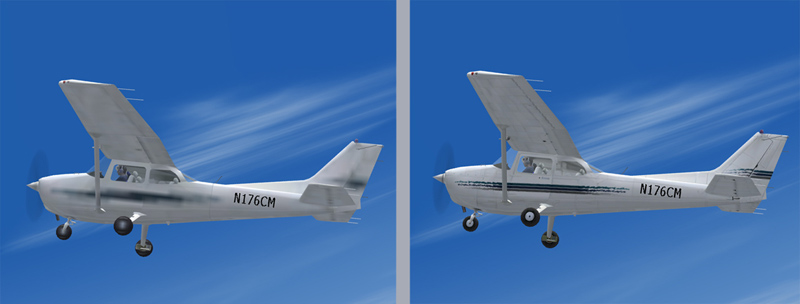
Global Max Texture Size: Very Small                 Global Max Texture Size: Massive

Image

Any Questions?
[img]http://www.simviation.com/phpupload/uploads/1440377488.jpg[/img]
User avatar
Wing Nut
Colonel
Colonel
 
Posts: 12720
Joined: Tue Jan 01, 2002 6:25 am

Re: awful plane graphs. *pic*

Postby Hagar » Sat Aug 27, 2005 12:36 pm

Any Questions?

None. That seems the obvious solution.

PS. I should have suggested that myself.
Image

Founder & Sole Member - Grumpy's Over the Hill Club for Veteran Virtual Aviators
Member of the Fox Four Group
My Google Photos albums
My Flickr albums
User avatar
Hagar
Colonel
Colonel
 
Posts: 30868
Joined: Wed Jun 19, 2002 7:15 am
Location: Costa Geriatrica

Re: awful plane graphs. *pic*

Postby machineman9 » Sat Aug 27, 2005 3:31 pm

[quote]As mentioned, the jagged edges are smoothed out using anti-aliasing. It is best to set
User avatar
machineman9
Major
Major
 
Posts: 4816
Joined: Fri Sep 17, 2004 9:05 am

Re: PORBALEM SORTED PLZ DELETE

Postby Wing Nut » Sat Aug 27, 2005 3:54 pm

Machineman, this forum does not have a whole lot of rules, but chief among them (after no talking politics and religion) is that there is NO text speak allowed.  Please respect that rule in the future...  ;)

Kevin
[img]http://www.simviation.com/phpupload/uploads/1440377488.jpg[/img]
User avatar
Wing Nut
Colonel
Colonel
 
Posts: 12720
Joined: Tue Jan 01, 2002 6:25 am

Re: PORBALEM SORTED PLZ DELETE

Postby C » Sat Aug 27, 2005 4:01 pm

Also, I'd change the title back to how it originally was, then if someone is searching for help regarding a display problem similar to yours, the may find help in the thread without having to start another one... :)
User avatar
C
Colonel
Colonel
 
Posts: 11977
Joined: Mon May 19, 2003 1:04 pm
Location: Earth


Return to FS 2004 - A Century of Flight

Who is online

Users browsing this forum: No registered users and 327 guests