Control Problem - What Did I Do Wrong?

Forum dedicated to Microsoft FS2004 - "A Century of Flight".

Control Problem - What Did I Do Wrong?

Postby Hammerpgh » Fri Jul 29, 2005 6:02 am

Hi all,

Hopefully somebody here will be able to work out what I did last night to mess up my control system.

I decided to take my first flight out of England and left London City Airport on my way across to Charles De-Galle Airport late last night. Everything seemed fine, no problems on take-off, got up to the required altitude and was heading happily in the right direction enjoying the scenery and watching the traffic come and go. Once over the channel with not a lot to look at I decided to have a play around with some of the control options and in particular was checking out some of the autopilot ones.

That's when it all semed to go awry!! Suddenly I found that I was climbing rapidly and had no control at all. I was quickly warned that I was above my designated altitude and after desperately pressing combinations of buttons to try to see what I had switched on I  eventually discovered the 'Z' key to turn off the autopilot options (I think!!) and was able to drop back down to my correct level.

However, from that point on I never fully regained control and was having to constantly keep the joystick pushed well forward to prevent from climbing rapidly. I disabled the joystick a couple of times to see if it made any difference but as soon as it was enabled again the plane reared upwards at a great rate of knots and I had to fight to get it back level again.

Any ideas as to what I might have done?

Cheers

Peter

PS:- Also, is there anywhere that displays what you currently have switched on (autopilot options, etc).

Hammerpgh
Ground hog
Ground hog
 
Posts: 29
Joined: Wed Jul 20, 2005 11:26 am
Location: LONDON, UK

Re: Control Problem - What Did I Do Wrong?

Postby eno » Fri Jul 29, 2005 6:58 am

You don't say which aircraft you're flying ...... but I suspect that its a heavy. If so you need to climb more carefully... Most  heavies do what's known as a step climb. They will climb to a low cruise altitude and burn fuel ..... then climb a bit higher and burn more and eventually reach the main cruise altitude.

If as I suspect this is the case then you'll either A. need to alter the fuel settings before your flight or B. use the step climb. Otherwise the aircraft will display the symptons described.
[align=center][img]http://www.simviation.com/yabbuploads/imaginsigeno.jpg[/img][/align]
User avatar
eno
Lieutenant Colonel
Lieutenant Colonel
 
Posts: 6708
Joined: Sun Jan 18, 2004 12:30 pm
Location: Derbyshire UK

Re: Control Problem - What Did I Do Wrong?

Postby Hammerpgh » Fri Jul 29, 2005 7:24 am

I was just flying a Cessna 172.. not a big bird. The problem wasn't apparent initialy only after I had been flying for a while and started playing around with some of the autopilot options.

Peter
Hammerpgh
Ground hog
Ground hog
 
Posts: 29
Joined: Wed Jul 20, 2005 11:26 am
Location: LONDON, UK

Re: Control Problem - What Did I Do Wrong?

Postby TwoLow » Fri Jul 29, 2005 7:29 am

You may have messed with the pitch or trim 'fine tuning' controls. That would have your plane all over the place.
Why yes, I am a noobie/newbie/knewbie
User avatar
TwoLow
2nd Lieutenant
2nd Lieutenant
 
Posts: 130
Joined: Fri Jul 08, 2005 10:04 am
Location: Warner Robins, GA

Re: Control Problem - What Did I Do Wrong?

Postby dave3cu » Fri Jul 29, 2005 7:30 am

Sounds like you increased your target altitude on the AP, starting your climb.

When you then switched off the AP your elevator trim is left in the climb attitude.

Manually trim for level flight, and check you AP settings before re-engaging.

Dave
At that time [1909] the chief engineer was almost always the chief test pilot as well. That had the fortunate result of eliminating poor engineering early in aviation.
dave3cu
Major
Major
 
Posts: 3141
Joined: Sun May 19, 2002 9:55 am
Location: 3CU, Northern Wisconsin, USA

Re: Control Problem - What Did I Do Wrong?

Postby TSC. » Fri Jul 29, 2005 8:16 am

Hi Hammerpgh,

As mentioned by TwoLow & Dave3cu - this problem sounds exactly like pitch/trim - it caught me out in exactly the same way when I first tried FS & usually results in lots of swearing at joysticks.

Unfortunately it is a fairly lengthy subject to teach about - but once you have been told it will all make perfect sense. Here is a good tutorial on the subject:

http://www.flightsim.com/cgi/kds?$=main/howto/trim.htm

The trick is to make small adjustments & the let the plane settle (you can watch the vertical speed dial) before adjusting again if it's not quite right - otherwise you'll end up 'chasing the needle' as they say.

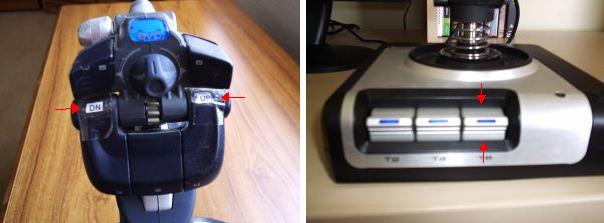
PS: for ease, if you have 2 buttons free on your joystick then you will find it really helpful to assign them the funtions for pitch/trim up & pitch/trim down - maybe with some small stickers on the button to remind you which is which - these two examples (different sticks) made my flying sooo much more enjoyable:
Image
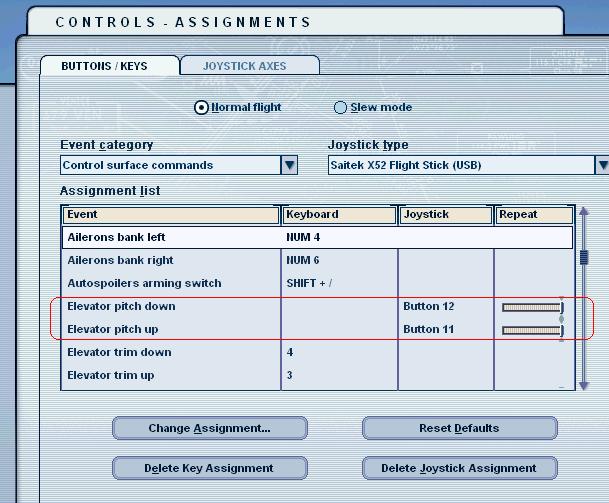
To change the button assignment just go into Settings-> Assignments, then go into the 'Event Category' drop down menu & select 'Control Surface Commands' -> select 'Elevator Pitch Down' & 'Elevator Pitch Up' & assign them to the keys on your joystick:
Image
Sorry if all of these instuctions seem a bit condescending, they're not meant to be - I just like to try & get most of the issues covered incase people don't know - we were all newbies once.

Cheers,

TSC.
Last edited by TSC. on Fri Jul 29, 2005 8:41 am, edited 1 time in total.
Image

'Only two things are infinite.......The Universe and Human stupidity........and I'm not too sure about the Universe' - Einstein
User avatar
TSC.
Major
Major
 
Posts: 4273
Joined: Wed Nov 03, 2004 11:11 am
Location: Torquay, Devon, England.

Re: Control Problem - What Did I Do Wrong?

Postby dave3cu » Fri Jul 29, 2005 10:31 pm

Image

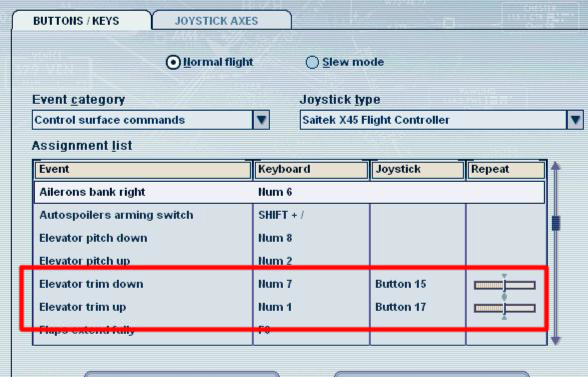
This is where you assign elevator 'trim'. The keyboard assignments shown are the default (with numlock off).

Dave
At that time [1909] the chief engineer was almost always the chief test pilot as well. That had the fortunate result of eliminating poor engineering early in aviation.
dave3cu
Major
Major
 
Posts: 3141
Joined: Sun May 19, 2002 9:55 am
Location: 3CU, Northern Wisconsin, USA

Re: Control Problem - What Did I Do Wrong?

Postby Hammerpgh » Sat Jul 30, 2005 2:43 pm

Thanks for the great help guys, the info on the joystick settings is particular useful. The first js shown look's to be the same one I am using (Saitek Cyborg Evo Force). I'll certainly follow the instructions given and try them out.

Before reading this thread again I started another little test flight and initially the controls did still seem screwed but after a short while I got things more back to normal. Although I have to be honest and say that I still felt things weren't quite the same as previously. It just seemed that I had to move the stick way too much for just the smallest change. I adjusted the null zone settings and this did make a difference.

I am going to have to play around with the settings a little more I think as I also don't seem to get much in the way of force effects.

The js is new as I only got it on Thursday evening so maybe it's just a case of getting used to the thing and finding the settings that I am comfortable with.

Many thanks again.

Peter

PS:- With regard to dave3cu's reply about setting the target altitude on the AP.. how exactly do I do that as if I did that I must have done it without realising? Thanks
Hammerpgh
Ground hog
Ground hog
 
Posts: 29
Joined: Wed Jul 20, 2005 11:26 am
Location: LONDON, UK

Re: Control Problem - What Did I Do Wrong?

Postby dave3cu » Sat Jul 30, 2005 4:17 pm

Z turns ap on/off (which you found)

Crtl+Z turns altitude hold on/off

Ctrl+Shft+Z selects the altitude 'bug' , the + or - keys then increase or decrease your AP target altitude.

So if your just tryin keys/combos to see what happens....... ;)

Dave
At that time [1909] the chief engineer was almost always the chief test pilot as well. That had the fortunate result of eliminating poor engineering early in aviation.
dave3cu
Major
Major
 
Posts: 3141
Joined: Sun May 19, 2002 9:55 am
Location: 3CU, Northern Wisconsin, USA

Re: Control Problem - What Did I Do Wrong?

Postby Hammerpgh » Sat Jul 30, 2005 5:45 pm

Ahh.. I know that Ctrl-Z was one of the combos I pressed before the problem started so it looks like you hit the nail on the head with that one...

Cheers
Hammerpgh
Ground hog
Ground hog
 
Posts: 29
Joined: Wed Jul 20, 2005 11:26 am
Location: LONDON, UK

Re: Control Problem - What Did I Do Wrong?

Postby Hammerpgh » Tue Aug 02, 2005 3:11 am

Hi again people,

Further to my earlier queries about control problems I just would like some clarification on a few issues.

I am still finding that the controls are a little touchy and in particular I am now finding that the plane constantly pulls to the left. I correct it with the joystick and get back on course but it soon starts pulling left again. Is this normal, is it the simulator modelling the wind or other forces on the aircraft or does it sound like a controller problem? The fact that it is always to the left makes me think it is the controller. I am using the Saitek Cyborg Evo Force and there are no calibration options for this device as apparently it doesn't require them. If I level it off and immediately selct AP then the flight continues perfectly straight with no drift but I am not sure if that is because the AP automatically corrects the drift or because the drift is no longer there becauise the joystick is no longer part of the equation.

Apologies if these questions are a  little pedantic but as a newbie I want to ensure I am learning with a fully working joystick.

Thanks.

Peter
Hammerpgh
Ground hog
Ground hog
 
Posts: 29
Joined: Wed Jul 20, 2005 11:26 am
Location: LONDON, UK

Re: Control Problem - What Did I Do Wrong?

Postby RollerBall » Tue Aug 02, 2005 4:45 am

As someone who had problems myself with a Logitech Wingman F/F I'd say it's your stick. You don't say whether EVERY aircraft pulls to the left or just the same one always does.

If it's just the one, try some others. If they do as well, it's probably the stick.

I can't believe that there's no calibration feature for that stick. Never heard of that before and I'd never buy a stick that can't be calibrated.
RollerBall
 

Re: Control Problem - What Did I Do Wrong?

Postby Hammerpgh » Tue Aug 02, 2005 7:02 am

Thanks for the info. I will try another plane tonight.

I wasn't aware of the lack of calibration until I got it home. Going to the control panel brings up all the usual options but it says at the top that calibration is not required for this device. It still shows the normal screen so you can see the joystick movements, button presses, etc. and when moving the joystick about all it's axes everything seems ok but I was just made unsure by the behaviour in FS9.

Cheers
Hammerpgh
Ground hog
Ground hog
 
Posts: 29
Joined: Wed Jul 20, 2005 11:26 am
Location: LONDON, UK

Re: Control Problem - What Did I Do Wrong?

Postby dave3cu » Tue Aug 02, 2005 7:11 am

Could be a number of causes:

If its with props only it could be P-factor and torque. Most props are right turning (viewed from the cockpit) which tend to turn the a/c to the left. In flight, go to (alt menu) Aircraft>Realism Settings and move all Flight Model sliders to the left/easy, to see if this corrects your problem. This effect is normal and if you wish to bump the setting back up, you have to counteract it with trim (if available) or stick pressure.

Your a/c's rudder and/or aileron trim may not be trimmed properly (affects all a/c and can carry over from 1 a/c or flight to another) . Fly the Baron 58 (as it has visible controls for both), with Realism
Last edited by dave3cu on Tue Aug 02, 2005 7:14 am, edited 1 time in total.
At that time [1909] the chief engineer was almost always the chief test pilot as well. That had the fortunate result of eliminating poor engineering early in aviation.
dave3cu
Major
Major
 
Posts: 3141
Joined: Sun May 19, 2002 9:55 am
Location: 3CU, Northern Wisconsin, USA

Re: Control Problem - What Did I Do Wrong?

Postby Hammerpgh » Tue Aug 02, 2005 7:30 am

Many thanks Dave,

Once home I will check out all you have mentioned.

So is there no way to actually get all my settings back to square one so that I can at least know they are set back to the defaults?  When the problems first arose I just assumed that once I started a new flight everything would be back to how it started but it seems that is not the case from what you are saying.

Peter
Hammerpgh
Ground hog
Ground hog
 
Posts: 29
Joined: Wed Jul 20, 2005 11:26 am
Location: LONDON, UK


Return to FS 2004 - A Century of Flight

Who is online

Users browsing this forum: No registered users and 343 guests