Trouble with repaint installation

Forum dedicated to Microsoft FS2004 - "A Century of Flight".

Trouble with repaint installation

Postby Thunderbird1 » Thu Jul 14, 2005 4:53 pm

Every aircraft repaint I've downloaded and installed recently is not showing up in FS. Any suggestions? All the aircraft I've downloaded work with no problem, just the repaints are giving me heartburn.
Thunderbird1
2nd Lieutenant
2nd Lieutenant
 
Posts: 146
Joined: Thu Oct 28, 2004 4:42 am

Re: Trouble with repaint installation

Postby legoalex2000 » Thu Jul 14, 2005 4:58 pm

are you typing in the configurations in the aircraft.cfg? the readme's in each repaint comes with a set of config's th
at you copy & paste into the aircraft.cfg file. also you must change the first line (from aircraft.XX to aircraft.3)

hope that helps, it works, but i give up on repaints

:)Ramos
legoalex2000
 

Re: Trouble with repaint installation

Postby lemoncat » Thu Jul 14, 2005 7:42 pm

the first is the original...the second is an example of the first...cut and paste,,,then add>>>>>>>>>>>>>>>>>>>>>>>>>>>>>>>>>>>>>>>>>>>>>>>>>>>>>>>>

[fltsim.0]
title=MirageIIICZ3
sim=Dassault Mirage IIICZ
model=
panel=
sound=
texture=
checklists=
ui_manufacturer=SAAF
ui_type=Dassault Mirage IIICZ
ui_variation=814 - 2 Sqn, SAAF
visual_damage=1
description=The Mirage IIICZ's were delivered in a natural metal finish, No. 814 among the initial batch of Mirage IIICZ delivered to the SAAF in the early 1960's.\n\n
atc_heavy=0
atc_id=814
atc_airline=Air Force
atc_flight_number=814

[fltsim.1] <<<<<<<<title=MirageIIICZ3 pete <<<<<<<<<<<<sim=Dassault Mirage IIICZ
model=
panel=
sound=
texture=pete <<<<<<<<<<<<<<<<<<checklists=
ui_manufacturer=SAAF
ui_type=Dassault Mirage IIICZ
ui_variation=814 - 2 Sqn, pete >>>>>>>>this
visual_damage=1
description=The Mirage IIICZ's were delivered in a natural metal finish, No. 814 among the initial batch of Mirage IIICZ delivered to the SAAF in the early 1960's.\n\n
atc_heavy=0
atc_id=814
atc_airline=Air Force
atc_flight_number=814

their the only four things you need to worry about really  ;)

User avatar
lemoncat
Major
Major
 
Posts: 4286
Joined: Fri Jan 02, 2004 6:41 pm
Location: earth

Re: Trouble with repaint installation

Postby wji » Thu Jul 14, 2005 8:20 pm

It's usually because the [fltsim.0] number is not sequenced. This is the one item which will prevent flyable aircraft from being visible (albeit duplicates) in the selection list. But, you've probably got it figured out after reading the foreging posts.
Image PhotoShop 7 user
User avatar
wji
Major
Major
 
Posts: 1644
Joined: Tue May 04, 2004 11:27 am

Re: Trouble with repaint installation

Postby Thunderbird1 » Fri Jul 15, 2005 4:10 am

Cool! Thanks It worked well with the ones that had the configurations included. Still trying to figure the ones that don't have the configurations.
Thunderbird1
2nd Lieutenant
2nd Lieutenant
 
Posts: 146
Joined: Thu Oct 28, 2004 4:42 am

Re: Trouble with repaint installation

Postby wji » Fri Jul 15, 2005 10:35 am

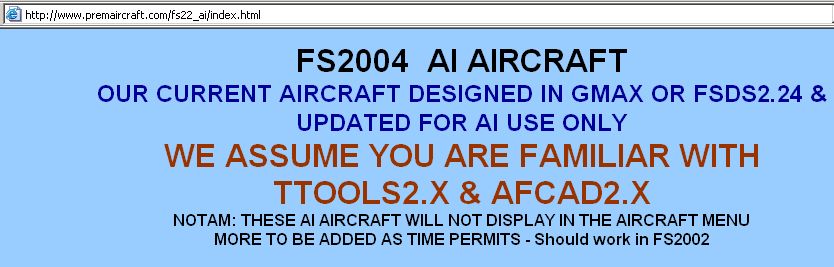
Sounds like AI aircraft to me

Image

Barry Blaisdell said it best . . .  
"THESE AI AIRCRAFT WILL NOT DISPLAY IN THE AIRCRAFT MENU
Image PhotoShop 7 user
User avatar
wji
Major
Major
 
Posts: 1644
Joined: Tue May 04, 2004 11:27 am


Return to FS 2004 - A Century of Flight

Who is online

Users browsing this forum: No registered users and 208 guests