 by Graycat » Sun Jul 10, 2005 2:27 pm
I completely agree with Bill that Nick's smoke is the most accurate of all the effects out there.
Here is another little trick that i've learned when using Nick's smoke:
1.) Make a backup copy of your Aircraft.cfg before any modifications.
2.) Go to the [Lights] section of the Aircraft.cfg and add a new light at the bottom of the section (example below is from the FFX 737-500 Aircraft.cfg)
[LIGHTS]
//Types: 1=beacon, 2=strobe, 3=navigation, 4=cockpit, 5=landing
// 6=taxi, 7=recognition, 8=wing, 9=logo, 10=cabin
// Type (X Axis) (Y Axis) (Z Axis)
light.0= 3, -8.54, -49.74, 1.90, fx_navred ,
light.1= 3, -8.54, 49.74, 1.90, fx_navgre ,
light.2= 3, -8.94, -49.74, 1.90, fx_navred ,
light.3= 3, -8.94, 49.74, 1.90, fx_navgre ,
light.4= 3, -49.52, 0.00, 6.30, fx_navwhih ,
light.5= 2, -10.14, -49.84, 1.90, fx_strobe ,
light.6= 2, -10.14, 49.84, 1.90, fx_strobe ,
light.7= 1, 2.20, 0.00, 10.30, fx_beaconh ,
light.8= 3, -13.60, -49.22, 1.90, fx_navwhi ,
light.9= 3, -13.60, 49.22, 1.90, fx_navwhi ,
The next light in the sequence will be light.10. As for position, just copy&paste the coordinates from the [GeneralEngineData] section since the X,Y,Z coordinates are in the same order:
light.10= 3, -9.66, -15.80, -0.833, fx_navred ,
Please note that the coordinates numbers in the [GeneralEngineData] section represent the (X Axis), (Y Axis), and (Z Axis) of the engine's moment of thrust vector and may not line up exactly with the visual model. But it will give you a pretty good "ballpark" figure of where the light should be positioned initially.
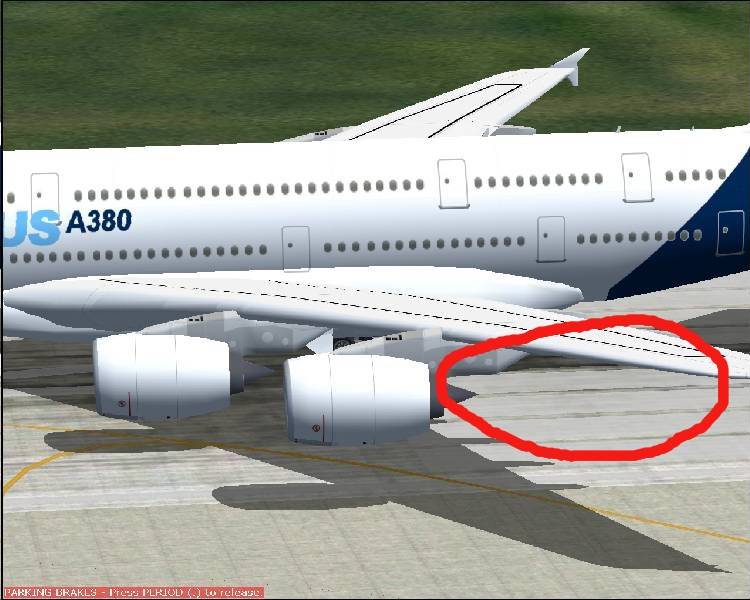
In the light.10 example above I have also taken the liberty of moving the (X axis) coordinate 8 feet to the rear of the engine. It would not do to have the new light appear in the center of the engine -- you wouldn't be able to see it then!
Another thing is the color of the light. I always use the navred light because I see the red color better.
Save the Aircraft.cfg and leave it running in the background (minimize it).
3. Now startup FS 2004 and select the aircraft that you want to add smoke to. Turn on the lights. You can now see another red navigation light "hovering" behind your engine. Now you can minimize FS 2004 and go back to your Aircraft.cfg file and adjust the numbers for the (X Axis) (Y Axis) (Z Axis) coordinates in the light.10 line. Bring up FS 2004 again and **very important** select a different aircraft (not a different paintscheme of the same aircraft, but a different aircraft altogether). Now go back and select the aircraft that you're adding smoke to. Now you will see that the position of the light has changed.
If you want you can press the Alt key and go to the FS 2004 menu Options>Controls>Assignments and scroll down the list until you get to the item listed as "Reload User Aircraft". I have mine mapped to Ctrl + Shift + R.
Anytime you want to check on the corrected lights position you can then press the Ctrl + Shift + R keys and your aircraft will be reloaded and the light will change position.
Continue adjusting the light.10 (X,Y,Z) coordinates until you get the light centered behind the engine.
4.) Once the light is centered open the Aircraft.cfg and replace the light.10 effect fx_navred to fx_nicksmokeAI_737. You may want to adjust the (X Axis) coordinate of light.10 another 10 to 15 feet (in other words subtract another 10 to 15 feet) to the rear of the engine. You don't want the smoke to be coming out of the front of the engine!
5.) Now copy the entire light.10 line and paste it immediately below on the next line. Change the light.10 to light.11 on the new line and then look at the (Y Axis) number and change it to the opposite (i.e. if it is a negative number change it to a positive number and vice-versa).
6.) You're finished! Save and close the Aircraft.cfg file.
This sounds like a long, roundabout method of placing smoke effects but (believe me) it saves a lot of time in the long run.
Also if you have any questions or issues IM me here at SimV and I'll be happy to help.
Happy Flying -- And may your main wheels always touch down first!
Dave F.








 PhotoShop 7 user
