STRM

Forum dedicated to Microsoft FS2004 - "A Century of Flight".

STRM

Postby Airbus_eurofighter » Sat Jun 04, 2005 10:55 am

Hi buddies, i've got a trouble with the STRM mesh, well, i put the bgl's wanted in a new folder, then i open Fs2004, and when i open the Fs to add it to the library, i see that into the folder it isnt nothing!!!

Zitin
Spitfire dreamer

Image

Im Who is trying to learn to overlock, to learn photoshop, to learn AFCAD, Jac's paintshop pro, Gmax... No time enough :(
User avatar
Airbus_eurofighter
2nd Lieutenant
2nd Lieutenant
 
Posts: 281
Joined: Thu May 12, 2005 6:29 pm

Re: STRM

Postby commoner » Sat Jun 04, 2005 11:18 am

...For each area you download.........make a new folder in the main scenery folder and give it a name you will remember.....SRTM-canada or whatever it is

Then inside that folder make another new folder and call it scenery...put the .bgl inside that...THEN go to the scenery library and ADD it ...........OK...commoner ;)
Image"In theory, there is no difference between theory and practice. But, in practice, there is."
User avatar
commoner
Major
Major
 
Posts: 3221
Joined: Sat Aug 28, 2004 2:26 am
Location: Yorkshire. England. UK.

Re: STRM

Postby Souichiro » Sat Jun 04, 2005 11:50 am

I just throw it in the ADDON scenery! Fs loads it on start up then
Image
User avatar
Souichiro
Ground hog
Ground hog
 
Posts: 0
Joined: Tue Aug 28, 2007 11:34 am

Re: STRM

Postby commoner » Sat Jun 04, 2005 12:02 pm

I just throw it in the ADDON scenery! Fs loads it on start up then

....mmm.... ???...nah....commoner ::)
Image"In theory, there is no difference between theory and practice. But, in practice, there is."
User avatar
commoner
Major
Major
 
Posts: 3221
Joined: Sat Aug 28, 2004 2:26 am
Location: Yorkshire. England. UK.

Re: STRM

Postby Fozzer » Sat Jun 04, 2005 12:11 pm

I just throw it in the ADDON scenery! Fs loads it on start up then


I've tried that before...without much success... :'(...!

Commoner method works fine.... ;D...!

You know you've got it right when your file name appears in the search window... ;)...!
Just make sure you put your new .bgl file in a new, named, folder, before popping it into the Main Scenery folder...!

Paul.... 8)...!
Win 8.1 64-bit. DX11. Advent Tower. Intel i7-3770 3.9 GHz 8-core. 8 GB System RAM. AMD Radeon HD 7700 1GB RAM. DVD ROM. 2 Terra Byte SATA Hard Drive. Philips 17" LCD Monitor. Saitek Cyborg X Fly-5 Joystick. ...and a Briggs and Stratton Petrol Lawn Mower.
User avatar
Fozzer
Colonel
Colonel
 
Posts: 27369
Joined: Thu Jan 31, 2002 3:11 pm
Location: Hereford. England. EGBS.

Re: STRM

Postby Souichiro » Sat Jun 04, 2005 12:13 pm

....mmm.... ???...nah....commoner ::)


Why not?
Image
User avatar
Souichiro
Ground hog
Ground hog
 
Posts: 0
Joined: Tue Aug 28, 2007 11:34 am

Re: STRM

Postby commoner » Sat Jun 04, 2005 12:16 pm

lol...well Souichi is from Holland so he would see everything FLAT anyway...eh?......commoner ;D

..Sorry Sou. just could NOT resist that one............commoner ;)
Image"In theory, there is no difference between theory and practice. But, in practice, there is."
User avatar
commoner
Major
Major
 
Posts: 3221
Joined: Sat Aug 28, 2004 2:26 am
Location: Yorkshire. England. UK.

Re: STRM

Postby commoner » Sat Jun 04, 2005 12:18 pm


Why not?


.....'cos that ain't the way it works............comm.
Last edited by commoner on Sat Jun 04, 2005 12:19 pm, edited 1 time in total.
Image"In theory, there is no difference between theory and practice. But, in practice, there is."
User avatar
commoner
Major
Major
 
Posts: 3221
Joined: Sat Aug 28, 2004 2:26 am
Location: Yorkshire. England. UK.

Re: STRM

Postby Saitek » Sat Jun 04, 2005 12:19 pm

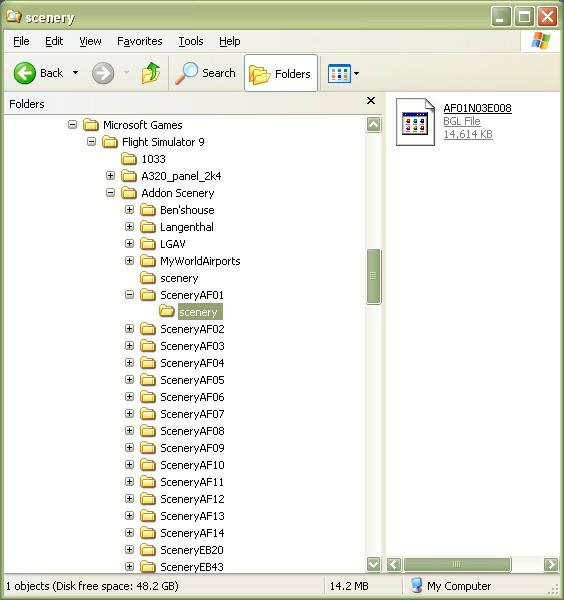
Here is how I do it. ;D


Image
Windows 7 Pro 64bit
Intel Core 2 Duo E2180 2GHz
GA-P35-DS3L Intel P35
Kingston HyperX 4GB (2x2) DDR2 6400C4 800Mhz
GeForce 8800 GT 512MB
2 x 22" monitors
200GB Sata
Be Quiet! Straight Power 650W

Flying FS
Saitek
Lieutenant Colonel
Lieutenant Colonel
 
Posts: 5274
Joined: Thu Jun 19, 2003 3:04 pm
Location: UK

Re: STRM

Postby commoner » Sat Jun 04, 2005 12:21 pm

...WOW...Sai.....that looks complicated.... ;D...each to his own is about right eh? Whatever works for you..........Derek. ;)
Image"In theory, there is no difference between theory and practice. But, in practice, there is."
User avatar
commoner
Major
Major
 
Posts: 3221
Joined: Sat Aug 28, 2004 2:26 am
Location: Yorkshire. England. UK.

Re: STRM

Postby Airbus_eurofighter » Sat Jun 04, 2005 12:28 pm

YES,  i do all that but when i search in the fs library it doesnt appear, hte bgl file

Zitin
Spitfire dreamer

Image

Im Who is trying to learn to overlock, to learn photoshop, to learn AFCAD, Jac's paintshop pro, Gmax... No time enough :(
User avatar
Airbus_eurofighter
2nd Lieutenant
2nd Lieutenant
 
Posts: 281
Joined: Thu May 12, 2005 6:29 pm

Re: STRM

Postby Fozzer » Sat Jun 04, 2005 12:28 pm

...WOW...Sai.....that looks complicated.... ;D...each to his own is about right eh? Whatever works for you..........Derek. ;)


I just put the .bgl file in a bucket.
Carry it over to the Scenery Bin.
..and empty it in there...
...complete with the bucket.

Paul...I love simplicity... ;D...!
LOL...!
Win 8.1 64-bit. DX11. Advent Tower. Intel i7-3770 3.9 GHz 8-core. 8 GB System RAM. AMD Radeon HD 7700 1GB RAM. DVD ROM. 2 Terra Byte SATA Hard Drive. Philips 17" LCD Monitor. Saitek Cyborg X Fly-5 Joystick. ...and a Briggs and Stratton Petrol Lawn Mower.

User avatar
Fozzer
Colonel
Colonel
 
Posts: 27369
Joined: Thu Jan 31, 2002 3:11 pm
Location: Hereford. England. EGBS.

Re: STRM

Postby Saitek » Sat Jun 04, 2005 12:29 pm

I don't know of any other way! ??? :o
Lets see yours then. :)
Windows 7 Pro 64bit
Intel Core 2 Duo E2180 2GHz
GA-P35-DS3L Intel P35
Kingston HyperX 4GB (2x2) DDR2 6400C4 800Mhz
GeForce 8800 GT 512MB
2 x 22" monitors
200GB Sata
Be Quiet! Straight Power 650W

Flying FS
Saitek
Lieutenant Colonel
Lieutenant Colonel
 
Posts: 5274
Joined: Thu Jun 19, 2003 3:04 pm
Location: UK

Re: STRM

Postby Saitek » Sat Jun 04, 2005 12:30 pm

YES,  i do all that but when i search in the fs library it doesnt appear, hte bgl file

Zitin


You do what I have done.. then fire up FS. Go to add scenery and then click add area. Browase through and then click the file. You DON'T click the scenery folder.
Windows 7 Pro 64bit
Intel Core 2 Duo E2180 2GHz
GA-P35-DS3L Intel P35
Kingston HyperX 4GB (2x2) DDR2 6400C4 800Mhz
GeForce 8800 GT 512MB
2 x 22" monitors
200GB Sata
Be Quiet! Straight Power 650W

Flying FS
Saitek
Lieutenant Colonel
Lieutenant Colonel
 
Posts: 5274
Joined: Thu Jun 19, 2003 3:04 pm
Location: UK

Re: STRM

Postby Airbus_eurofighter » Sat Jun 04, 2005 12:31 pm

I open the add-on scenery and its the folder that i have made , but when i open that folder there isnt nothing...!!!

Zitin
Spitfire dreamer

Image

Im Who is trying to learn to overlock, to learn photoshop, to learn AFCAD, Jac's paintshop pro, Gmax... No time enough :(
User avatar
Airbus_eurofighter
2nd Lieutenant
2nd Lieutenant
 
Posts: 281
Joined: Thu May 12, 2005 6:29 pm

Next

Return to FS 2004 - A Century of Flight

Who is online

Users browsing this forum: No registered users and 199 guests