Taxi Markings

Forum dedicated to Microsoft FS2004 - "A Century of Flight".

Taxi Markings

Postby Mistral » Thu Jun 02, 2005 10:31 am

Hi guys :)

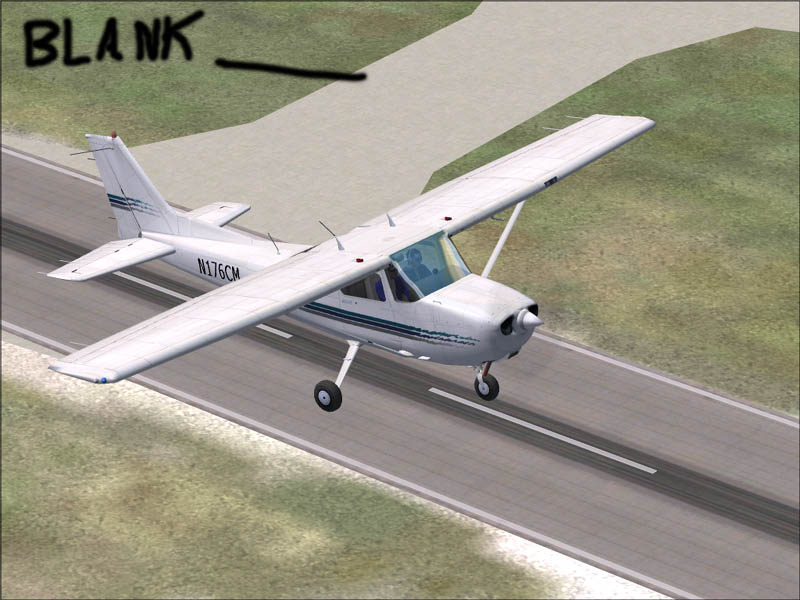
I have been having this problem for about a year now: The taxi marking just wont show ???. I thought it could just be the FS files getting corrupted, so i re-instaled FS, but they still didnt show. This lead me to believe it must be due to some scenery addon, so i formated my PC, removed all addons and then ran FS, but they still werent there >:(

Image

The other wierd thing is about one out of twenty times they do show up...

Can anyone help?

Mike
Last edited by Mistral on Thu Jun 02, 2005 10:33 am, edited 1 time in total.
Mistral
 

Re: Taxi Markings

Postby ozzy72 » Thu Jun 02, 2005 10:35 am

I was under the impression that only the major airports had them...
Image
There are two types of aeroplane, Spitfires and everything else that wishes it was a Spitfire!
User avatar
ozzy72
Administrator
Administrator
 
Posts: 33284
Joined: Fri May 24, 2002 4:45 am
Location: Madsville

Re: Taxi Markings

Postby JRoc » Thu Jun 02, 2005 11:33 am

Depends on the airport.

If you do want taxiway markings, download AFCAD, and you can select the existing taxiway and in its properties, set it to show the markings.
JRoc
1st Lieutenant
1st Lieutenant
 
Posts: 401
Joined: Thu Dec 11, 2003 3:41 am
Location: CYVR/CYQR/CYMJ/CYXE (nomad!)

Re: Taxi Markings

Postby gr31 » Thu Jun 02, 2005 11:40 am

Depends on the airport.

If you do want taxiway markings, download AFCAD, and you can select the existing taxiway and in its properties, set it to show the markings.


Taxiways without any markings normally are set  with "closed" as their type. Just change the type using AFCAD and the markings will show up.
Snakedriver 70/71
User avatar
gr31
2nd Lieutenant
2nd Lieutenant
 
Posts: 95
Joined: Thu Jul 15, 2004 10:36 am

Re: Taxi Markings

Postby Mistral » Thu Jun 02, 2005 4:37 pm

Might try that, thanks :)

But the thing is they dont show on any airports, for example, that pic was taken from Seattle-Tacoma, and there deffinatley used to be taxi markings there. So if they are not showing do you think that editing in AFCAD will help, or does my PC have some sort of issue with them ???

Cheers,
Mike
Mistral
 

Re: Taxi Markings

Postby Jared » Thu Jun 02, 2005 6:37 pm

What are your display settings set at? have they changed recently? Perhaps with a rebuild of the fs9.cfg?

I do believe that if the display settings are turned down enough the taxiway signs will not be displayed...not sure though...
User avatar
Jared
Lieutenant Colonel
Lieutenant Colonel
 
Posts: 9976
Joined: Sun Jul 13, 2003 11:18 am
Location: Uniontown, Ohio


Return to FS 2004 - A Century of Flight

Who is online

Users browsing this forum: No registered users and 216 guests