Waterzone effects

Forum dedicated to Microsoft FS2004 - "A Century of Flight".

Waterzone effects

Postby airlinefly » Sun May 29, 2005 10:06 pm

How do I get the waterzone files right? Meaning, how can I get the water effects that the authors on Simviation advertise?

I've tried to place the files as the instructions say, but I still can't seem to get it right. Can anyone help me with this water issue?
Raymond Camacho
airlinefly
Ground hog
Ground hog
 
Posts: 47
Joined: Sat May 28, 2005 2:08 pm
Location: Norfolk, Virginia

Re: Waterzone effects

Postby GA_Pilot » Sun May 29, 2005 10:13 pm

Some graphics cards do not support water effects, unless yours is one of those I really dont know..... ???
GA_Pilot
 

Re: Waterzone effects

Postby Saitek » Mon May 30, 2005 2:20 am

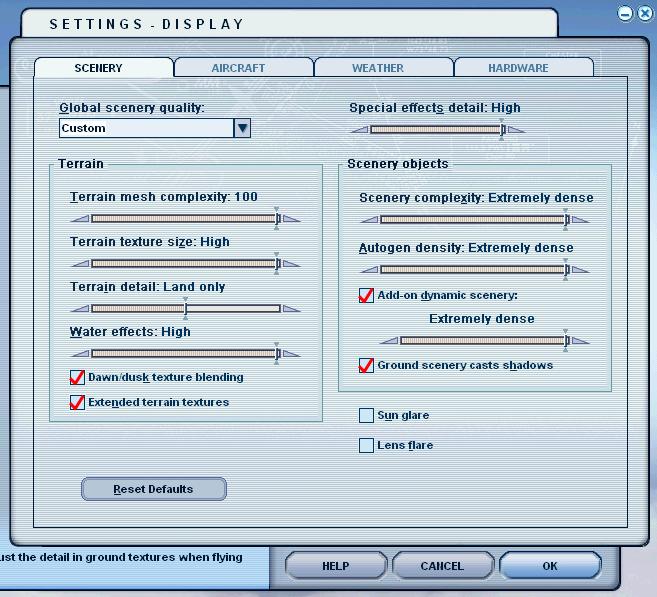
HAve you turned the water effects to high on the sim (at the expense of the land slider bar)?
Windows 7 Pro 64bit
Intel Core 2 Duo E2180 2GHz
GA-P35-DS3L Intel P35
Kingston HyperX 4GB (2x2) DDR2 6400C4 800Mhz
GeForce 8800 GT 512MB
2 x 22" monitors
200GB Sata
Be Quiet! Straight Power 650W

Flying FS
Saitek
Lieutenant Colonel
Lieutenant Colonel
 
Posts: 5274
Joined: Thu Jun 19, 2003 3:04 pm
Location: UK

Re: Waterzone effects

Postby airlinefly » Mon May 30, 2005 9:06 am

I cannot adjust any water effects on the slider bar under settings. My sim doesn't give me that option and I don't know why. I should have a video card that allows for that.
Raymond Camacho
airlinefly
Ground hog
Ground hog
 
Posts: 47
Joined: Sat May 28, 2005 2:08 pm
Location: Norfolk, Virginia

Re: Waterzone effects

Postby eno » Mon May 30, 2005 9:21 am

What is your graphics card?
[align=center][img]http://www.simviation.com/yabbuploads/imaginsigeno.jpg[/img][/align]
User avatar
eno
Lieutenant Colonel
Lieutenant Colonel
 
Posts: 6708
Joined: Sun Jan 18, 2004 12:30 pm
Location: Derbyshire UK

Re: Waterzone effects

Postby || Andy || » Mon May 30, 2005 9:23 am

What is ure graphics card...

(right click on desktop > properties > settings (whats it say?)

I doubt you've got a card that supports full water effects, if the slider doesnt even show..
|| Andy ||
Major
Major
 
Posts: 2613
Joined: Sun Jan 09, 2005 5:55 am
Location: Shropshire, United Kingdom

Re: Waterzone effects

Postby airlinefly » Mon May 30, 2005 9:30 am

I have a Plug and Play Monitor on Intel(R) 82845G/GL/GE/PE/GV Grapics Controller and I run Windows XP.
Raymond Camacho
airlinefly
Ground hog
Ground hog
 
Posts: 47
Joined: Sat May 28, 2005 2:08 pm
Location: Norfolk, Virginia

Re: Waterzone effects

Postby Saitek » Mon May 30, 2005 9:56 am

Doesn't sound too promising to me. ::)
Here are my settings you have to have the (water) settings like this to get them to work:

Image
Last edited by Saitek on Mon May 30, 2005 9:57 am, edited 1 time in total.
Windows 7 Pro 64bit
Intel Core 2 Duo E2180 2GHz
GA-P35-DS3L Intel P35
Kingston HyperX 4GB (2x2) DDR2 6400C4 800Mhz
GeForce 8800 GT 512MB
2 x 22" monitors
200GB Sata
Be Quiet! Straight Power 650W

Flying FS
Saitek
Lieutenant Colonel
Lieutenant Colonel
 
Posts: 5274
Joined: Thu Jun 19, 2003 3:04 pm
Location: UK

Re: Waterzone effects

Postby JBaymore » Mon May 30, 2005 10:34 am

airlinefly,

Most integrated (built into the mobo) video adapters are not very "robust".  Sounds like what you have.  Probably does not support DirectX 9.x.

Go to the "Run" prompt off the start menu tab, and type in DxDiag".  Hit "run".  Check out what that test system has to say about your system.... it'll let you know what your computer will support.

Check your machine and seeif it has an AGP slot.  If it does, save up your change and invest in a good AGP video card.  You'll not only be able to get water effects...... but the whole sim will look better than it already does and it will run smoother and faster.

As to WHICH video card to get....... head down to the "Hardware Forum" and look at the threads there relating to video cards.  Also head over to the Tom's Hardware website and see their FS2004 video card test results.

best,

..................john
Image ImageIntel i7 960 quad 3.2G LGA 1366, Asus P6X58D Premium, 750W Corsair, 6 gig 1600 DDR3, Spinpoint 1TB 720
User avatar
JBaymore
Global Moderator
Global Moderator
 
Posts: 10020
Joined: Sat May 24, 2003 9:15 am
Location: New Hampshire

Re: Waterzone effects

Postby || Andy || » Mon May 30, 2005 11:06 am

Its a standard Mo-Board chip....

It wont support DX9
|| Andy ||
Major
Major
 
Posts: 2613
Joined: Sun Jan 09, 2005 5:55 am
Location: Shropshire, United Kingdom

Re: Waterzone effects

Postby airlinefly » Mon May 30, 2005 11:06 am

ok then, sounds like a good idea. I'll just have to get a better video card.

Thanks  :)
Raymond Camacho
airlinefly
Ground hog
Ground hog
 
Posts: 47
Joined: Sat May 28, 2005 2:08 pm
Location: Norfolk, Virginia

Re: Waterzone effects

Postby airlinefly » Mon May 30, 2005 11:19 am

Ok, now. I did a DxDiag on my system and it does say it supports DirectX 9.x. So I don't understand. Is there something else I'm missing?
Raymond Camacho
airlinefly
Ground hog
Ground hog
 
Posts: 47
Joined: Sat May 28, 2005 2:08 pm
Location: Norfolk, Virginia

Re: Waterzone effects

Postby Saitek » Mon May 30, 2005 12:03 pm

What you need is a new video card. Here is a commonly used table as a guide.


Image

I have a R9600XT. It costs about
Last edited by Saitek on Mon May 30, 2005 12:03 pm, edited 1 time in total.
Windows 7 Pro 64bit
Intel Core 2 Duo E2180 2GHz
GA-P35-DS3L Intel P35
Kingston HyperX 4GB (2x2) DDR2 6400C4 800Mhz
GeForce 8800 GT 512MB
2 x 22" monitors
200GB Sata
Be Quiet! Straight Power 650W

Flying FS
Saitek
Lieutenant Colonel
Lieutenant Colonel
 
Posts: 5274
Joined: Thu Jun 19, 2003 3:04 pm
Location: UK

Re: Waterzone effects

Postby JBaymore » Mon May 30, 2005 1:21 pm

Video cards are a PERT of the issue.... but not all of it.  So don't get lulled into thinking JUST changing that will allow you to max out your fs2004 settings.

I have a Radeon 9800XT.  When I bought it..... top of the heap.... but now "second heap"   ;).

But it wasn't until I upgraded the REST of the system from a 2.4gig P with a 533 fsb to a 3.2 gig Hyperthreading P with an 800 fsb that I really saw what I would consider the ability to USE the nice features in fs2004.

But I am "picky" as to getting the viauals way "up there" AND wanting a minimum of 20 fsp on short final into a big international airport with AI set at 100%.

You'll still get improved performance with a separate AGP video card........... just don't expect miracles.

best,

........john

PS:  Don't waste money on an API card.  If you don;t have an AGP slot....... put the money in a mobo upgrade.
Image ImageIntel i7 960 quad 3.2G LGA 1366, Asus P6X58D Premium, 750W Corsair, 6 gig 1600 DDR3, Spinpoint 1TB 720
User avatar
JBaymore
Global Moderator
Global Moderator
 
Posts: 10020
Joined: Sat May 24, 2003 9:15 am
Location: New Hampshire


Return to FS 2004 - A Century of Flight

Who is online

Users browsing this forum: No registered users and 252 guests