Upon installing 9.1 update..

Forum dedicated to Microsoft FS2004 - "A Century of Flight".

Upon installing 9.1 update..

Postby Politically Incorrect » Fri May 20, 2005 9:00 am

I was surprised it went in flawlessly. Yes I waited for a long time but since a storm took out my phone line until about 15 minutes ago I had nothing better to do, lol.
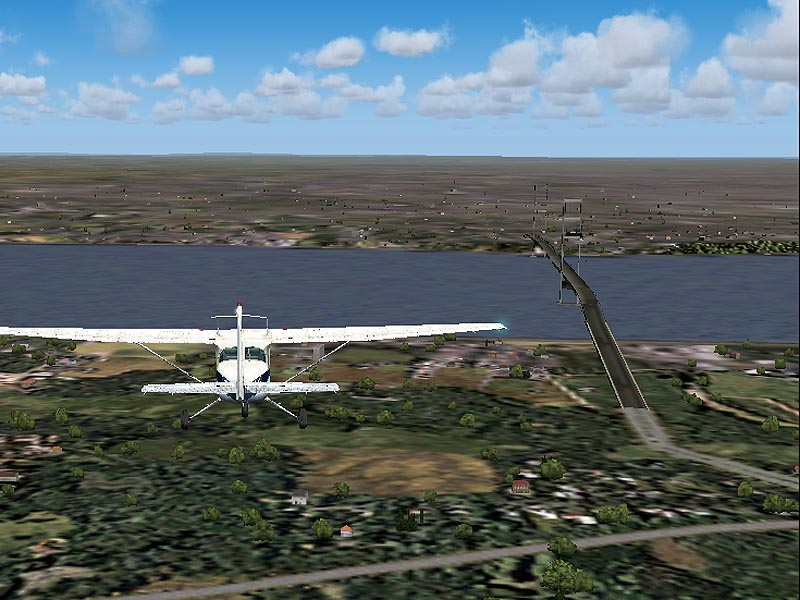
I was eager to see if and what may have been improved, it was a pleasant scene to see even some smaller local bridges have be placed in it! But is it a common occurance to everyone that installed this update to not only have the bridges now but they are placed off center of the road they should be connected to???
Every bridge and even those that were present (before and in proper posistion) are off to the side of the road or train tracks that the should connect to, some are even broken(seperated) like they have suffered a major earthquake.
Is this a known issue or is it something that I can fix on my own??

User avatar
Politically Incorrect
Major
Major
 
Posts: 3366
Joined: Sat Sep 13, 2003 12:47 pm
Location: Williamsport, PA

Re: Upon installing 9.1 update..

Postby Politically Incorrect » Sat May 21, 2005 5:06 am

Anyone ??
User avatar
Politically Incorrect
Major
Major
 
Posts: 3366
Joined: Sat Sep 13, 2003 12:47 pm
Location: Williamsport, PA

Re: Upon installing 9.1 update..

Postby commoner » Sat May 21, 2005 5:29 am

Anyone ??


...Hi PC...do you actually mean EVERY bridge is out of line or are you overstating the fact a bit? Can you give a screenie or two and the places you took them from...I'd be glad to compare my shots with yours as a check...........not heard of anybody with a problem of this magnitude...EVERY bridge out of line..........mmmm......commoner ;)

...My own local bridge....the HUMBER bridge, which was incidentally one of the "missing" bridges,  lines up perfectly...check that one.....

Image
Last edited by commoner on Sat May 21, 2005 5:46 am, edited 1 time in total.
Image"In theory, there is no difference between theory and practice. But, in practice, there is."

User avatar
commoner
Major
Major
 
Posts: 3221
Joined: Sat Aug 28, 2004 2:26 am
Location: Yorkshire. England. UK.

Re: Upon installing 9.1 update..

Postby Politically Incorrect » Sat May 21, 2005 8:37 am

Thanks for the reply Commoner, I am busy all day today but this evening or tommorow morning I ll post pics for you. I may overstate "everyone" becasue that would be near to impossible for me to have checked every bridge ;)
But noticed many around the Knoxville TN area, that were and some that werent there before the update are all off center, I dont think i have any before update screenies I will look and see if I saved some so maybe I can provide a before and after image.
Thanks for your time!
Jeff
User avatar
Politically Incorrect
Major
Major
 
Posts: 3366
Joined: Sat Sep 13, 2003 12:47 pm
Location: Williamsport, PA

Re: Upon installing 9.1 update..

Postby wji » Sat May 21, 2005 11:50 am

As I recall, there was a list of FS9.1 bridges that the patch corrected. It did not correct them all. The main advance, IMO, of the FS9.1 patch gives the simulation the capability to handle more scenery textures in a given addon scenery. This limitation was causing FS9 to crash-2-desktop. FS9.1 also corrected the 'spring-bug' (spring-time-season related scenery issues).
Bill
P.S. Don't leave home without it
Last edited by wji on Sat May 21, 2005 11:51 am, edited 1 time in total.
Image PhotoShop 7 user
User avatar
wji
Major
Major
 
Posts: 1644
Joined: Tue May 04, 2004 11:27 am


Return to FS 2004 - A Century of Flight

Who is online

Users browsing this forum: No registered users and 261 guests