how do you make screenshots so smooth

Forum dedicated to Microsoft FS2004 - "A Century of Flight".

how do you make screenshots so smooth

Postby marick626 » Tue May 03, 2005 6:24 pm

yes, I have been wondering.

Ive have seen some wonderfull screenshots from people, especially from the screenshot contest.

how can you make the screenshotsa so smooth?

is it the computer?

Banned for this...
http://www.simviation.com/cgi-bin/yabb/ ... 78;start=0
Posted by a Mod...
marick626
Captain
Captain
 
Posts: 613
Joined: Sat Mar 05, 2005 4:41 pm
Location: Puerto Rico

Re: how do you make screenshots so smooth

Postby beefhole » Tue May 03, 2005 7:06 pm

screenshots are so smooth because they're still shots... :P

If you're refering to the quality of the shot, many people use addons like the payware active camera or the freeware F1 view to get much better angles.  They alos set their graphics to max, just for that one shot.
User avatar
beefhole
Major
Major
 
Posts: 3804
Joined: Thu Jun 05, 2003 8:57 am
Location: Philadelphia

Re: how do you make screenshots so smooth

Postby dave3cu » Tue May 03, 2005 7:14 pm

Its in your graphics adapter (g/a), if its capable. Its called 'anti-aliasing' (a/a) and smooths out the edges.

Depending on your system, it can be a frame-rate killer, but for those 'smooth' pics, a must.

If your g/a is capable, a/a can be activated from the FS Display settings, hardware tab, or from your g/a config tool (R. click on desktop, select Properties, settings tab, advanced button) if it has one. (your g/a config tool is recommended as setting from FS can reduce frame rates and does not take best advantage of your g/a).

Dave
Last edited by dave3cu on Tue May 03, 2005 7:18 pm, edited 1 time in total.
At that time [1909] the chief engineer was almost always the chief test pilot as well. That had the fortunate result of eliminating poor engineering early in aviation.
dave3cu
Major
Major
 
Posts: 3141
Joined: Sun May 19, 2002 9:55 am
Location: 3CU, Northern Wisconsin, USA

Re: how do you make screenshots so smooth

Postby JBaymore » Tue May 03, 2005 7:34 pm

Remember for screenshot use.... the screenshot is the goal ..... not smooth flicker and stutter free flying.  So for that specific use, you can tolerate stutter and low framerates for the sake of the quality shot.

First plan out your "photo shoot" doing some real flying in the situation you plan to shoot your shot.  Plan out background and angles and such.  Play with time of day for lighting, season, and background traffic and such.   Figure out what makes the best "photo".

THEN....... once you have the plan....... go into settings in the sim and maximize absolutely everything you can (except AA).  Go into your graphics card manager and max out Anti Aliasing and Ansiotropic Filtering.  

Then go back and TAKE the "mother of all screenshots".

Hope this suggestion helps someone out for the upcoming May SimV screenshot contest.  Since these are ground shots........ the framerate and stutter issue is NOT a factor for ANYONE anyway!!

best,

..................john
Image ImageIntel i7 960 quad 3.2G LGA 1366, Asus P6X58D Premium, 750W Corsair, 6 gig 1600 DDR3, Spinpoint 1TB 720

User avatar
JBaymore
Global Moderator
Global Moderator
 
Posts: 10020
Joined: Sat May 24, 2003 9:15 am
Location: New Hampshire

Re: how do you make screenshots so smooth

Postby Scottler » Tue May 03, 2005 8:28 pm

Absolutely...max EVERYTHING out for your screenshot.  Set the shot up very deliberately.  Don't leave anything to chance.  Lighting, weather, angles....set it all up to your liking.  Take the shot.  Then go back and re-set your settings to a flyable level for your normal flying. ;)
Great edit, Bob.


Google it.

www.google.com
Scottler
Lieutenant Colonel
Lieutenant Colonel
 
Posts: 5011
Joined: Mon Jun 16, 2003 10:40 am
Location: Albany, New York USA

Re: how do you make screenshots so smooth

Postby Omag 2.0 » Wed May 04, 2005 7:08 am

Take the shot in the highest resolution you can. Than resize it to 800x640 using a good resizer ( I recommend photoshop). This makes the shot even smoother!

And download the latest drivers for your graficscard! sometimes it well worth it!
Last edited by Omag 2.0 on Wed May 04, 2005 7:09 am, edited 1 time in total.
[center]
Image

Check my aviation-photo's at www.airliners.be

Or go straight to Omag's Album[/cent
User avatar
Omag 2.0
Lieutenant Colonel
Lieutenant Colonel
 
Posts: 9490
Joined: Tue Aug 05, 2003 6:43 am
Location: Somewhere, Belgium

Re: how do you make screenshots so smooth

Postby Wing Nut » Wed May 04, 2005 10:21 am
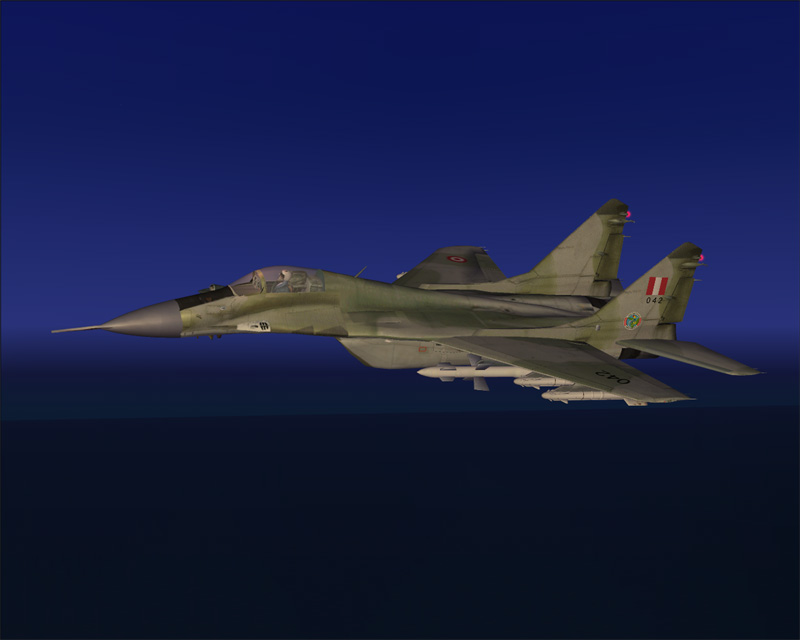
Other issues to condsider are anti-aliasing, mip mapping, and global texture sizes.  All of the above will contribute to this:

Image
800x600x16
Anti-aliasing=off
Global Texture Size=Very Small
Mip-Mapping=0
Filtering= Bilinear
Render to Texture=off
Transform and Lighting=off
Hardware rendered lights=6

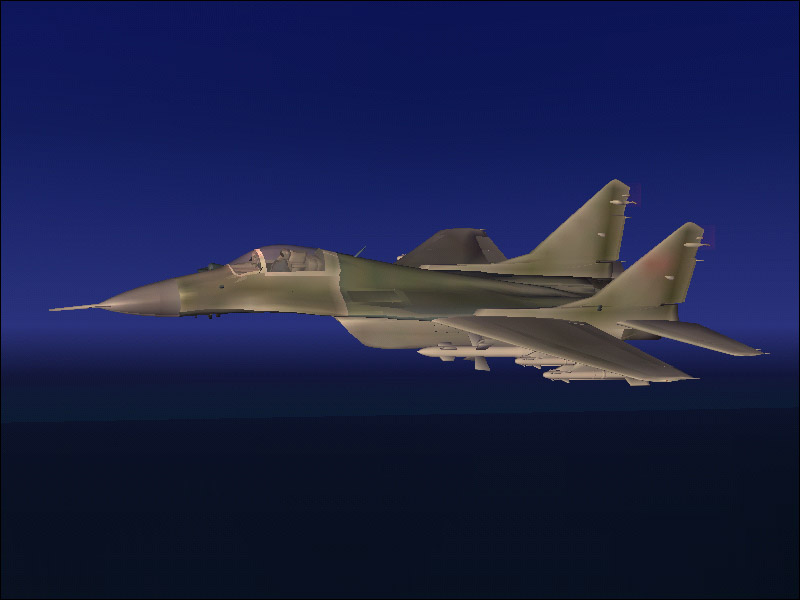
And will turn it into THIS:
Image
1280x1024x32
Anti-aliasing=on
Global Texture Size=Massive
Mip-Mapping=4
Filtering= Trilinear
Render to Texture=on
Transform and Lighting=on
Hardware rendered lights=6
[img]http://www.simviation.com/phpupload/uploads/1440377488.jpg[/img]
User avatar
Wing Nut
Colonel
Colonel
 
Posts: 12720
Joined: Tue Jan 01, 2002 6:25 am

Re: how do you make screenshots so smooth

Postby JBaymore » Wed May 04, 2005 10:32 am

Great visual example of what we are suggesting Kev.  Thanks.

best,

.............john
Image ImageIntel i7 960 quad 3.2G LGA 1366, Asus P6X58D Premium, 750W Corsair, 6 gig 1600 DDR3, Spinpoint 1TB 720
User avatar
JBaymore
Global Moderator
Global Moderator
 
Posts: 10020
Joined: Sat May 24, 2003 9:15 am
Location: New Hampshire

Re: how do you make screenshots so smooth

Postby Wing Nut » Wed May 04, 2005 10:52 am

There is some debate as to wether the Anti-aliasing should be controlled by the graphics card or the game.
Last edited by Wing Nut on Wed May 04, 2005 11:19 am, edited 1 time in total.
[img]http://www.simviation.com/phpupload/uploads/1440377488.jpg[/img]
User avatar
Wing Nut
Colonel
Colonel
 
Posts: 12720
Joined: Tue Jan 01, 2002 6:25 am

Re: how do you make screenshots so smooth

Postby Scottler » Wed May 04, 2005 11:01 am

When I'm flying, I let my card control my AA....if I'm taking screenshots, I have 'em both on just to get as much as I possibly can.
Great edit, Bob.


Google it.

www.google.com
Scottler
Lieutenant Colonel
Lieutenant Colonel
 
Posts: 5011
Joined: Mon Jun 16, 2003 10:40 am
Location: Albany, New York USA

Re: how do you make screenshots so smooth

Postby rajiv2 » Thu May 05, 2005 6:53 am

why dont you guys post some samples ;)

User avatar
rajiv2
2nd Lieutenant
2nd Lieutenant
 
Posts: 107
Joined: Mon Dec 27, 2004 7:10 am
Location: philippines

Re: how do you make screenshots so smooth

Postby Hyperion2 » Thu May 05, 2005 6:58 am

Great idea.  How about some with a Mig? ;)
Hyperion2
 

Re: how do you make screenshots so smooth

Postby Souichiro » Thu May 05, 2005 6:59 am

why dont you guys post some samples ;)



Look in the freeware/payware screenshots forum!!

my screensize is 1280x1024x32

Everything is maxed always (water over land)

I have
Last edited by Souichiro on Thu May 05, 2005 8:36 am, edited 1 time in total.
Image
User avatar
Souichiro
Ground hog
Ground hog
 
Posts: 0
Joined: Tue Aug 28, 2007 11:34 am

Re: how do you make screenshots so smooth

Postby Wing Nut » Thu May 05, 2005 8:15 am

BTW, my system specs are:

P4 2.4 Gig
1024 Mb Ram
180 Gig HD
256 Mb FX5200
and a partridge in a pear tree...
[img]http://www.simviation.com/phpupload/uploads/1440377488.jpg[/img]
User avatar
Wing Nut
Colonel
Colonel
 
Posts: 12720
Joined: Tue Jan 01, 2002 6:25 am

Re: how do you make screenshots so smooth

Postby marick626 » Sat May 07, 2005 12:55 pm
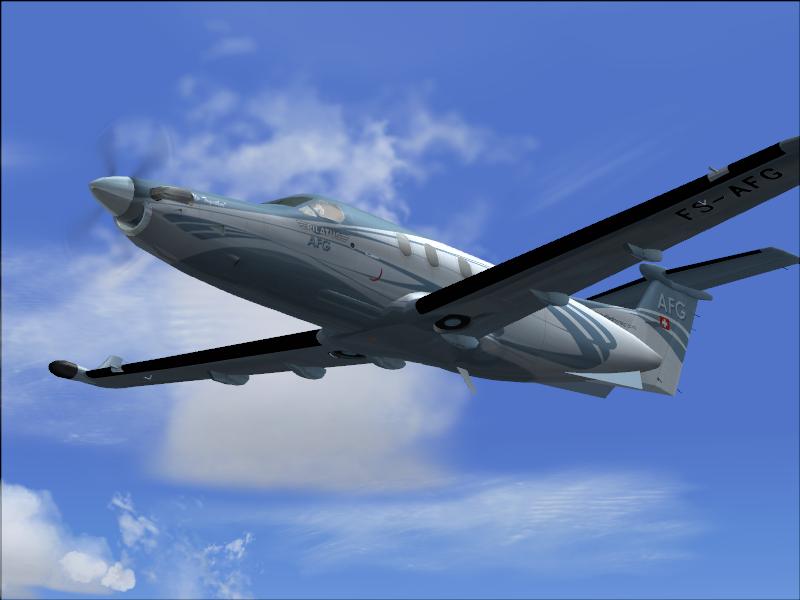
I juse fraps but the quality of the photos are very well poor

I want it to loock cool.
Anti Aliasing is not the problem

Image
Banned for this...
http://www.simviation.com/cgi-bin/yabb/ ... 78;start=0
Posted by a Mod...
marick626
Captain
Captain
 
Posts: 613
Joined: Sat Mar 05, 2005 4:41 pm
Location: Puerto Rico

Next

Return to FS 2004 - A Century of Flight

Who is online

Users browsing this forum: No registered users and 352 guests