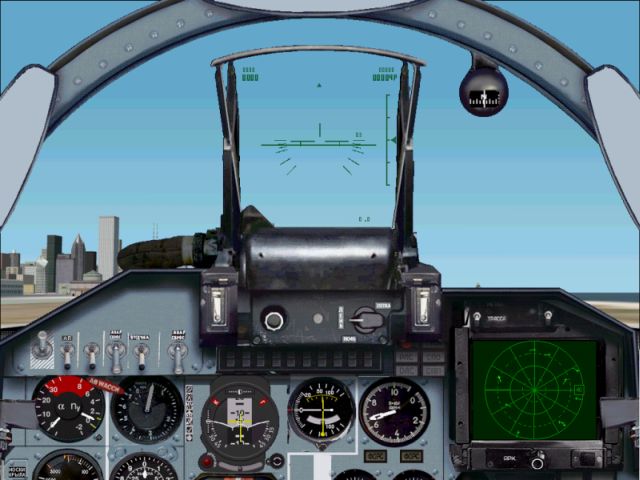
Suhoi  su-27 panel

Forum dedicated to Microsoft FS2004 - "A Century of Flight".

Suhoi  su-27 panel

Postby Hammer » Sun Mar 27, 2005 5:34 pm

Another puzzler to me guys. I downloaded the Suhoi SU-27 from I think the 2004 downloads, intended it to go into FS2004, it wound up in FS2002, it flys, but the panel is russian & apparently inoperative. Downloaded
Su27pnl_i3d.zip. After a struggle, finally got it in the SU27XS folder, deleted the standard panel so I thought, created a flight, the original panel is in the A/C, no sign of the Su27 pnl, still in the FS2002 SU27XS folder. Occupied most of an Easter Sunday, tho. NEED HELP. Read all of the Tut's. Running Windows XP home, Dell 2.4MZ. Couldn't get 2004NOCD crack to work either ??? Thanks guys. Kind of laid an Easter egg with this one.

Hammer
Ground hog
Ground hog
 
Posts: 41
Joined: Mon Jun 09, 2003 1:10 pm

Re: Suhoi

Postby Hagar » Sun Mar 27, 2005 5:40 pm

Hammer. You're not making a lot of sense. If this is for FS2004 what's it doing in FS2002?

Installing a panel should not be difficult. First, I suggest you rename the original Panel folder in the aircraft you intend installing it to to back it up. Something like Panel.orig will do. Now make sure the appropriate BMPs & Panel.cfg are configured in a folder named Panel. Paste this new Panel folder into the aircraft & any included gauges into FS9\Gauges.
Image

Founder & Sole Member - Grumpy's Over the Hill Club for Veteran Virtual Aviators
Member of the Fox Four Group
My Google Photos albums
My Flickr albums
User avatar
Hagar
Colonel
Colonel
 
Posts: 30868
Joined: Wed Jun 19, 2002 7:15 am
Location: Costa Geriatrica

Re: Suhoi

Postby A/SGT.Mav316 » Sun Mar 27, 2005 6:57 pm

As for the FS9 "NOCD" Patch, read the "README" file clearly.

Inside the downloaded folder you will find a FS9 exe. file. Now all you have to do is go into your computer where the FS9 folder is located (the folder that you use to place your addon aircraft, scenery fixes, and guages)

If you look in that folder the FS9exe file is the icon with an airplane (matching the same icon in the downloaded folder). You must delete that exe. file and paste the downloaded exe file in the FS9 folder replacing it.

Now remove that FS9 disk4 from your computer and click on that exe file and FS9 should start without your disk in the drive!  :o

TA DA! Take care enjoy
Its only in your mind, strong mind, strong soul and nobody can take that from you!
User avatar
A/SGT.Mav316
Major
Major
 
Posts: 1325
Joined: Sun Feb 02, 2003 12:31 am
Location: New York City

Re: Suhoi

Postby Hagar » Sun Mar 27, 2005 7:08 pm

I would suggest backing up the original FS9.exe before pasting the other one in just in case. Also make sure you have the correct version of the patch. This will depend on whether you have the FS9.1 update installed.

I found Su27pnl_i3d.zip & downloaded it to check it out. It's posted in the FS2002 section & the Readme says it's for FS2002. It works fine for me in FS2002 but as it says on the download page & also in the instructions you need FSUIPC.dll installed for some of the gauges to function. One thing I've never seen before, some of the main panel images are in a DIB format instead of the usual BMP. This doesn't seem to affect anything & it works fine as you can see.
Image

I haven't tried it in FS9 as it shouldn't be necessary. According to the file description the Su-27 you mention is a complete package for FS2002/4, including its own authentic panel. If this aircraft has a DVC installing a different panel will mess it up.
Last edited by Hagar on Sun Mar 27, 2005 7:16 pm, edited 1 time in total.
Image

Founder & Sole Member - Grumpy's Over the Hill Club for Veteran Virtual Aviators
Member of the Fox Four Group
My Google Photos albums
My Flickr albums
User avatar
Hagar
Colonel
Colonel
 
Posts: 30868
Joined: Wed Jun 19, 2002 7:15 am
Location: Costa Geriatrica

Re: Suhoi

Postby Hammer » Tue Mar 29, 2005 11:03 am

Hagar,
Thanks much for the reply & advice. How that download ended up in 2002 instead of 2004, I Can't explain. I believe I've read several unfavorable comments about FSeditor, that thing drives me nuts, I wish I could get rid of it. I have backed up the original panel. When Su27XS is opened, I have a Su27pnl_i3d sub folder which has 6 sub folders, with 6 bitmap images, A/C config, Xlist text doc, etc. My question is can I insert the Su27 pnl in the Su27XS A/C folder or should I the contents in another folder. Right now, the only thing I feel sure of is your "Tut" description of the structure of aircraft. Thanks again.

Also thanks to A/Sgt mav316, when I open the FS9 file, to delete FS9.Exe, windows XP tells me windows can't find FS9.Exe, but windows search shows it as being there, will keep trying ???
Hammer
Ground hog
Ground hog
 
Posts: 41
Joined: Mon Jun 09, 2003 1:10 pm

Re: Suhoi

Postby Hagar » Tue Mar 29, 2005 11:43 am

I don't have the Su-27 installed but when you open its folder it should have the usual Model, Panel, Sound & Texture subfolders. To install the new panel rename the Panel folder to Panel.orig as I suggested. Now unzip Su27pnl_i3d.zip & open the extracted folder. You should see 2 zipfiles named Gauges.zip & Panel.zip. Right-click on Panel.zip & select the Extract to ..... option. Now open the Panel folder you just extracted. Inside it should be another folder named Panel containing 1 x BMP, 2 x DIB & 1 x Panel.cfg files. Paste this folder into the Su-27 folder. The panel is now installed. Do the same with Gauges.zip. Open the extracted Gauges folder & find 36 x GAU files + 1 x CAB file. Click Edit/Select All on the menu bar & paste all 37 files into FS9\Gauges. That's the gauges installed.

You will need to install FSUIPC.dll to FS9\Modules for some of the gauges to function. http://www.schiratti.com/dowson.html

PS. You might need to change your folder options to "Show hidden files" to see FS9.exe. It should be in the main Flight Simulator 9 folder. The icon will look the same as the shortcut to FS9 on your desktop.

PPS.
How that download ended up in 2002 instead of 2004, I Can't explain. I believe I've read several unfavorable comments about FSeditor, that thing drives me nuts, I wish I could get rid of it.

Ah, that explains it. If you're using the FS2002 version of FSEdit to install addons it will natually install them to to FS2002. No need to get rid of FSEdit. Simply stop using it. It's easy enough to install files manually. Follow the tutes posted in the Help section of SimV & also my Lair from the link in my sig.
Last edited by Hagar on Tue Mar 29, 2005 12:04 pm, edited 1 time in total.
Image

Founder & Sole Member - Grumpy's Over the Hill Club for Veteran Virtual Aviators
Member of the Fox Four Group
My Google Photos albums
My Flickr albums
User avatar
Hagar
Colonel
Colonel
 
Posts: 30868
Joined: Wed Jun 19, 2002 7:15 am
Location: Costa Geriatrica


Return to FS 2004 - A Century of Flight

Who is online

Users browsing this forum: No registered users and 324 guests