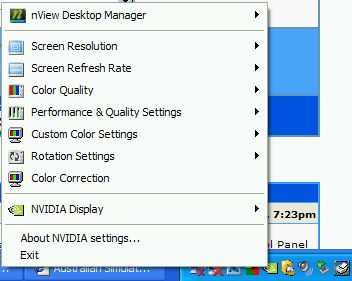
I have another question here - the usual way I (and perhaps others) access their graphics/video card is to go onto "Control Panel -> Display -> Settings -> Advanced", like so:
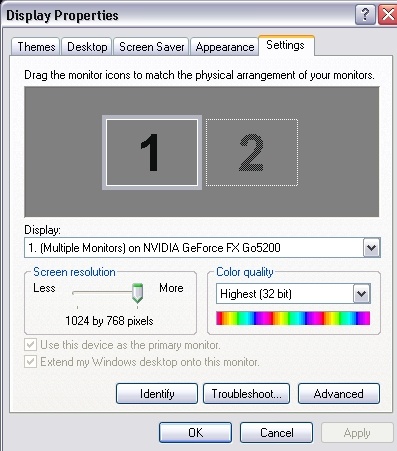
Usually I can press the "Advanced" button and there is a tab with my graphics/video card's settings/setup on it, but as you can see (at the top of the next pic), there is no tab to access my video card's settings:
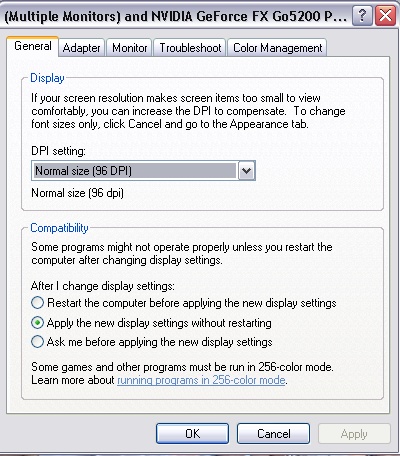
Does anyone out there know another way to access my video card's settings so I can turn on Anti-aliasing, Anisotropic (is that spelt right?) Filtering etc?
Thanks

(P.S. Sorry if I sounds like a total novice, I feel really stupid asking this question :-[
 )
)



 Mainboard: Asus P5K-Premium, CPU=Intel E6850 @ x8x450fsb 3.6ghz, RAM: 4gb PC8500 Team Dark, Video: NV8800GT, HDD: 2x1Tb Samsung F3 RAID-0 + 1Tb F3, PSU: Antec 550 Basiq, OS: Win7x64, Display: 24&