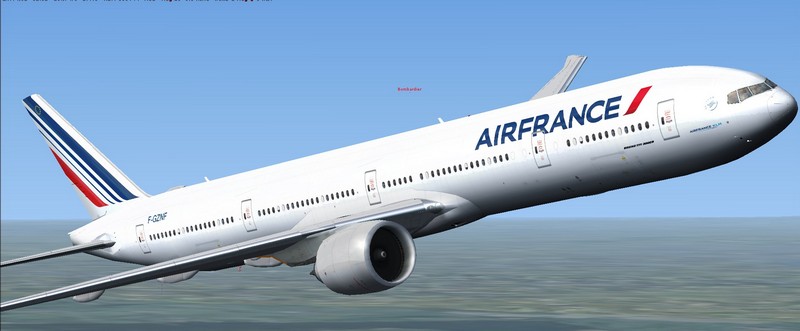
Boeing 777-300ER Air France Package Doesn't work

FSX including FSX Steam version.

Boeing 777-300ER Air France Package Doesn't work

Postby XcentY » Mon Mar 30, 2015 12:50 pm

Hello,

I've just downloaded the file (see topic) and extracted the content to my FSX/SimObjects/Airplanes.
The airplane is available in FSX but all textures are missing.

I tried "Boeing 777-300ER American Airlines". Same Problem. Seems these packages (same author) doesn't work on FSX Steam Edition

Help please.

XcentY
Ground hog
Ground hog
 
Posts: 2
Joined: Mon Mar 30, 2015 12:47 pm

Re: Boeing 777-300ER Air France Package Doesn't work

Postby Capt_Cronic » Mon Mar 30, 2015 3:22 pm

when I open up the MDL file, I see it's an FS8 (FS2002) model, not fsx.
that may be the problem
ASUS P8Z77-VLK, I5-3570k @ 4.4ghz, G.SKILL 16gb 1600, GTX 570 2560MB GDDR5, 2x OCZ Vertex 4 128Gb SSD SATA 3,
WD 500GB SATA 3, ASUS DRW-24B1ST SATA 3, OCZ ModXStream Pro 700W Modular, Samsung 52" lcd, Win 7 Ultimate x64 SP1
Capt_Cronic
2nd Lieutenant
2nd Lieutenant
 
Posts: 218
Joined: Fri Nov 08, 2013 1:37 pm

Re: Boeing 777-300ER Air France Package Doesn't work

Postby garymbuska » Mon Mar 30, 2015 4:53 pm

Capt_Cronic wrote:when I open up the MDL file, I see it's an FS8 (FS2002) model, not fsx.
that may be the problem

Ther is no matbe about it. some one goofed and put the aircraft in the wrong catagory. This plane was meant fro FS2002 Which is why the textures are not showing up. I would recomend you delete this and any other aircraft with the same problem
<<s
Gary M Buska
SYSTEM Specs ASUS P8Z68 V/GEN 3 mother board: INTELL I7 2600k 3.48 ghz Quad core CPU with Sandy bridge: 12 Gigs of 1800hz ram:
GTX 950 OVER CLOCKED: 2 Gigs Ram Windows 10 Home 64 bit Operating system. 750W Dedicated modular power supply. Two Internal 1TB hard drives 1 External 1TB 3.2 USB hard drive. SAITEK Cessna flight Yoke with throttles.
CH Rudder Peddles 27 inch Wide screen Monitor
User avatar
garymbuska
Major
Major
 
Posts: 4415
Joined: Tue Dec 30, 2003 11:10 am
Location: Jacksonville, Florida

Re: Boeing 777-300ER Air France Package Doesn't work

Postby pete » Tue Mar 31, 2015 1:24 am

Can you tell us what aircraft you are laking about?

No point in making assessments without know the aircraft. I would be VERY surprised to see FS2002 B777 a/c in our FSX section
Simplicity is the ultimate sophistication. – Leonardo da Vinci
User avatar
pete
Administrator
Administrator
 
Posts: 10244
Joined: Mon Jan 01, 2001 2:01 am
Location: Cloud Cuckoo Land

Re: Boeing 777-300ER Air France Package Doesn't work

Postby Hagar » Tue Mar 31, 2015 2:25 am

pete wrote:Can you tell us what aircraft you are laking about?

No point in making assessments without know the aircraft. I would be VERY surprised to see FS2002 B777 a/c in our FSX section

I presume it's this one Pete -->http://simviation.com/1/search?submit=1&keywords=airfrance777-300er_fsx.zip&categoryId=

It's a Posky model which usually work well in FSX. The usual fix for texture display problems is to disable DX10 Preview from FSX Settings. I haven't got FSX SE so can't check it out.

*NOTE. The file description says FSX Native model.
Image

Founder & Sole Member - Grumpy's Over the Hill Club for Veteran Virtual Aviators
Member of the Fox Four Group
My Google Photos albums
My Flickr albums
User avatar
Hagar
Colonel
Colonel
 
Posts: 30868
Joined: Wed Jun 19, 2002 7:15 am
Location: Costa Geriatrica

Re: Boeing 777-300ER Air France Package Doesn't work

Postby pete » Tue Mar 31, 2015 4:25 am

Well that one works fine in FSX

Image


I also don't have Steam .... but I'd be surprised if it didn't work OK ....
Simplicity is the ultimate sophistication. – Leonardo da Vinci
User avatar
pete
Administrator
Administrator
 
Posts: 10244
Joined: Mon Jan 01, 2001 2:01 am
Location: Cloud Cuckoo Land

Re: Boeing 777-300ER Air France Package Doesn't work

Postby pete » Tue Mar 31, 2015 8:44 am

XcentY wrote:Hello,

I've just downloaded the file (see topic) and extracted the content to my FSX/SimObjects/Airplanes.
The airplane is available in FSX but all textures are missing.

I tried "Boeing 777-300ER American Airlines". Same Problem. Seems these packages (same author) doesn't work on FSX Steam Edition

Help please.


Have you tried, as Doug suggested, disabling DX10 preview? (Under Settings - Display)
Simplicity is the ultimate sophistication. – Leonardo da Vinci
User avatar
pete
Administrator
Administrator
 
Posts: 10244
Joined: Mon Jan 01, 2001 2:01 am
Location: Cloud Cuckoo Land

Re: Boeing 777-300ER Air France Package Doesn't work

Postby garymbuska » Tue Mar 31, 2015 9:10 am

pete wrote:
XcentY wrote:Hello,

I've just downloaded the file (see topic) and extracted the content to my FSX/SimObjects/Airplanes.
The airplane is available in FSX but all textures are missing.

I tried "Boeing 777-300ER American Airlines". Same Problem. Seems these packages (same author) doesn't work on FSX Steam Edition

Help please.


Have you tried, as Doug suggested, disabling DX10 preview? (Under Settings - Display)[/quote
I suggest you get in touch with Steam Support. I was one of the Beta testers for the steam edition and there were a few problems with some addon aircraft and scenery not working. This could be a server problem. Steam had to take some things away to get this game to run using there servers, This could be one of those cases. But Steam support is probably were you need to look. <<s
Gary M Buska
SYSTEM Specs ASUS P8Z68 V/GEN 3 mother board: INTELL I7 2600k 3.48 ghz Quad core CPU with Sandy bridge: 12 Gigs of 1800hz ram:
GTX 950 OVER CLOCKED: 2 Gigs Ram Windows 10 Home 64 bit Operating system. 750W Dedicated modular power supply. Two Internal 1TB hard drives 1 External 1TB 3.2 USB hard drive. SAITEK Cessna flight Yoke with throttles.
CH Rudder Peddles 27 inch Wide screen Monitor
User avatar
garymbuska
Major
Major
 
Posts: 4415
Joined: Tue Dec 30, 2003 11:10 am
Location: Jacksonville, Florida

Re: Boeing 777-300ER Air France Package Doesn't work

Postby XcentY » Tue Mar 31, 2015 9:47 am

I've read what you suggested. It seems that textures are not compatible with DX10.
This come with models made for old versions of Flight Simulator.
However, I'll not turn it back to DX9. I've set my FSX to work on DX10. I've 60fps constant in DX10 while it drops to 20fps in DX9
==> Author has to provide correct info "FSX DX9 compatible" by example.
XcentY
Ground hog
Ground hog
 
Posts: 2
Joined: Mon Mar 30, 2015 12:47 pm


Return to Flight Simulator X (FSX) and Steam

Who is online

Users browsing this forum: No registered users and 448 guests