Texture problems

FSX including FSX Steam version.

Texture problems

Postby lancer24 » Thu Jan 08, 2015 3:43 pm

Hi, I have downloaded and installed Team FS KBT's EA-18G for FSX and it works perfectly. I wanted to add more liveries for it so I downloaded a few. When I went to install one livery I ran into some problems. One livery showed up being silvery-white on the top of the fuselage and made the fuel tanks transparent. I downloaded another livery for the plane and it turned out alright. I was wondering if anyone knows how to fix the bad livery's textures or is there nothing that can be done for it?
Attachments
EA-18 good.JPG
good livery example
EA-18 good.JPG (113 KiB) Viewed 1770 times
EA-18 bad2.JPG
bad livery2
EA-18 bad2.JPG (114.95 KiB) Viewed 1770 times
EA-18 bad.JPG
bad livery
EA-18 bad.JPG (115.25 KiB) Viewed 1770 times
lancer24
Ground hog
Ground hog
 
Posts: 38
Joined: Sun Dec 28, 2014 6:06 pm

Re: Texture problems

Postby Hagar » Fri Jan 09, 2015 6:37 am

Hi there. It's difficult to suggest anything without more information. It would help to know where you downloaded the EA-18G & the liveries you're having problems with.
If possible give file names and/or links to pages they're posted on.
Image

Founder & Sole Member - Grumpy's Over the Hill Club for Veteran Virtual Aviators
Member of the Fox Four Group
My Google Photos albums
My Flickr albums
User avatar
Hagar
Colonel
Colonel
 
Posts: 30868
Joined: Wed Jun 19, 2002 7:15 am
Location: Costa Geriatrica

Re: Texture problems

Postby lancer24 » Sat Jan 10, 2015 5:42 am

Hi, I downloaded both the plane and the liveries from simviation. The EA-18G is the Team KBT version that has you needing their F-18E and F model along with the G. It is Not the most recent version that has come out where it is just the EA-18G from Team KBT with an additional 2 extra liveries. I believe that version is by a guy named Chris.
lancer24
Ground hog
Ground hog
 
Posts: 38
Joined: Sun Dec 28, 2014 6:06 pm

Re: Texture problems

Postby Hagar » Sat Jan 10, 2015 6:42 am

OK. I can probably figure that out. What about the liveries?
Image

Founder & Sole Member - Grumpy's Over the Hill Club for Veteran Virtual Aviators
Member of the Fox Four Group
My Google Photos albums
My Flickr albums
User avatar
Hagar
Colonel
Colonel
 
Posts: 30868
Joined: Wed Jun 19, 2002 7:15 am
Location: Costa Geriatrica

Re: Texture problems

Postby lancer24 » Sat Jan 10, 2015 1:37 pm

The bad livery is by a guy named Josef of FSXTripline.blogspot.com. The file name is 562VAQ-129Grey. In his config file for the livery he says you need Team KBT's ea18gv2.zip file, which I have.
The good livery is by a guy named Joe Kunzler, growlernoise@gmail.com. The file name is VAQ-136_CAG_Repaint. He also says that you need the ea18gv2.zip file.
lancer24
Ground hog
Ground hog
 
Posts: 38
Joined: Sun Dec 28, 2014 6:06 pm

Re: Texture problems

Postby Hagar » Sat Jan 10, 2015 1:58 pm

OK. I've checked this out & it's an Alpha Channel problem. This is easily fixed if you know how.

You will need DXTBmp if you haven't already got it. Download & install the current version here --> http://www.mwgfx.co.uk/programs/dxtbmp.htm

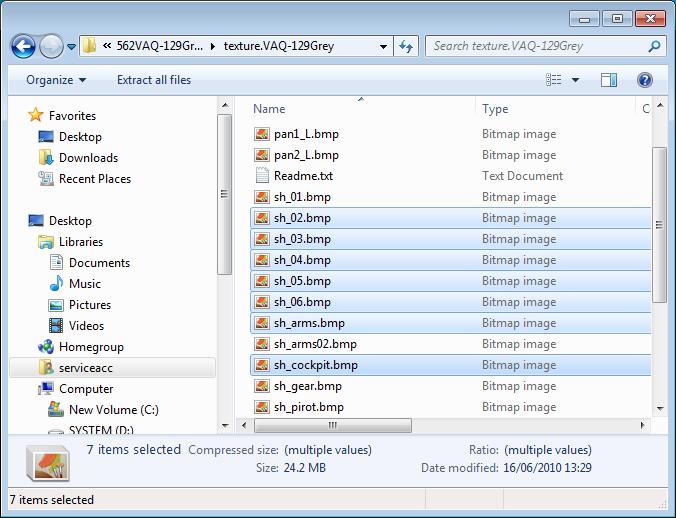
Open the highlighted textures in the shot below in DXTBmp one at a time.
Image

If the Alpha Channel displays as completely black you need to invert it. (Alpha > Invert Alpha)
The Alpha Channel should now be all white.

Finally save it in the original format. (File > Save As > Extended Bitmap)
Overwrite the original when prompted.

That should do it.

Note: I haven't had time to check if any other textures need tweaking. If you have any problems please let me know.
Image

Founder & Sole Member - Grumpy's Over the Hill Club for Veteran Virtual Aviators
Member of the Fox Four Group
My Google Photos albums
My Flickr albums
User avatar
Hagar
Colonel
Colonel
 
Posts: 30868
Joined: Wed Jun 19, 2002 7:15 am
Location: Costa Geriatrica

Re: Texture problems

Postby lancer24 » Mon Jan 12, 2015 1:24 am

Hi, I have downloaded the Dxtmp from the website you mentioned, installed it and opened each texture. I believe that I have done so correctly, inverted the alpha channels from black to white, and then overwrote the old ones then saved when prompted. But the aircraft still comes out silvery-white on top the fuselage and the tanks and pylons remain transparent :?
lancer24
Ground hog
Ground hog
 
Posts: 38
Joined: Sun Dec 28, 2014 6:06 pm

Re: Texture problems

Postby Hagar » Mon Jan 12, 2015 3:12 am

Did you exit FSX before editing the textures & restart it before trying them?

If so, the only thing I can suggest is that you've edited the wrong set of textures. It's very easy to become confused when doing this sort of thing, especially if you have several versions of the same aircraft. Make sure that you're working on the correct texture folder in the affected aircraft & that it's the one installed to FSX. Also that you're selecting the modified aircraft in FSX.
Image

Founder & Sole Member - Grumpy's Over the Hill Club for Veteran Virtual Aviators
Member of the Fox Four Group
My Google Photos albums
My Flickr albums
User avatar
Hagar
Colonel
Colonel
 
Posts: 30868
Joined: Wed Jun 19, 2002 7:15 am
Location: Costa Geriatrica

Re: Texture problems

Postby lancer24 » Tue Jan 13, 2015 3:17 pm

Hi, I am not sure I remember if I exited FSX before or after, but what I did was use Dxtmp to navigate to the bad livery 562VAQ-129Grey in FSX, then flipped the alphas of the textures you highlighted earlier from black to white, saved them (I think), exited, started FSX and the airplane seems to still have the silvery-white appearance. May I ask if in using Dxtmp that if there is a little lock in the left-hand corner of the textures that it means that I have done the procedure correctly (saved them)? If so, there are no little locks on the textures in the 562VAQ-129Grey file in FSX. Maybe some how the corrections made in Dxtmp did not carry over to FSX?
Attachments
capture1.JPG
textures saved in FSX?
capture1.JPG (106.95 KiB) Viewed 1456 times
Capture.JPG
little locks means saved in Dxtmp?
Capture.JPG (71.93 KiB) Viewed 1456 times
lancer24
Ground hog
Ground hog
 
Posts: 38
Joined: Sun Dec 28, 2014 6:06 pm

Re: Texture problems

Postby Hagar » Tue Jan 13, 2015 3:42 pm

I've not encountered those lock icons before. As you appear to have FSX installed to the default C:\Program Files location I'm wondering if they mean that the files are protected due to the security features of Win7 & 8. This could mean that they cannot be edited in that location.

The easiest way to find out is to open the files you edited once again in DXTBmp. If the Alpha Channel displays as black the changes weren't saved.

If this is the case I suggest moving the texture.VAQ-129Grey folder to a location outside the Program Files directory (for example your Desktop) before editing the texture files. When the edited files are saved successfully you can move it back again.

Which OS are you using? From your shots it looks like Win7.
Image

Founder & Sole Member - Grumpy's Over the Hill Club for Veteran Virtual Aviators
Member of the Fox Four Group
My Google Photos albums
My Flickr albums
User avatar
Hagar
Colonel
Colonel
 
Posts: 30868
Joined: Wed Jun 19, 2002 7:15 am
Location: Costa Geriatrica

Re: Texture problems

Postby niesenak » Tue Jan 13, 2015 7:42 pm

...have you tried turning off DX10 preview?

I had the same symptoms with about half my models the other day. DX10 preview was messing with them.
niesenak
Ground hog
Ground hog
 
Posts: 3
Joined: Sun Jan 11, 2015 8:30 pm

Re: Texture problems

Postby lancer24 » Wed Jan 14, 2015 3:20 am

Yes, I have FSX installed into C:\Programs (x86)-Microsoft games-Microsoft Flight Simulator X... I have Win 7 Home Ed 64-bit. Upon trying Dxtmp again to see if the textures were saved, I found that they are and with the alpha being white. Then I investigated your idea of Win 7 having a security feature in place that may of some how blocked the texture editing and I think that may be where the problem lies. I right clicked the texture file 562 VAQ-129Grey and then clicked properties then security. Under group or user names I had 3 groups...System, Richard (Richard-PC\Richard)-me, and Administrators (Richard-PC\Administrators) Two of the groups had all permissions but Richard-PC\Richard had only the read & execute and read permissions with check marks. I then edited it so it had all permissions, opened Dxtmp, tried the process again but the little locks still remained. I then went into FSX to see if the DX10 box was checked but it was not :?
lancer24
Ground hog
Ground hog
 
Posts: 38
Joined: Sun Dec 28, 2014 6:06 pm

Re: Texture problems

Postby Hagar » Wed Jan 14, 2015 5:35 am

lancer24 wrote:I have Win 7 Home Ed 64-bit.

The same as the machine I tested this on. I really don't understand why you're having problems.

Upon trying Dxtmp again to see if the textures were saved, I found that they are and with the alpha being white.

That appears to confirm that your changes were saved. Which format were they saved in? The originals are Extended 32-bit 888-8.

Then I investigated your idea of Win 7 having a security feature in place that may of some how blocked the texture editing and I think that may be where the problem lies. I right clicked the texture file 562 VAQ-129Grey and then clicked properties then security. Under group or user names I had 3 groups...System, Richard (Richard-PC\Richard)-me, and Administrators (Richard-PC\Administrators) Two of the groups had all permissions but Richard-PC\Richard had only the read & execute and read permissions with check marks. I then edited it so it had all permissions, opened Dxtmp, tried the process again but the little locks still remained.

I found this on the padlocked file icons. http://www.sevenforums.com/tutorials/320930-lock-icon-files-folders-remove-windows-7-a.html
I'm not sure it would cause your problems. The fact that your edited textures were saved seems to indicate not.

I then went into FSX to see if the DX10 box was checked but it was not

DX10 Preview would cause the textures on some older aircraft (originally created for FS9 like the EA-18G) not to display at all.
This should not affect the 3D model as in your shot EA-18 bad2.JPG.
Image

Founder & Sole Member - Grumpy's Over the Hill Club for Veteran Virtual Aviators
Member of the Fox Four Group
My Google Photos albums
My Flickr albums
User avatar
Hagar
Colonel
Colonel
 
Posts: 30868
Joined: Wed Jun 19, 2002 7:15 am
Location: Costa Geriatrica

Re: Texture problems

Postby lancer24 » Wed Jan 14, 2015 2:17 pm

Hi, I think I know where the problem may lie now. When you said which format the texture files were saved in I was a little confused. So I opened Dxtmp and searched through some of the menus it has to see what you meant. I found the 888-8 you had mentioned and then it struck me....looking under the file menu I remember using the save feature but NOT the Save As feature. I was not paying close attention to your instructions on using Dxtmp. I tested it out on one of the other textures in the 562 VAQ-129Grey file and when I saved it (as per your instructions) it DIDN'T have one of those little locks on it :) Sorry for all the fuss and trouble...if I would of paid closer attention to the instructions it would of been fixed. I guess I was rushing through it or something. So, may I ask would you suggest I delete the 562 VAQ-129Grey file out of the airplanes folder, and delete its entry in the aircrafts config file and start over...this time doing it right, :) or is there a way to somehow salvage it as it is now?
lancer24
Ground hog
Ground hog
 
Posts: 38
Joined: Sun Dec 28, 2014 6:06 pm

Re: Texture problems

Postby Hagar » Wed Jan 14, 2015 2:36 pm

I've just checked this out & I'm not sure using the DXTBmp "Save" option instead of "Save As" would affect anything.

So, may I ask would you suggest I delete the 562 VAQ-129Grey file out of the airplanes folder, and delete its entry in the aircrafts config file and start over...

This might be a good idea. May I suggest that you paste the extracted texture.VAQ-129Grey folder to your desktop before editing any textures.
When editing is complete & the changes are saved you can paste it into the EA-18G_Growler_V2 folder in FSX.

Please tell me if this fixed it.
Image

Founder & Sole Member - Grumpy's Over the Hill Club for Veteran Virtual Aviators
Member of the Fox Four Group
My Google Photos albums
My Flickr albums
User avatar
Hagar
Colonel
Colonel
 
Posts: 30868
Joined: Wed Jun 19, 2002 7:15 am
Location: Costa Geriatrica

Next

Return to Flight Simulator X (FSX) and Steam

Who is online

Users browsing this forum: No registered users and 813 guests