Stranded Ships and boats.

FSX including FSX Steam version.

Stranded Ships and boats.

Postby Sprocket » Wed Jan 07, 2015 8:41 am

Inspired by SAM HUNTER, I thought I'd put some ships and boats in the sim.

Some ships are on dry land--
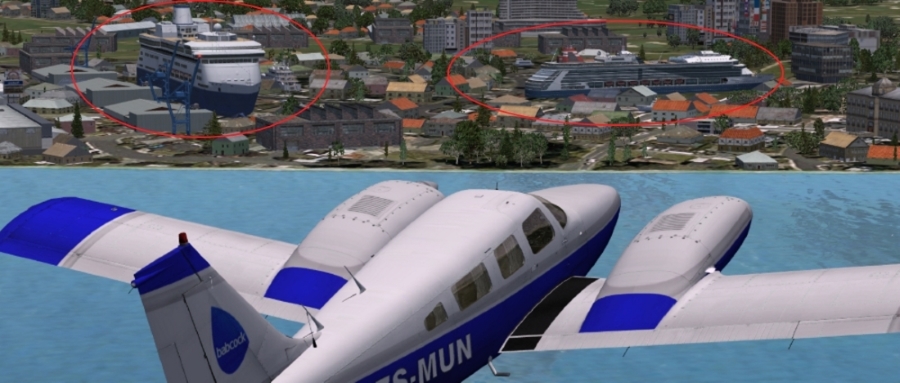
Image


The whole container dock is flooded--
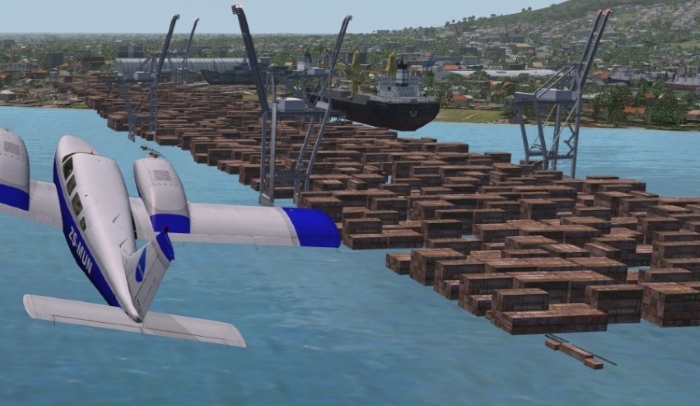
Image


I know it is not too serious, but can anything be done to correct these?
:?:

This is Cape town.

Jan
User avatar
Sprocket
1st Lieutenant
1st Lieutenant
 
Posts: 309
Joined: Wed Oct 30, 2013 12:10 pm

Re: Stranded Ships and boats.

Postby Jetranger » Wed Jan 07, 2015 10:02 am

Well, I think you need to call the Coast Guard, and have those ship Captains tested for drinking or something,,,,

my advice for what its worth and it ain't much !!!! :lol: :lol: :lol:
User avatar
Jetranger
Major
Major
 
Posts: 3232
Joined: Fri Sep 30, 2011 2:49 am
Location: Kansas City Missouri USA / KMKC

Re: Stranded Ships and boats.

Postby chops » Wed Jan 07, 2015 11:04 am

Nothing out of the ordinary.

Image
User avatar
chops
2nd Lieutenant
2nd Lieutenant
 
Posts: 142
Joined: Thu Jul 18, 2002 8:53 am

Re: Stranded Ships and boats.

Postby garymbuska » Wed Jan 07, 2015 11:39 am

The quickest way to get rid of them is to turn off the Ships and Ferries slider. Then they will not show up. I do not use any Ships or any ocean going vessels of any kind as I am here to fly not watch boats.

<<s
Gary M Buska
SYSTEM Specs ASUS P8Z68 V/GEN 3 mother board: INTELL I7 2600k 3.48 ghz Quad core CPU with Sandy bridge: 12 Gigs of 1800hz ram:
GTX 950 OVER CLOCKED: 2 Gigs Ram Windows 10 Home 64 bit Operating system. 750W Dedicated modular power supply. Two Internal 1TB hard drives 1 External 1TB 3.2 USB hard drive. SAITEK Cessna flight Yoke with throttles.
CH Rudder Peddles 27 inch Wide screen Monitor
User avatar
garymbuska
Major
Major
 
Posts: 4415
Joined: Tue Dec 30, 2003 11:10 am
Location: Jacksonville, Florida

Re: Stranded Ships and boats.

Postby Kl791 » Wed Jan 07, 2015 2:38 pm

Hi
The problem you have there is not related to AI ships - it is related to scenery versus land class - looking at the image you see both ships but also harbor cranes far from the water and from the precise placement of the ships it is not AI ships but static ships. And the containers out in the water has nothing to do with AI either... so the right thing to do is to check if the scenery you have installed from the area is compatible with the land class you use - eventually there could also be a file missing.
Best regards
Henrik
Kl791
Ground hog
Ground hog
 
Posts: 9
Joined: Sat Jan 03, 2015 5:22 am

Re: Stranded Ships and boats.

Postby zswobbie1 » Fri Jan 09, 2015 1:54 am

It could be some of your Cape Town Add-on scenery that you have put in. Try disabling then to see. I dont remember the names of the add-ons, but it could be Cape Town Harbours? (I do stand corrected) I did have similar things, also in the CT area.
BTW, you in Cape Town?
zswobbie1
1st Lieutenant
1st Lieutenant
 
Posts: 430
Joined: Fri Apr 23, 2010 3:29 am

Re: Stranded Ships and boats.

Postby Sprocket » Fri Jan 09, 2015 5:42 am

Kl791 wrote:Hi
The problem you have there is not related to AI ships - it is related to scenery versus land class - looking at the image you see both ships but also harbor cranes far from the water and from the precise placement of the ships it is not AI ships but static ships. And the containers out in the water has nothing to do with AI either... so the right thing to do is to check if the scenery you have installed from the area is compatible with the land class you use - eventually there could also be a file missing.
Best regards
Henrik


Hi Henrik,
Like I said, this is not a biggy really, more a point of interest.
My scenery is ORBX Global, together with "Africa Land class" by Scenery Tech (Paid purchase) .**

I quote from "Scenery Tech" FAQ:

"Q: Does landclass affect other scenery elements besides terrain (water bodies, roads, etc.)?
A: No, landclass does not alter "vector" scenery elements such as coastlines, roads, or parks. Elevation data will also be unaffected.
"

What I do not have are any "vector" programs.

** Let me rush to say that I am more than pleased with this combination. Add to this all the brilliant add-ons by the guys at Aeroworx -

http://aeroworxsa.blogspot.co.uk/ and I think South Africa has become for me one of the most realistic places to fly over. I will post some screenshots later.

Getting back to the boat issue....not serious, and to honest, I had the boats slider set to 50% -- just to see :D

Thanks for the interest..Jan

zswobbie1 wrote:It could be some of your Cape Town Add-on scenery that you have put in. Try disabling then to see. I dont remember the names of the add-ons, but it could be Cape Town Harbours? (I do stand corrected) I did have similar things, also in the CT area.<br abp="374">BTW, you in Cape Town?


Hi Robin,
No, not from Cape Town, originally from Jhb, but living in England now, near a town called Biggleswade, about 20 minutes away from the Old Warden airfield, (EGTH) where they house the famous Shuttleworth Collection.

http://en.wikipedia.org/wiki/Shuttleworth_Collection

Jan
User avatar
Sprocket
1st Lieutenant
1st Lieutenant
 
Posts: 309
Joined: Wed Oct 30, 2013 12:10 pm

Re: Stranded Ships and boats.

Postby zswobbie1 » Sat Jan 10, 2015 1:55 am

Hi Jan, pity you so far away. We have an Impala as well as a Shackleton simulator at our virtual club at Ysterplaat. Anyhow, I'm sure you know of the Addons from Triengtrieng? I think that's how it's spelt. I've combined theirs with Aeroworx & I just cannot remember how I sorted the ship issue.
zswobbie1
1st Lieutenant
1st Lieutenant
 
Posts: 430
Joined: Fri Apr 23, 2010 3:29 am


Return to Flight Simulator X (FSX) and Steam

Who is online

Users browsing this forum: No registered users and 548 guests
