aircraft adding problems

FSX including FSX Steam version.

aircraft adding problems

Postby Vjtto » Mon Jan 05, 2015 12:33 pm

hello, i wanted to add new aircrafts to my msx, i followed some tutorials and i think i've understood everything. there is just one problem, i haven't got the folder:"microsoft games"
anyone would help me? thank you
Vjtto

Vjtto
Ground hog
Ground hog
 
Posts: 31
Joined: Mon Jan 05, 2015 12:28 pm

Re: aircraft adding problems

Postby Hagar » Mon Jan 05, 2015 1:36 pm

If you have a 64-bit OS & your FSX is in the default location the Microsoft Games folder will be in the C:\Program Files (x86) directory.
Image

Founder & Sole Member - Grumpy's Over the Hill Club for Veteran Virtual Aviators
Member of the Fox Four Group
My Google Photos albums
My Flickr albums
User avatar
Hagar
Colonel
Colonel
 
Posts: 30868
Joined: Wed Jun 19, 2002 7:15 am
Location: Costa Geriatrica

Re: aircraft adding problems

Postby Vjtto » Mon Jan 05, 2015 2:09 pm

hi hagar, thank you for your help, i know where normaly the folder "microsoft games" will be but in "programs files (86x)" there isn't
Vjtto
Ground hog
Ground hog
 
Posts: 31
Joined: Mon Jan 05, 2015 12:28 pm

Re: aircraft adding problems

Postby Hagar » Mon Jan 05, 2015 3:02 pm

Make sure your Folder Options are set to 'Show Hidden Files & Folders'. http://windows.microsoft.com/en-gb/windows7/change-folder-options

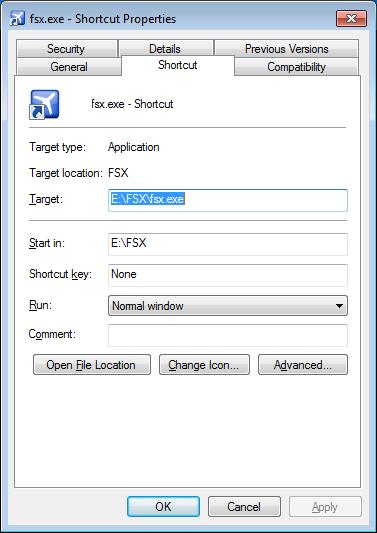
You could try this. Right-click on the FSX desktop shortcut & click Properties. (Note that my FSX is not in the default location.)
Image

Click the Open File Location button to open the FSX root directory folder in Windows Explorer.
Once you've located it you can create a Desktop shortcut to it for future convenience.
Image

Founder & Sole Member - Grumpy's Over the Hill Club for Veteran Virtual Aviators
Member of the Fox Four Group
My Google Photos albums
My Flickr albums
User avatar
Hagar
Colonel
Colonel
 
Posts: 30868
Joined: Wed Jun 19, 2002 7:15 am
Location: Costa Geriatrica

Re: aircraft adding problems

Postby Vjtto » Mon Jan 05, 2015 4:52 pm

yes, i have, but it doesn't appear yet :(
Vjtto
Ground hog
Ground hog
 
Posts: 31
Joined: Mon Jan 05, 2015 12:28 pm

Re: aircraft adding problems

Postby Vjtto » Mon Jan 05, 2015 4:59 pm

in my shortcut properties, there is not the same screen, maybe because it's in italian
Vjtto
Ground hog
Ground hog
 
Posts: 31
Joined: Mon Jan 05, 2015 12:28 pm

Re: aircraft adding problems

Postby Vjtto » Mon Jan 05, 2015 5:06 pm

ive got security, details, old versions, general, and web document, not the shortcut
Vjtto
Ground hog
Ground hog
 
Posts: 31
Joined: Mon Jan 05, 2015 12:28 pm

Re: aircraft adding problems

Postby Hagar » Mon Jan 05, 2015 5:08 pm

Which OS are you using?
Image

Founder & Sole Member - Grumpy's Over the Hill Club for Veteran Virtual Aviators
Member of the Fox Four Group
My Google Photos albums
My Flickr albums
User avatar
Hagar
Colonel
Colonel
 
Posts: 30868
Joined: Wed Jun 19, 2002 7:15 am
Location: Costa Geriatrica

Re: aircraft adding problems

Postby Vjtto » Mon Jan 05, 2015 5:44 pm

windows
Vjtto
Ground hog
Ground hog
 
Posts: 31
Joined: Mon Jan 05, 2015 12:28 pm

Re: aircraft adding problems

Postby Hagar » Mon Jan 05, 2015 5:46 pm

Vjtto wrote:windows

Yes but I mean WinXP, Vista, Win7 or Win8?
Image

Founder & Sole Member - Grumpy's Over the Hill Club for Veteran Virtual Aviators
Member of the Fox Four Group
My Google Photos albums
My Flickr albums
User avatar
Hagar
Colonel
Colonel
 
Posts: 30868
Joined: Wed Jun 19, 2002 7:15 am
Location: Costa Geriatrica

Re: aircraft adding problems

Postby Vjtto » Mon Jan 05, 2015 5:55 pm

7
Vjtto
Ground hog
Ground hog
 
Posts: 31
Joined: Mon Jan 05, 2015 12:28 pm

Re: aircraft adding problems

Postby Hagar » Mon Jan 05, 2015 6:05 pm

Click Start & type Flight Simulator in the Search box.
Image

Founder & Sole Member - Grumpy's Over the Hill Club for Veteran Virtual Aviators
Member of the Fox Four Group
My Google Photos albums
My Flickr albums
User avatar
Hagar
Colonel
Colonel
 
Posts: 30868
Joined: Wed Jun 19, 2002 7:15 am
Location: Costa Geriatrica

Re: aircraft adding problems

Postby Vjtto » Mon Jan 05, 2015 6:06 pm

ok now?
Vjtto
Ground hog
Ground hog
 
Posts: 31
Joined: Mon Jan 05, 2015 12:28 pm

Re: aircraft adding problems

Postby Hagar » Mon Jan 05, 2015 6:09 pm

Microsoft Flight Simulator X should be listed in the results. Click on it to open the folder.

I don't know if it will have the same name in the Italian version.
Last edited by Hagar on Mon Jan 05, 2015 6:15 pm, edited 1 time in total.
Image

Founder & Sole Member - Grumpy's Over the Hill Club for Veteran Virtual Aviators
Member of the Fox Four Group
My Google Photos albums
My Flickr albums
User avatar
Hagar
Colonel
Colonel
 
Posts: 30868
Joined: Wed Jun 19, 2002 7:15 am
Location: Costa Geriatrica

Re: aircraft adding problems

Postby Vjtto » Mon Jan 05, 2015 6:10 pm

there is the .exe (steam edition) , and the documents of the game (just a folder with some airport files)
I have to put the files there?
Vjtto
Ground hog
Ground hog
 
Posts: 31
Joined: Mon Jan 05, 2015 12:28 pm

Next

Return to Flight Simulator X (FSX) and Steam

Who is online

Users browsing this forum: No registered users and 534 guests