Do-335 Help Please

FSX including FSX Steam version.

Re: Do-335 Help Please

Postby jandjfrench » Sat Nov 08, 2014 12:13 pm

Hi Hagar,
I misunderstood. I was under the impression that the link to the final version you posted displayed the textures properly without modifications. I see what's happening now. I tried inverting the the alpha on a texture I was having problems with (vertical stabilizer) and it displayed correctly. I previously tried eliminating the alpha and also replacing it with a created black and still had transparent areas.
I'd appreciate getting your modified textures. No sense reinventing the wheel. I found that 17 or 18 of the textures have alpha channels and I'm assuming they all have to be modified. I tried to simply create an all black alpha and re-save for each texture file for one variation so I know it's a chore. And it didn't work anyway. I don't know how many textures you've modified but I'll accept whatever. I'm interested at taking a look at the gauges as well.
Rather than mailing the textures to me directly may I suggest uploading them to a hosting service and then jut sending me the link. That way if anyone else is intersted you could send them the link as well. I use Box.net which provides 10GB of free storage and I've never had a problem. As an example, here's a link to an image I created which I use when modifying cameras: https://app.box.com/s/ys7z93ybmvyovdek56t6
Thank you.
Jim F.

jandjfrench
2nd Lieutenant
2nd Lieutenant
 
Posts: 106
Joined: Fri Dec 31, 2010 10:13 pm
Location: Salinas, CA  USA

Re: Do-335 Help Please

Postby Hagar » Sat Nov 08, 2014 12:42 pm

Jim. Just to clarify this. An FS9 texture with a black Alpha Channel will be fully transparent in FSX. To make them visible you need to make the Alpha white.

I haven't got time to upload anything right now. I've only modified the textures shown in my shots so it might be easier for you to do this yourself. Then you can do the ones you want.
Only 4 textures in each variation need editing. These are

simTECH_Do335_01_N.bmp
simTECH_Do335_02_N.bmp
simTECH_Do335_03_N.bmp
simTECH_Do335_04_N.bmp

Tell me if you have problems.

PS. simTECH_Do335_05_N.bmp might need doing as well.
Image

Founder & Sole Member - Grumpy's Over the Hill Club for Veteran Virtual Aviators
Member of the Fox Four Group
My Google Photos albums
My Flickr albums
User avatar
Hagar
Colonel
Colonel
 
Posts: 30868
Joined: Wed Jun 19, 2002 7:15 am
Location: Costa Geriatrica

Re: Do-335 Help Please

Postby jandjfrench » Sat Nov 08, 2014 12:59 pm

Hi,

It seemed like a batch file would come in handy here. I checked the SDK and discovered a "-invert" switch which inverts the alpha channel. I already had a batch file for converting the BMPs to DDSs so I simply added the switch, saved the new BAT along with Imagetool.exe to the first texture folder and ran the BAT. Worked like a charm. Well, pretty much. All textures look perfect but the gun sight is a negative of what it should be. I had a black area at the bottom of the screen and had to edit the Panel.cfg so that in Window00 'render_3d_window=0'. No gauges or wanings.
Here's the .bat contents:

@echo on
imagetool -batch -nogui -nomip -dxt3 -dds -invert -nodither -r *.bmp
del *.bmp


IF I can figure out how to post images here I will but don't have time to investigate now.
Jim F.
jandjfrench
2nd Lieutenant
2nd Lieutenant
 
Posts: 106
Joined: Fri Dec 31, 2010 10:13 pm
Location: Salinas, CA  USA

Re: Do-335 Help Please

Postby Hagar » Sat Nov 08, 2014 1:06 pm

jandjfrench wrote:Hi,

It seemed like a batch file would come in handy here. I checked the SDK and discovered a "-invert" switch which inverts the alpha channel. I already had a batch file for converting the BMPs to DDSs so I simply added the switch, saved the new BAT along with Imagetool.exe to the first texture folder and ran the BAT. Worked like a charm. Well, pretty much. All textures look perfect but the gun sight is a negative of what it should be. I had a black area at the bottom of the screen and had to edit the Panel.cfg so that in Window00 'render_3d_window=0'. No gauges or wanings.
Here's the .bat contents:

@echo on
imagetool -batch -nogui -nomip -dxt3 -dds -invert -nodither -r *.bmp
del *.bmp


IF I can figure out how to post images here I will but don't have time to investigate now.
Jim F.

Using a batch file is fine providing you edit the necessary textures only. Most of them don't need it. Inverting the Alpha on the gunsight_Do335.bmp texture will make it display negative as you describe.
Image

Founder & Sole Member - Grumpy's Over the Hill Club for Veteran Virtual Aviators
Member of the Fox Four Group
My Google Photos albums
My Flickr albums
User avatar
Hagar
Colonel
Colonel
 
Posts: 30868
Joined: Wed Jun 19, 2002 7:15 am
Location: Costa Geriatrica

Re: Do-335 Help Please

Postby jandjfrench » Sat Nov 08, 2014 1:26 pm

Hi,
That was the only problem I noticed. There well may be other problems. I was just trying to share preliminary results. Using the batch file only takes about 30 seconds total to not only fix the alpha problems but convert all the files to the more efficient DDS. Having to restore an original texture or so doesn't seem to be much of a problem considering.
Jim F.
jandjfrench
2nd Lieutenant
2nd Lieutenant
 
Posts: 106
Joined: Fri Dec 31, 2010 10:13 pm
Location: Salinas, CA  USA

Re: Do-335 Help Please

Postby Hagar » Sat Nov 08, 2014 1:29 pm

Keep me informed of progress. I doubt the gunsight is the only one. What about the prop textures?

I suspect you might find that doing this manually will be quicker in the long run. The textures I listed earlier are the only ones I found that need editing.
Image

Founder & Sole Member - Grumpy's Over the Hill Club for Veteran Virtual Aviators
Member of the Fox Four Group
My Google Photos albums
My Flickr albums
User avatar
Hagar
Colonel
Colonel
 
Posts: 30868
Joined: Wed Jun 19, 2002 7:15 am
Location: Costa Geriatrica

Re: Do-335 Help Please

Postby jandjfrench » Sat Nov 08, 2014 2:26 pm

Hi,
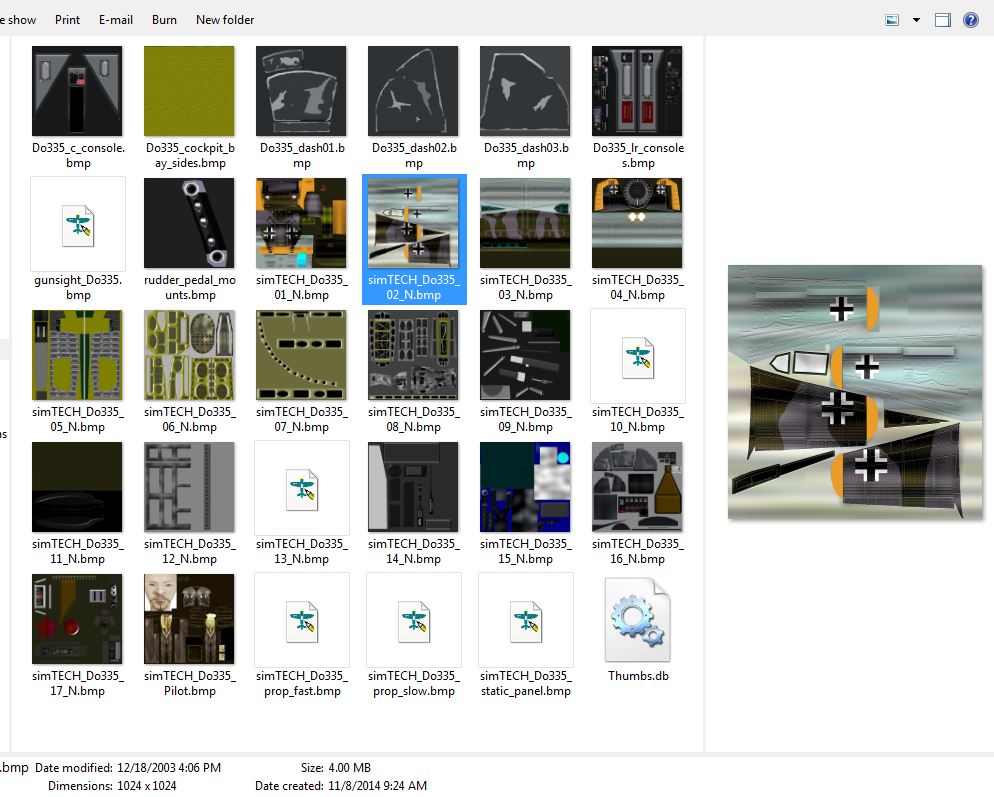
There was a problem with the prop textures also. I generally try to almost eliminate the strobing effect anyway, as it's an artifact of recording and not something the eye sees in reality, so I mess with these textures anyway. This seems rather serendipitous but I have my BMPs associated with DXTBmp and when I view the files in the folder as "Large icons" the ones that don't show an image but simply the DXTBmp icon seem to be the ones that have problems. So it looks like at this point, backing up the Texture folder, running the BAT with Imagetool in the folder and then copying the original files that have the DXTBmp icon displayed to the folder and deleting the related DDSs seems simple enough. Of course, I still have to mess with the prop textures. I'm not saying that this is final and there aren't other drawbacks but it seems pretty quick. Longer to write about then actually do.
I guess I'll look into the gauges now. Hopefully the FSX version of the aircraft has corrected some of the problem. The plane handles well and sounds great but unless I can find some way to start it from cold and dark without resorting to Ctrl+E , the 2D panel or a popup I'll probably delete it.
Jim F.
jandjfrench
2nd Lieutenant
2nd Lieutenant
 
Posts: 106
Joined: Fri Dec 31, 2010 10:13 pm
Location: Salinas, CA  USA

Re: Do-335 Help Please

Postby jandjfrench » Sat Nov 08, 2014 2:39 pm

Hi,

This is mainly an image test but shows the files referenced in my previous post.

Image

Jim F.
jandjfrench
2nd Lieutenant
2nd Lieutenant
 
Posts: 106
Joined: Fri Dec 31, 2010 10:13 pm
Location: Salinas, CA  USA

Re: Do-335 Help Please

Postby Hagar » Sat Nov 08, 2014 8:31 pm

jandjfrench wrote:Hi,

This is mainly an image test but shows the files referenced in my previous post.

https://www.simviation.com/phpupload/upl ... 490831.jpg

Jim F.

Well your test worked. My BMP files are associated with the default Windows Picture Viewer & they display just like the ones in your shot. The files that display with just the icon are in a different format to the others. DXT as opposed to extended 32-bit 888.
Image

Founder & Sole Member - Grumpy's Over the Hill Club for Veteran Virtual Aviators
Member of the Fox Four Group
My Google Photos albums
My Flickr albums
User avatar
Hagar
Colonel
Colonel
 
Posts: 30868
Joined: Wed Jun 19, 2002 7:15 am
Location: Costa Geriatrica

Re: Do-335 Help Please

Postby jandjfrench » Sat Nov 08, 2014 9:20 pm

Hi,
Things are coming along pretty good. I went back to the original Panel and the VC gauges are clearer. There are only a few FS98 gauges and they are all on pop up windows. I've deleted the Ammo counter in the VC and in its place I've added the Master battery, Autopilot, and Engine control gauges from one of the pop up windows. I still need Flap and Gear indicators in the VC and intend to replace both Fuel pressure gauges with these. I've never known what to do with fuel pressure gauges. It seems like the one remaining problem that I should address involves the Radio compass. The ADF is on a pop up and I'm not sure I even want to fix this. I seldom use the ADF anyway. After eliminating panel problems I'll probably upload the aircraft to BOX with several modified textures and post the link in hopes that this will meet some of Bob's needs. I always modify panels to suit my needs and realize that others might not feel similarly. I always have APChart as Panel 1 and a GPS as Panel 3.
Jim F.
jandjfrench
2nd Lieutenant
2nd Lieutenant
 
Posts: 106
Joined: Fri Dec 31, 2010 10:13 pm
Location: Salinas, CA  USA

Re: Do-335 Help Please

Postby BobF » Sat Nov 08, 2014 10:18 pm

Hi Jim. Sounds great. I already have made a 1°,15°,25°, 45° flap gauge, included a throttle gauge and gear indicators to replace the FS98 ones in the 2d panel. I really do appreciate your help. Bob.
BobF
2nd Lieutenant
2nd Lieutenant
 
Posts: 91
Joined: Thu May 26, 2005 10:20 pm
Location: So. CA.

Re: Do-335 Help Please

Postby jandjfrench » Sun Nov 09, 2014 5:25 am

Hi,
The project so far:

https://app.box.com/s/gj1vrm0sic35fd3wzqqz

This only includes the first 5 textures. I discovered that the autopilot doesn't work when started from cold and dark unless Ctrl+E is used. Probably needs an avionics switch. Couldn't find a round flap gauge that matched the values in the aircraft.cfg so I edited the cfg to match the gauge! I couldn't open the bomb bay doors unless I used the controls on the pop up. The cowl flaps work but there's no gauge to check how much open. I included a text file with some control references from the docs that I've been using as a guide. I'm open to any suggestions for changes, but I think things are coming along pretty good to this point.

Jim F.
jandjfrench
2nd Lieutenant
2nd Lieutenant
 
Posts: 106
Joined: Fri Dec 31, 2010 10:13 pm
Location: Salinas, CA  USA

Re: Do-335 Help Please

Postby Hagar » Sun Nov 09, 2014 6:22 am

Jim. Just tried your project. It works fine so far. The DDS textures seem to load a lot quicker. Well done!

Here's a suggestion for future variations, if you intend doing them of course. Now you've done most of the hard work it might save you some time. The majority of the textures are common. These are all contained in the folder named Texture which can be used as a master. For all new variations all you need to do is convert the 4 main textures I listed in a previous reply. Delete all the others from the folders & add a Texture.cfg as used in the default aircraft pointing to the master Texture folder of the aircraft. This is the one I used, copied from the default Beech Baron.

[fltsim]

fallback.1=..\texture
fallback.2=..\..\..\..\Scenery\Global\texture
fallback.3=..\..\..\..\..\..\Scenery\Global\texture

This method will also reduce the file size of the package.

I think this illustrates the amount of work required to update an FS9 aircraft for use in FSX. It's not a simple case of adding thumbnails to the Texture folders.
Image

Founder & Sole Member - Grumpy's Over the Hill Club for Veteran Virtual Aviators
Member of the Fox Four Group
My Google Photos albums
My Flickr albums
User avatar
Hagar
Colonel
Colonel
 
Posts: 30868
Joined: Wed Jun 19, 2002 7:15 am
Location: Costa Geriatrica

Re: Do-335 Help Please

Postby jandjfrench » Sun Nov 09, 2014 1:52 pm

Hi Hagar,

I hadn't verified that only those 4 textures were unique. I see you're right. I was thinking about the default Cub with the yellow cockpit displayed in the other variations and wasn't sure something similar wasn't the case here. I'm familiar with the terrain.cfg and use it regularly. A few weeks ago a I was modifying an FS9 LIC Bellanca Scout that was in 4 separate SimObject folders; an individual folder for the regular, float, ski, and tundra tire versions. Each version had multiple textures. I added a terrain.cfg to each of the texture folders and kept only the unique files in each. The common files were only in "Texture". In each configuration, the common files were the same, so I tried to come up with a way to further eliminate duplicate files but it became too much of a headache so I gave up. In the generic terrain.cfg file contents you posted I have no idea what situation fallback.3 refers to. I think it's there to handle some folder arrangement but don't know which. I leave it in anyway.
I wasn't planning on modifying the additional textures any time soon but you've piqued my interest. I'm not exactly sure what I'm going to do but It's going to be something like deleting all but the unique textures in each texture folder, adding the terrain.cfg and then running my batch file in the folder. Quick and dirty, just the way I like it. I went overboard on reducing the prop strobing effect so I'm going to have to fix that first. I use Autothumbnail so the thumbnails can be added after all else is done.
The main problems remaining that I see are adding an Avionics switch somewhere in the VC and adding some reference and checklist info for the kneeboard. I like to document the animations and how they're activated. There's not a lot of consistency. In this case I can't figure out how to open the bomb bay doors without using the pop up panel. If you know of any way to identify specific animations and what the related control is please let me know.

Jim F.
jandjfrench
2nd Lieutenant
2nd Lieutenant
 
Posts: 106
Joined: Fri Dec 31, 2010 10:13 pm
Location: Salinas, CA  USA

Re: Do-335 Help Please

Postby Hagar » Sun Nov 09, 2014 2:31 pm

Hi Jim. I was wrong about those common textures, sorry. There are at least two more that are unique. I tried your batch file & it works well.

The bomb bay doors will open with the spoiler key. I discovered this by trial & error.
Image

Founder & Sole Member - Grumpy's Over the Hill Club for Veteran Virtual Aviators
Member of the Fox Four Group
My Google Photos albums
My Flickr albums
User avatar
Hagar
Colonel
Colonel
 
Posts: 30868
Joined: Wed Jun 19, 2002 7:15 am
Location: Costa Geriatrica

PreviousNext

Return to Flight Simulator X (FSX) and Steam

Who is online

Users browsing this forum: No registered users and 883 guests