777 Black panel

FSX including FSX Steam version.

777 Black panel

Postby shj92922 » Thu Oct 02, 2014 7:06 am

i had downloaded emirates 777/ singapore 777 and new zealand 777
but the panel all in black
i tried to fix it through googling but nothing help
could someone help me

shj92922
Ground hog
Ground hog
 
Posts: 36
Joined: Thu Oct 02, 2014 7:03 am

Re: 777 Black panel

Postby garymbuska » Thu Oct 02, 2014 7:48 am

shj92922 wrote:i had downloaded emirates 777/ singapore 777 and new zealand 777
but the panel all in black
i tried to fix it through googling but nothing help
could someone help me


If you see a actual panel but no gauges than the odds are the gauges have not been placed in the proper place.
If you are not seeing anything at all than the problem is inside of the panel folder
If you open up the folder of the aircraft than open the panel folder you will probably see a line like this Alias=B737-400
And if you have removed that aircraft than you will see a blank panel
That is the biggest problem with freeware aircraft most of them do not come with a panel but depend upon a default panel instead.
I down loaded a B747 the other day and the panel it used was the B737-400 Panel so you now have a panel of a two engine aircraft but the plane has four engines. I absolutely hate this and will trash the aircraft faster than you can say jump.

<<v
Gary M Buska
SYSTEM Specs ASUS P8Z68 V/GEN 3 mother board: INTELL I7 2600k 3.48 ghz Quad core CPU with Sandy bridge: 12 Gigs of 1800hz ram:
GTX 950 OVER CLOCKED: 2 Gigs Ram Windows 10 Home 64 bit Operating system. 750W Dedicated modular power supply. Two Internal 1TB hard drives 1 External 1TB 3.2 USB hard drive. SAITEK Cessna flight Yoke with throttles.
CH Rudder Peddles 27 inch Wide screen Monitor
User avatar
garymbuska
Major
Major
 
Posts: 4415
Joined: Tue Dec 30, 2003 11:10 am
Location: Jacksonville, Florida

Re: 777 Black panel

Postby Modlerbob » Thu Oct 02, 2014 7:50 am

First thing to check is whether the gauges have been inserted in the main gauges directory.

User avatar
Modlerbob
2nd Lieutenant
2nd Lieutenant
 
Posts: 288
Joined: Tue May 27, 2014 12:06 am
Location: Central Florida

Re: 777 Black panel

Postby shj92922 » Thu Oct 02, 2014 8:01 am

the problem is this
Image
shj92922
Ground hog
Ground hog
 
Posts: 36
Joined: Thu Oct 02, 2014 7:03 am

Re: 777 Black panel

Postby pete » Thu Oct 02, 2014 9:44 am

No gauges -- what aircraft is it? (page where it is located)

There are 100's 777's

First thing to check is whether the gauges have been inserted in the main gauges directory.


--- or the panel folder of the aircraft ...
Simplicity is the ultimate sophistication. – Leonardo da Vinci
User avatar
pete
Administrator
Administrator
 
Posts: 10243
Joined: Mon Jan 01, 2001 2:01 am
Location: Cloud Cuckoo Land

Re: 777 Black panel

Postby shj92922 » Thu Oct 02, 2014 9:57 am

http://simviation.com/1/download?file=a ... leId=47148
that it

Boeing 777-200ER Air New Zealand Package (Category: FSX > Civil Jets)
shj92922
Ground hog
Ground hog
 
Posts: 36
Joined: Thu Oct 02, 2014 7:03 am

Re: 777 Black panel

Postby pete » Thu Oct 02, 2014 10:43 am

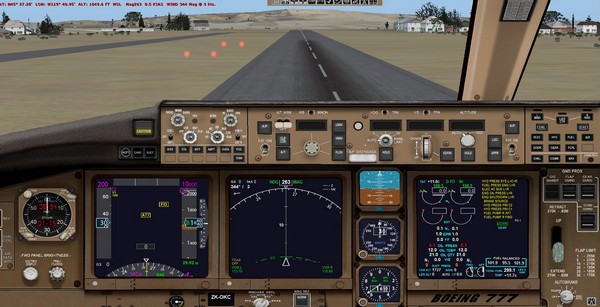
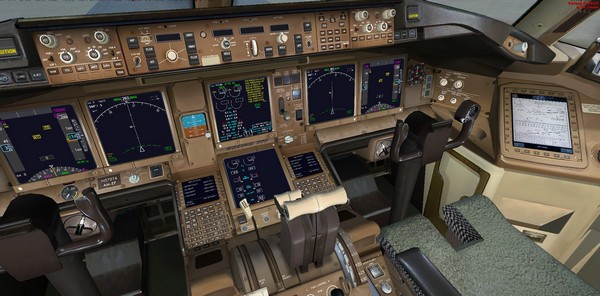
Your image is not the aircraft you have mentioned -- see difference

Here is the aircraft you mentioned and photos:

http://simviation.com/1/search?submit=1 ... p&x=15&y=8

OK all the gauges seem to be in the panel folder so you shouldn't have a problem.

Here is the same aircraft for me straight out of the box:

Image


Image


You are referring to another aircraft in FSX -- and not this one. Your image is not this 777!

If you open up the folder of the aircraft than open the panel folder you will probably see a line like this Alias=B737-400


You're thinking of other sites ;) I really try to avoid such gross errors at simviation. I generally check out files from new uploaders or uploaders who regularly make mistakes -- & fix them before approval. SIMVIATION HAS VERY HIGH STANDARDS 8-)
Simplicity is the ultimate sophistication. – Leonardo da Vinci
User avatar
pete
Administrator
Administrator
 
Posts: 10243
Joined: Mon Jan 01, 2001 2:01 am
Location: Cloud Cuckoo Land

Re: 777 Black panel

Postby shj92922 » Fri Oct 03, 2014 1:27 am

Image
this is mine man
this is the plane file
FSX/P3D Boeing 777-300ER Air New Zealand 'The Hobbit' Package (Category: FSX > Civil Jets)
http://simviation.com/1/download?file=a ... leId=47290
shj92922
Ground hog
Ground hog
 
Posts: 36
Joined: Thu Oct 02, 2014 7:03 am

Re: 777 Black panel

Postby pete » Fri Oct 03, 2014 3:11 am

1. You have now said 3 different aircraft
2. The Hobbit 777 is exactly the same as the one I tested above -- all gauges present in the panel folder. It has exactly the same panel - works fine.
Simplicity is the ultimate sophistication. – Leonardo da Vinci
User avatar
pete
Administrator
Administrator
 
Posts: 10243
Joined: Mon Jan 01, 2001 2:01 am
Location: Cloud Cuckoo Land

Re: 777 Black panel

Postby shj92922 » Fri Oct 03, 2014 4:59 am

but i have problem man
i downloaded more than 4 777 and all have a problem i think must do something
great if you can help me
shj92922
Ground hog
Ground hog
 
Posts: 36
Joined: Thu Oct 02, 2014 7:03 am

Re: 777 Black panel

Postby Hagar » Fri Oct 03, 2014 5:01 am

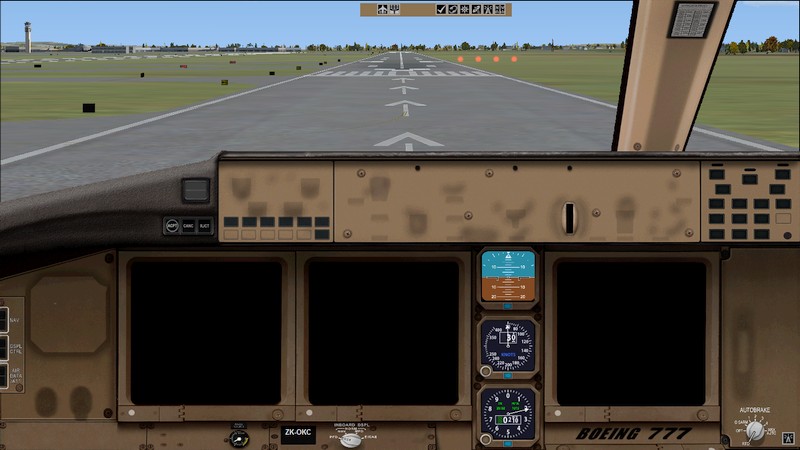
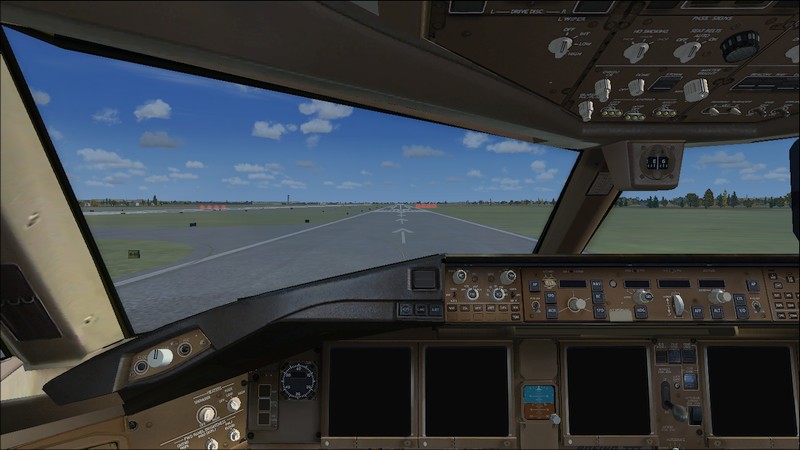
Hang on a moment! Something odd here. It might depend on your system or which version of FSX you have.

I just tried the Air NZ 777-200 in FSX Deluxe RTM (No Service Packs) on my Win7 laptop with the same result as shj92922.
Image

Image

It works fine in FSX Gold + Acceleration on my WinXP machine. I'll investigate further when I have more time.
Image

Founder & Sole Member - Grumpy's Over the Hill Club for Veteran Virtual Aviators
Member of the Fox Four Group
My Google Photos albums
My Flickr albums
User avatar
Hagar
Colonel
Colonel
 
Posts: 30868
Joined: Wed Jun 19, 2002 7:15 am
Location: Costa Geriatrica

Re: 777 Black panel

Postby Hagar » Fri Oct 03, 2014 2:22 pm

shj92922. It would help to know which version of FSX you're using. Have you installed either SP2 or Acceleration?
Image

Founder & Sole Member - Grumpy's Over the Hill Club for Veteran Virtual Aviators
Member of the Fox Four Group
My Google Photos albums
My Flickr albums
User avatar
Hagar
Colonel
Colonel
 
Posts: 30868
Joined: Wed Jun 19, 2002 7:15 am
Location: Costa Geriatrica

Re: 777 Black panel

Postby shj92922 » Fri Oct 03, 2014 4:11 pm

FSX gold edition
this is what you want to know
i got Windows 7 64bit
shj92922
Ground hog
Ground hog
 
Posts: 36
Joined: Thu Oct 02, 2014 7:03 am

Re: 777 Black panel

Postby Hagar » Fri Oct 03, 2014 4:15 pm

shj92922 wrote:FSX gold edition
this is what you want to know
i got Windows 7 64bit

Did you install Acceleration?
Image

Founder & Sole Member - Grumpy's Over the Hill Club for Veteran Virtual Aviators
Member of the Fox Four Group
My Google Photos albums
My Flickr albums
User avatar
Hagar
Colonel
Colonel
 
Posts: 30868
Joined: Wed Jun 19, 2002 7:15 am
Location: Costa Geriatrica

Re: 777 Black panel

Postby kurmark » Fri Oct 03, 2014 7:38 pm

http://simviation.com/1/search?submit=1 ... ip&x=7&y=6


try this... rhe dll file into fsx_main


best regards

kurmark
kurmark
Ground hog
Ground hog
 
Posts: 5
Joined: Mon Aug 11, 2014 5:31 pm

Next

Return to Flight Simulator X (FSX) and Steam

Who is online

Users browsing this forum: No registered users and 926 guests