Downloaded Embraer 135 Delta Con. no gauges

FSX including FSX Steam version.

Re: Downloaded Embraer 135 Delta Con. no gauges

Postby whizard » Tue Aug 12, 2014 1:15 am

kurmark wrote:Ihad the thame prob in FSX Gold
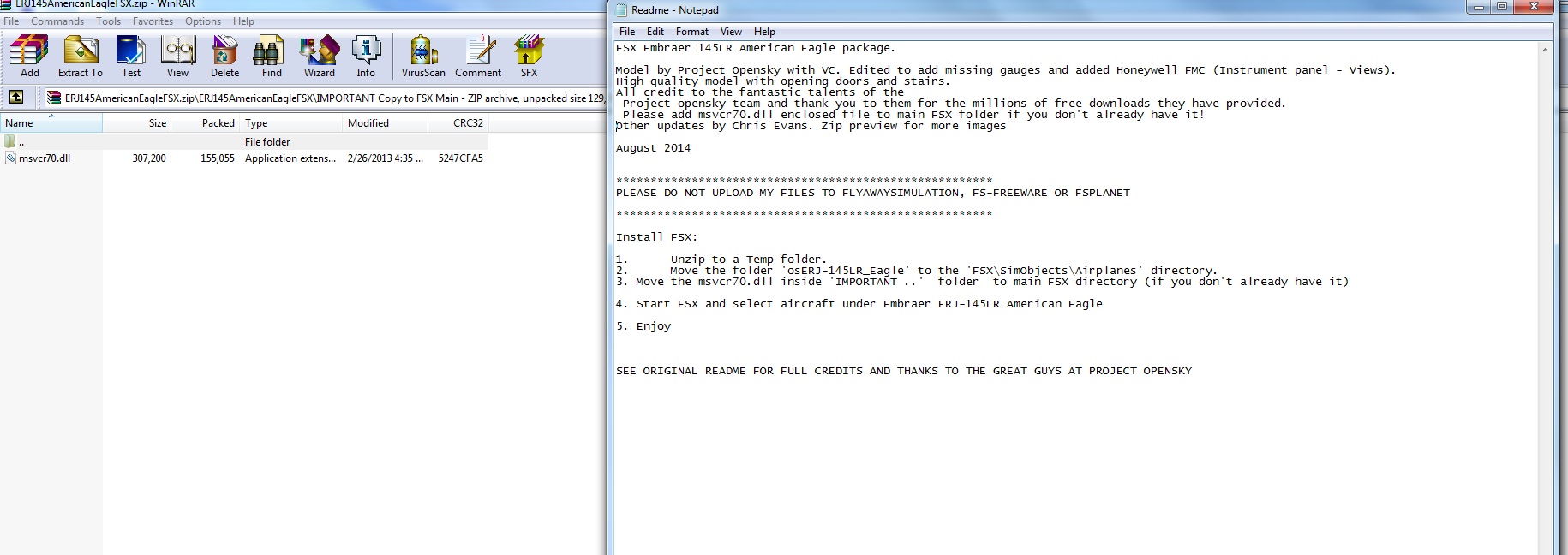
take the "msvcr70.dll" from fs9 main into the FSX main folder or load the dll down from everywehre

and gauges are shown - they are compiled from c to xml


best regards kurmark


Thanks - that solved it. Its working now. Its the missing "msvcr70.dll" from fs9 that's the problem...dropped it into FSX main folder and all works fine.

:D
whizard
Ground hog
Ground hog
 
Posts: 7
Joined: Mon Aug 11, 2014 6:14 am

Re: Downloaded Embraer 135 Delta Con. no gauges

Postby pete » Tue Aug 12, 2014 1:57 am

Thanks Kumark

Patch posted and something learned! O0


http://simviation.com/1/search?submit=1 ... ip&x=7&y=6
Simplicity is the ultimate sophistication. – Leonardo da Vinci
User avatar
pete
Administrator
Administrator
 
Posts: 10243
Joined: Mon Jan 01, 2001 2:01 am
Location: Cloud Cuckoo Land

Re: Downloaded Embraer 135 Delta Con. no gauges

Postby Modlerbob » Tue Aug 12, 2014 5:35 am

Thanks for the fix! I am thinking that the reason why some of my other downloaded planes don't have instruments may be due to a similar problem. This is the first version of FS that I have owned since 2002. I never had FS9 so I don't have those files.
User avatar
Modlerbob
2nd Lieutenant
2nd Lieutenant
 
Posts: 288
Joined: Tue May 27, 2014 12:06 am
Location: Central Florida

Re: Downloaded Embraer 135 Delta Con. no gauges

Postby Victory103 » Tue Aug 12, 2014 11:53 am

Thanks whizard also for the fix of adding the .xml style stock FSX Gold LJ45 gauges, more crisp in the VC. I guess I can re-download the -145 now.

For this and Lear flyers, another author made some improvements to the stock LJ .xml gauges, search "Barthel".
Victory103
2nd Lieutenant
2nd Lieutenant
 
Posts: 124
Joined: Thu Jul 11, 2002 7:03 pm
Location: TX, USA

Re: Downloaded Embraer 135 Delta Con. no gauges

Postby Hawkeye07 » Tue Aug 12, 2014 4:05 pm

Kumark's cure solved my dilemma too. Thanks Kumark, Much appreciated! Now does anyone know how to solve the skidding nose wheel. Unless you creep along at a snails pace the nose wheel skids/slides every time you try to make a turn. Anyone have a cure?


Hawkeye
Image

An Aircraft Mechanic only needs two tools, Duct Tape and WD40.
If it moves and it's not supposed to - use the Duct Tape.
If it doesn't move and it's supposed to - use the WD40.

Intel(R) i5 CPU 750 @ 2.67GHz, P55M-UD4, GeForce GTX960 8.00 GB RAM, Windows 7 Ultimate (32 bit & 64 bit on separate HDs)
User avatar
Hawkeye07
Major
Major
 
Posts: 1275
Joined: Sun Dec 02, 2012 7:10 pm
Location: Landlocked in the Midwest USA at KAXN

Re: Downloaded Embraer 135 Delta Con. no gauges

Postby Victory103 » Thu Aug 14, 2014 8:03 am

Spoke too soon, just replacing all the FS9 Lear gauges with .xml FSX gauges without adjusting the size/position left me with an unworkable VC, got to fix the 2D as well but I never use it .

Noticed the nose wheel as well, we know the tire friction settings in FS are way off, but I'm not sure how to fix that.
Victory103
2nd Lieutenant
2nd Lieutenant
 
Posts: 124
Joined: Thu Jul 11, 2002 7:03 pm
Location: TX, USA

Re: Downloaded Embraer 135 Delta Con. no gauges

Postby Hawkeye07 » Thu Aug 14, 2014 11:06 am

Victory103 wrote:Spoke too soon, just replacing all the FS9 Lear gauges with .xml FSX gauges without adjusting the size/position left me with an unworkable VC, got to fix the 2D as well but I never use it .

Noticed the nose wheel as well, we know the tire friction settings in FS are way off, but I'm not sure how to fix that.


Kumark's fix really solved the instrument problem so I ditched my .xml conversion effort.

I'm surprised no one else has mentioned the skidding nose wheel but you and I. We can't be the only ones with the problem. Hmmm? :think:


Hawkeye
Image

An Aircraft Mechanic only needs two tools, Duct Tape and WD40.
If it moves and it's not supposed to - use the Duct Tape.
If it doesn't move and it's supposed to - use the WD40.

Intel(R) i5 CPU 750 @ 2.67GHz, P55M-UD4, GeForce GTX960 8.00 GB RAM, Windows 7 Ultimate (32 bit & 64 bit on separate HDs)
User avatar
Hawkeye07
Major
Major
 
Posts: 1275
Joined: Sun Dec 02, 2012 7:10 pm
Location: Landlocked in the Midwest USA at KAXN

Re: Downloaded Embraer 135 Delta Con. no gauges

Postby Modlerbob » Thu Aug 14, 2014 12:14 pm

I noticed that this and several other jets were hard to turn even at very slow speeds on the ground without using the brakes. Not being an expert I just assumed it was a normal condition. I have also noticed on some jets like the Dassault Falcon 2000 when checking the fuel and cargo load that the center of mass is way forward and I couldn't adjust it aft.
User avatar
Modlerbob
2nd Lieutenant
2nd Lieutenant
 
Posts: 288
Joined: Tue May 27, 2014 12:06 am
Location: Central Florida

Re: Downloaded Embraer 135 Delta Con. no gauges

Postby kurmark » Thu Aug 14, 2014 6:28 pm

I read this ....
some of the Posky models need a gauge/gauges to control things like wing flex and gear animations.


[VCockpit03]
size_mm=512,512
pixel_size=512,512
texture=$Posky_ACU
background_color=0,0,0
gauge00=Posky744!PkyCALC, 140,80,140,80
gauge01=Posky744!PkyNosegearheight, 140,80,140,80
gauge02=Posky744!PkyBodygearheight, 140,80,140,80
gauge03=Posky744!PkyWinggearheight, 140,80,140,80
gauge04=Posky744!PkyLeftgearboggie, 140,80,140,80
gauge05=Posky744!PkyRightgearboggie, 140,80,140,80
gauge06=Posky744!PkyLeftwgearboggie, 140,80,140,80
gauge07=Posky744!PkyRightwgearboggie, 140,80,140,80

gauge08=Posky744!PkyNosegearsteerling, 140,80,140,80

gauge09=Posky744!PkyWINGROOTFLEX, 140,80,140,80
gauge10=Posky744!PkyRWINGMIDFLEX, 140,80,140,80
gauge11=Posky744!PkyRWINGTIPFLEX, 140,80,140,80
gauge12=Posky744!PkyLWINGMIDFLEX, 140,80,140,80
gauge13=Posky744!PkyLWINGTIPFLEX, 140,80,140,80
gauge14=Posky744!PkyRudder, 140,80,140,80

and have no idea where we can downl this gauges :doh:

best regards kurmark
kurmark
Ground hog
Ground hog
 
Posts: 5
Joined: Mon Aug 11, 2014 5:31 pm

Re: Downloaded Embraer 135 Delta Con. no gauges

Postby Hagar » Fri Aug 15, 2014 3:05 am

The Posky744 gauge is included with many Posky aircraft packages. Try the first file on this page (CF6-80 SP3A). http://poskyarchive.com/category/boeing/b747-400/

I don't know if this will fix the steering problem on the 135.
Image

Founder & Sole Member - Grumpy's Over the Hill Club for Veteran Virtual Aviators
Member of the Fox Four Group
My Google Photos albums
My Flickr albums
User avatar
Hagar
Colonel
Colonel
 
Posts: 30868
Joined: Wed Jun 19, 2002 7:15 am
Location: Costa Geriatrica

Re: Downloaded Embraer 135 Delta Con. no gauges

Postby Hawkeye07 » Sun Aug 17, 2014 6:04 pm

Hagar wrote:The Posky744 gauge is included with many Posky aircraft packages. Try the first file on this page (CF6-80 SP3A). http://poskyarchive.com/category/boeing/b747-400/

I don't know if this will fix the steering problem on the 135.


It didn't seem to have any effect but then I could be doing something wrong here. I installed the Posky744 folder in the panel folder
and added "gauge04=Posky744!PkyNosegearsteerling, 140,80,140,80" to the [Vcockpit03]. What did I do wrong Hagar?


Hawkeye
Image

An Aircraft Mechanic only needs two tools, Duct Tape and WD40.
If it moves and it's not supposed to - use the Duct Tape.
If it doesn't move and it's supposed to - use the WD40.

Intel(R) i5 CPU 750 @ 2.67GHz, P55M-UD4, GeForce GTX960 8.00 GB RAM, Windows 7 Ultimate (32 bit & 64 bit on separate HDs)
User avatar
Hawkeye07
Major
Major
 
Posts: 1275
Joined: Sun Dec 02, 2012 7:10 pm
Location: Landlocked in the Midwest USA at KAXN

Re: Downloaded Embraer 135 Delta Con. no gauges

Postby mrplanecrazzy » Sun Aug 17, 2014 6:52 pm

I believe the uploader fixed this by saying you needed to put msvcr.dll into FSX main folder. That particular file has been included in the other newer uploads.

Image
Intel(R) Core™ i7-4790K - ASUS Z97-A - NVIDIA GeForce GTX 780 - 250GB Samsung 840 EVO - 1.5TB Gaming Western Digital VelociRaptor 10,000RPM - Corsair 32GB (8GBx4) DDR3/2133MHz - 900 Watts -Apevia Warlock Power Supply LG 49" 4K Monitor 4096x2160
User avatar
mrplanecrazzy
2nd Lieutenant
2nd Lieutenant
 
Posts: 92
Joined: Tue Jul 01, 2014 9:55 pm
Location: KORL

Re: Downloaded Embraer 135 Delta Con. no gauges

Postby Hawkeye07 » Sun Aug 17, 2014 11:05 pm

The earlier ERJ135 downloads (8/10/14 and prior) didn't have the "msvcr70.dll" file but I already had it in my Main file evidently from some previous Posky's. Unfortunately no joy. Thanks for the heads up though mrpc, hopefully it might help some of our fellow simmers.


Hawkeye
Image

An Aircraft Mechanic only needs two tools, Duct Tape and WD40.
If it moves and it's not supposed to - use the Duct Tape.
If it doesn't move and it's supposed to - use the WD40.

Intel(R) i5 CPU 750 @ 2.67GHz, P55M-UD4, GeForce GTX960 8.00 GB RAM, Windows 7 Ultimate (32 bit & 64 bit on separate HDs)
User avatar
Hawkeye07
Major
Major
 
Posts: 1275
Joined: Sun Dec 02, 2012 7:10 pm
Location: Landlocked in the Midwest USA at KAXN

Re: Downloaded Embraer 135 Delta Con. no gauges

Postby Hagar » Mon Aug 18, 2014 3:32 am

Hawkeye07 wrote:
Hagar wrote:The Posky744 gauge is included with many Posky aircraft packages. Try the first file on this page (CF6-80 SP3A). http://poskyarchive.com/category/boeing/b747-400/

I don't know if this will fix the steering problem on the 135.


It didn't seem to have any effect but then I could be doing something wrong here. I installed the Posky744 folder in the panel folder
and added "gauge04=Posky744!PkyNosegearsteerling, 140,80,140,80" to the [Vcockpit03]. What did I do wrong Hagar?


Hawkeye

I'm not sure where kumark got that Panel.cfg entry but it's not from any of the Embraer 135s that I've tried. I suspect the PkyNosegearsteerling XML gauge controls the animation of the nose leg & not the flight dynamics*. I don't think it will work if it's not defined in the model.

*The nose gear steering angle is usually defined in the [contact_points] section of Aircraft.cfg.
Image

Founder & Sole Member - Grumpy's Over the Hill Club for Veteran Virtual Aviators
Member of the Fox Four Group
My Google Photos albums
My Flickr albums
User avatar
Hagar
Colonel
Colonel
 
Posts: 30868
Joined: Wed Jun 19, 2002 7:15 am
Location: Costa Geriatrica

Re: Downloaded Embraer 135 Delta Con. no gauges

Postby Hawkeye07 » Mon Aug 18, 2014 10:40 am

HAGAR: "I'm not sure where kumark got that Panel.cfg entry but it's not from any of the Embraer 135s that I've tried. I suspect the PkyNosegearsteerling XML gauge controls the animation of the nose leg & not the flight dynamics*. I don't think it will work if it's not defined in the model.

*The nose gear steering angle is usually defined in the [contact_points] section of Aircraft.cfg."


The nose gear steering angle seems to be fine as in it turns in the correct direction and accurate deflection. But then it skids along as if on ice and unless you're going very slow you won't make your turn. I've had this three or four other NON Posky A/C in the past too. I rechecked the contact points in the A/C CFG and it's at 70.0 which is fine. Still skids. :cry:

Hawkeye
Image

An Aircraft Mechanic only needs two tools, Duct Tape and WD40.
If it moves and it's not supposed to - use the Duct Tape.
If it doesn't move and it's supposed to - use the WD40.

Intel(R) i5 CPU 750 @ 2.67GHz, P55M-UD4, GeForce GTX960 8.00 GB RAM, Windows 7 Ultimate (32 bit & 64 bit on separate HDs)
User avatar
Hawkeye07
Major
Major
 
Posts: 1275
Joined: Sun Dec 02, 2012 7:10 pm
Location: Landlocked in the Midwest USA at KAXN

PreviousNext

Return to Flight Simulator X (FSX) and Steam

Who is online

Users browsing this forum: No registered users and 833 guests