Downloaded Embraer 135 Delta Con. no gauges

FSX including FSX Steam version.

Re: Downloaded Embraer 135 Delta Con. no gauges

Postby Victory103 » Mon Aug 11, 2014 11:01 am

FSX-A user here and I do have gauges, but did have a similar issue when I d/l'd the ERJ145 a few months ago, so much so that I deleted it. Confirm that none of the buttons besides the cabin door/airstair work on the POSKY control panel?

I was looking at adding the ISG gauges (there is a FS9 panel.cfg out for the -145) and the newer FSX LJ45 gauges that I grabbed a few couple years ago that fixed the PFD.

Still a great model, with wing flex! Manual is for the -145 series, but I assume the speeds are close for the smaller -135.
Victory103
2nd Lieutenant
2nd Lieutenant
 
Posts: 124
Joined: Thu Jul 11, 2002 7:03 pm
Location: TX, USA

Re: Downloaded Embraer 135 Delta Con. no gauges

Postby Hagar » Mon Aug 11, 2014 11:33 am

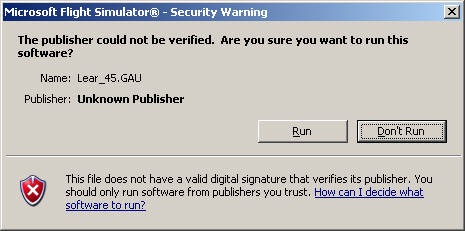
I think I've finally figured this out. The cause of the problem is definitely the lear_45.gau not being recognised.

When you first select the ERJ145 after installing it you should see this warning pop-up.
Image

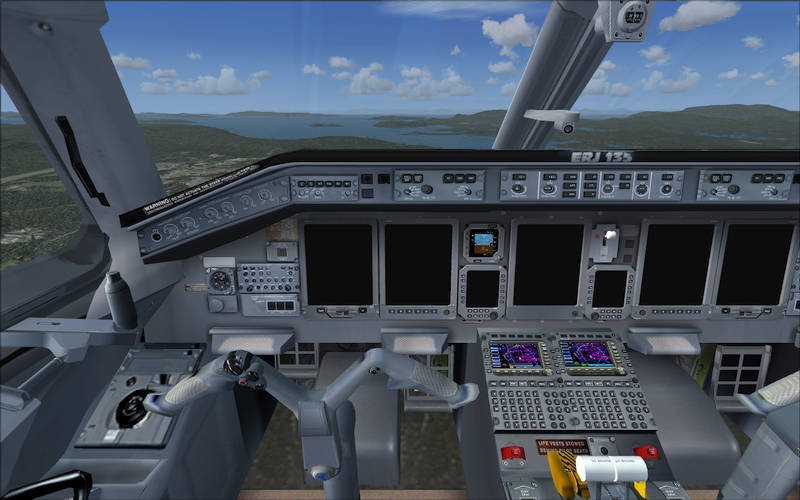
If you click Don't Run the gauge will not be loaded & the VC will look like this.
Image

To fix this restart FSX & select the CRJ145. This time when the pop-up appears click the Run option.
Image

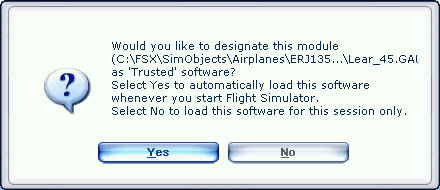
The gauge will be loaded & you will then see this option.
Image

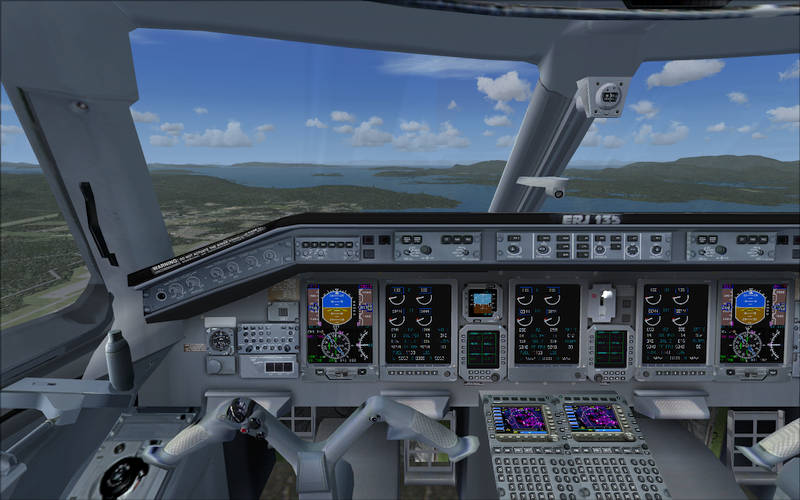
Click Yes & this is what you get.
Image

Please tell me if I'm right.
Last edited by Hagar on Mon Aug 11, 2014 11:37 am, edited 1 time in total.
Image

Founder & Sole Member - Grumpy's Over the Hill Club for Veteran Virtual Aviators
Member of the Fox Four Group
My Google Photos albums
My Flickr albums
User avatar
Hagar
Colonel
Colonel
 
Posts: 30868
Joined: Wed Jun 19, 2002 7:15 am
Location: Costa Geriatrica

Re: Downloaded Embraer 135 Delta Con. no gauges

Postby whizard » Mon Aug 11, 2014 11:36 am

Hagar - If you properly installed it as per instruction, there are only 2 files with a .gau extension in the Embraer panel folder.

They are:

lear_45.gau
magnetic_compass.gau

The Embraer 135 panel.cfg file calls the gauges as follows in the panel as extracted be default.

gauge"X"=Lear_45

In FSX Gold the Lear45 gauges are to be called as follows.

Go look in the Lear45 folder SimObjects => Airplanes=> Lear45

Then open the panel.cfg file of the Lear45

gauge00=Lear_45_XML

So what I've done is

1. copy the archive as is (do not extract it) Lear_45_XML from the Lear45 folder under SimObjects => Airplanes, into the Embraer's panel folder for a start.

2. Then add the "_XML " part to all the Lear45 gauges in the Embraer's panel.cfg file.... DO it for all the sections of the panel.cfg file

My cockpit is coming alive now.

<<s

Example - only part of what you need to change to get it to work...

//--------------------------------------------------------
[Window00]
file=Forward_640.bmp
file_1024=Forward_1024.bmp
size_mm=640
position=7
visible=1
ident=MAIN_PANEL

gauge00=Lear_45_XML!AOA, 19,122,48
gauge01=Lear_45_XML!Chronometer, 0,174,67
gauge02=Lear_45_XML!Gear Lever, 586,204,52
gauge03=Lear_45_XML!Left Gear Light, 595,184,20
gauge04=Lear_45_XML!Right Gear Light, 616,184,20
gauge05=Lear_45_XML!Nose Gear Light, 605,163,20
gauge06=Lear_45_XML!Pitot Heat, 7,237,20
gauge07=Lear_45_XML!Deice, 38,237,20
gauge08=Lear_45_XML!Navigation Lights, 4,264,29
gauge09=Lear_45_XML!Strobe Lights, 34,264,29
gauge10=Lear_45_XML!Landing Lights, 8,298,50
gauge11=Lear_45_XML!Master Caution, 125,30,46
gauge12=Lear_45_XML!PFD, 68,76,188
gauge13=Lear_45_XML!EICAS, 255,76,188
gauge14=Lear_45_XML!Radio Stack, 453, 143 ,129
gauge15=Lear_45_XML!Pitch Trim, 535,15,24
gauge16=Lear_45_XML!Aileron Trim, 560,26,47
gauge17=Lear_45_XML!Rudder Trim, 608,24,32
gauge18=Lear_45_XML!Backup Airspeed, 442,75,66
gauge19=Lear_45_XML!Backup Attitude, 508,75,66
gauge20=Lear_45_XML!Backup Altimeter, 574,75,66
gauge21=Lear_45_XML!Left Starter, 515,312,20
gauge22=Lear_45_XML!Right Starter, 539,312,20
gauge23=Lear_45_XML!Battery, 445,312,20
gauge24=Lear_45_XML!Left Alternator, 467,312,20
gauge25=Lear_45_XML!Right Alternator, 489,312,20
gauge26=Lear_45_XML!Fuel Left Standby, 565,312,20
gauge27=Lear_45_XML!Fuel Right Standby, 617,312,20
gauge28=Lear_45_XML!Fuel Crossfeed, 591,312,20
gauge29=Lear_45_XML!Autopilot, 208,16,324
gauge30=Lear_45_XML!Nav GPS Switch, 178,24,15
gauge31=SimIcons1024!ECU Icon, 611,290,12,12
gauge32=SimIcons1024!Compass Icon, 625,290,12,12
gauge33=SimIcons1024!GPS Icon, 597,290,12,12
gauge34=SimIcons1024!Kneeboard Icon, 597,276,12,12
gauge35=SimIcons1024!ATC Icon, 611,276,12,12
gauge36=SimIcons1024!Map Icon, 625,276,12,12


:D
whizard
Ground hog
Ground hog
 
Posts: 7
Joined: Mon Aug 11, 2014 6:14 am

Re: Downloaded Embraer 135 Delta Con. no gauges

Postby Hagar » Mon Aug 11, 2014 11:44 am

Yes whizard. That would probably fix it but it would involve a certain amount of editing.

I don't like mysteries & have been trying to figure out why the panel of this aircraft works for some but not others. Please see my previous post for what I think is the explanation.
Image

Founder & Sole Member - Grumpy's Over the Hill Club for Veteran Virtual Aviators
Member of the Fox Four Group
My Google Photos albums
My Flickr albums
User avatar
Hagar
Colonel
Colonel
 
Posts: 30868
Joined: Wed Jun 19, 2002 7:15 am
Location: Costa Geriatrica

Re: Downloaded Embraer 135 Delta Con. no gauges

Postby whizard » Mon Aug 11, 2014 12:06 pm

I tried moving the gua files - its made no difference.

The editor of the FSX Posky EMB 135 built the panel.cfg file with FS Panel Studio panel editor.

But it unfortunately is buggy in FSX Gold with Acceleration installed.

I can't get it to work 100% as it looks on other screen shots of the same aircraft in FSX here. The engine management MFDs don't work 100%. And neither does the COM screens.

Deleting the aircraft - pity but I don't have the time to rework everything in the panel manually either. ;)
whizard
Ground hog
Ground hog
 
Posts: 7
Joined: Mon Aug 11, 2014 6:14 am

Re: Downloaded Embraer 135 Delta Con. no gauges

Postby Hagar » Mon Aug 11, 2014 12:17 pm

whizard wrote:I tried moving the gua files - its made no difference.

The editor of the FSX Posky EMB 135 built the panel.cfg file with FS Panel Studio panel editor.

But it unfortunately is buggy in FSX Gold with Acceleration installed.

I can't get it to work 100% as it looks on other screen shots of the same aircraft in FSX here. The engine management MFDs don't work 100%. And neither does the COM screens.

All my shots in this topic were taken in FSX Gold + Acceleration.
Image

Founder & Sole Member - Grumpy's Over the Hill Club for Veteran Virtual Aviators
Member of the Fox Four Group
My Google Photos albums
My Flickr albums
User avatar
Hagar
Colonel
Colonel
 
Posts: 30868
Joined: Wed Jun 19, 2002 7:15 am
Location: Costa Geriatrica

Re: Downloaded Embraer 135 Delta Con. no gauges

Postby whizard » Mon Aug 11, 2014 12:36 pm

Wow!

Then I give up...I'll download and install (again) a different version of the same - and see if there is any difference in the package. :)

I run Win 7 Home Premium 64 bit but cant see that that will make a difference...as my other a/c all work in FSX Gold - payware and freeware.

And mine is a fresh and recent install of FSX Gold + Acceleration on my sim system. And I am hardly a newbie at installing aircraft in FS9 or FSX.
whizard
Ground hog
Ground hog
 
Posts: 7
Joined: Mon Aug 11, 2014 6:14 am

Re: Downloaded Embraer 135 Delta Con. no gauges

Postby Hagar » Mon Aug 11, 2014 1:14 pm

whizard wrote:Wow!

Then I give up...I'll download and install (again) a different version of the same - and see if there is any difference in the package. :)

I run Win 7 Home Premium 64 bit but cant see that that will make a difference...as my other a/c all work in FSX Gold - payware and freeware.

And mine is a fresh and recent install of FSX Gold + Acceleration on my sim system. And I am hardly a newbie at installing aircraft in FS9 or FSX.

Please don't give up. Your solution is probably the best idea as it uses the FSX default gauge.

I've been troubleshooting this sort of problem on this forum for a very long time. I'm not trying to teach my granny to suck eggs but I don't know how experienced new members are. In this case I would just like to confirm my explanation for the FS9 lear_45 gauge not being recognised by some users. You may or may not know that verified FS9 gauges are listed under the [Trusted] header in fsx.cfg like this:

[Trusted]
C:\FSX\SimObjects\Airplanes\ERJ135LR - Chautauqua Delta Connection\panel\Lear_45.GAU.onbkntkakneuunbkqarbbwqobarinlnalhtkabtk=2

If the value at the end of the line following the = is -2 the gauge has not been loaded & will not display.
Image

Founder & Sole Member - Grumpy's Over the Hill Club for Veteran Virtual Aviators
Member of the Fox Four Group
My Google Photos albums
My Flickr albums
User avatar
Hagar
Colonel
Colonel
 
Posts: 30868
Joined: Wed Jun 19, 2002 7:15 am
Location: Costa Geriatrica

Re: Downloaded Embraer 135 Delta Con. no gauges

Postby whizard » Mon Aug 11, 2014 2:22 pm

In the Fsx.cfg file

The gauges either have a value of 1 or 2 under the [Trusted] section

If the value =1 (initially)

When you load the EMB135 ; FSX asks you to trust the gauge files that have not been trusted before - and you need to select yes ....answering yes, gives the gauge a value = 2

[Trusted]
C:\FSX\SimObjects\Airplanes\ERJ135LR - Chautauqua Delta Connection\panel\Lear_45.GAU.onbkntkakneuunbkqarbbwqobarinlnalhtkabtk=2

Despite accepting the file, while running FSX as admin, the panel doesn't work

I tried it with the gauges copied to the main FSX gauge folder also. And tried it without doing this.

No luck.

Manually changing the gauge value to 1 in the fsx.cfg file does not work either.

The publisher could not be verified. Are you sure you want to run this software?

Name: Lear_45.GAU
Publisher::Unknown Publisher

Option = Run


Then FSX asks

Would you like to designate this module

C:\Microsoft Games\Microsoft Fligh...\Lear_45.GAU as 'Trusted' software?
Select Yes to automatically load this software whenever you start Flight Simulator.
Select No to load this software for this session only.


No matter what you select here - Yes or No it makes no difference to the fsx.cfg file - to set the file as trusted. The Lear_45.GAU keeps a value of 2.

Read this...

http://support.precisionmanuals.com/kb/ ... ust-policy
whizard
Ground hog
Ground hog
 
Posts: 7
Joined: Mon Aug 11, 2014 6:14 am

Re: Downloaded Embraer 135 Delta Con. no gauges

Postby kurmark » Mon Aug 11, 2014 5:48 pm

Ihad the thame prob in FSX Gold
take the "msvcr70.dll" from fs9 main into the FSX main folder or load the dll down from everywehre

and gauges are shown - they are compiled from c to xml


best regards kurmark
kurmark
Ground hog
Ground hog
 
Posts: 5
Joined: Mon Aug 11, 2014 5:31 pm

Re: Downloaded Embraer 135 Delta Con. no gauges

Postby Modlerbob » Mon Aug 11, 2014 5:57 pm

Wow, someone else is having the same problem. I'm not losing my mind. I have FSX Gold too. So in layman's terms how do I fix it?
User avatar
Modlerbob
2nd Lieutenant
2nd Lieutenant
 
Posts: 288
Joined: Tue May 27, 2014 12:06 am
Location: Central Florida

Re: Downloaded Embraer 135 Delta Con. no gauges

Postby Modlerbob » Mon Aug 11, 2014 6:20 pm

OK, I downloaded the ERJ145 which I did not previously have. When I picked it the first time it asked whether to run the lear gauges file and I said yes for every occurrence and the ERJ145 loaded with the instruments. But when I went back and reinstalled the 135 still no instruments. I have FSX Acceleration and Windows 7 Pro. FSX is loaded in the default MS games subdirectory.
User avatar
Modlerbob
2nd Lieutenant
2nd Lieutenant
 
Posts: 288
Joined: Tue May 27, 2014 12:06 am
Location: Central Florida

Re: Downloaded Embraer 135 Delta Con. no gauges

Postby Modlerbob » Mon Aug 11, 2014 6:41 pm

Upon further thought why can't the author of the ERJ 135 model go back and make the instrument portion of the config file the same as that in the ERJ 145. It looks to me like it is the same person.
User avatar
Modlerbob
2nd Lieutenant
2nd Lieutenant
 
Posts: 288
Joined: Tue May 27, 2014 12:06 am
Location: Central Florida

Re: Downloaded Embraer 135 Delta Con. no gauges

Postby boromir125 » Mon Aug 11, 2014 6:54 pm

I have the same problem. The plane downloads wonderfully...the gauges? not so much so. I've tried a couple of things and will try to copy another panel. My system? Win 8.1, Radon graphics. Nothing special, and my set up is kinda strange anyway. FSX doesn't really want to work well, but will work with some coaxing, gentle words and the promise not to drop it out my second story office if it does. Just for the record, I've also noticed that it my system doesn't like models that have been reconfigured from FS9,,,FSX native isn't a problem though, and It responds better with directx10 preview. Go figure.
boromir125
2nd Lieutenant
2nd Lieutenant
 
Posts: 108
Joined: Sun Jul 14, 2013 2:34 pm
Location: Vermont

Re: Downloaded Embraer 135 Delta Con. no gauges

Postby Modlerbob » Mon Aug 11, 2014 9:00 pm

After checking I found that the EJR 145 has a different author. So maybe Chris Evans can go back and find the problem. Even though it works fine for some it's beginning to look like there is a significant number of us that can't get the instruments to load correctly. This may be an easy fix for those who are familiar with the programming aspect of aircraft in FSX but I am not one of those people. I do appreciate that this is freeware but I hope that Mr. Evans has enough pride in his work to seek a fix and repost all the different EJR 135's he has created.
User avatar
Modlerbob
2nd Lieutenant
2nd Lieutenant
 
Posts: 288
Joined: Tue May 27, 2014 12:06 am
Location: Central Florida

PreviousNext

Return to Flight Simulator X (FSX) and Steam

Who is online

Users browsing this forum: No registered users and 852 guests