WV-2, EC-121 problem

FSX including FSX Steam version.

WV-2, EC-121 problem

Postby Modlerbob » Thu Jul 31, 2014 12:41 pm

I have always liked the looks of the Lockheed Constellation family of airplanes and growing up in Jacksonville, Fl. I used to watch the Navy WV-2's taking off to fly out and investigate storms during hurricane season. So when I found the WV-2, EC-121 package for FSX I downloaded them. Every time I try to fly one of the planes in the package I get it in the air and then in about 10 minutes the engines start to shut down. First #1, followed over the next minute or two by the other three. None of the simulators engine trouble functions are turned on but I tried reducing power shortly after takeoff with no change in results. Then I tried opening the cowl flaps before takeoff, same result. So I checked the fuel load and that is not a problem either. I discovered the flight engineers panel and made sure all the fuel pump switches were on and watched the temperature gauges and didn't notice a problem. So, are any of you familiar with this model? Is there a master fuel switch I haven't noticed or are the guys who developed this model cleverly making this happen?
User avatar
Modlerbob
2nd Lieutenant
2nd Lieutenant
 
Posts: 288
Joined: Tue May 27, 2014 12:06 am
Location: Central Florida

Re: WV-2, EC-121 problem

Postby Jetranger » Thu Jul 31, 2014 7:38 pm

So is this the one your talking about ???

Searched EC121 and this is what came up on this site.
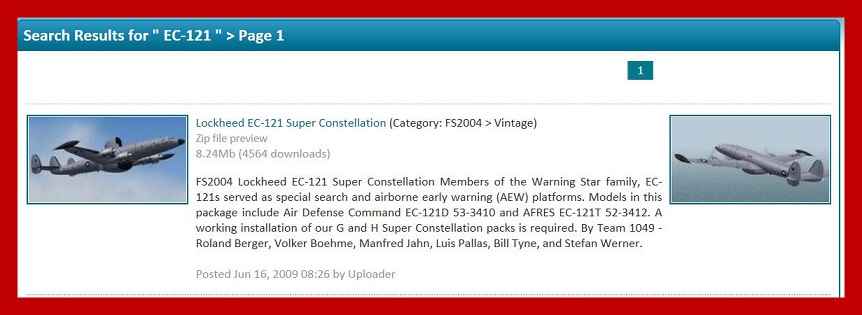
Image

Also, what Simulator do you have - 2004 or FSX , or FSX Gold/Acceleration ??

I don't have this particular Constellation , tho I do have 57 other Lockheed constellations , Just Flights and FSDZIGNS L-049A Lockheed Constellations, which are different than Manfred Johns versions.


FSDZIGNS Constellations : http://simviation.com/1/search?submit=1&keywords=jetranger&x=22&y=8


Double check to make sure all the files are in the right places with your EC121 Download, sometimes that can cause your engine problem.

I looked thru that particular download and it appears according to the download that there are some definite starting sequences incorporated into that particular model.

another thing , did you actually download your EC121 Model from this site or another site ???

sometimes important files get left out of the upload process by mistake, and you may not have got all the files you were supposed to, happens sometimes.

I know another trick,,, explaning it may be more difficult,,,,,,

find another Manfred johns Constellation,,,,

get into the Aircrafts CFG File - copy only the Engine parimeters and paste them into the the current Aircraft CFG File that giving you the problem,,, don't forget to delete the current engine data tho,,,

or, you could take possibly ALL the Important Flight Data from another Manfred Johns Constellation,,, and copy that data below all your Aircrafts within the list of your current Constellation,,,, making sure to keep all your current liverys / paints you have now within that Aircraft CFG File.

Jetranger

User avatar
Jetranger
Major
Major
 
Posts: 3232
Joined: Fri Sep 30, 2011 2:49 am
Location: Kansas City Missouri USA / KMKC

Re: WV-2, EC-121 problem

Postby Modlerbob » Thu Jul 31, 2014 9:43 pm

Since I posted the question in the FSX section I assumed it was understood that I was referring to a FSX model. As with most all other FSX prop planes the sim starts with it sitting on the runway of my selected airport all four engines running. It appears to be running out of fuel but all the gauges show nearly full tanks on all tanks. The engine gauges do not indicate they are over heating and there was no fire warning light and no apparent fires from the external views. I have also downloaded several Constellation airliners and they all work normally. The planes were all downloaded here in the simviation aircraft library.

I will try your suggestions and see if it will keep running for more than 15 minutes.
User avatar
Modlerbob
2nd Lieutenant
2nd Lieutenant
 
Posts: 288
Joined: Tue May 27, 2014 12:06 am
Location: Central Florida

Re: WV-2, EC-121 problem

Postby Modlerbob » Fri Aug 01, 2014 1:56 am

I guess this is one of those planes that you can't just jump into the simulated cockpit and fly. But I think making it so the engines will self destruct even when the realism setting doesn't call for it is a bit much. By trial and error I finally found the right combination of settings to keep the motors running for more than 15 minutes.

And btw thanks for the help.
User avatar
Modlerbob
2nd Lieutenant
2nd Lieutenant
 
Posts: 288
Joined: Tue May 27, 2014 12:06 am
Location: Central Florida

Re: WV-2, EC-121 problem

Postby garymbuska » Sun Aug 03, 2014 9:48 pm

I was in VW4 Hurricane Hunters stationed at Jacksonville, Florida my home town. The old super Connie was a great plane but talk about a small cockpit when you first walked into the plane you can face to face to a huge power supply that had a monsters vacuum tube in it. Once we closed the door all of the crewman stripped down to just there under wear as the plans was a slow cooker. You could not wear a watch in the air craft as it would stop working because of the magnetism from that huge radar. I hated to see them go though when you flew through strong winds those big wings looked like the wings of a Albatross and actually looked like they were flapping.
The Symbol above my name is my squadron patch.
I had to have one of these birds in my FS9 Fleet but have not found a good one for FSX yet.
<<v
Gary M Buska
SYSTEM Specs ASUS P8Z68 V/GEN 3 mother board: INTELL I7 2600k 3.48 ghz Quad core CPU with Sandy bridge: 12 Gigs of 1800hz ram:
GTX 950 OVER CLOCKED: 2 Gigs Ram Windows 10 Home 64 bit Operating system. 750W Dedicated modular power supply. Two Internal 1TB hard drives 1 External 1TB 3.2 USB hard drive. SAITEK Cessna flight Yoke with throttles.
CH Rudder Peddles 27 inch Wide screen Monitor
User avatar
garymbuska
Major
Major
 
Posts: 4415
Joined: Tue Dec 30, 2003 11:10 am
Location: Jacksonville, Florida

Re: WV-2, EC-121 problem

Postby Modlerbob » Mon Aug 04, 2014 9:57 am

Gary, I am not a "real" pilot and generally I like my flight sim planes computer friendly, meaning the computer handles details like making sure the engines don't fry themselves. But after reading the instructions and finding out which buttons do what the WV-2s I downloaded are an interesting change from the modern era of planes. I would recommend getting this one and trying it out as you can always delete it if it does not suit you. Even with the period correct nav aids it is easy to navigate close enough to an airport to make a hands on landing. Earlier today I flew a P-3 mission from "Rosey Roads" to Miami using FSrealWX to generate the weather associated with Bertha. The plane really got bounced around and it almost gives one a feeling for what it is like in heavy weather.

Maybe later I will make a similar mission with the WV-2.
User avatar
Modlerbob
2nd Lieutenant
2nd Lieutenant
 
Posts: 288
Joined: Tue May 27, 2014 12:06 am
Location: Central Florida

Re: WV-2, EC-121 problem

Postby garymbuska » Mon Aug 04, 2014 8:56 pm

I was not a pilot bu t was a crew member I flew in either the radio position or on what we used to call mercy missions I would fly in the radar position. We once flew a bunch of books to a school in Antigua and would fly to Alameda for parts for the P3,s
You may not know this but if the P3 wings were not on the bottom this plane could land on a aircraft carrier without a arresting hook. The props could turn almost completely backwards. But what was really scary was while the props were in ground idle you could light a match behind the prop and it would not blow it out.
Imagine it is dark you are wearing ear protection (what we called mickey mouse ears) you can not see anything and not hear noting but a dull roar. if you forget where you are at and walk between two engines you will not do it twice. A flight line at night can be a very dangerous place.

<<v
Gary M Buska
SYSTEM Specs ASUS P8Z68 V/GEN 3 mother board: INTELL I7 2600k 3.48 ghz Quad core CPU with Sandy bridge: 12 Gigs of 1800hz ram:
GTX 950 OVER CLOCKED: 2 Gigs Ram Windows 10 Home 64 bit Operating system. 750W Dedicated modular power supply. Two Internal 1TB hard drives 1 External 1TB 3.2 USB hard drive. SAITEK Cessna flight Yoke with throttles.
CH Rudder Peddles 27 inch Wide screen Monitor
User avatar
garymbuska
Major
Major
 
Posts: 4415
Joined: Tue Dec 30, 2003 11:10 am
Location: Jacksonville, Florida


Return to Flight Simulator X (FSX) and Steam

Who is online

Users browsing this forum: No registered users and 424 guests