HOW TO INSTALL A NEW GAUGE??

FSX including FSX Steam version.

HOW TO INSTALL A NEW GAUGE??

Postby mo123pep » Sun Feb 23, 2014 7:35 am

I have am trying to modify one of the gauges on the Cessna 310 Q by Rob Richardson and I am trying to find out how to do this?? The AI (aircraft attitude indicator) on the virtual cockpit panel does not have a pointer at the top to indicate the amount of spin (turn) the aircraft is making and I use this to keep my self from turn to tight. I would like to change it to a different one that does have a pointer at the top like the one on the "standard cockpit" when you press the "W" key. Is there any way to do this?? Thanks for any tips or help on this one. Mike
mo123pep
Ground hog
Ground hog
 
Posts: 16
Joined: Sat Jan 04, 2014 7:46 pm

Re: HOW TO INSTALL A NEW GAUGE??

Postby Fozzer » Sun Feb 23, 2014 8:33 am

Find an Aircraft which contains the type of gauge that you are looking for....
Make a note of it in the Panel.cfg file listing....
Replace the unwanted gauge type with the new gauge type in the Panel.cfg file listing, leaving the coordinates as they are!
...gauge xx=....

(Make a copy of the Panel.cfg File before you modify it, in case you change your mind!).

Paul.... :mrgreen: ...!

Alternatively....>>>> http://www.fspanelstudio.com/
Win 8.1 64-bit. DX11. Advent Tower. Intel i7-3770 3.9 GHz 8-core. 8 GB System RAM. AMD Radeon HD 7700 1GB RAM. DVD ROM. 2 Terra Byte SATA Hard Drive. Philips 17" LCD Monitor. Saitek Cyborg X Fly-5 Joystick. ...and a Briggs and Stratton Petrol Lawn Mower.
User avatar
Fozzer
Colonel
Colonel
 
Posts: 27369
Joined: Thu Jan 31, 2002 3:11 pm
Location: Hereford. England. EGBS.

Re: HOW TO INSTALL A NEW GAUGE??

Postby mo123pep » Sun Feb 23, 2014 8:49 am

Thank you Paul but "how do I identify the gauge in the existing panel.cfg"? Mike
mo123pep
Ground hog
Ground hog
 
Posts: 16
Joined: Sat Jan 04, 2014 7:46 pm

Re: HOW TO INSTALL A NEW GAUGE??

Postby Hagar » Sun Feb 23, 2014 9:20 am

I've just checked out Rob Richardson's Cessna 310Q. It has no 2D panel. The gauges used on the VC main panel are not defined in Panel.cfg so I presume these gauges are an integral part of the MDL file. In that case there's not much you can do about it.
Image

Founder & Sole Member - Grumpy's Over the Hill Club for Veteran Virtual Aviators
Member of the Fox Four Group
My Google Photos albums
My Flickr albums
User avatar
Hagar
Colonel
Colonel
 
Posts: 30868
Joined: Wed Jun 19, 2002 7:15 am
Location: Costa Geriatrica

Re: HOW TO INSTALL A NEW GAUGE??

Postby mo123pep » Sun Feb 23, 2014 9:42 am

I have sent an email directly to Rob and maybe he can help. Thanks a bunch for checking it out. Mike
mo123pep
Ground hog
Ground hog
 
Posts: 16
Joined: Sat Jan 04, 2014 7:46 pm

Re: HOW TO INSTALL A NEW GAUGE??

Postby Jetranger » Sun Feb 23, 2014 10:19 am

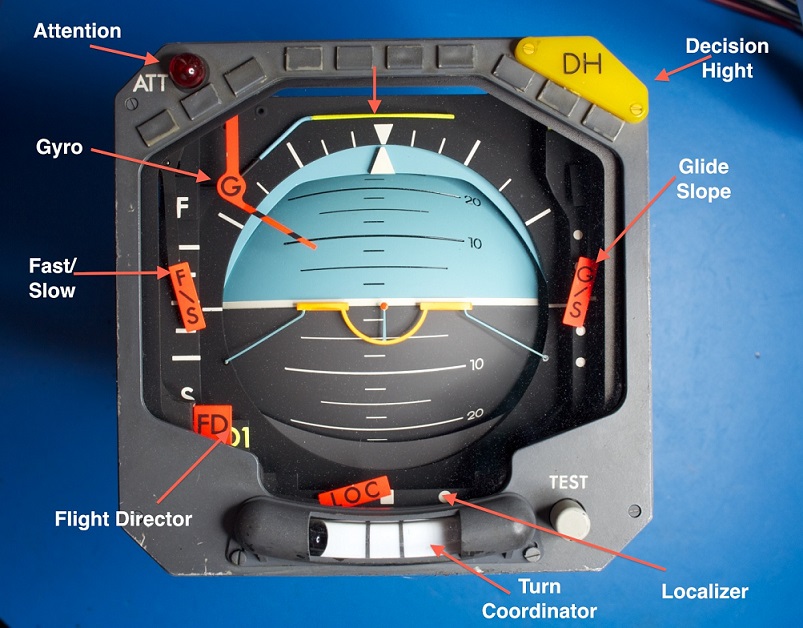
Kinda interesting, I had googled attitude indicator and this came up, I never really knew what all those symbols stood for on the gauge,,

this will educate you, if your like me :? and kinda clueless :D

Maybe this will help ???


Image
User avatar
Jetranger
Major
Major
 
Posts: 3232
Joined: Fri Sep 30, 2011 2:49 am
Location: Kansas City Missouri USA / KMKC

Re: HOW TO INSTALL A NEW GAUGE??

Postby Jetranger » Sun Feb 23, 2014 10:27 am

:?

I never really knew what all those Icons stood for ?

I just thought that

DH - stood for Dead Head ?

FS - find South

FD - front Door

GYRO - Dance

Localizer - meant your were getting local

G/S - Go Slow

least they put a Happy Face on the gauge with a Smile , that yellow drooping thing smilin' at ya ! :D

Now I know what all the stuff really means :P
User avatar
Jetranger
Major
Major
 
Posts: 3232
Joined: Fri Sep 30, 2011 2:49 am
Location: Kansas City Missouri USA / KMKC

Re: HOW TO INSTALL A NEW GAUGE??

Postby mo123pep » Sun Feb 23, 2014 11:48 am

There is a lot info on this gauge "IF" you have the right gauge. Unfortunately the Cessna 310 Q doesn't have the right one!! Mike
mo123pep
Ground hog
Ground hog
 
Posts: 16
Joined: Sat Jan 04, 2014 7:46 pm

Re: HOW TO INSTALL A NEW GAUGE??

Postby OldAirmail » Sun Feb 23, 2014 11:52 am

Can you show us a picture of the gauge that you "don't like"?

There are several 310s around. It might be easiest just switching to a different 310.
.. .
Get the most out of your controls - SPAD.neXt

Image
. . . . . .Any time, any plane, any weather.
. . . . . . . . . . . . . Prepar3d V4
User avatar
OldAirmail
Major
Major
 
Posts: 4814
Joined: Sun Feb 17, 2013 3:06 pm
Location: Concrete, WA ICAO - 3W5

Re: HOW TO INSTALL A NEW GAUGE??

Postby garymbuska » Sun Feb 23, 2014 11:56 am

mo123pep wrote:I have am trying to modify one of the gauges on the Cessna 310 Q by Rob Richardson and I am trying to find out how to do this?? The AI (aircraft attitude indicator) on the virtual cockpit panel does not have a pointer at the top to indicate the amount of spin (turn) the aircraft is making and I use this to keep my self from turn to tight. I would like to change it to a different one that does have a pointer at the top like the one on the "standard cockpit" when you press the "W" key. Is there any way to do this?? Thanks for any tips or help on this one. Mike


For a few dollars you can get FSpanelstudio. This is by far the best tool for editing and creating panels with. Its only negative is that it can not edit Virtual cockpits.
With this program all you have to do is to open the panel of the aircraft you wish to edit. It will than display the panel just as you would see it in FS. All you have to do is to highlight any gauge and it will tell you what gauge it is using. To add a gauge it does not get any easier just select the gauge you wish to add and then drag it to where you want it and than save. The gauge will show up in FS the next time you select that aircraft right where you put it. You do not need to know any coordinates.
Truthfully it does not get any easier than this.
http://fspanelstudio.com/


<<v
Gary M Buska
SYSTEM Specs ASUS P8Z68 V/GEN 3 mother board: INTELL I7 2600k 3.48 ghz Quad core CPU with Sandy bridge: 12 Gigs of 1800hz ram:
GTX 950 OVER CLOCKED: 2 Gigs Ram Windows 10 Home 64 bit Operating system. 750W Dedicated modular power supply. Two Internal 1TB hard drives 1 External 1TB 3.2 USB hard drive. SAITEK Cessna flight Yoke with throttles.
CH Rudder Peddles 27 inch Wide screen Monitor
User avatar
garymbuska
Major
Major
 
Posts: 4415
Joined: Tue Dec 30, 2003 11:10 am
Location: Jacksonville, Florida

Re: HOW TO INSTALL A NEW GAUGE??

Postby Fozzer » Sun Feb 23, 2014 1:17 pm

Like you, Garry...

.....I am an enthusiast of "FS Panel Studio", but that is mainly because I mostly have fun with the "2D panels", where it is extremely easy to add, remove, and modify gauges....

..but, as Hagar points out, the VC (3D) panel is part of the original designers aircraft model, and therefore extremely difficult to modify.

Easy-peasy with 2D panels...not so easy with 3D panels!

Paul.....2D Panel Fiddler.... :D ...!

http://www.fspanelstudio.com/

Quote:
"Keep in Mind...
While FS Panel Studio can be used to perform some editing of gauge placement in Virtual Cockpits, VCs are primarily implemented in the model.cfg file, which defines 3D geometry which cannot be edited in FSPS".
End quote.
Win 8.1 64-bit. DX11. Advent Tower. Intel i7-3770 3.9 GHz 8-core. 8 GB System RAM. AMD Radeon HD 7700 1GB RAM. DVD ROM. 2 Terra Byte SATA Hard Drive. Philips 17" LCD Monitor. Saitek Cyborg X Fly-5 Joystick. ...and a Briggs and Stratton Petrol Lawn Mower.
User avatar
Fozzer
Colonel
Colonel
 
Posts: 27369
Joined: Thu Jan 31, 2002 3:11 pm
Location: Hereford. England. EGBS.

Re: HOW TO INSTALL A NEW GAUGE??

Postby garymbuska » Mon Feb 24, 2014 2:17 pm

Fozzer wrote:Like you, Garry...

.....I am an enthusiast of "FS Panel Studio", but that is mainly because I mostly have fun with the "2D panels", where it is extremely easy to add, remove, and modify gauges....

..but, as Hagar points out, the VC (3D) panel is part of the original designers aircraft model, and therefore extremely difficult to modify.

Easy-peasy with 2D panels...not so easy with 3D panels!

Paul.....2D Panel Fiddler.... :D ...!

http://www.fspanelstudio.com/

Quote:
"Keep in Mind...
While FS Panel Studio can be used to perform some editing of gauge placement in Virtual Cockpits, VCs are primarily implemented in the model.cfg file, which defines 3D geometry which cannot be edited in FSPS".
End quote.


I am aware of that which is why I stated the only negative thing about FSPS is it can not edit Virtual cockpits.

<<u
Gary M Buska
SYSTEM Specs ASUS P8Z68 V/GEN 3 mother board: INTELL I7 2600k 3.48 ghz Quad core CPU with Sandy bridge: 12 Gigs of 1800hz ram:
GTX 950 OVER CLOCKED: 2 Gigs Ram Windows 10 Home 64 bit Operating system. 750W Dedicated modular power supply. Two Internal 1TB hard drives 1 External 1TB 3.2 USB hard drive. SAITEK Cessna flight Yoke with throttles.
CH Rudder Peddles 27 inch Wide screen Monitor
User avatar
garymbuska
Major
Major
 
Posts: 4415
Joined: Tue Dec 30, 2003 11:10 am
Location: Jacksonville, Florida


Return to Flight Simulator X (FSX) and Steam

Who is online

Users browsing this forum: No registered users and 862 guests