FSX on dual Monitor

FSX including FSX Steam version.

FSX on dual Monitor

Postby G.K. » Fri Feb 07, 2014 1:57 pm

So..........New PC (as I mentioned elsewhere) flies like a goodun. Most sliders maxed out and 30 fps in most situations. Some of the buttons off though. I've tweaked the config slightly but not much. It goes well.

Today I passed a second hand elec equip store and they had a 17" monitor in there for £25 so I thought I'd give it a go on a dual monitor Setup.

I've now got it setup. It works well, how did I do without it? Spot view on one, instruments on the other........fantastic! No more constant switching views. The monitor is a goodun.....I tried 2 virtual cockpit views, 1 forward, 1 side window but the graphic card complained and gave me some graphic glitches. Further tweaking of the config to give better balance sorted out the glitches but at a FPS expense. Not to worry I thought, spot view on one and instruments on the other works brilliantly without a noticeable performance hit..........

..........Flew for 20 minutes and FSX froze, crashed and rebooted. Back to the drawing board.....Any suggestions?

G.K.
Captain
Captain
 
Posts: 569
Joined: Fri Oct 07, 2011 4:25 pm
Location: Sussex

Re: FSX on dual Monitor

Postby Jetranger » Fri Feb 07, 2014 2:29 pm

Your New Computer - are you using the "On Board" Graphics Video Card that came with the computer, or, does it have a Upgraded Video Card that's in one of the external slots ???

IF you have a external Video card - I'd go in and go thru all the settings and adjust everything.

if you have just the onboard video card,, you may be limited.

I had that problem too before I upgraded my New Computer to be able to fully handle FSX Gold Acceleration.

I use 2 32" monitors now - without a glitch.

most of those general store bought computers don't have all that great of a Video Graphics card that comes with them,, their fairly generic and limited.
User avatar
Jetranger
Major
Major
 
Posts: 3232
Joined: Fri Sep 30, 2011 2:49 am
Location: Kansas City Missouri USA / KMKC

Re: FSX on dual Monitor

Postby OldAirmail » Fri Feb 07, 2014 2:34 pm

G.K. wrote:

..........Flew for 20 minutes and FSX froze, crashed and rebooted. Back to the drawing board.....Any suggestions?

Is it 32 or 64 bit operating system?

How much memory?

Look in the manual and see what kind of video card you have.
.. .
Get the most out of your controls - SPAD.neXt

Image
. . . . . .Any time, any plane, any weather.
. . . . . . . . . . . . . Prepar3d V4
User avatar
OldAirmail
Major
Major
 
Posts: 4814
Joined: Sun Feb 17, 2013 3:06 pm
Location: Concrete, WA ICAO - 3W5

Re: FSX on dual Monitor

Postby G.K. » Fri Feb 07, 2014 3:14 pm

Yes, Sorry about the lack of info :oops:

i5 on a Asus z87 board, 8 gig of ram.
Nvidia GT640 2 gig.
Win 7 64 bit

GEX and UTX.

I have FS recorder installed. It sometimes doesn't boot correctly and tells me it's been disabled but FSX works OK after that message.
G.K.
Captain
Captain
 
Posts: 569
Joined: Fri Oct 07, 2011 4:25 pm
Location: Sussex

Re: FSX on dual Monitor

Postby OldAirmail » Fri Feb 07, 2014 6:27 pm

I posted this for another person, and I think that it may help you too.

This was in response to Windows 8 problems, but I have Win 7 Pro 64bit and it helped me.

At any rate, it's quick, free, and easy so give it a try.

I don't have Windows 8.anything. I also don't have any problems changing any kind of settings while in flight.

On the other hand :evil: , I do have some of the Prepar3d V2 files suddenly being changed to "Read Only" at some point during the day, even when I haven't been using P3D.
When that happens, Prepar3d will very suddenly stop, with or without a warning. Usually without.

Let me restate that again: this problem occurs without even running Prepar3d.

On the other hand, when Prepar3d IS running, there's no problem making changes, back and forth, during a flight.


There is a solution. Or at least a practical solution for my particular problem, and maybe yours.

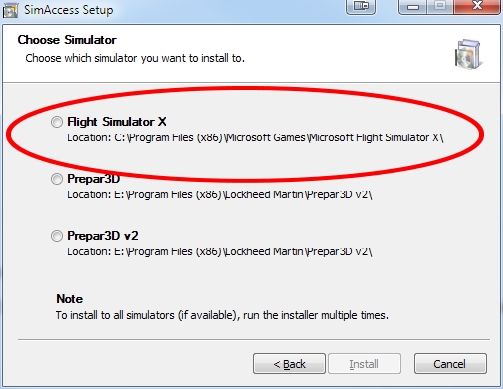
There's a very thorough program called SimAccess from Flightsim Estonia.


What does this have to do with FSX or Windows 8.anything?

SimAccess is a free program that will unlock FSX, and both versions of Prepar3d files.

Image


I haven't needed it for FSX, but for some reason I have to run it about once a week to fix Prepar3d V2.

But without SimAccess, I would hardly be able to use Prepar3d.


If anyone thinks that access rights is the cause of their problem, I'd suggest using it.
.. .
Get the most out of your controls - SPAD.neXt

Image
. . . . . .Any time, any plane, any weather.
. . . . . . . . . . . . . Prepar3d V4
User avatar
OldAirmail
Major
Major
 
Posts: 4814
Joined: Sun Feb 17, 2013 3:06 pm
Location: Concrete, WA ICAO - 3W5

Re: FSX on dual Monitor

Postby G.K. » Sat Feb 08, 2014 8:26 am

Thanks OldAirmail, I'll check it out. These modern OS's are a right pain in the rear when it comes to doing stuff behind the scenes.

I'll also uninstall FS recorder to see if that makes things more stable.
G.K.
Captain
Captain
 
Posts: 569
Joined: Fri Oct 07, 2011 4:25 pm
Location: Sussex

Re: FSX on dual Monitor

Postby OldAirmail » Sat Feb 08, 2014 10:14 am

It may only be happening to me, but over the past 3 to 5 months I've been seeing strange occurrences of files suddenly being locked.

Because it's only a file or folder here and there, and only a small number of locations, I don't think that it's a virus.

On the other hand I have seen where virus checkers have done the same thing to keep a virus from spreading.

For me, the end result was the program simply stopping. No pop-up, no warning.

Checking the Event Viewer isn't always helpful to most people.

This is from the last time that it crashed.
The program fsx.exe version 10.0.61637.0 stopped interacting with Windows and was closed. To see if more information about the problem is available, check the problem history in the Action Center control panel.
Process ID: 924
Start Time: 01cf14831ea566b5
Termination Time: 0
Application Path: C:\Program Files (x86)\Microsoft Games\Microsoft Flight Simulator X\fsx.exe
Report Id: 6339770a-8076-11e3-93da-f46d04ae06c6


Trying to restart FSX ended with the same result - Crash. No pop-up, no warning.

Running SimAccess resolved the situation.
.. .
Get the most out of your controls - SPAD.neXt

Image
. . . . . .Any time, any plane, any weather.
. . . . . . . . . . . . . Prepar3d V4
User avatar
OldAirmail
Major
Major
 
Posts: 4814
Joined: Sun Feb 17, 2013 3:06 pm
Location: Concrete, WA ICAO - 3W5

Re: FSX on dual Monitor

Postby G.K. » Sun Feb 09, 2014 8:49 am

I've uninstalled FS recorder and So far so good.

Another issue which you veteran dualists are probably aware of is the colour matching. It's not really an issue with instruments on one screen and external view on the other but with 2 external views or 2 virtual cockpit views the colour match is terrible. My original monitor has a much warmer look, I can't match them up with either the monitor controls or the NVidia controls.

Ah well........ Overall though, dual monitors is a definite increase in sim enjoyment. 8)
G.K.
Captain
Captain
 
Posts: 569
Joined: Fri Oct 07, 2011 4:25 pm
Location: Sussex

Re: FSX on dual Monitor

Postby OldAirmail » Sun Feb 09, 2014 9:52 am

I definitely understand the color/monitor discrepancy.

I have 2 ASUS models, exact same model, but bought about 14 moths apart.

One is brighter than the other, but I can't get them to match.

One is a little bit warmer in color than the other, but I can't get them to match.

I've tried various combinations of adjustments with the buttons on the monitors & the video card color adjuster. No luck.

There're close enough anyway not to be a problem though.


The third monitor is a totally different brand, and there's no chance of getting that one adjusted close to the other two.

That third monitor is also half an inch shorter and needs to be compensated for. That at least isn't a big deal.


No question about it - if you can, buy all three monitors at the same time, not to mention the same make/model.

Unless I'm flying with all three monitors lit up, I just use the two ASUS monitors on for day to day use.
.. .
Get the most out of your controls - SPAD.neXt

Image
. . . . . .Any time, any plane, any weather.
. . . . . . . . . . . . . Prepar3d V4
User avatar
OldAirmail
Major
Major
 
Posts: 4814
Joined: Sun Feb 17, 2013 3:06 pm
Location: Concrete, WA ICAO - 3W5


Return to Flight Simulator X (FSX) and Steam

Who is online

Users browsing this forum: No registered users and 966 guests

