AI traffic File BGL

FSX including FSX Steam version.

AI traffic File BGL

Postby Dennyyoung » Fri Feb 07, 2014 6:14 pm

Does anyone have a solution here to this problem


I tried to open Traffic BGL.files in my ......Scenery/world/scenery folder File in FSX BUT it looks like this........


nvlzxckjhv9;8uaejrf
'we.f
?wEF354W6CFwjbhWEIUFYHwopejkf;owjfopijwf2445awffawHJFCUOI;YH8W
SJDCBN;ic;UODFU890R3409T8UIRL;KGSAEL,'EVBEF6VBEEFEVJIHOAEJHVOIPJ
JHNCVOAsUIWEFVHOAEJINRGU80
un-re

tried to open with Notepad, Adobe Reader and word pad etc but its unreadable

Is there some other program to open it up with ?
Dennyyoung
Ground hog
Ground hog
 
Posts: 27
Joined: Mon Dec 30, 2013 11:10 am

Re: AI traffic File BGL

Postby Capt_Cronic » Fri Feb 07, 2014 7:22 pm

ASUS P8Z77-VLK, I5-3570k @ 4.4ghz, G.SKILL 16gb 1600, GTX 570 2560MB GDDR5, 2x OCZ Vertex 4 128Gb SSD SATA 3,
WD 500GB SATA 3, ASUS DRW-24B1ST SATA 3, OCZ ModXStream Pro 700W Modular, Samsung 52" lcd, Win 7 Ultimate x64 SP1
Capt_Cronic
2nd Lieutenant
2nd Lieutenant
 
Posts: 218
Joined: Fri Nov 08, 2013 1:37 pm

Re: AI traffic File BGL

Postby Dennyyoung » Fri Feb 07, 2014 8:24 pm

OK ....Thanks Capt Cronic
Dennyyoung
Ground hog
Ground hog
 
Posts: 27
Joined: Mon Dec 30, 2013 11:10 am

Re: AI traffic File BGL

Postby Dennyyoung » Fri Feb 07, 2014 8:33 pm

Capt Cronic I went to the site but did not see where to download the Tool File
Dennyyoung
Ground hog
Ground hog
 
Posts: 27
Joined: Mon Dec 30, 2013 11:10 am

Re: AI traffic File BGL

Postby PhantomTweak » Fri Feb 07, 2014 11:33 pm

Try going to http://www.avsim.com/ or http://www.projectai.com/ and doing a search for the "Traffic Tools" and "Collect Airports" programs. They are, I think, what you are looking for, but I have been known to be wrong in the past. Often :lol:

Good luck! Pat☺
Have fun, fly high, far, and free!
Pat
2S7, Chiloquin OR Image
User avatar
PhantomTweak
Captain
Captain
 
Posts: 599
Joined: Mon Oct 14, 2013 11:10 pm
Location: Chiloquin OR

Re: AI traffic File BGL

Postby Dennyyoung » Sat Feb 08, 2014 9:27 am

Thanks P.T
Dennyyoung
Ground hog
Ground hog
 
Posts: 27
Joined: Mon Dec 30, 2013 11:10 am

Re: AI traffic File BGL

Postby Hagar » Sat Feb 08, 2014 11:15 am

Traffic Toolbox is part of the FSX SDK.

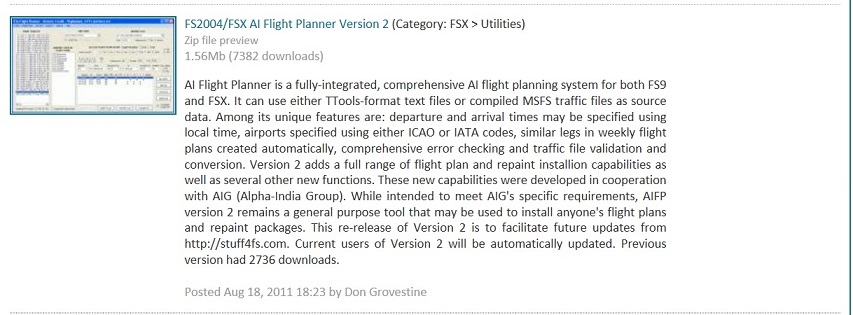
AI Flight Planner might be what you're looking for. http://simviation.com/1/search?submit=1&keywords=AIFP2121.zip&x=15&y=6
Image

Founder & Sole Member - Grumpy's Over the Hill Club for Veteran Virtual Aviators
Member of the Fox Four Group
My Google Photos albums
My Flickr albums
User avatar
Hagar
Colonel
Colonel
 
Posts: 30868
Joined: Wed Jun 19, 2002 7:15 am
Location: Costa Geriatrica

Re: AI traffic File BGL

Postby Dennyyoung » Sat Feb 08, 2014 1:17 pm

I know but I have tried every thing I know to do but unable to get it to load...work...from A to Z tools will not show up on my menu
Dennyyoung
Ground hog
Ground hog
 
Posts: 27
Joined: Mon Dec 30, 2013 11:10 am

Re: AI traffic File BGL

Postby Dennyyoung » Sat Feb 08, 2014 3:57 pm

I have FSX Deluxe edition.....do I still need to install any other programs to add traffic, redo airport parking assignment .
Dennyyoung
Ground hog
Ground hog
 
Posts: 27
Joined: Mon Dec 30, 2013 11:10 am

Re: AI traffic File BGL

Postby Hestntonpms » Sun Feb 09, 2014 12:07 am

I think you're looking for "AI traffic Editor X "
I do not know if we are allowed to link to other sim sites here but if you Google what I just wrote,you will see a few and one very popular sim site that has it as a download.
Gigabyte X79 Chip set Mobo
Intel-i7 4820K CPU/Liquid cooled
Single GTX Titan 6gig GPU/ extreme air cooled
16 gig/1600 MHz quad channel DDR3
1 T/B -Raid-0 array,Risking it all for every ounce of performance until I go with SSD's
User avatar
Hestntonpms
2nd Lieutenant
2nd Lieutenant
 
Posts: 75
Joined: Thu Jan 30, 2014 4:41 pm
Location: Long Island NY

Re: AI traffic File BGL

Postby Jetranger » Sun Feb 16, 2014 10:13 am

So did Denny ever get that program A.I. Traffic planner to work ??

I went and downloaded it and installed it - but - I might get it work properly , maybe , by this time Next year !!!!

Geshhhh, ya gotta be a computer programmer to use the thing :shock: :evil:

take me a week to read all the instructions that come with it :D :D :D !

somebody, had a "whooole lotta time" on their hands to write that program :roll:

I like the part where I got to choose to "Scan my Traffic Files",,, and ,,, it automatically took me to my Documents Folder ???????? :roll: :? :shock: :D

Don't believe theres any "Traffic Files" in the Documents Folder !!!

kinda think - it should of automatically located the Traffic files location, and opened that area automatically for the user, I mean, it is a program, that's wrote to do that.

I Directed it myself to the appropriate location, but I have to wonder - :roll: what were they thinking ????

Ohhh well, something to spend an Entire Rainy week trying to figure the program out and maybe make it work, heavy on the maybe !


Found these Video Tutorials about AI Flight planner, this might help, get more out of the Video's, than I do by reading the overly complicated instructions !!

http://www.youtube.com/watch?v=CkwCpGwa-Ac
User avatar
Jetranger
Major
Major
 
Posts: 3232
Joined: Fri Sep 30, 2011 2:49 am
Location: Kansas City Missouri USA / KMKC

Re: AI traffic File BGL

Postby Jetranger » Sun Feb 16, 2014 12:41 pm

:evil: :evil: :evil: :twisted: :twisted: :twisted:

NOTICE !!!

Be very very very careful with that Program "A.I. Traffic Planner" !!!

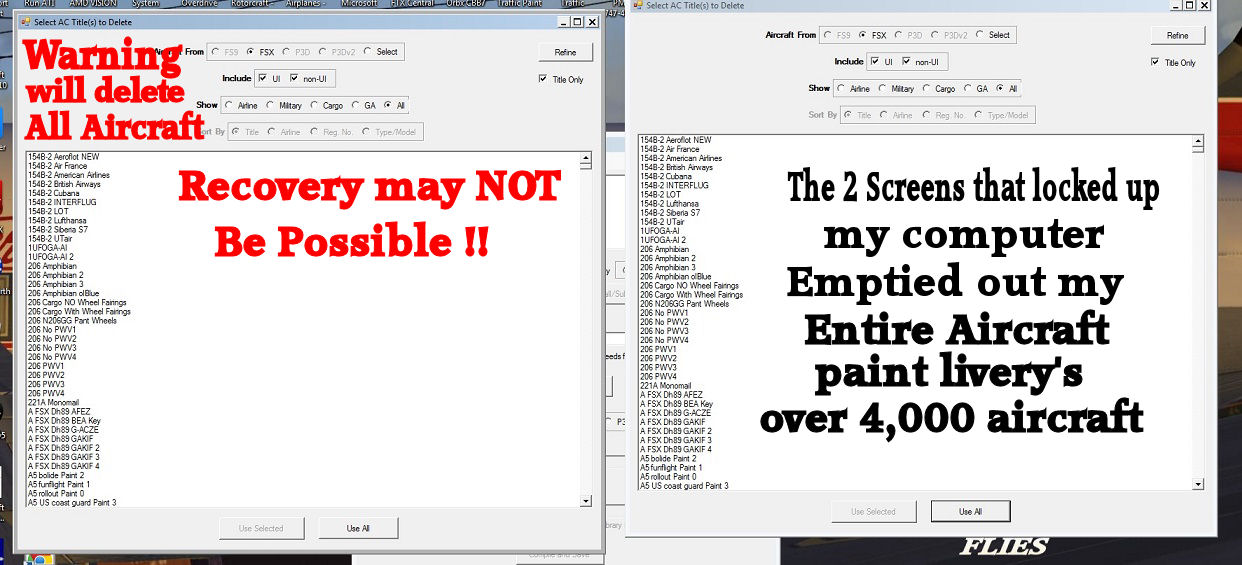
I was using it and trying to learn how it works, and some screens popped up and Locked up my Computer, it just sat there idle.

I had to Log Off, and restart my computer,,,

NOW get this - after I restarted it - I seen a bunch of folders the Recycle Bin,,,, guess what , it was ALL my Aircraft Paints I had collected for the last 3 years for all my PAYWARE and FREEWARE Aircraft !!

I'll post screen shots later of the screens that came up with this software .

they had better all go back into my proper folders,,, or,, I'll be soin some very very Serious Hunting of somebody @!!!!!!

Take that Program and stick it right the light don't shine - Ya I'm beyond MIFFED !!! :evil: :evil: :evil: :twisted: :twisted: :twisted:


http://simviation.com/1/search?submit=1&keywords=+ai+flight+planner&x=17&y=10

Image
User avatar
Jetranger
Major
Major
 
Posts: 3232
Joined: Fri Sep 30, 2011 2:49 am
Location: Kansas City Missouri USA / KMKC

Re: AI traffic File BGL

Postby Jetranger » Sun Feb 16, 2014 1:40 pm

Luckily, I was able to save over 4,000 Aircraft

That particular Pop up page should of had some kind of RED Warning across the front to warn users of the end result, warning , making sure of their actions.

Have NO Idea why the program Locked up, I was trying to read what the page said and was about, and it just Froze, wouldn't let me out of it or go back, couldn't cancel out of it nothing, only option was to log off and restart my computer and when I logged back on, and my Desk Top came back to life, I noticed my Trash can was full/ had trash in it,,,

I took a Look and it was ALL my Paint addon's I'd collected the last 3 years for all my Payware and Freeware Aircraft and the ones I custom painted the interiors on for hours on end till the weee hours of the morning.

Some of ya may think that program is great, whatever I wouldn't have it - and I could go on and on,

Just glad I don't have to go up to Victoria BC !!!

Just be Forewarned and be very very very CAREFUL with that program and what and how you use it, if you don't know what something does, leave it alone and don't try to experiment and find out what it does - Also be very careful about clicking on certain pages, that may come up, if your not sure what the page / program will do, you may be very Disappointed in the end results !!

This is the type of Program, that you'd better be very Computer coded literate and understand some codes, and be good at reading between the lines of what the program and its contents are supposed to do to your simulator !

1 Fatal Experiment or Test to see if something works, could result in a Disaster for your Simulator permanently !

I believe this Program could of been wrote better and more user friendly and understandable than the way it is now !

might be good at making scenery, but the programming skills - lame,, as well as the some of the documentation needs to be in more laymans terms that's understandable !


Image
User avatar
Jetranger
Major
Major
 
Posts: 3232
Joined: Fri Sep 30, 2011 2:49 am
Location: Kansas City Missouri USA / KMKC

Re: AI traffic File BGL

Postby Jetranger » Sun Feb 16, 2014 2:08 pm

I should of had a CLUE when I watched this Video, not really the Video, BUT, All the users who've left comments below the video about this program, that should of told me right there, Trash the thing !

http://www.youtube.com/watch?v=0ZcjlVn6tmY

Evidently, its got problems and obviously not that well wrote so users can understand what their doing and or needs to be done.

The comments below the these videos, speak Volumes from users who've tried it !!!

Ain't in my Computer anymore !!

I found a Nifty place for it tho :D :D :P :P


Image
User avatar
Jetranger
Major
Major
 
Posts: 3232
Joined: Fri Sep 30, 2011 2:49 am
Location: Kansas City Missouri USA / KMKC

Re: AI traffic File BGL

Postby Jetranger » Sun Feb 16, 2014 2:15 pm

OMFG - I spoke tto soon,,,,,

I just went and started up my FSX,,,, AND I GOT NOTHING THAT PROGRAM HAS QWIPED OUT MY ENTIRE AIRCRAFT CFG LIVERY LIST, ALL 4,897 OF MY DAMNED AIRCRAFT

I Got Nothing,,,, zero zip Zilch notta :evil: :evil: :evil: :evil: :evil: :evil: :evil:

I gotta go have a cigerrate,,, i',m so pissed off right now,,,,, better hope I can recover this or I'm headin to Victoria BC Thatas a fact !! :evil: :evil: :evil: ,
User avatar
Jetranger
Major
Major
 
Posts: 3232
Joined: Fri Sep 30, 2011 2:49 am
Location: Kansas City Missouri USA / KMKC

Next

Return to Flight Simulator X (FSX) and Steam

Who is online

Users browsing this forum: No registered users and 935 guests