Scenery.cfg error

FSX including FSX Steam version.

Scenery.cfg error

Postby beegee » Fri Jan 24, 2014 4:27 pm

Hi everyone,

After trying to add some scenery files, I got this error message "SCENERY.CFG file error. Invalid remote scenery path in scenery Area.115." Anyone know how to fix it? Thanks
beegee
Ground hog
Ground hog
 
Posts: 17
Joined: Sun Jan 05, 2014 8:34 pm
Location: Montreal, Canada

Re: Scenery.cfg error

Postby papituwall » Sat Jan 25, 2014 7:39 am

This happens when there is a change in the location of a scenery. I suppose you use FSX.
¿Do you install scenery in a separate hard drive?

The scenery area 115 must have a name, for instance "AirhispaniaSC"
There are two ways:

1-Open FSX, go to scenery library, you won't see area 115 but you'll see (following the example) AirhispaniaSC: uninstall and reinstall the scenery.

2-You can edit scenery.cfg and look for area 115 and set manually the right path in the line "Local".

[Area.115]
Title=AirHispania SC
Local=Addon Scenery\AirHispania SC <<<<<<<<< SET PATH HERE
Remote=
Active=TRUE
Required=FALSE
Layer=39
User avatar
papituwall
Captain
Captain
 
Posts: 833
Joined: Thu Sep 19, 2013 1:42 pm
Location: LEZG

Re: Scenery.cfg error

Postby Hagar » Sat Jan 25, 2014 10:59 am

Area.115 is the FSX\Addon Scenery folder. This is activated by default. I suspect you deleted the Addon Scenery\scenery & \texture sub-folders. These are empty unless you installed something to them. This is how it should look:

Image

Open your FSX\Addon Scenery folder to check it. If either or both sub-folders are missing create new folders renaming them scenery & texture.
Image

Founder & Sole Member - Grumpy's Over the Hill Club for Veteran Virtual Aviators
Member of the Fox Four Group
My Google Photos albums
My Flickr albums
User avatar
Hagar
Colonel
Colonel
 
Posts: 30868
Joined: Wed Jun 19, 2002 7:15 am
Location: Costa Geriatrica

Re: Scenery.cfg error

Postby papituwall » Sat Jan 25, 2014 12:27 pm

I had not FSX available when my first answer, this is area 115, as Hagar says it is in default scenery.

[Area.115]
Title=Reno
Local=Scenery\Cities\Reno
Layer=115
Active=TRUE
Required=TRUE

Something happened with your Reno scenery
User avatar
papituwall
Captain
Captain
 
Posts: 833
Joined: Thu Sep 19, 2013 1:42 pm
Location: LEZG

Re: Scenery.cfg error

Postby Hagar » Sat Jan 25, 2014 1:41 pm

papituwall wrote:I had not FSX available when my first answer, this is area 115, as Hagar says it is in default scenery.

[Area.115]
Title=Reno
Local=Scenery\Cities\Reno
Layer=115
Active=TRUE
Required=TRUE

Something happened with your Reno scenery

It depends on which Scenery.cfg file you're looking at. There are three different locations for this file. Two are templates. The active Scenery.cfg is in this location:-

C:\ProgramData\Microsoft\FSX\Scenery.cfg in Vista or Windows 7

or

C:\Documents and Settings\All Users\Microsoft\FSX\Scenery.cfg under Windows XP

This is copied from my own active Scenery.cfg:-

[Area.114]
Title=Propeller Objects
Local=Scenery\Props
Layer=114
Active=TRUE
Required=TRUE

[Area.115]
Title=Addon Scenery
Local=Addon Scenery
Layer=115
Active=TRUE
Required=FALSE


[Area.116]
Title=Reno
Local=Scenery\Cities\Reno
Layer=116
Active=TRUE
Required=FALSE
[Area.117]
Title=Istanbul
Local=Scenery\Cities\Istanbul
Layer=117
Active=TRUE
Required=FALSE
[Area.118]
Title=Longleat
Local=Scenery\Cities\Longleat
Layer=118
Active=TRUE
Required=FALSE
[Area.119]
Title=Berlin
Local=Scenery\Cities\Berlin
Layer=119
Active=TRUE
Required=FALSE

As I said earlier, Area.115 is the FSX\Addon Scenery folder. The error is easily fixed if you follow my instructions.
Image

Founder & Sole Member - Grumpy's Over the Hill Club for Veteran Virtual Aviators
Member of the Fox Four Group
My Google Photos albums
My Flickr albums
User avatar
Hagar
Colonel
Colonel
 
Posts: 30868
Joined: Wed Jun 19, 2002 7:15 am
Location: Costa Geriatrica

Re: Scenery.cfg error

Postby papituwall » Sun Jan 26, 2014 4:30 am

Tx. Hagar, I'm curious, because this is my active scenery.cfg (FSX acceleration):

... ... ....
[Area.115]
Title=Reno
Local=Scenery\Cities\Reno
Layer=115
Active=TRUE
Required=TRUE

[Area.116]
Title=Estambul
Local=Scenery\Cities\Istanbul
Layer=116
Active=TRUE
Required=TRUE

[Area.117]
Title=Longleat
Local=Scenery\Cities\Longleat
Layer=117
Active=TRUE
Required=TRUE

[Area.118]
Title=Berlín
Local=Scenery\Cities\Berlin
Layer=118
Active=TRUE
Required=TRUE

[Area.119]
Title=Base aérea de Edwards
Local=Scenery\Cities\Edwards_AFB
Layer=119
Active=TRUE
Required=TRUE

[Area.120]
Title=Escenario adicional <<<<Addon Scenery
Local=Addon Scenery
Layer=120
Active=TRUE
Required=FALSE

All addons I have start here, and all are placed out of FSX in another hard drive.

[Area.121]
Title=AirHispania SCX Aerodromos
Local=O:\FSX_airports\AirHispania SCX Aerodromos
Layer=121
Active=TRUE
Required=FALSE

[Area.122]
Title=AirHispania SCX Librerias
Local=O:\FSX_airports\AirHispania SCX Librerias
Layer=122
Active=TRUE
Required=FALSE

[Area.123]
Title=AirHispania SCX Varios
Local=O:\FSX_airports\AirHispania SCX Varios
Layer=123
Active=TRUE
Required=FALSE

[Area.124]
Title=ACG IWM Duxford FSX
Local=O:\FSX_airports\ACG IWM Duxford FSX
Layer=124
Active=TRUE
Required=FALSE

[Area.125]
Title=ACG IWM Duxford Airshow Addon
Local=O:\FSX_airports\ACG IWM Duxford Airshow Addon
Layer=125
Active=TRUE
Required=FALSE

... ... ...

Regards
User avatar
papituwall
Captain
Captain
 
Posts: 833
Joined: Thu Sep 19, 2013 1:42 pm
Location: LEZG

Re: Scenery.cfg error

Postby Hagar » Sun Jan 26, 2014 7:37 am

papituwall wrote:Tx. Hagar, I'm curious, because this is my active scenery.cfg (FSX acceleration):

... ... ...

Regards

That's odd. Perhaps it depends on which version (country) of FSX you have. Mine is the UK version which I believe is the same as the US version.
Image

Founder & Sole Member - Grumpy's Over the Hill Club for Veteran Virtual Aviators
Member of the Fox Four Group
My Google Photos albums
My Flickr albums
User avatar
Hagar
Colonel
Colonel
 
Posts: 30868
Joined: Wed Jun 19, 2002 7:15 am
Location: Costa Geriatrica

Re: Scenery.cfg error

Postby Bass » Sun Jan 26, 2014 9:29 am

This is interesting, and Hagar, i dont think it depends on the FSX version!
I got a scenery backup showing this:

[Area.115]
Title=Addon Scenery
Local=Addon Scenery
Layer=115
Active=TRUE
Required=FALSE
[Area.116]
Title=Reno
Local=Scenery\Cities\Reno
Layer=116
Active=TRUE
Required=FALSE
[Area.117]
Title=Istanbul
Local=Scenery\Cities\Istanbul
Layer=117
Active=TRUE
Required=FALSE
[Area.118].............

and now my scenery shows this (same system, same FSX install, but after alot of addons)

[Area.115]
Title=Reno
Local=Scenery\Cities\Reno
Layer=115
Active=TRUE
Required=TRUE

[Area.116]
Title=Istanbul
Local=Scenery\Cities\Istanbul
Layer=116
Active=TRUE
Required=TRUE

[Area.117]
Title=Longleat
Local=Scenery\Cities\Longleat
Layer=117
Active=TRUE
Required=TRUE

[Area.118]
Title=Berlin
Local=Scenery\Cities\Berlin...........

I dont know why this is!!! I cant find any Addon scenery Areas in my last cfg :think:
"Just try to be YOU"!............ Kurt 

System. GA-X58A-UD3R, i7-950QC, Corsair XMS3 18GB 2000, GTX 780 tf 3GB, Corsair CMPSU-850, 24 BenQ 120, TM Hotas cougar, win7 pro.
User avatar
Bass
Major
Major
 
Posts: 3043
Joined: Wed Feb 15, 2012 9:32 am
Location: Scandinavia

Re: Scenery.cfg error

Postby Hagar » Sun Jan 26, 2014 10:25 am

Curiouser & curiouser. :think:

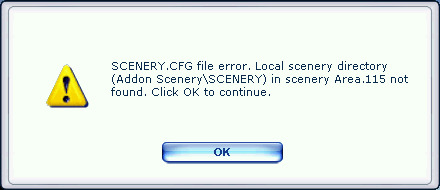
As an experiment I deleted the scenery sub-folder from my FSX\Addon Scenery folder. (Note that this folder is empty by default.) I got this error when I started FSX.

Image

This confirms that the missing FSX\AddonScenery\scenery sub-folder causes an error message. I still think this is the most likely reason for what is a common problem. When first starting to install 3rd party scenery some people delete those little scenery & texture sub-folders because they don't think they should be there.
Image

Founder & Sole Member - Grumpy's Over the Hill Club for Veteran Virtual Aviators
Member of the Fox Four Group
My Google Photos albums
My Flickr albums
User avatar
Hagar
Colonel
Colonel
 
Posts: 30868
Joined: Wed Jun 19, 2002 7:15 am
Location: Costa Geriatrica

Re: Scenery.cfg error

Postby Fozzer » Sun Jan 26, 2014 11:39 am

When I create my own scenery using; "Instant Scenery" scenery designer, that is where the xxx.bgl files are placed automatically.....in the normally empty "scenery" folder, so it is important that it appears there, in the Add-on Scenery Folder.
All my "downloaded" scenery Files go into the main Add-on Scenery Folder and appear in the Add-on Scenery library.

Paul.
Win 8.1 64-bit. DX11. Advent Tower. Intel i7-3770 3.9 GHz 8-core. 8 GB System RAM. AMD Radeon HD 7700 1GB RAM. DVD ROM. 2 Terra Byte SATA Hard Drive. Philips 17" LCD Monitor. Saitek Cyborg X Fly-5 Joystick. ...and a Briggs and Stratton Petrol Lawn Mower.
User avatar
Fozzer
Colonel
Colonel
 
Posts: 27369
Joined: Thu Jan 31, 2002 3:11 pm
Location: Hereford. England. EGBS.

Re: Scenery.cfg error

Postby beegee » Sun Jan 26, 2014 4:10 pm

Thanks everyone for the replies. My Area.115 also shows Reno as the city when the error occurred. I tried the repair tool found on the FSX disc1 and it (of course) fouled up the whole FSX installation. I had to re-install FSX. Everything is now working great. :D
beegee
Ground hog
Ground hog
 
Posts: 17
Joined: Sun Jan 05, 2014 8:34 pm
Location: Montreal, Canada

Re: Scenery.cfg error

Postby papituwall » Sun Jan 26, 2014 4:15 pm

Considering a clean installation the "addon scenery" is the last one in the list, but:
Both of you have it in position 115 and me in 120, but all we have 120 default sceneries, I think these last 5 sceneries come with acceleration so in this case "addon scenery" was installed before acceleration and keeps position 115. What happened is that after installation I moved to the last position. My apologies for the confusion.

Hagar is 100% right: I still think this is the most likely reason for what is a common problem. When first starting to install 3rd party scenery some people delete those little scenery & texture sub-folders because they don't think they should be there.

In the case of Fozzer, is the contrary, it looks like you have inadvertently deleted the line "addon scenery" from FSX (program opened) scenery library.
Not being there, also it is not in scenery.cfg so nobody "claims" for this scenery. Then, if you have data in those scenery & texture sub-folders, they won't be loaded.

Regards
User avatar
papituwall
Captain
Captain
 
Posts: 833
Joined: Thu Sep 19, 2013 1:42 pm
Location: LEZG

Re: Scenery.cfg error

Postby Bass » Mon Jan 27, 2014 9:19 am

!!! I have not deleted anything, yet, in my addons folder nor inside FSX library!!
I do have scenery and texture sub folders inside Addon scenery showing a few bgl and bmp (i dont use 'em tho)
The interesting issue here is, i have none Addon scenery in my scenery.cfg and i have none Addon scenery in FSX library, and i've never got any scenery errors when loading FSX!
Can you explain that.
"Just try to be YOU"!............ Kurt 

System. GA-X58A-UD3R, i7-950QC, Corsair XMS3 18GB 2000, GTX 780 tf 3GB, Corsair CMPSU-850, 24 BenQ 120, TM Hotas cougar, win7 pro.

User avatar
Bass
Major
Major
 
Posts: 3043
Joined: Wed Feb 15, 2012 9:32 am
Location: Scandinavia

Re: Scenery.cfg error

Postby garymbuska » Mon Jan 27, 2014 10:12 am

Every one time out here.
When it comes to a scenery cfg file one has to remember that every one file can be different. The bottom line here is you need to find out what the name of the scenery and where it is located at in order to fix this error. But what I have for area 115 and what you have for area can be different depending upon if you have either added scenery or changed the order in which the scenery is created.
All one has to do is to alter the order in which scenery is created and what you had for area 115 can now be different because you changed the order. A lot of people do this and do not truly understand what they are doing.
Think of it as a deck of cards. If you take a brand new deck and pull say the 15th card it might be the 10 of clubs. But now if you shuffle the same deck and pull the 15th card it could be the ace of hearts. The same thing holds true in a scenery cfg file after a brand new install what you find in area 115 will always be the same on a different system provided they have not shuffled the deck per say. Now mind you if you should add a file I think that all new files go to the bottom of the deck so if you had say 200 area,s and add a file you now will have 201 areas and the last one will be what you just added.
The problem here is that some add on scenery needs to be on top of the deck so now what was the first layer becomes the second and so forth.
so if the last area in your scenery was say area 200 it will now become area 201. I know this can be confusing but it is really simple.


<<v
Gary M Buska
SYSTEM Specs ASUS P8Z68 V/GEN 3 mother board: INTELL I7 2600k 3.48 ghz Quad core CPU with Sandy bridge: 12 Gigs of 1800hz ram:
GTX 950 OVER CLOCKED: 2 Gigs Ram Windows 10 Home 64 bit Operating system. 750W Dedicated modular power supply. Two Internal 1TB hard drives 1 External 1TB 3.2 USB hard drive. SAITEK Cessna flight Yoke with throttles.
CH Rudder Peddles 27 inch Wide screen Monitor
User avatar
garymbuska
Major
Major
 
Posts: 4415
Joined: Tue Dec 30, 2003 11:10 am
Location: Jacksonville, Florida

Re: Scenery.cfg error

Postby Bass » Tue Jan 28, 2014 10:56 am

Thanks Gary for that input, but i dont see anything new in it!
I know alot about sceneries and therefor also scenery.cfg's.

My Q was, why/when are FSX (windows) deleting my >[Areaxx] Addon scenery< when installing other Addon folders inside Addon Scenery?
As i said, never got any scenery errors as Hagar showed. Why is that?

Maybe i should try to add Addon scenery to FSX library, but then i'm sure i'll get an error :violin:
"Just try to be YOU"!............ Kurt 

System. GA-X58A-UD3R, i7-950QC, Corsair XMS3 18GB 2000, GTX 780 tf 3GB, Corsair CMPSU-850, 24 BenQ 120, TM Hotas cougar, win7 pro.
User avatar
Bass
Major
Major
 
Posts: 3043
Joined: Wed Feb 15, 2012 9:32 am
Location: Scandinavia

Next

Return to Flight Simulator X (FSX) and Steam

Who is online

Users browsing this forum: No registered users and 986 guests