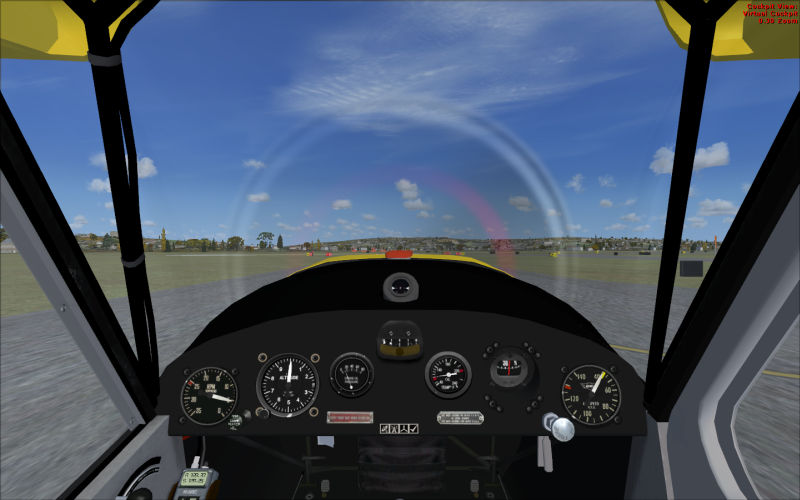
Question about missing instruments

FSX including FSX Steam version.

Question about missing instruments

Postby Redbirdman » Tue Oct 15, 2013 10:02 pm

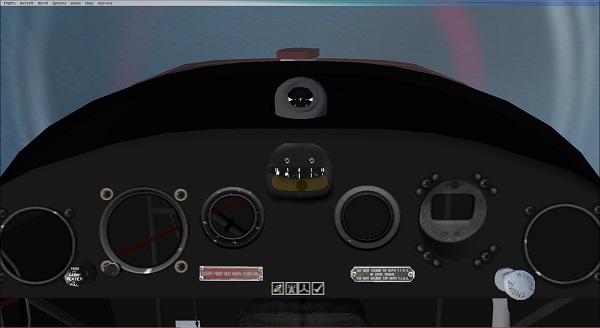
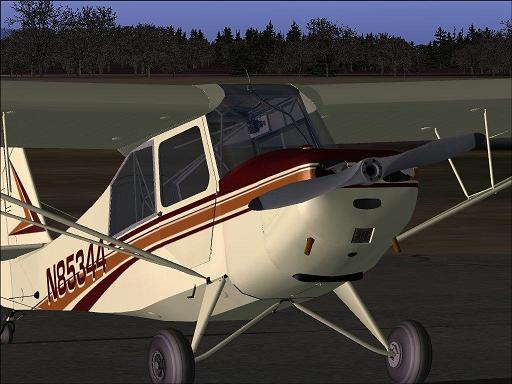
Maybe someone can give me a clue about a Long Island Classic L-16 panel that's been eluding me.

Its an FS9 model that I have had for a few years.........I just dropped in a thumbnail and sent it over to my new FSX.
At the same time I did the same for my Long Island Classics Aeronca 7AC.........
Now, both work fine in FSX. However, the 7AC has a complete VC panel, while the L16 has missing gauges !
What is weird is the 7AC uses almost all L16 gauges and panel. The config is almost exactly the same and both have gauge 'cabinet files' in the 'panel' folder....and the textures folder is identical except for a radio switch...

Image

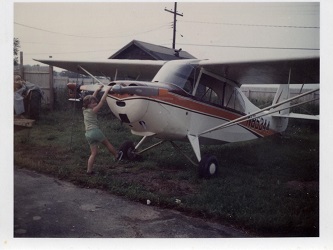
BTW......this air machine is rather dear to my heart......right after it came out Sea Wolf did a repaint of my old 'Civil' Aeronca from the 70's and the repaint is right there alongside the LIC L16 in all the downloads.
Image


Soooooo, any help would really be appreciated.....
Thanks...
<<q
User avatar
Redbirdman
Ground hog
Ground hog
 
Posts: 6
Joined: Tue Oct 15, 2013 8:26 pm

Re: Question about missing instruments

Postby PhantomTweak » Tue Oct 15, 2013 10:47 pm

Are they "missing" or just dark? I had that with some of the gauges in an MD500 in FS'04. It looks like the knob on the right of the top pic, the silver twisty one, may be the same as in the MD 500. try clicking on the right side of it a few times and see what happens...?
Just a thought, I DO have them on very rare occaisions! :lol: They usually get lonely and go away pretty fast tho. :whistle:

Have fun, fly high, far, and free! <<s
Pat
2S7
Have fun, fly high, far, and free!
Pat
2S7, Chiloquin OR Image
User avatar
PhantomTweak
Captain
Captain
 
Posts: 599
Joined: Mon Oct 14, 2013 11:10 pm
Location: Chiloquin OR

Re: Question about missing instruments

Postby EVVFCX » Wed Oct 16, 2013 6:37 am

Hi,

Have a look at your panel.cfg, check if it's been aliased (wrongly), could be why gauges missing on one but they use same gauge set.


regards

Steve
User avatar
EVVFCX
Captain
Captain
 
Posts: 751
Joined: Tue Nov 27, 2007 8:32 am
Location: Pontefract, West Yorkshire

Re: Question about missing instruments

Postby Redbirdman » Wed Oct 16, 2013 6:54 pm

Thanks for the responses.....I'll check.
But the majority of the holes are not dark..... you can actually see the tubing, dust and old electrical tape under the panel...and I don't remember seeing 'aliased' in the config....but I'll check again.
User avatar
Redbirdman
Ground hog
Ground hog
 
Posts: 6
Joined: Tue Oct 15, 2013 8:26 pm

Re: Question about missing instruments

Postby Fozzer » Thu Oct 17, 2013 3:48 am

The detail certainly appears within the instruments....

...maybe you just need to illuminate them...with the "Panel Lighting Switch"...(wherever that is?)... :? ...!

Paul...sometimes in the dark... :mrgreen: ...!
Win 8.1 64-bit. DX11. Advent Tower. Intel i7-3770 3.9 GHz 8-core. 8 GB System RAM. AMD Radeon HD 7700 1GB RAM. DVD ROM. 2 Terra Byte SATA Hard Drive. Philips 17" LCD Monitor. Saitek Cyborg X Fly-5 Joystick. ...and a Briggs and Stratton Petrol Lawn Mower.
User avatar
Fozzer
Colonel
Colonel
 
Posts: 27369
Joined: Thu Jan 31, 2002 3:11 pm
Location: Hereford. England. EGBS.

Re: Question about missing instruments

Postby COBS » Thu Oct 17, 2013 5:58 am

Could you please post the following :-

1. the "title" of the "cabinet files" .

and

2. Copy and paste in your reply the full "Panel cfg" text .
I know that it can be quite long , but it might help in finding the reason that your
instruments are not showing.

Cheers
Karol
COBS
2nd Lieutenant
2nd Lieutenant
 
Posts: 81
Joined: Fri Jul 02, 2010 9:59 am
Location: Australia

Re: Question about missing instruments

Postby Redbirdman » Thu Oct 17, 2013 9:54 am

Well, here we go: I hope this helps....THANKS!
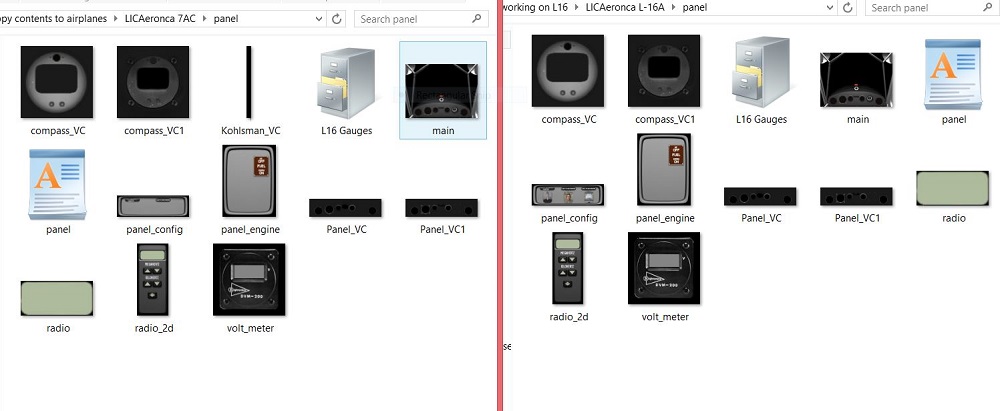
Image


7AC PANEL THAT SHOWS FINE:


This Panel.cfg file created by FS Panel Studio panel editor utility - http://www.fspanelstudio.com
// Built Thursday, December 22, 2005 at 13:43 FSPS Build:18222

[Window Titles]
Window00=Main Panel
Window01=Engine Controls
Window02=Configuration
Window03=Radio Stack
Window04=GPS


[VIEWS]
VIEW_FORWARD_WINDOWS=MAIN_PANEL,THROTTLE_PANEL,10001,RADIO_STACK_PANEL,GPS_PANEL

VIEW_FORWARD_ZOOM=0.500
VIEW_FORWARD_DIR=7.000, 0.000, 0.000


//--------------------------------------------------------
[Window00]
file=main.bmp
file_1024=main.bmp
size_mm=1024,768
window_size_ratio=1.000
position=7
visible=1
ident=MAIN_PANEL

gauge00=L16 Gauges!airspeed, 787,642,97,97
gauge01=L16 Gauges!altimeter, 271,619,98,98
gauge02=L16 Gauges!rpm, 136,639,95,95
gauge03=L16 Gauges!oilpres, 399,622,58,58
gauge04=L16 Gauges!oiltemp, 564,621,58,58
gauge05=L16 Gauges!compass, 658,605,84,84
gauge06=L16 Gauges!fuel, 496,491,32,28
gauge07=L16 Gauges!engine_primer, 724,702,59,50
gauge08=L16 Gauges!cabinheat, 215,716,50,43
gauge09=L16 Gauges!skidball, 464,556,94,78
gauge10=L16 Gauges!GPS Icon, 475,734,19,19
gauge11=L16 Gauges!Radio Icon, 494,734,19,19
gauge12=L16 Gauges!Throttle Quadrant Prop Icon, 513,734,19,19
gauge13=L16 Gauges!options Icon, 532,734,19,19


//--------------------------------------------------------
[Window01]
file=panel_engine.bmp
file_1024=panel_engine.bmp
size_mm=389,529
window_size_ratio=1.000
position=0
visible=0
ident=THROTTLE_PANEL
window_size= 0.280, 0.500
window_pos= 0.000, 0.000

gauge00=L16 Gauges!fuel_cutoff, 249,238,121,212
gauge01=L16 Gauges!mags, 35,336,209,171
gauge02=L16 Gauges!throttle, 66,49,128,288


//--------------------------------------------------------
[Window02]
file=panel_config.bmp
file_1024=panel_config.bmp
size_mm=665
window_size_ratio=1.000
position=0
visible=0
ident=10001
window_size= 0.520, 0.190
window_pos= 0.250, 0.000

gauge00=L16 Gauges!Co-Pilot Status, 264,65,83,110
gauge01=L16 Gauges!Pilot Status, 105,65,83,110
gauge02=L16 Gauges!Door Status, 387,65,83,110
gauge03=L16 Gauges!Wheelpants, 504,65,83,110


//--------------------------------------------------------
[Window03]
file=radio_2d.bmp
file_1024=radio_2d.bmp
size_mm=235
window_size_ratio=1.000
position=0
visible=0
ident=RADIO_STACK_PANEL
window_size= 0.170, 0.540
window_pos= 0.830, 0.000

gauge00=L16 Gauges!radio, 41,62,154,56
gauge01=L16 Gauges!radio_popup, 43,185,143,237


//--------------------------------------------------------
[Window04]
Background_color=0,0,0
size_mm=512
window_size_ratio=1.000
position=0
visible=0
ident=GPS_PANEL
window_size= 0.500, 0.500
window_pos= 0.000, 0.000

gauge00=fs9gps!gps_295, 7,10,482,396


//--------------------------------------------------------
[Vcockpit01]
file=Panel_VC1.bmp
Background_color=0,0,0
size_mm=1024,256
visible=1
pixel_size=1024,1024
texture=$Panel_VC1

gauge00=L16 Gauges!kohlsmanknob, 230,199,27,23
gauge01=L16 Gauges!GPS Icon, 473,229,19,19
gauge02=L16 Gauges!Radio Icon, 492,229,19,19
gauge03=L16 Gauges!Throttle Quadrant Prop Icon, 511,229,19,19
gauge04=L16 Gauges!options Icon, 530,229,19,19


[Vcockpit02]
file=Kohlsman_VC.bmp
size_mm=38,588
visible=1
render_3d_window=1
pixel_size=512,512
texture=$kohlsman_VC

gauge00=L16 Gauges!kohlsman, 5,143,21,287

//--------------------------------------------------------
[Vcockpit03]
file=radio.bmp
Background_color=0,0,0
size_mm=128,128
visible=0
pixel_size=128,128
texture=$radio

gauge00=L16 Gauges!radio, 7,14,112,96


[Color]
Day=255,255,255
Night=5,5,5
Luminous=5,5,5

[Default View]
X=0
Y=0
SIZE_X=8191
SIZE_Y=8191

L 16 PANEL THAT DOES NOT SHOW INSTRUMENTS IN THE PANEL HOLES

// This Panel.cfg file created by FS Panel Studio panel editor utility - http://www.fspanelstudio.com
// Built Saturday, October 02, 2004 at 17:49 FSPS Build:14852

[Window Titles]
Window00=Main Panel
Window01=Engine Controls
Window02=Configuration
Window03=Radio Stack
Window04=GPS


[VIEWS]
VIEW_FORWARD_WINDOWS=MAIN_PANEL,THROTTLE_PANEL,10001,RADIO_STACK_PANEL,GPS_PANEL

VIEW_FORWARD_ZOOM=0.500
VIEW_FORWARD_DIR=7.000, 0.000, 0.000


//--------------------------------------------------------
[Window00]
file=main.bmp
file_1024=main.bmp
size_mm=1024,768
window_size_ratio=1.000
position=7
visible=1
ident=MAIN_PANEL

gauge00=L16 Gauges!airspeed, 787,642,97,97
gauge01=L16 Gauges!altimeter, 271,619,98,98
gauge02=L16 Gauges!rpm, 136,639,95,95
gauge03=L16 Gauges!oilpres, 399,622,58,58
gauge04=L16 Gauges!oiltemp, 564,621,58,58
gauge05=L16 Gauges!compass, 658,605,84,84
gauge06=L16 Gauges!fuel, 496,491,32,28
gauge07=L16 Gauges!engine_primer, 724,702,59,50
gauge08=L16 Gauges!cabinheat, 215,716,50,43
gauge09=L16 Gauges!skidball, 464,556,94,78
gauge10=L16 Gauges!GPS Icon, 475,734,19,19
gauge11=L16 Gauges!Radio Icon, 494,734,19,19
gauge12=L16 Gauges!Throttle Quadrant Prop Icon, 513,734,19,19
gauge13=L16 Gauges!options Icon, 532,734,19,19
gauge14=l16 gauges!Emerg Status, 933, 651 ,91,113


//--------------------------------------------------------
[Window01]
file=panel_engine.bmp
file_1024=panel_engine.bmp
size_mm=389,529
window_size_ratio=1.000
position=0
visible=0
ident=THROTTLE_PANEL
window_size= 0.280, 0.500
window_pos= 0.000, 0.000

gauge00=L16 Gauges!fuel_cutoff, 249,238,121,212
gauge01=L16 Gauges!mags, 35,336,209,171
gauge02=L16 Gauges!throttle, 66,49,128,288


//--------------------------------------------------------
[Window02]
file=panel_config.bmp
file_1024=panel_config.bmp
size_mm=665
window_size_ratio=1.000
position=0
visible=0
ident=10001
window_size= 0.520, 0.190
window_pos= 0.250, 0.000

gauge00=L16 Gauges!Co-Pilot Status, 298,64,83,110
gauge01=L16 Gauges!Disco_ball_Status, 484,63,83,110
gauge02=L16 Gauges!Pilot Status, 106,63,83,110


//--------------------------------------------------------
[Window03]
file=radio_2d.bmp
file_1024=radio_2d.bmp
size_mm=235
window_size_ratio=1.000
position=0
visible=0
ident=RADIO_STACK_PANEL
window_size= 0.170, 0.540
window_pos= 0.830, 0.000

gauge00=L16 Gauges!radio, 41,62,154,56
gauge01=L16 Gauges!radio_popup, 43,185,143,237


//--------------------------------------------------------
[Window04]
Background_color=0,0,0
size_mm=512
window_size_ratio=1.000
position=0
visible=0
ident=GPS_PANEL
window_size= 0.500, 0.500
window_pos= 0.000, 0.000

gauge00=fs9gps!gps_295, 7,10,482,396


//--------------------------------------------------------
[Vcockpit01]
file=Panel_VC.bmp
Background_color=0,0,0
size_mm=1024,256
visible=1
pixel_size=1024,1024
texture=$Panel_VC

gauge00=L16 Gauges!airspeed, 842,119,107,107
gauge01=L16 Gauges!altimeter, 234,99,108,108
gauge02=L16 Gauges!rpm, 78,122,106,106
gauge03=L16 Gauges!oilpres, 383,99,64,64
gauge04=L16 Gauges!oiltemp, 577,99,65,65
gauge05=l16 gauges!Emerg Status, 3,5,83,110


//--------------------------------------------------------
[Vcockpit02]
file=Panel_VC1.bmp
Background_color=0,0,0
size_mm=1024,256
visible=1
pixel_size=1024,1024
texture=$Panel_VC1

gauge00=L16 Gauges!kohlsmanknob, 230,199,27,23
gauge01=L16 Gauges!GPS Icon, 473,229,19,19
gauge02=L16 Gauges!Radio Icon, 492,229,19,19
gauge03=L16 Gauges!Throttle Quadrant Prop Icon, 511,229,19,19
gauge04=L16 Gauges!options Icon, 530,229,19,19


//--------------------------------------------------------
[Vcockpit03]
file=Compass_VC.bmp
Background_color=0,0,0
size_mm=128,128
visible=0
pixel_size=128,128
texture=$Compass_VC

gauge00=L16 Gauges!compass, 7,5,119,119


//--------------------------------------------------------
[Vcockpit04]
file=Compass_VC1.bmp
Background_color=0,0,0
size_mm=128,128
visible=0
pixel_size=128,128
texture=$Compass_VC1


//--------------------------------------------------------
[Vcockpit05]
file=volt_meter.bmp
Background_color=0,0,0
size_mm=128,128
visible=0
pixel_size=128,128
texture=$volt_meter

gauge00=L16 Gauges!voltage, 38,39,52,22


//--------------------------------------------------------
[Vcockpit06]
file=radio.bmp
Background_color=0,0,0
size_mm=128,128
visible=0
pixel_size=128,128
texture=$radio

gauge00=L16 Gauges!radio, 7,14,112,96


[Color]
Day=255,255,255
Night=5,5,5
Luminous=5,5,5

[Default View]
X=0
Y=0
SIZE_X=8191
SIZE_Y=6143


whewww.. that was a lot of typing! :>) :D
User avatar
Redbirdman
Ground hog
Ground hog
 
Posts: 6
Joined: Tue Oct 15, 2013 8:26 pm

Re: Question about missing instruments

Postby Bass » Thu Oct 17, 2013 10:24 am

As i see it, FSX dont read you FS9 VC textures correctly.
Try to mess about a little with Kohlsman_VC.

Remember to save what you got.
"Just try to be YOU"!............ Kurt 

System. GA-X58A-UD3R, i7-950QC, Corsair XMS3 18GB 2000, GTX 780 tf 3GB, Corsair CMPSU-850, 24 BenQ 120, TM Hotas cougar, win7 pro.
User avatar
Bass
Major
Major
 
Posts: 3043
Joined: Wed Feb 15, 2012 9:32 am
Location: Scandinavia

Re: Question about missing instruments

Postby COBS » Thu Oct 17, 2013 10:21 pm

OK , thanks for that.

Note the difference between the two Panel cfg's.
The working one has 3 VC entries , ie: [Vcockpit01] [Vcockpit02] [Vcockpit03]
While.
The NON working one has 6 VC entries , ie: [Vcockpit01] to [Vcockpit06]

Try the Following :-

1. Copy the Current "NON" working Panel cfg , then paste it into a Folder in your 'My Documents' area
this is you insurance backup copy.

2. Go to your working Panel cfg
"Right Click" your mouse and hold it down at the very beginning of [Vcockpit01] then drag it down
to the very end of [Vcockpit03] ,
now release you mouse,
You will see that all 3 VC sections are hilighted , "Left click" the mouse on the Hilighted area , you
will get a dialogue box , select copy .

NOW.
Go to your NON working Panel cfg
Hilight all 6 VC sections . ( Right click and drag)
Then "Left click" on the hilighted area , and select 'Paste" from the dialogue box.
You will now only have 3 VC sections in this Panel cfg .

IMPORTANT ... SAVE your modified Panel cfg .

PLEASE be very careful to ensure you Highlight " ALL " of the VC sections concerned .

Now go and test fly the aircraft to see if it works .

Please let us know if that fixes your problem.

Cheers
Karol

PS : you Modified VC section should end up looking like the following ;

[Vcockpit01]
file=Panel_VC1.bmp
Background_color=0,0,0
size_mm=1024,256
visible=1
pixel_size=1024,1024
texture=$Panel_VC1

gauge00=L16 Gauges!kohlsmanknob, 230,199,27,23
gauge01=L16 Gauges!GPS Icon, 473,229,19,19
gauge02=L16 Gauges!Radio Icon, 492,229,19,19
gauge03=L16 Gauges!Throttle Quadrant Prop Icon, 511,229,19,19
gauge04=L16 Gauges!options Icon, 530,229,19,19


[Vcockpit02]
file=Kohlsman_VC.bmp
size_mm=38,588
visible=1
render_3d_window=1
pixel_size=512,512
texture=$kohlsman_VC

gauge00=L16 Gauges!kohlsman, 5,143,21,287

//--------------------------------------------------------
[Vcockpit03]
file=radio.bmp
Background_color=0,0,0
size_mm=128,128
visible=0
pixel_size=128,128
texture=$radio

gauge00=L16 Gauges!radio, 7,14,112,96
COBS
2nd Lieutenant
2nd Lieutenant
 
Posts: 81
Joined: Fri Jul 02, 2010 9:59 am
Location: Australia

Re: Question about missing instruments

Postby COBS » Thu Oct 17, 2013 10:49 pm

Is it possible that you got the WORKING and NON WORKING Panel cfg's the wrong way around ?

What you stated as the " working " panel cfg
does not have the following VC section in it , therefore the instruments listed in that section should not be
showing up in the Virtual Cockpit.

//--------------------------------------------------------
[Vcockpit01]
file=Panel_VC.bmp
Background_color=0,0,0
size_mm=1024,256
visible=1
pixel_size=1024,1024
texture=$Panel_VC

gauge00=L16 Gauges!airspeed, 842,119,107,107
gauge01=L16 Gauges!altimeter, 234,99,108,108
gauge02=L16 Gauges!rpm, 78,122,106,106
gauge03=L16 Gauges!oilpres, 383,99,64,64
gauge04=L16 Gauges!oiltemp, 577,99,65,65
gauge05=l16 gauges!Emerg Status, 3,5,83,110


//--------------------------------------------------------

In my opinion the version with the 6 VC sections should be the one that works.

PLEASE check this out before doing what was suggested at my previous post .

Cheers
Karol
COBS
2nd Lieutenant
2nd Lieutenant
 
Posts: 81
Joined: Fri Jul 02, 2010 9:59 am
Location: Australia

Re: Question about missing instruments

Postby Redbirdman » Fri Oct 18, 2013 9:40 am

OK..
First : I am sure the 7AC model that does work was constructed by Long Island Classics after the L16... I say this because Sea Wolf did not have the 7AC to construct my old 'civil' repaint on at the time, so he used the L16. The build 'dates' in the config reinforce this.
2nd: The shorter config does belong to the working panel in the 7AC....I just checked.

3rd.... I am not absolutely sure, but I believe the panel actually worked when I first installed the L16 in FSX a month ago.
I say this because I was curious to see if my old Airknocker , my PA 38112 Tomahawk and scenery someone made for me of my own house and airport would work in fsx ???? AND IT DID.......except the scenery lost hangar doors and made the trees look like concrete blocks.

soooooo, I went to the next step and installed fsupic, FSXFlight, teamspeak, SP 1 and SP 2.. and tried to get FSinn and copilot setup (in whatever required order)...NO JOY on FS Inn and copilot......but all the others are a go.
THEN......I found the missing instruments in the L16.......but OK instruments in the 7AC
AND a major problem with the Tommyhawk panel.........

I thought I would take the problems one at a time but now I am wondering if SP2 or some other anomaly possessed my electric machine?

anyhow........I have a day or two's work set out for me on a RW annual with a high priced A and E , so I'll get back and try this all out tonight
THANK YOU all for working on this with me... <<q

Image
(photo from 1969, the little girl now works for a busy NYC heliport and her daughter is often my co-pilot :D )
User avatar
Redbirdman
Ground hog
Ground hog
 
Posts: 6
Joined: Tue Oct 15, 2013 8:26 pm

Re: Question about missing instruments

Postby COBS » Fri Oct 18, 2013 9:59 am

That's a nice shot , they do tend to grow up too quickly , don't they .

I have downloaded this thread , and will carefully look at the two Panel cfg's to see if I can detect any differences.
As far as I can see both panels should be identical.

I think that it would be nice to get it working.

Cheers
Karol
COBS
2nd Lieutenant
2nd Lieutenant
 
Posts: 81
Joined: Fri Jul 02, 2010 9:59 am
Location: Australia

Re: Question about missing instruments

Postby Hagar » Fri Oct 18, 2013 10:57 am

Redbirdman wrote:I thought I would take the problems one at a time but now I am wondering if SP2 or some other anomaly possessed my electric machine?

That sounds like the answer to me. Some FS9 aircraft that display perfectly well in the RTM version of FSX have problems with SP2. It will be a display priority issue in the VC - the MDL file not the panel. I doubt it can be fixed by tweaking Panel.cfg.

I'm downloading the L-16 to check it out.

Update. Just installed the L-16 to my FSX Gold + Acceleration. It's as I suspected & I fear nothing can be done. I'll try it in FSX RTM on my laptop later to confirm.
Image

Founder & Sole Member - Grumpy's Over the Hill Club for Veteran Virtual Aviators
Member of the Fox Four Group
My Google Photos albums
My Flickr albums
User avatar
Hagar
Colonel
Colonel
 
Posts: 30868
Joined: Wed Jun 19, 2002 7:15 am
Location: Costa Geriatrica

Re: Question about missing instruments

Postby PhantomTweak » Fri Oct 18, 2013 12:06 pm

Obviously, the only possible solution is to remove the possessing spirit by sprinkling holy water blessed by a Westinghouse Tech-Rep on the CPU until the evil grey smoke is seen leaving the unit! :lol: :lol: Sadly, if you use too much, the GOOD blue smoke will leave also, and the unit will be dead. One must be VERY careful! :D

Good luck, and here's hoping for the best! :)
BTW, nice A/C in the piccy! Hope the young lady in question is a good C/P for ya! :pray:

Pat B., chillin' in Chiioquin! 8)
Have fun, fly high, far, and free!
Pat
2S7, Chiloquin OR Image
User avatar
PhantomTweak
Captain
Captain
 
Posts: 599
Joined: Mon Oct 14, 2013 11:10 pm
Location: Chiloquin OR

Re: Question about missing instruments

Postby Hagar » Fri Oct 18, 2013 12:19 pm

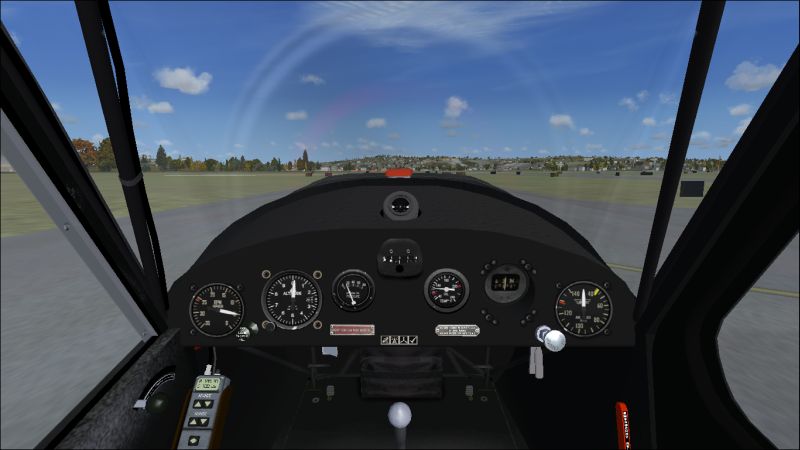
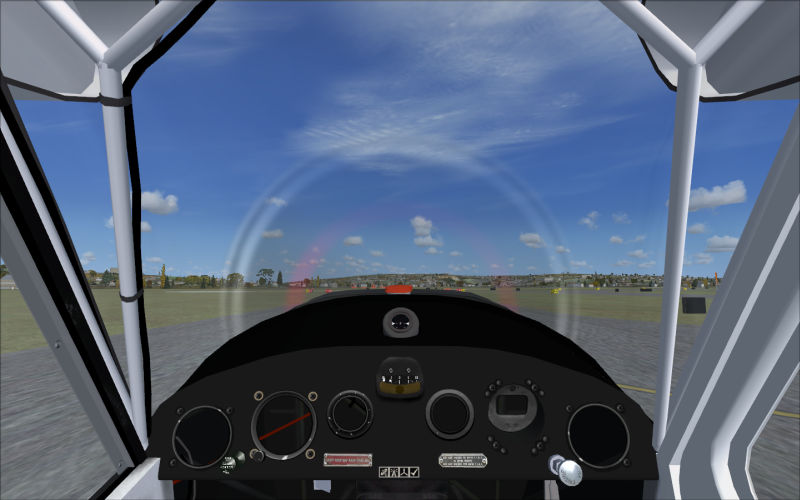
I think this confirms that it's an SP2 display issue wth the L-16 MDL.

L-16 VC in FSX RTM (straight out of the box without SP2 installed).
Image

Same aircraft in FSX Gold + Acceleration (including SP1 & SP2).
Image

7AC in FSX Gold + Acceleration as above.
Image

I don't know of any way to fix it.
Image

Founder & Sole Member - Grumpy's Over the Hill Club for Veteran Virtual Aviators
Member of the Fox Four Group
My Google Photos albums
My Flickr albums
User avatar
Hagar
Colonel
Colonel
 
Posts: 30868
Joined: Wed Jun 19, 2002 7:15 am
Location: Costa Geriatrica

Next

Return to Flight Simulator X (FSX) and Steam

Who is online

Users browsing this forum: No registered users and 1070 guests