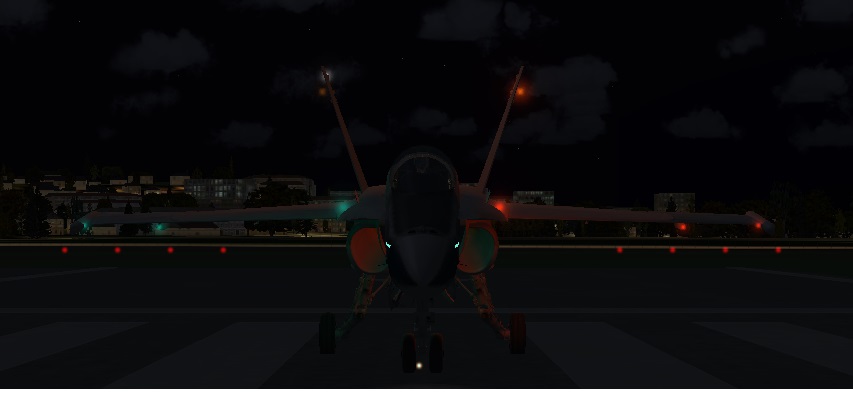
F/A-18 Anti-collision beacons...

FSX including FSX Steam version.

F/A-18 Anti-collision beacons...

Postby SolarAngel » Mon Oct 14, 2013 2:49 pm

I am running FSX with Acceleration have noticed that the only navigation lights that illuminate are the rectangular green lights along the fuselage and stabilizers of the standard FSX Hornet. I forgot what those are called. Anyways, I have no navigation lights or anti-collision lights. Do I need to modify the aircraft config file? Thanks.
SolarAngel
Ground hog
Ground hog
 
Posts: 3
Joined: Wed Aug 14, 2013 11:14 am

Re: F/A-18 Anti-collision beacons...

Postby PhantomTweak » Mon Oct 14, 2013 11:18 pm

Being a FS2004 user, I haven't an answer to your original question, BUT: those little rectangular green strips on the fuselage, tail, and wingtips are called "Formation Lights", and are used to allow the pilots to fly close formation durin No-Lights flights. Incredibly hard to see from any real distance, thus preserving their EmCon conditions while allowing them to see one another up close.

Have fun, fly far, and safe!
Have fun, fly high, far, and free!
Pat
2S7, Chiloquin OR Image
User avatar
PhantomTweak
Captain
Captain
 
Posts: 599
Joined: Mon Oct 14, 2013 11:10 pm
Location: Chiloquin OR

Re: F/A-18 Anti-collision beacons...

Postby garymbuska » Tue Oct 15, 2013 7:58 am

SolarAngel wrote:I am running FSX with Acceleration have noticed that the only navigation lights that illuminate are the rectangular green lights along the fuselage and stabilizers of the standard FSX Hornet. I forgot what those are called. Anyways, I have no navigation lights or anti-collision lights. Do I need to modify the aircraft config file? Thanks.


With out knowing what to look for it will not help you out much. I personally do not have any military aircraft in my fleet as I never found one that I liked and there was always some kind of problem like the one you are having now.
The Navigational lights are described in the aircraft cfg file. Try copying your aircraft cfg file in a post so we can see what you have.
Gary M Buska
SYSTEM Specs ASUS P8Z68 V/GEN 3 mother board: INTELL I7 2600k 3.48 ghz Quad core CPU with Sandy bridge: 12 Gigs of 1800hz ram:
GTX 950 OVER CLOCKED: 2 Gigs Ram Windows 10 Home 64 bit Operating system. 750W Dedicated modular power supply. Two Internal 1TB hard drives 1 External 1TB 3.2 USB hard drive. SAITEK Cessna flight Yoke with throttles.
CH Rudder Peddles 27 inch Wide screen Monitor
User avatar
garymbuska
Major
Major
 
Posts: 4415
Joined: Tue Dec 30, 2003 11:10 am
Location: Jacksonville, Florida

Re: F/A-18 Anti-collision beacons...

Postby PhantomTweak » Tue Oct 15, 2013 10:50 am

Having spent 10 years on Marine Corps air bases here and there, and having seen the F/A-18A come into the inventory, I am a little bit familiar with them :lol: in fact, I got out b/c I didn't want to cross-deck to 18's and be on det 8 months a year :naughty: Nothing else, it would have greatly annoyed the wifey, and we all know THAT is a condition to be avoided at all costs! :lol: Not trying to be a know-it-all, I just happened to know what formation lights are, is all :D

Good luck to OP on your light problem, sorry I couldn't be of more help :cry:

Have fun, fly far, high, and safe!! <<s
Have fun, fly high, far, and free!
Pat
2S7, Chiloquin OR Image
User avatar
PhantomTweak
Captain
Captain
 
Posts: 599
Joined: Mon Oct 14, 2013 11:10 pm
Location: Chiloquin OR

Re: F/A-18 Anti-collision beacons...

Postby EVVFCX » Tue Oct 15, 2013 4:11 pm

Hi Solar,

When your in your F-18, press the L key to turn on all your lights, shift+ L will light your panels, Ctrl+ L should give your landing lights which you can move using Ctrl+Shift and the numeric pads number keys will let you move the landing lights around.

Image


regards

Steve
User avatar
EVVFCX
Captain
Captain
 
Posts: 751
Joined: Tue Nov 27, 2007 8:32 am
Location: Pontefract, West Yorkshire


Return to Flight Simulator X (FSX) and Steam

Who is online

Users browsing this forum: No registered users and 1191 guests