Can't see out of aircraft

FSX including FSX Steam version.

Can't see out of aircraft

Postby echo62 » Thu Oct 03, 2013 12:37 am

I have fsx and have a problem seeing out the windows . it's like there painted and can't see out. It's just on my F\16 that I installed and a iris Tornado. Don't have any trouble with my other downloads. Thanks for help.
echo62
Ground hog
Ground hog
 
Posts: 3
Joined: Thu Oct 03, 2013 12:29 am

Re: Can't see out of aircraft

Postby Fozzer » Thu Oct 03, 2013 3:09 am

Were the aircraft that your have installed, designed for FSX, or are they models designed for FS '98, 2000, 2002, or 2004?
Models designed for the earlier Flight Sims are likely to give problems!
To avoid problems, ensure that the programs you are installing are fully designed for FSX!

Paul.... ;) ...!
Win 8.1 64-bit. DX11. Advent Tower. Intel i7-3770 3.9 GHz 8-core. 8 GB System RAM. AMD Radeon HD 7700 1GB RAM. DVD ROM. 2 Terra Byte SATA Hard Drive. Philips 17" LCD Monitor. Saitek Cyborg X Fly-5 Joystick. ...and a Briggs and Stratton Petrol Lawn Mower.
User avatar
Fozzer
Colonel
Colonel
 
Posts: 27369
Joined: Thu Jan 31, 2002 3:11 pm
Location: Hereford. England. EGBS.

Re: Can't see out of aircraft

Postby Bass » Thu Oct 03, 2013 6:48 am

As Paul said.
Tho, you could try to search > inglass.zip < .
That one worked for me back then with the Viper. Maybe also Tornado?!

Btw welcome in here ;)
"Just try to be YOU"!............ Kurt 

System. GA-X58A-UD3R, i7-950QC, Corsair XMS3 18GB 2000, GTX 780 tf 3GB, Corsair CMPSU-850, 24 BenQ 120, TM Hotas cougar, win7 pro.
User avatar
Bass
Major
Major
 
Posts: 3043
Joined: Wed Feb 15, 2012 9:32 am
Location: Scandinavia

Re: Can't see out of aircraft

Postby garymbuska » Thu Oct 03, 2013 6:58 am

I go along with Fozzer here. anything that is not specifically made for FSX will not work the way it is supposed to. Especially true on any thing visual such as aircraft and scenery . The general rule of thumb is you can usually go down but never up when it comes to different versions of software.
A good example is If you have a USB 2 port you can plug something in that is USB 1 but you can not plug a USB 2 device into a USB 1 port it will not work.
and USB 3 even uses a different cable they look the same and a USB 2 cable will plug into a USB 3 port but it will not work as a USB 3 port, as they are wired differently and the USB 3 has a BLUE plug.


<<r
Gary M Buska
SYSTEM Specs ASUS P8Z68 V/GEN 3 mother board: INTELL I7 2600k 3.48 ghz Quad core CPU with Sandy bridge: 12 Gigs of 1800hz ram:
GTX 950 OVER CLOCKED: 2 Gigs Ram Windows 10 Home 64 bit Operating system. 750W Dedicated modular power supply. Two Internal 1TB hard drives 1 External 1TB 3.2 USB hard drive. SAITEK Cessna flight Yoke with throttles.
CH Rudder Peddles 27 inch Wide screen Monitor
User avatar
garymbuska
Major
Major
 
Posts: 4415
Joined: Tue Dec 30, 2003 11:10 am
Location: Jacksonville, Florida

Re: Can't see out of aircraft

Postby Russell Irwin » Thu Oct 03, 2013 7:31 am

I've had a similar problem with Tom Ruth's aircraft in the past. The main problem, I found, was that I didn't have the correct shaders installed, and therefore could not download SP2. The lack of these shaders also caused the cockpit glass to appear opaque.

Make sure that all of your drivers are up to date, you have SP2, and, like Fozzer and Gary said, make sure that compatibility isn't the problem.
Russell Irwin
2nd Lieutenant
2nd Lieutenant
 
Posts: 149
Joined: Tue Oct 02, 2012 10:48 pm

Re: Can't see out of aircraft

Postby echo62 » Thu Oct 03, 2013 9:33 am

Ok , I will look and see what the downloads were for. I haven't updated my drivers in awhile so I'll do that also. Thanks everyone for your help :D
echo62
Ground hog
Ground hog
 
Posts: 3
Joined: Thu Oct 03, 2013 12:29 am

Re: Can't see out of aircraft

Postby Hagar » Thu Oct 03, 2013 9:43 am

It's just on my F\16 that I installed and a iris Tornado.

As Fozzer points out I suspect these models were both created for FS9. Some of these bugs are easy enough to fix if you know what you're doing. Some will work & others won't. It also depends on which version of FSX you have.

I've converted many FS9 aircraft to display properly in FSX, purely for my own use. You might like to try my Tornado glass fix which I uploaded here --> vc_glass.zip
Extract the file & paste a copy into every Texture folder of the Tornado - overwriting existing files when prompted. It works fine for me in FSX Gold + Acceleration.

The fix for the F-16 should be posted somewhere if you have a search on Google.
Image

Founder & Sole Member - Grumpy's Over the Hill Club for Veteran Virtual Aviators
Member of the Fox Four Group
My Google Photos albums
My Flickr albums
User avatar
Hagar
Colonel
Colonel
 
Posts: 30868
Joined: Wed Jun 19, 2002 7:15 am
Location: Costa Geriatrica

Re: Can't see out of aircraft

Postby pete » Thu Oct 03, 2013 10:01 am

Don't be put off just because it was originally created for FS2004.

It depends on a lot of other things too and many FS2004 aircraft work fine in FSX.

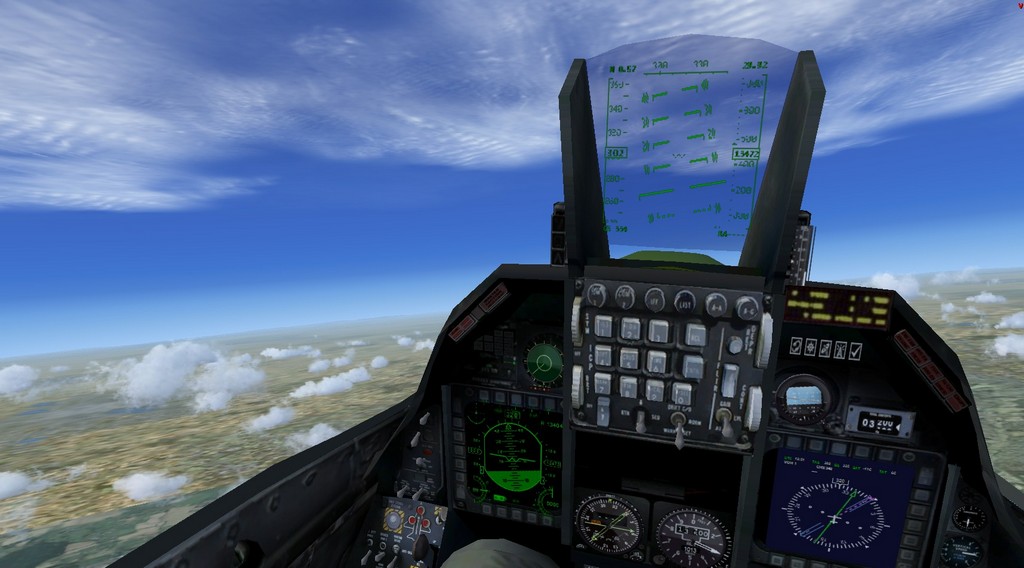
Here is Kirl Olssen F-16 - no black window (in FSX Accweleration or FSX with Service packs installed)

Image

This Iris Tornado is also OK for windows (but I notice 3 gauges are not showing)


I will check out the Iris Tornado base pack ....


EDIT: I am now re-uploading fixed versions of the iris Tornado GR4 and F3 - The F3 had black windows and the GR4 had missing gauges. I have swapped good files from both so now both are OK. Thanks for the feedback! O0

**Uploaded**
Simplicity is the ultimate sophistication. – Leonardo da Vinci
User avatar
pete
Administrator
Administrator
 
Posts: 10243
Joined: Mon Jan 01, 2001 2:01 am
Location: Cloud Cuckoo Land

Re: Can't see out of aircraft

Postby echo62 » Sat Oct 05, 2013 12:48 am

Thanks everyone for your help. Got both aircraft fixed today. Works great! :D
echo62
Ground hog
Ground hog
 
Posts: 3
Joined: Thu Oct 03, 2013 12:29 am


Return to Flight Simulator X (FSX) and Steam

Who is online

Users browsing this forum: No registered users and 953 guests