Grouping controls

FSX including FSX Steam version.

Grouping controls

Postby Russell Irwin » Sat Aug 31, 2013 4:07 pm

Is there a way for me to pair two actions in FSX to one key/button/axis? I want to group my left engines to one lever and my right engines to another, but I can't figure out how.
Russell Irwin
2nd Lieutenant
2nd Lieutenant
 
Posts: 149
Joined: Tue Oct 02, 2012 10:48 pm

Re: Grouping controls

Postby garymbuska » Sat Aug 31, 2013 9:45 pm

Russell Irwin wrote:Is there a way for me to pair two actions in FSX to one key/button/axis? I want to group my left engines to one lever and my right engines to another, but I can't figure out how.

I do not think this is possible. Now you can unlock the throttles but the only thing that is good for is to assist in turning corners . But you can achieve the same effect by using independent wheel brakes. I use Peddles and a flight yoke with throttles. The peddles are from CH and the yoke is a Cessna flight Yoke with throttles from Saitek


<<v
Gary M Buska
SYSTEM Specs ASUS P8Z68 V/GEN 3 mother board: INTELL I7 2600k 3.48 ghz Quad core CPU with Sandy bridge: 12 Gigs of 1800hz ram:
GTX 950 OVER CLOCKED: 2 Gigs Ram Windows 10 Home 64 bit Operating system. 750W Dedicated modular power supply. Two Internal 1TB hard drives 1 External 1TB 3.2 USB hard drive. SAITEK Cessna flight Yoke with throttles.
CH Rudder Peddles 27 inch Wide screen Monitor
User avatar
garymbuska
Major
Major
 
Posts: 4415
Joined: Tue Dec 30, 2003 11:10 am
Location: Jacksonville, Florida

Re: Grouping controls

Postby OldAirmail » Sat Aug 31, 2013 10:48 pm

I've never given any thought to "left pair"/"right pair" engine lever control.

But it must make sense to you.


First. Do you have FSUIPC? It's payware, but if you want more out of FSX, you need to put something in to it. Money, usually.

If not then this will be a total waste of time.

It may still be a waste of time, in that I use FSUIPC to send 2 commands with ONE BUTTON and not levers. Still, it may work.


I have TrackIR. Inside a VR cockpit it's one of the greatest flight sim add-ons around.

But when I switch to an outside view, it's irritating. You look left/it turns right. You look right/it turns left.


So when I hit the button to switch to an outside view, two things happen.

FSX has been instructed to switch to an outside view when I hit that button. It's a simple button assignment in FSX.

BUT in FSUIPC I've set that button up to send another command through SimConnect. TrackIR receives a button command to PAUSE TrackIR.

When I switch back to an interior VC view, TrackIR receives a command to resume. One button, two commands.


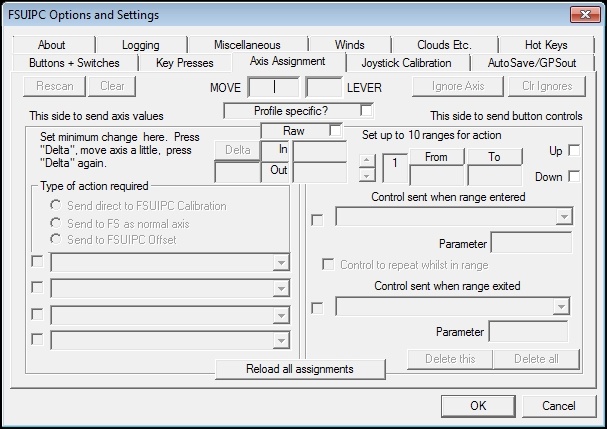
But you want to use levers/axis for two commands.

This is the area where, if it can be done, you want to look.
Image

Good luck.
User avatar
OldAirmail
Major
Major
 
Posts: 4814
Joined: Sun Feb 17, 2013 3:06 pm
Location: Concrete, WA ICAO - 3W5


Return to Flight Simulator X (FSX) and Steam

Who is online

Users browsing this forum: No registered users and 1023 guests


