Better frame rates with new video card?

FSX including FSX Steam version.

Re: Better frame rates with new video card?

Postby FoMoCo63 » Fri Aug 30, 2013 10:49 pm

From what I've seen so far is that a Sandy Bridge versus an Ivy Bridge isn't all that big of a difference right now, the substancial big difference that was found in just the wattage that was used to run the CPU's the sandy bridge used more The Core i7-2700K system needed 166.5 watts, but the Core i7-3700K drew only 136.3. The next generation Ivy Bridge is going to show more of a big impact more than what is seen now with the Ivy Bridge in terms of processing the video and use even less. The ivy does right now produce better graphics than the sandy no doubt.
If your going to still want better quality video your going to need a stand alone GPU card yet to get the best results using a sandy or ivy bridge right now. The demand for quality in some games just isn't there yet in a CPU that's going to take a good GPU yet as well to get the desired results. Also depends on how just far an individual wants to go, and what they want out of their PC.

I have read this at a few sites already that have bench tested the CPU's sandy versus ivy bridge. What tomorrow brings with the ivy bridge CPU seems to be just awsome compared to the start of the ivy bridge what it is now. I see intel has some very good ideas in store for us, and nVidia supports intel with some higher end cards already. What a great world we live in.

FoMoCo63
2nd Lieutenant
2nd Lieutenant
 
Posts: 246
Joined: Tue Jan 31, 2012 2:46 pm

Re: Better frame rates with new video card?

Postby Bass » Sat Aug 31, 2013 6:42 am

Sorry for being off topic.
But i have a Q to you MB experts. (I know i can search this, but maybe others will be interested).
My MB is GA-X58A-UD3R rev.2. It has North and south bridge. (CPU i7-950 quad).

Whats the differences between my 2 chips, and Ivy and/or Sandy bridge?
"Just try to be YOU"!............ Kurt 

System. GA-X58A-UD3R, i7-950QC, Corsair XMS3 18GB 2000, GTX 780 tf 3GB, Corsair CMPSU-850, 24 BenQ 120, TM Hotas cougar, win7 pro.
User avatar
Bass
Major
Major
 
Posts: 3043
Joined: Wed Feb 15, 2012 9:32 am
Location: Scandinavia

Re: Better frame rates with new video card?

Postby OldAirmail » Sun Sep 01, 2013 11:22 am

As best as I can recall, the northbridge/southbridge chipset controlled data on your motherboard.

The northbridge controlled data into, and out of, the CPU. It also controlled data into, and out of the memory. Possibly the PCIe 16 sockets too.


The southbridge controlled data below the CPU, memory. At the time it was a big improvement.

When I switched from my gigabyte motherboard to the Asus Sabertooth P67 with Sandy Bridge the improvement was MUCH better. Some of that was also due to the i5 CPU of course.


But in relation to Brunos' question, the chipset can make a tremendous difference in video throughput.


Sandy Bridge is a big improvement over the northbridge/southbridge setup.

Ivy Bridge is a smaller die set of Sandy Bridge, and isn't all that much of an improvement on Sandy Bridge.


If anyone is considering a new motherboard get one with the Haswell chipset. The actual improvements over Sandy Bridsge & Ivy Bridge may look small, but the overall improvements in your system will be very significant.
User avatar
OldAirmail
Major
Major
 
Posts: 4814
Joined: Sun Feb 17, 2013 3:06 pm
Location: Concrete, WA ICAO - 3W5

Re: Better frame rates with new video card?

Postby MASABI TROOPER » Sun Sep 01, 2013 4:20 pm

What does that mean...........SLI modus??
Bruno (Trooper)
User avatar
MASABI TROOPER
Captain
Captain
 
Posts: 556
Joined: Wed May 29, 2013 6:49 pm
Location: Guayaquil

Re: Better frame rates with new video card?

Postby OldAirmail » Sun Sep 01, 2013 8:36 pm

Scalable Link Interface.

Usually 2 (or more) NVIDIA cards of the same type working in tandem to make games display with more details at a faster rate.

AMD does the same thing, but calls their system CrossFire.


It never made sense to me because you need 2 powerful, and expensive, video cards to display on a monitor or 2.

I've always bought cards just under the bleeding edge, and have generally been happy with the results.

Just think about it. The video card that you spend more than a $1,000 for today will be selling for a couple of hundred dollars in a year or two. I can wait.
User avatar
OldAirmail
Major
Major
 
Posts: 4814
Joined: Sun Feb 17, 2013 3:06 pm
Location: Concrete, WA ICAO - 3W5

Re: Better frame rates with new video card?

Postby Bass » Mon Sep 02, 2013 9:14 am

Thanks for the answer OAM.
Atm i'll stick with my MB and my 2 Blackhawk running in sli, but i sure will check out the Haswell chip if i get into trouble.
"Just try to be YOU"!............ Kurt 

System. GA-X58A-UD3R, i7-950QC, Corsair XMS3 18GB 2000, GTX 780 tf 3GB, Corsair CMPSU-850, 24 BenQ 120, TM Hotas cougar, win7 pro.
User avatar
Bass
Major
Major
 
Posts: 3043
Joined: Wed Feb 15, 2012 9:32 am
Location: Scandinavia

Re: Better frame rates with new video card?

Postby OldAirmail » Mon Sep 02, 2013 11:43 am

How well does SLI work with FSX? Is there a big drop when not run in SLI mode?

And Bruno wants to run 4 monitors with 2 Nvidia cards (But I don't think that's possible in SLI mode???).


So I don't know about anyone other than me and Bruno, and I'm very interested.

It may be time for me to reconsider SLI & CrossFire.
User avatar
OldAirmail
Major
Major
 
Posts: 4814
Joined: Sun Feb 17, 2013 3:06 pm
Location: Concrete, WA ICAO - 3W5

Re: Better frame rates with new video card?

Postby Bass » Mon Sep 02, 2013 12:11 pm

Well, i tell you, they are both working at high (fan) speed when i need some extreme textures, ai aircrafts (90%) and a lot of ships (100% due to my aicarriers), wehicles and other (60%).
If i turn sli off and use one gpu, i'm lost and cant get what i want. I then need to turn everything down to 30% to get a proper smooth performance in fsx!

I dont know one bit about running 2-3 or 4 monitors, i have enough with my BenQ.

This is from my point of view on my screen ;)
"Just try to be YOU"!............ Kurt 

System. GA-X58A-UD3R, i7-950QC, Corsair XMS3 18GB 2000, GTX 780 tf 3GB, Corsair CMPSU-850, 24 BenQ 120, TM Hotas cougar, win7 pro.
User avatar
Bass
Major
Major
 
Posts: 3043
Joined: Wed Feb 15, 2012 9:32 am
Location: Scandinavia

Re: Better frame rates with new video card?

Postby OldAirmail » Mon Sep 02, 2013 1:17 pm

OK. I'll reconsider dual graphics cards. It's been quite a while since I looked into it.

I usually start replacing the main components every 3 or 4 years, and next year will be the 4 year mark for me.

Over all it takes me about 2 or 3 months to decide on the motherboard, CPU, and Graphics card.
User avatar
OldAirmail
Major
Major
 
Posts: 4814
Joined: Sun Feb 17, 2013 3:06 pm
Location: Concrete, WA ICAO - 3W5

Re: Better frame rates with new video card?

Postby garymbuska » Mon Sep 02, 2013 1:57 pm

FoMoCo63 wrote:From what I've seen so far is that a Sandy Bridge versus an Ivy Bridge isn't all that big of a difference right now, the substancial big difference that was found in just the wattage that was used to run the CPU's the sandy bridge used more The Core i7-2700K system needed 166.5 watts, but the Core i7-3700K drew only 136.3. The next generation Ivy Bridge is going to show more of a big impact more than what is seen now with the Ivy Bridge in terms of processing the video and use even less. The ivy does right now produce better graphics than the sandy no doubt.
If your going to still want better quality video your going to need a stand alone GPU card yet to get the best results using a sandy or ivy bridge right now. The demand for quality in some games just isn't there yet in a CPU that's going to take a good GPU yet as well to get the desired results. Also depends on how just far an individual wants to go, and what they want out of their PC.

I have read this at a few sites already that have bench tested the CPU's sandy versus ivy bridge. What tomorrow brings with the ivy bridge CPU seems to be just awsome compared to the start of the ivy bridge what it is now. I see intel has some very good ideas in store for us, and nVidia supports intel with some higher end cards already. What a great world we live in.


You are correct there is not a whole lot of difference between the two but the good news is my mother board will support both and as you can see by my signature I am using a video card. But I do know the Ivy bridge is the newest release from Intel for now.
Every one knows by now what is hot today is cold tomorrow.

<<r
Gary M Buska
SYSTEM Specs ASUS P8Z68 V/GEN 3 mother board: INTELL I7 2600k 3.48 ghz Quad core CPU with Sandy bridge: 12 Gigs of 1800hz ram:
GTX 950 OVER CLOCKED: 2 Gigs Ram Windows 10 Home 64 bit Operating system. 750W Dedicated modular power supply. Two Internal 1TB hard drives 1 External 1TB 3.2 USB hard drive. SAITEK Cessna flight Yoke with throttles.
CH Rudder Peddles 27 inch Wide screen Monitor
User avatar
garymbuska
Major
Major
 
Posts: 4415
Joined: Tue Dec 30, 2003 11:10 am
Location: Jacksonville, Florida

Re: Better frame rates with new video card?

Postby MASABI TROOPER » Mon Sep 02, 2013 4:14 pm

Howdy Old Airmail, just one question, can I drive 4 monitors adding the second video card??.............my motherboard is made to accept a second video card without problems..................
I plan to use the first one 38" for VC with Trackir 5, the second one 22" for instrument panel, the third one 22" for overhead panel, and number four 22" for maps, GPS and radio comunications.


Saludos :violin: :violin:

Bruno
Bruno (Trooper)
User avatar
MASABI TROOPER
Captain
Captain
 
Posts: 556
Joined: Wed May 29, 2013 6:49 pm
Location: Guayaquil

Re: Better frame rates with new video card?

Postby wlix261 » Mon Sep 02, 2013 7:41 pm

The new processor i7-4770K will do quite well. Its not that expensive.
wlix261
2nd Lieutenant
2nd Lieutenant
 
Posts: 55
Joined: Sat Jul 24, 2004 2:23 pm

Re: Better frame rates with new video card?

Postby OldAirmail » Mon Sep 02, 2013 10:39 pm

Bruno, I think that is a possible (maybe) no.

From what I understand, that would be a function of your motherboard as well as the video card. A few motherboards will allow you to operate 2 video cards independtly. But many do not.

Operating 2 video cards, as Bass does, in tandem is possible on most newer boards with some restrictions.

Read the manual for your video card to see how many monitors it'll support. If it's older it'll probably be 2.


But that doesn't mean that you're SOL. Video cards that do what you want used to be VERY expensive. Look around and you will probably find what you want.

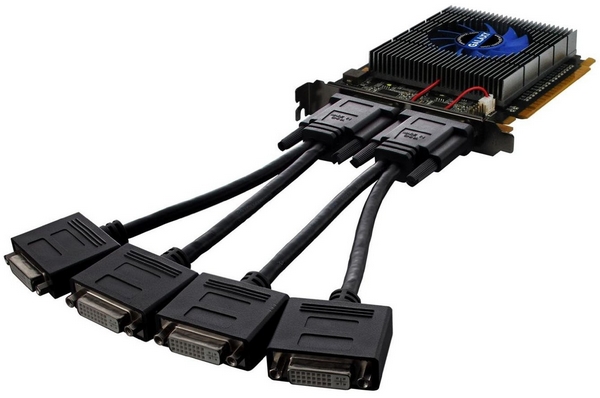
One thing to watch out for are video cards like this one ($75) - Galaxy GeForce MDT GT 520 1 GB DDR3 PCI Express. It will do what you want but it'll be slow.

Image
With the setup above you'll need adaptors to plug into these.


Depending on whether or not you play any high demand games you'll want 1 to 2GB of ram on the card.

Another concern is about your computer. The chipset in mine prevents me from using many of the better video cards out there. The cards will work, but not at their full capabilities.

In practice, though, that is not a problem. My system drives 6 monitors, and one of the small square Saitek instrument panels.


Another option might be using a USB to monitor cable like the Plugable UGA-3000 USB adaptor. Three of my monitors (and the small Saitek screen) work via USB ports.
User avatar
OldAirmail
Major
Major
 
Posts: 4814
Joined: Sun Feb 17, 2013 3:06 pm
Location: Concrete, WA ICAO - 3W5

Re: Better frame rates with new video card?

Postby Simnut99 » Thu Sep 05, 2013 5:40 pm

I currently run a EVGA GTX 470 FERMI ... my windows experience rates the card 7.8 out of 7.9 they are right about CPU is most important not the GPU
my pc is 3 years old. It has a 2.8 ghz dual core cpu 6gb ddr3 ram and a 1tb HDD.

I know my CPU is my bottleneck. I could get better results by getting a new i-7 processor and motherboard than I could by getting the biggest newest Graphics card and adding it to my current pc.
Simnut99
Ground hog
Ground hog
 
Posts: 1
Joined: Thu Sep 05, 2013 5:18 pm

Re: Better frame rates with new video card?

Postby MASABI TROOPER » Thu Sep 05, 2013 7:52 pm

Thank you old airmail, i will look arround and talk to my computer specialist...............

Regards

Bruno
Bruno (Trooper)
User avatar
MASABI TROOPER
Captain
Captain
 
Posts: 556
Joined: Wed May 29, 2013 6:49 pm
Location: Guayaquil

PreviousNext

Return to Flight Simulator X (FSX) and Steam

Who is online

Users browsing this forum: No registered users and 976 guests