Clouds at cruising altitude

FSX including FSX Steam version.

Clouds at cruising altitude

Postby 247hammond » Thu Aug 22, 2013 9:39 am

Hello, when I fly with real world weather and cruise at fl300+ it is always clear skies. I fly Northern Europe mostly so it is not always clear skies. My settings are detailed clouds set at 100nm

What can I do please?
247hammond
2nd Lieutenant
2nd Lieutenant
 
Posts: 64
Joined: Sun Mar 08, 2009 4:43 pm

Re: Clouds at cruising altitude

Postby garymbuska » Thu Aug 22, 2013 10:29 am

247hammond wrote:Hello, when I fly with real world weather and cruise at fl300+ it is always clear skies. I fly Northern Europe mostly so it is not always clear skies. My settings are detailed clouds set at 100nm

What can I do please?

Check out this link it should explain things about clouds and what altitudes you will see them at.
http://nenes.eas.gatech.edu/Cloud/Clouds.pdf
At 30,000 feet about the only clouds you will see at or above your altitude are Cirrus clouds or Cumulonimbus Clouds Otherwise known as a thunder head at that level but if you should see one avoid it like the plague because the weather in it is going to be severe.
I for one do not use the real world weather in FSX as it does not do a very good job.
There are several programs out there that do a much better job at depicting weather I use Active Sky Evolution as it works with both FSX and FS9
here is the link for that
http://www.hifitechinc.com/index.php?ti ... o%2520HiFi


<<v
Last edited by garymbuska on Thu Aug 22, 2013 10:40 am, edited 1 time in total.
Gary M Buska
SYSTEM Specs ASUS P8Z68 V/GEN 3 mother board: INTELL I7 2600k 3.48 ghz Quad core CPU with Sandy bridge: 12 Gigs of 1800hz ram:
GTX 950 OVER CLOCKED: 2 Gigs Ram Windows 10 Home 64 bit Operating system. 750W Dedicated modular power supply. Two Internal 1TB hard drives 1 External 1TB 3.2 USB hard drive. SAITEK Cessna flight Yoke with throttles.
CH Rudder Peddles 27 inch Wide screen Monitor
User avatar
garymbuska
Major
Major
 
Posts: 4415
Joined: Tue Dec 30, 2003 11:10 am
Location: Jacksonville, Florida

Re: Clouds at cruising altitude

Postby 247hammond » Thu Aug 22, 2013 10:38 am

Thanks for the reply, I mean I don't get any clouds underneath the aircraft and when I do they are scattered unrealistically
247hammond
2nd Lieutenant
2nd Lieutenant
 
Posts: 64
Joined: Sun Mar 08, 2009 4:43 pm

Re: Clouds at cruising altitude

Postby Huy753 » Thu Aug 22, 2013 12:42 pm

I don't know the answer, but you can try to put everything to full at Realistic Settings
Image
Sorry if I'm wrong, Only trying to help :)
Image
Huy753
2nd Lieutenant
2nd Lieutenant
 
Posts: 51
Joined: Mon Aug 19, 2013 8:43 am
Location: UK

Re: Clouds at cruising altitude

Postby OldAirmail » Sun Aug 25, 2013 10:47 pm

I have similar complaints.

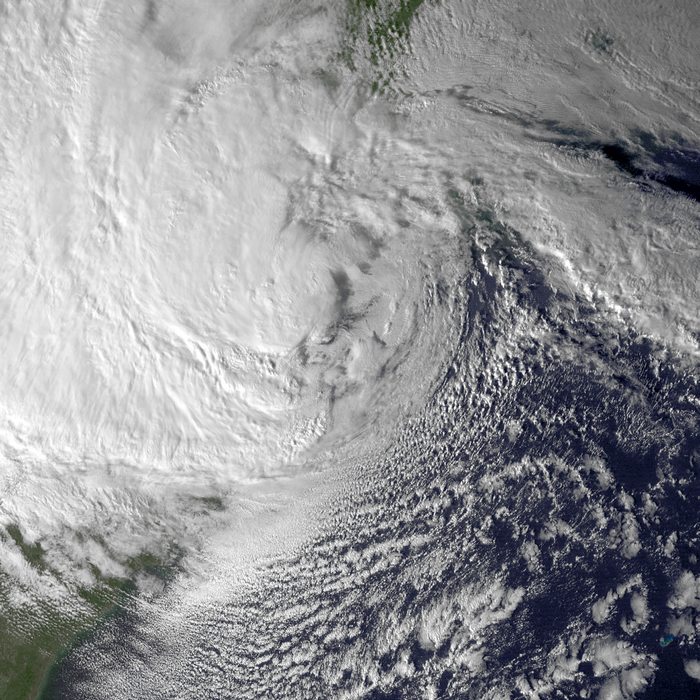
Last year I went up in hurricane Sandy (via FSX, of course).

In real life, all you could see was clouds (I live between Philadelphia & Trenton).

In FSX (from the ground), I saw lots of blue patches between the clouds. From a few thousand feet up I saw lots of ground between the patchy clouds.

I then flew over Atlantic City when Sandy was at its closest. I saw lots of ground between the patchy clouds.


This is what I was looking for.
Hurricane Sandy
Image


I bought REX Essential PLUS OverDrive hoping that I could make heavy cloud cover look a little more realistic in FSX.

I'm somewhat sorry that I bought REX as I had some problems with it. Once I get everything running well I'll try it again.

I have a bad feeling that I'll have to work on it far more than I wanted to, just to get a heavy overcast.
User avatar
OldAirmail
Major
Major
 
Posts: 4814
Joined: Sun Feb 17, 2013 3:06 pm
Location: Concrete, WA ICAO - 3W5

Re: Clouds at cruising altitude

Postby garymbuska » Mon Aug 26, 2013 9:50 am

OldAirmail wrote:I have similar complaints.

Last year I went up in hurricane Sandy (via FSX, of course).

In real life, all you could see was clouds (I live between Philadelphia & Trenton).

In FSX (from the ground), I saw lots of blue patches between the clouds. From a few thousand feet up I saw lots of ground between the patchy clouds.

I then flew over Atlantic City when Sandy was at its closest. I saw lots of ground between the patchy clouds.


This is what I was looking for.
Hurricane Sandy
Image


I bought REX Essential PLUS OverDrive hoping that I could make heavy cloud cover look a little more realistic in FSX.

I'm somewhat sorry that I bought REX as I had some problems with it. Once I get everything running well I'll try it again.

I have a bad feeling that I'll have to work on it far more than I wanted to, just to get a heavy overcast.




The only program that I know of that depicts a hurricane is Active Sky Evolution or Active Sky 12.
You can actually see the storm as if you were looking at a satellite picture. It shows up on the included radar that comes with Active Sky Called XGAUGE
which you can install into any or all of your fleet.
Active Sky 12 is strictly for FSX but Active Sky Evolution can be used for both FSX and FS9 .
I started out using Active Sky 6 and have upgraded with each new product that has come out. This is by far the best weather generating program out there to me.
Here is the link
http://www.hifitechinc.com/

<<v
Gary M Buska
SYSTEM Specs ASUS P8Z68 V/GEN 3 mother board: INTELL I7 2600k 3.48 ghz Quad core CPU with Sandy bridge: 12 Gigs of 1800hz ram:
GTX 950 OVER CLOCKED: 2 Gigs Ram Windows 10 Home 64 bit Operating system. 750W Dedicated modular power supply. Two Internal 1TB hard drives 1 External 1TB 3.2 USB hard drive. SAITEK Cessna flight Yoke with throttles.
CH Rudder Peddles 27 inch Wide screen Monitor
User avatar
garymbuska
Major
Major
 
Posts: 4415
Joined: Tue Dec 30, 2003 11:10 am
Location: Jacksonville, Florida

Re: Clouds at cruising altitude

Postby FabioL » Mon Aug 26, 2013 3:04 pm

Hi,
An annoying FSX cloud issue is within the FSX.CFG line "CLOUD_COVERAGE_DENSITY=" that is by default set to the value 8 whenever you max out the cloud cover in FSX settings, whereas FSX can actually handle 12. Setting it to 12 manually in the CFG file will maximise cloud cover.
BUT whenever you go into FSX settings, FSX will automatically reset this value to 8 even if you don't touch weather settings, so check it before firing up FSX.
The best payware weather program's should increase cloud cover for you, but I like to set mine manually in FSX.CFG anyway.
Hope this helps!
Fabs
FabioL
2nd Lieutenant
2nd Lieutenant
 
Posts: 71
Joined: Sat May 05, 2012 2:54 pm
Location: Guildford


Return to Flight Simulator X (FSX) and Steam

Who is online

Users browsing this forum: No registered users and 867 guests
