787 and panel

FSX including FSX Steam version.

787 and panel

Postby alpinemike » Mon Aug 12, 2013 8:06 pm

Hello, I have installed a 787 package. It defaults to a 737 panel. I found an add on panel here and cannot seem to get it to fully work correctly. It shows both the 373 and new 787 but totally lost all flat panel. So there are actually a few issues I am having. I apologize if I have somehow overlooked some obvious solution. I have looked, if there is one, I cannot find it..

Thank you in advance for any advice
alpinemike
Ground hog
Ground hog
 
Posts: 4
Joined: Mon Aug 12, 2013 7:57 pm

Re: 787 and panel

Postby Bluenarrow » Mon Aug 12, 2013 11:59 pm

Howdy, there's a good 2d panel for the b787 dreamliner at FlightSim.com, currently I'm using and is very similar to actual panel of the real plane
maybe you could take a look, hope you like it
Regards
Bluenarrow
Ground hog
Ground hog
 
Posts: 48
Joined: Thu Jul 18, 2013 11:40 am
Location: San Jose CR

Re: 787 and panel

Postby alpinemike » Tue Aug 13, 2013 1:19 am

Yup, that's thew one I'm trying to use. But it isn't loading correctly. I get parts of the 737 panel and the 787 panel.. Not sure what to do..
alpinemike
Ground hog
Ground hog
 
Posts: 4
Joined: Mon Aug 12, 2013 7:57 pm

Re: 787 and panel

Postby alpinemike » Tue Aug 13, 2013 2:11 am

Image
alpinemike
Ground hog
Ground hog
 
Posts: 4
Joined: Mon Aug 12, 2013 7:57 pm

Re: 787 and panel

Postby ThaddeusHWJ » Tue Aug 13, 2013 4:44 am

Hi there, I think you've either did not download FSX SP1 or SP2, or there is something wrong with the panel which you had downloaded.

Another option is for you to download the 787 panel from Simviation, which is quite old. Just search 787 panel in the Search bar and it should be there.

ThaddeusHWJ
ThaddeusHWJ
Ground hog
Ground hog
 
Posts: 34
Joined: Sun Aug 11, 2013 9:47 am
Location: Singapore

Re: 787 and panel

Postby alrot » Tue Aug 13, 2013 10:56 am

Where is the gauge? this is not a matter of sp1&2 issue? this happen for the lack of the gauge "B737_800.CAB" which should be in the Panel folder...


Alex
User avatar
alrot
Lieutenant Colonel
Lieutenant Colonel
 
Posts: 8961
Joined: Wed Oct 08, 2003 10:47 am

Re: 787 and panel

Postby alpinemike » Tue Aug 13, 2013 5:39 pm

No it's there. So is both service packs. I just dumped the jet package and panel, cleaned any related file and the registry. I reinstalled the model pack and the panel. Same problem... no idea what the issue is. All my other jets are fine :?
alpinemike
Ground hog
Ground hog
 
Posts: 4
Joined: Mon Aug 12, 2013 7:57 pm

Re: 787 and panel

Postby alrot » Tue Aug 13, 2013 6:17 pm

alpinemike wrote:Hello, I have installed a 787 package. It defaults to a 737 panel. I found an add on panel here and cannot seem to get it to fully work correctly. It shows both the 373 and new 787 but totally lost all flat panel. So there are actually a few issues I am having. I apologize if I have somehow overlooked some obvious solution. I have looked, if there is one, I cannot find it..

Thank you in advance for any advice


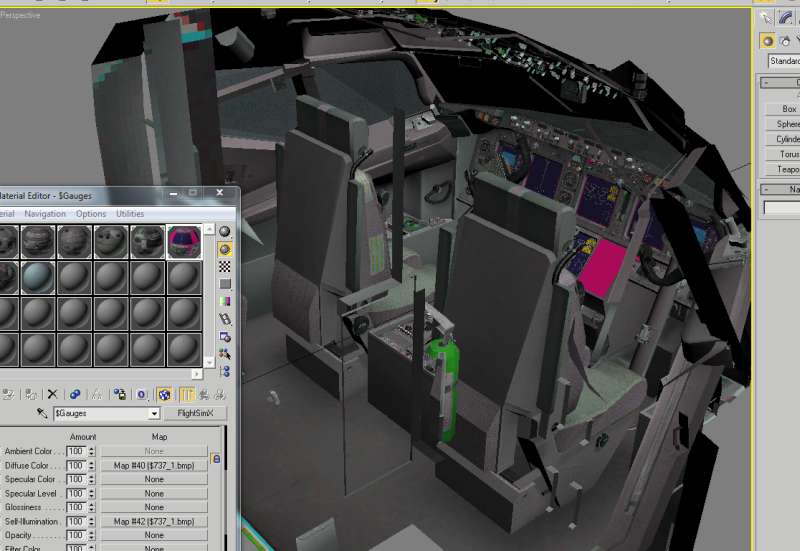
ok ,I'm not getting this ,I made and Upgrade for cockpits of the 737 and the 747,..
Image

I'm Alejandro Rojas L. can you give me some more details of that 787 package ?I don't know if you mean my work,. I made and entire redesign of these cockpits BUT it was meant to be for the Default FSX 737-800 ,and so far no complaints either I made them like 2 years ago

I'm giving a Link from my webpage in the downlaod are please find the ""FSX Default Boeing 737-800 Upgraded Cockpit"" It will iinstall and entire cockpit model it will replace the old one .the one Microsoft gave us as the original ;Please made a back up of this FIRST (just make a copy of the B737-800 folder)

http://simviation.com//fsnd/Downloads.htm

Alejandro
User avatar
alrot
Lieutenant Colonel
Lieutenant Colonel
 
Posts: 8961
Joined: Wed Oct 08, 2003 10:47 am


Return to Flight Simulator X (FSX) and Steam

Who is online

Users browsing this forum: No registered users and 1144 guests

