how to add jets to fsx with w7

FSX including FSX Steam version.

Re: how to add jets to fsx with w7

Postby bombardier » Mon Jul 29, 2013 4:37 pm

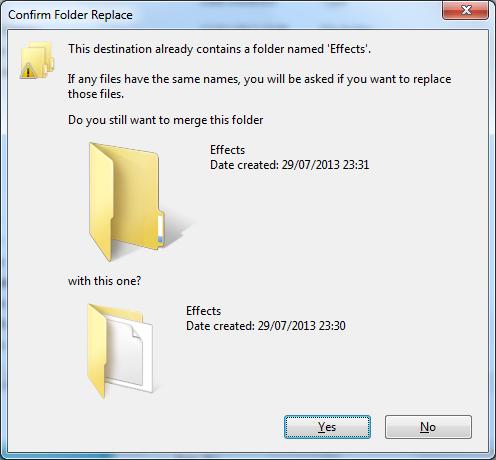
hey hager: so if it asks for me to merge this file into the effects file I should click on yes right. just makeing sure.

you have explained the information good for me thanks for the time that you give me.

bomberdier

User avatar
bombardier
2nd Lieutenant
2nd Lieutenant
 
Posts: 288
Joined: Sat Sep 04, 2010 2:58 pm
Location: united states

Re: how to add jets to fsx with w7

Postby Hagar » Mon Jul 29, 2013 4:57 pm

No. Please read my previous reply carefully.
Image

Founder & Sole Member - Grumpy's Over the Hill Club for Veteran Virtual Aviators
Member of the Fox Four Group
My Google Photos albums
My Flickr albums
User avatar
Hagar
Colonel
Colonel
 
Posts: 30868
Joined: Wed Jun 19, 2002 7:15 am
Location: Costa Geriatrica

Re: how to add jets to fsx with w7

Postby bombardier » Mon Jul 29, 2013 6:02 pm

helllo hager

I have read yur last post a few times, I understand it what you said from word to word, so that clears that up. but when I put that file from the downloaded plane in this case the a380 sa into fsx effects file it asks me to merge it into the fsx effects file you said no well the plane will never take off. it does not say that for you when you want to put the downloaded effects folder into the fsx effects folder? if so why is it asking me to merge the downloaded effects folder into the fsx effects folder. this time its not me, its the program that messing up the effects folder. one last ditch unless you want me to try the merge thing I will but I know what the answer wil be.

bombardier
User avatar
bombardier
2nd Lieutenant
2nd Lieutenant
 
Posts: 288
Joined: Sat Sep 04, 2010 2:58 pm
Location: united states

Re: how to add jets to fsx with w7

Postby Hagar » Tue Jul 30, 2013 2:29 am

You're obviously using a different method to what I described. I suspect you're pasting the complete Effects folder from the download into your FSX root directory.

Image

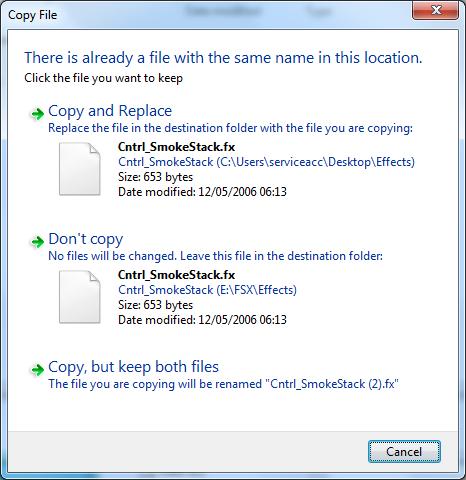
That's OK, use whichever method works for you. I suggest the Don't copy option if you see this warning.

Image

Note: Effects files are purely visual. Installing them will not affect the performance of the aircraft in any way.
Image

Founder & Sole Member - Grumpy's Over the Hill Club for Veteran Virtual Aviators
Member of the Fox Four Group
My Google Photos albums
My Flickr albums
User avatar
Hagar
Colonel
Colonel
 
Posts: 30868
Joined: Wed Jun 19, 2002 7:15 am
Location: Costa Geriatrica

Re: how to add jets to fsx with w7

Postby bombardier » Tue Jul 30, 2013 4:48 pm

hello hager the top box where it says merge is the one its uses or maybe i use. and yes when I see copy from to this folder no I do not do that.

if you use an easier way can you tell me about it or maybe you did and I did not catch it in time. ok i just looked over one of your posts titled I suggest installing effects like this: about copy and paste. so I can copy whats in the downloaded effects file and paste them to the root effects folder in fsx. sounds easy to me.


bombardier
User avatar
bombardier
2nd Lieutenant
2nd Lieutenant
 
Posts: 288
Joined: Sat Sep 04, 2010 2:58 pm
Location: united states

Re: how to add jets to fsx with w7

Postby bombardier » Tue Jul 30, 2013 6:36 pm

hello hager:

I was going to use the edit feature but I do not see one. so I will post another one. I have been use the fsx icon on the desk top to try to install the aircraft and its not showing up altough it is listed in the airplanes folder. should I have gone through windows explorer to install the airplanes. and if you say yes I cannot find it in w7.

bombardier
User avatar
bombardier
2nd Lieutenant
2nd Lieutenant
 
Posts: 288
Joined: Sat Sep 04, 2010 2:58 pm
Location: united states

Re: how to add jets to fsx with w7

Postby Hagar » Wed Jul 31, 2013 2:06 am

Bombardier. There are several different ways of doing things in Windows.* I use exactly the same methods in Win7 as I've always used in previous versions of Windows. I suggest you use whatever works for you.

should I have gone through windows explorer to install the airplanes. and if you say yes I cannot find it in w7.

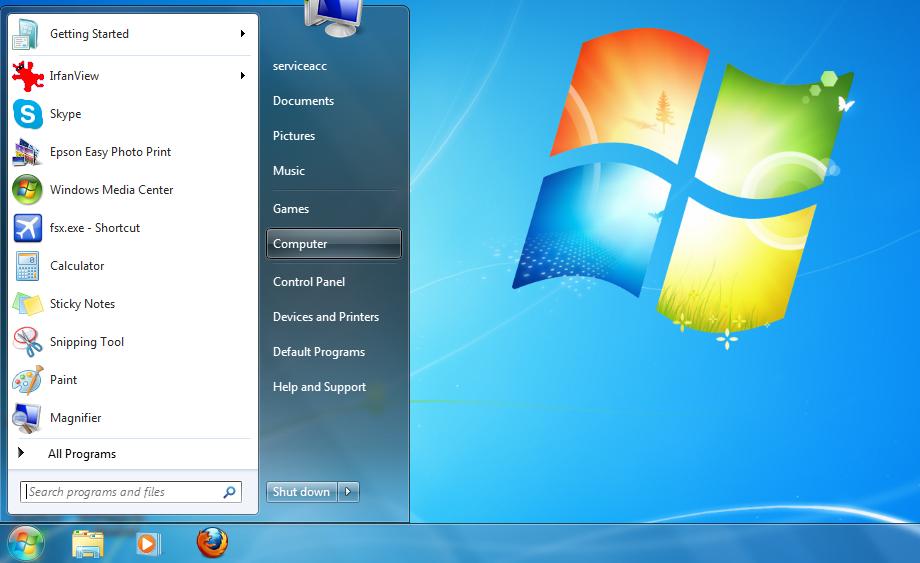
*One way to access Windows Explorer/My Computer in Windows 7 is from Start > Computer

Image
Image

Founder & Sole Member - Grumpy's Over the Hill Club for Veteran Virtual Aviators
Member of the Fox Four Group
My Google Photos albums
My Flickr albums
User avatar
Hagar
Colonel
Colonel
 
Posts: 30868
Joined: Wed Jun 19, 2002 7:15 am
Location: Costa Geriatrica

Re: how to add jets to fsx with w7

Postby bombardier » Sun Aug 04, 2013 3:40 pm

hello to anyone:

I'm working on getting some of my jets installed into fsx the ones that loaded in fsx did ok. but is there any super-11 jets for fsx I did not see any on camsim. I have been having trouble installing the super-11 emirates and lufthansia. its just these 2. so I was thinking maybe if I downloaded them again and see if that does any good.

bombardier
User avatar
bombardier
2nd Lieutenant
2nd Lieutenant
 
Posts: 288
Joined: Sat Sep 04, 2010 2:58 pm
Location: united states

Previous

Return to Flight Simulator X (FSX) and Steam

Who is online

Users browsing this forum: No registered users and 989 guests