Better frame rates with new video card?

FSX including FSX Steam version.

Better frame rates with new video card?

Postby MASABI TROOPER » Thu Jun 20, 2013 5:38 pm

Hello everybody
I´m using the NVIDIA GT 520 2gb videocard operating with two screens, one for the cockpit and the other one for flight instruments using by the way the trackir 5. Now i´m planning to buy the Nvidia Geforce Gtx 680 Classified 4gb.
I hope that i get better famerates with this improve.................now i have not all setings at ultrahigh and it is working with no problems. The reason is that i would like to have all settings at ultra high.

any comments please................

Bruno
Bruno (Trooper)
User avatar
MASABI TROOPER
Captain
Captain
 
Posts: 556
Joined: Wed May 29, 2013 6:49 pm
Location: Guayaquil

Re: Better frame rates with new video card?

Postby Gunslinger619 » Thu Jun 20, 2013 9:33 pm

FSX is a CPU intense program, not a GPU intense program. I have the GTX560Ti 2GB card, Don't waste your $$$. Upgrade to a i7-3770K processor like mine, then you will notice quite the difference. Movie quality, with ALL sliders MAXED!!!!
User avatar
Gunslinger619
2nd Lieutenant
2nd Lieutenant
 
Posts: 50
Joined: Sat Feb 09, 2013 6:18 pm
Location: KMYF

Re: Better frame rates with new video card?

Postby Icy » Thu Jun 20, 2013 9:50 pm

+1 on the CPU intensive nature of FSX

My 650ti will do the job with room to spare. I'd invest in at least a 650 (or equivalent) and put most of your budget into a nice powerful processor (the AMD FX 6350 is a great processor, though if you have the money an i7-3770k is absolutely amazing).
Image
Computer Specs: [OS] Windows 10 Pro x64bit, [CPU] AMD FX4300 (Quad Core @3.8Ghz), [RAM] 8.00 GB (@1600 Mt/s), [GPU] GIGABYTE GTX 760 OC (2GB version), [Primary Drive] Mushkin 120GB SSD, [Secondary Drive] Seagate 500GB HDD
User avatar
Icy
2nd Lieutenant
2nd Lieutenant
 
Posts: 59
Joined: Wed Oct 19, 2011 9:26 pm
Location: Brunswick, Georgia

Re: Better frame rates with new video card?

Postby Blaunarwal » Thu Jun 20, 2013 11:40 pm

I have the i7-3770K and a Z77 Board and FSX still stutters. Even my whole FSX installation is on a SATA III SSD drive. My GPU NVidida 570 is only at 50% performance, has still reserves. I don't have all sliders left. But with complex areas like New York, where you have several airports and lot of traffic, FSX goes down to 10 fps. This mostly because of loading scenery. I tried all kind of fsx.cfg tuning but never got rid of stutters. Maybe without traffic I could get it better. So I keep flying with the annoying stops from time to time, where FSX needs up to minutes to load scenery. I sometimes have the feeling, FSX run better on my old Vista system. Maybe it's some kind of addon, one of these dll's which slow down my FSX. I wonder if I will ever find out. Best place to fly FSX are remote islands in the Pacific. There I have fantastic performance. :shock:
User avatar
Blaunarwal
2nd Lieutenant
2nd Lieutenant
 
Posts: 134
Joined: Sun Oct 24, 2010 1:42 am
Location: LSZH

Re: Better frame rates with new video card?

Postby MASABI TROOPER » Fri Jun 21, 2013 10:12 am

Thank you guys for your comments, i have the i7-3770 CPU 3.4 Ghz, 8 GB memory, 64 bits.
What i noticed is that the stuttering depends on the aircraft that is being used at the moment, some planes dont stutter and others do.............
Question: I´m working with two screens allready. If i add a second video card to drive two screens, that will allow me to increase two more screens??.i would like to have 4 screens working...........Flight instrumens, Upper panel, Left and right panel, Outside viev or virtual cockpit.
Very best regards, and i appreciate your comments very much

Bruno
Bruno (Trooper)
User avatar
MASABI TROOPER
Captain
Captain
 
Posts: 556
Joined: Wed May 29, 2013 6:49 pm
Location: Guayaquil

Re: Better frame rates with new video card?

Postby MASABI TROOPER » Fri Jun 21, 2013 10:57 am

Salue Blaunarwal, wonsch du i der schwiiz??


Bruno
Bruno (Trooper)
User avatar
MASABI TROOPER
Captain
Captain
 
Posts: 556
Joined: Wed May 29, 2013 6:49 pm
Location: Guayaquil

Re: Better frame rates with new video card?

Postby Hawkeye07 » Sat Jun 22, 2013 11:32 am

MASABI TROOPER wrote:Thank you guys for your comments, i have the i7-3770 CPU 3.4 Ghz, 8 GB memory, 64 bits.
What i noticed is that the stuttering depends on the aircraft that is being used at the moment, some planes dont stutter and others do.............
Bruno


I've noticed that when I fly some of my Fast Movers like the Sectionf8 F-86 or Dino's F-14 especially at near full throttle and low alt. that's when I encounter more stuttering.
It's what I call "Trans Sonic Stutter" :lol:
Image

An Aircraft Mechanic only needs two tools, Duct Tape and WD40.
If it moves and it's not supposed to - use the Duct Tape.
If it doesn't move and it's supposed to - use the WD40.

Intel(R) i5 CPU 750 @ 2.67GHz, P55M-UD4, GeForce GTX960 8.00 GB RAM, Windows 7 Ultimate (32 bit & 64 bit on separate HDs)
User avatar
Hawkeye07
Major
Major
 
Posts: 1275
Joined: Sun Dec 02, 2012 7:10 pm
Location: Landlocked in the Midwest USA at KAXN

Re: Better frame rates with new video card?

Postby Blaunarwal » Sat Jun 22, 2013 1:15 pm

MASABI TROOPER wrote:Salue Blaunarwal, wonsch du i der schwiiz??

Bruno


Ja klar, staht ja. ;-)
User avatar
Blaunarwal
2nd Lieutenant
2nd Lieutenant
 
Posts: 134
Joined: Sun Oct 24, 2010 1:42 am
Location: LSZH

Re: Better frame rates with new video card?

Postby MASABI TROOPER » Sat Jun 22, 2013 2:31 pm

Jep, transonic stutter is good.............
Bruno (Trooper)
User avatar
MASABI TROOPER
Captain
Captain
 
Posts: 556
Joined: Wed May 29, 2013 6:49 pm
Location: Guayaquil

Re: Better frame rates with new video card?

Postby MASABI TROOPER » Sat Jun 22, 2013 2:34 pm

Also, Blaunarwal, en Gruess uus de Trope Suedamerikas...................... :D

Bruno (Trooper)
Bruno (Trooper)
User avatar
MASABI TROOPER
Captain
Captain
 
Posts: 556
Joined: Wed May 29, 2013 6:49 pm
Location: Guayaquil

Re: Better frame rates with new video card?

Postby OldAirmail » Sat Jun 22, 2013 11:01 pm

Things aren't always straight forward.

In general, a faster CPU of a lesser grade/model will beat out a more capable, but slower, CPU.

EXAMPLE - a 4 core CPU running at 3.3 will beat out an 8 core CPU running at 3.0, insofar as FSX is concerned.

You may also have to factor in your motherboard. My Sabertooth P67 motherboard uses Sandy Bridge. So while it can use an i7, it isn't going to get the full use of an i7 CPU. I'd need a board with Ivy Bridge to do that.

FSX wasn't intended to run on super computers (at the time). So 4 gig, or more, had never been a factor in it's design.

Then you get the hyperthreading problem with FSX. The i5 has 4 (I think) and FSX can use them. The i7 has a bunch more. And FSX can not use more than the first 4.

The Sandy Bridge vs. Ivy Bridge thing comes into effect with your video card. That's why I use a "less" capable/powerful GPU.

The list goes on.


There are many people with more powerful systems than I have. But by carefully matching the components I do better than some.

Your post started off with the hope of having a better video experience, regarding FSX. This is what you can have with a little bit of attention to detail
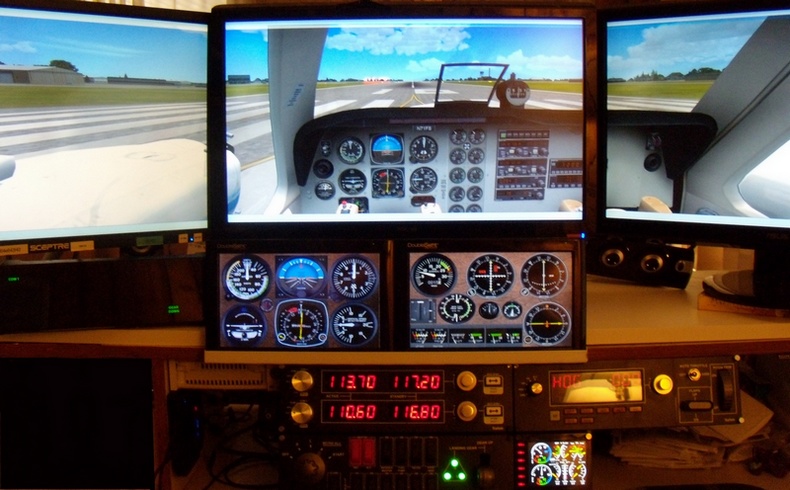
Image

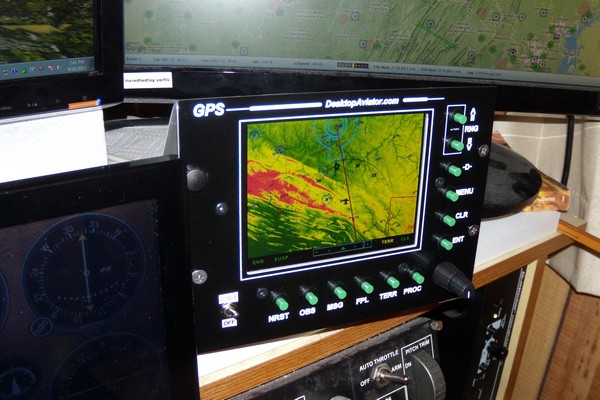
On top of all that I just added a GPS/monitor to the mix.
Image


"If i add a second video card to drive two screens, that will allow me to increase two more screens??."

Adding another video card isn't going to let you add more monitors. That is something that has to be built into the card.
User avatar
OldAirmail
Major
Major
 
Posts: 4814
Joined: Sun Feb 17, 2013 3:06 pm
Location: Concrete, WA ICAO - 3W5

Re: Better frame rates with new video card?

Postby OldAirmail » Thu Aug 29, 2013 6:20 pm

Say, Bruno. What did you end up getting for a video card?

Something with more monitor connectors, I hope.
User avatar
OldAirmail
Major
Major
 
Posts: 4814
Joined: Sun Feb 17, 2013 3:06 pm
Location: Concrete, WA ICAO - 3W5

Re: Better frame rates with new video card?

Postby MASABI TROOPER » Thu Aug 29, 2013 7:54 pm

I have two monitors working with FSX
One for Maps and instruments 22"
One for VC with Trackir 5 38"

I had to do some adjustments and now everything works smoothly without problems (No stuttering at all)...I am still working with my NVIDIA GT 520 2 Gb..............no problem.
Im thinking to buy a second card with identical specifications to drive 2 aditional monitors.............this in order to manage maps separate as i work with Plan-G v3

Very best regards
Bruno
Bruno (Trooper)
User avatar
MASABI TROOPER
Captain
Captain
 
Posts: 556
Joined: Wed May 29, 2013 6:49 pm
Location: Guayaquil

Re: Better frame rates with new video card?

Postby garymbuska » Fri Aug 30, 2013 9:06 am

I am quite happy with my I7 3820 Quad core Cpu This is the second generation uses a Sandy bridge.
The third generation came out 2 weeks after I bought this one, it uses the Ivy bridge I am using 12 gigs of 1800mhz htz ram and have frame rates locked at 30 with every thing maxed out with the exception of traffic. I see no sense in having a lot of water or ground traffic so I keep it set at about 15 %
Gary M Buska
SYSTEM Specs ASUS P8Z68 V/GEN 3 mother board: INTELL I7 2600k 3.48 ghz Quad core CPU with Sandy bridge: 12 Gigs of 1800hz ram:
GTX 950 OVER CLOCKED: 2 Gigs Ram Windows 10 Home 64 bit Operating system. 750W Dedicated modular power supply. Two Internal 1TB hard drives 1 External 1TB 3.2 USB hard drive. SAITEK Cessna flight Yoke with throttles.
CH Rudder Peddles 27 inch Wide screen Monitor
User avatar
garymbuska
Major
Major
 
Posts: 4415
Joined: Tue Dec 30, 2003 11:10 am
Location: Jacksonville, Florida

Re: Better frame rates with new video card?

Postby OldAirmail » Fri Aug 30, 2013 9:14 pm

MASABI TROOPER wrote:I have two monitors working with FSX
One for Maps and instruments 22"
One for VC with Trackir 5 38"

I had to do some adjustments and now everything works smoothly without problems (No stuttering at all)...I am still working with my NVIDIA GT 520 2 Gb..............no problem.
Im thinking to buy a second card with identical specifications to drive 2 aditional monitors.............this in order to manage maps separate as i work with Plan-G v3

Very best regards
Bruno

I know that NVIDIA makes cards that'll support 4, or more monitors, but I thought that all you could do with 2 of the same cards was to run them in SLI mode?
User avatar
OldAirmail
Major
Major
 
Posts: 4814
Joined: Sun Feb 17, 2013 3:06 pm
Location: Concrete, WA ICAO - 3W5

Next

Return to Flight Simulator X (FSX) and Steam

Who is online

Users browsing this forum: No registered users and 970 guests