How do I fix this little issue?

FSX including FSX Steam version.

How do I fix this little issue?

Postby F35LightningII » Fri Jun 14, 2013 9:54 pm

Hi guys

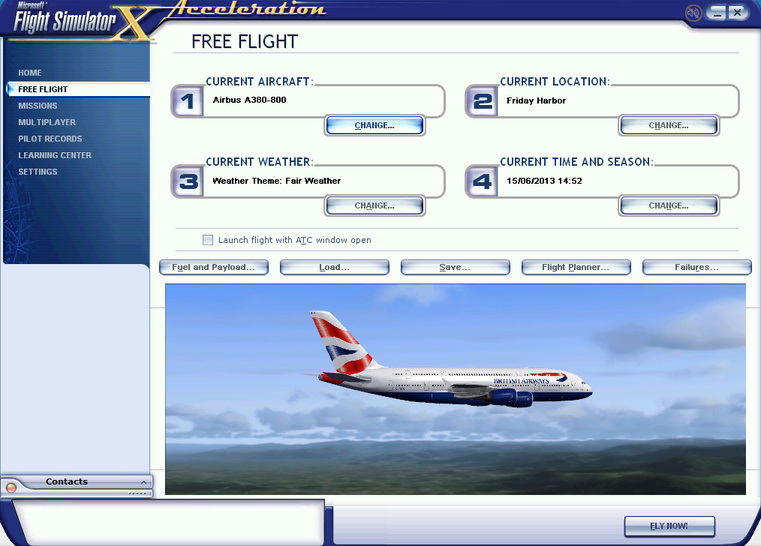
I've got an A380 (can't remember which developer) and it's good, but there's one thing I don't like about it - the default zoom is very zoomed out.

Here's what it looks like in the Free Flight screen:
Image

How do I fix this?
User avatar
F35LightningII
2nd Lieutenant
2nd Lieutenant
 
Posts: 276
Joined: Fri Feb 11, 2011 7:02 pm
Location: Auckland, New Zealand

Re: How do I fix this little issue?

Postby Bass » Sat Jun 15, 2013 7:41 am

If you got a photo program, maybe you can save a zoomed copi. (Dont know much about that).

You could also try to take a picture of the aircraft on ground or in air and then rename it > thumbnail.jpg < .
Put it into texture folder/s. (Save the original/s).

BDSizer is a good little neat program to size a pictures volume up and down.
User avatar
Bass
Major
Major
 
Posts: 3043
Joined: Wed Feb 15, 2012 9:32 am
Location: Scandinavia

Re: How do I fix this little issue?

Postby dave3cu » Sat Jun 15, 2013 9:58 am

The 3-d aircraft in the 'preview' window is rendered from the aircraft's .mdl file. From this FSDeveloper forum topic-http://www.fsdeveloper.com/forum/showthread.php?t=223219-the initial 'preview' zoom level is determined from a 'radius' value stored in the .mdl file. Maybe Arno's 'RadItor' tool, mentioned in the topic, could help.

Rather than 'fix' you could just use the rotate and zoom features in the 'preview' window. Move the mouse cursor into the preview window; left click and drag the cursor to change the aircraft's attitude/viewpoint; rotate the mouse wheel to zoom in/out.
dave3cu
Major
Major
 
Posts: 3141
Joined: Sun May 19, 2002 9:55 am
Location: 3CU, Northern Wisconsin, USA


Return to Flight Simulator X (FSX) and Steam

Who is online

Users browsing this forum: No registered users and 1118 guests

