


After spending a large amount of time making photoscenery for Phillip Island and making modifications to Leongatha airfield (Victoria, Australia), I was very annoyed in seeing that all grass at airports have gone wierd. They appear to have been replaced with some ground textures but have no idea what may have caused it as I have removed all of my recent FSX tweaks (from past week).

This is a picture of the problem:
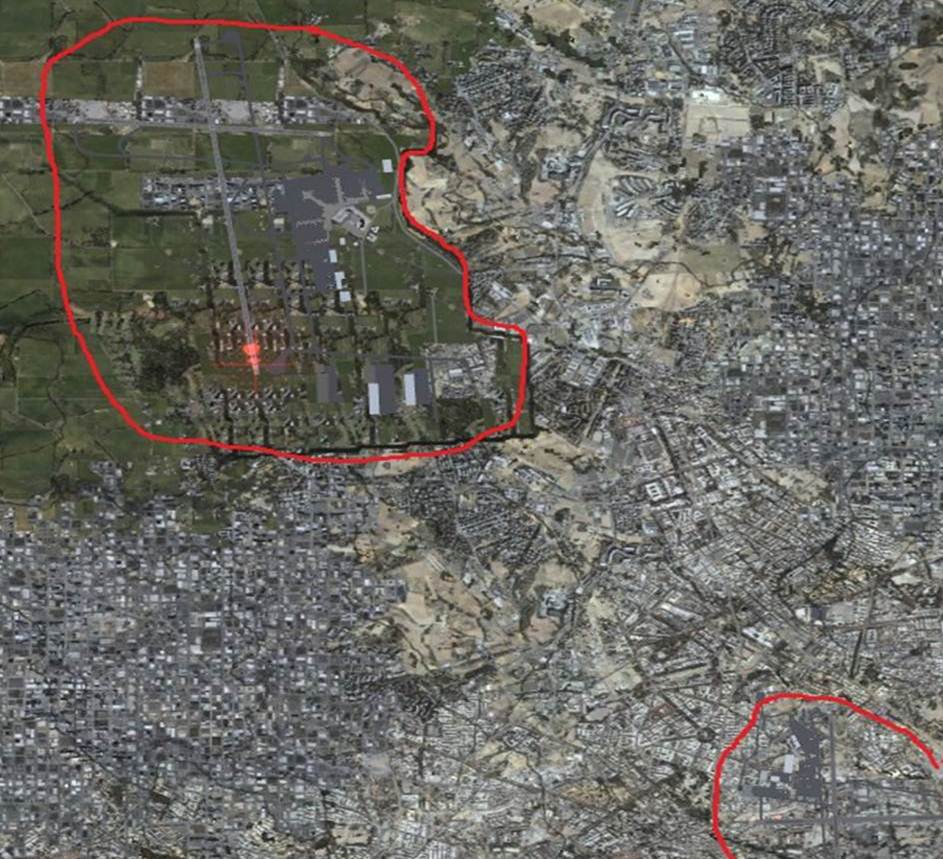
As you can see, the scenery doesn't seem to stop when it enters the airport.
The Phillip Island photoscenery that I put in didn't change the texture of the grass at any of the airports (I don't think) and only included mesh of that area only. This is the first time that I have done photscenery which is why I am including this in this post as I am not sure whether there may be any side-effects.
After the Leongatha modification was when I noticed this issue. I did it by using ADE but have done other airports using this program before so I don't think that this will be the problem. One idea that I had about this modification was whether ADE had somehow corrupted a part of FSX which controlled the exclusion of scenery and autogen. The reason that I think this might be the problem is because I made an exlude autogen polygon in ADE on Leongattha Airfield.

I have included a picture of the issue (with the red marker outlining the airport) showing melbourne international (YMML). I know that I can use the repair tool that might fix this but, like many people, would require a lot of time to add all the tweaks so would prefer not taking this option. Because the issue only started showing today, I thought that there may be a less dramatic fix could be used. If anyone could provide any ideas that would support/disprove my idea of ADE corrupting FSX scenery would be good, because it would prevent this sort of problem in the future/
Any help would be appreciated,
Evilmouse171

