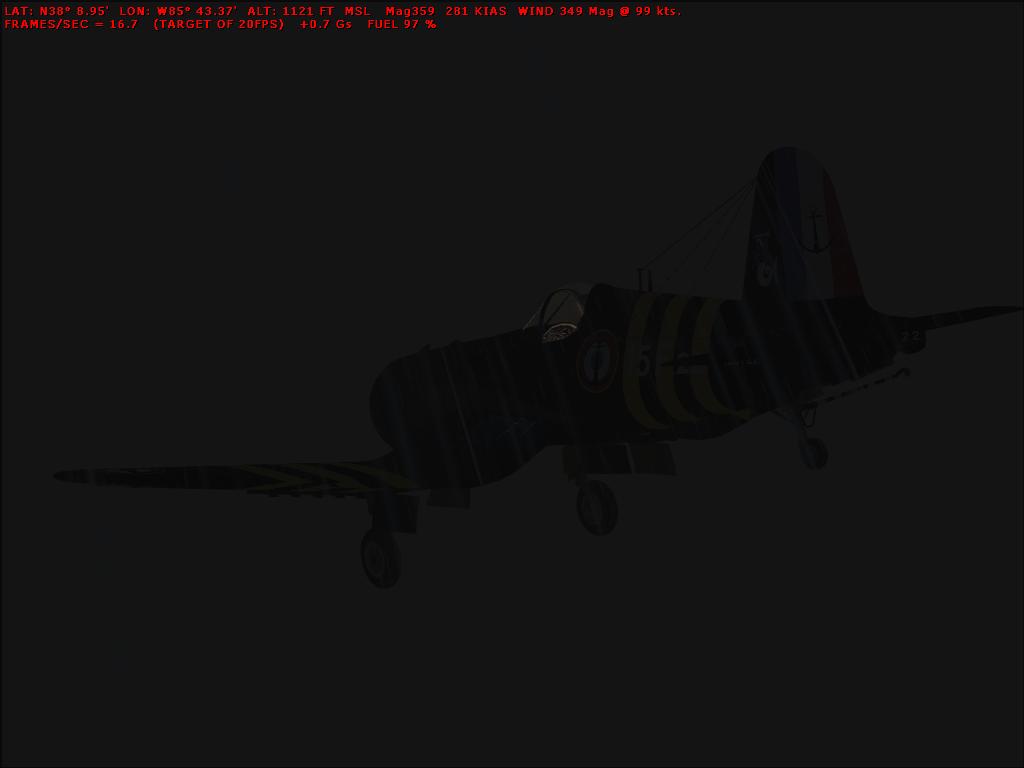
extream langing in Vought (november freeware screenshot contest entery)

Flight Simulation Screenshots displaying your Flight Simulation Experience. MSFS, FSX, Prepar3D, XPlane and other Flight Simulators. Focus is your Flight Simulator Experience. Please upload to Simviation (Button at top right)

extream langing in Vought (november freeware screenshot contest entery)

Postby jaime » Wed Nov 18, 2009 5:04 pm

ok...here is my entry for the freeware contest

Plane: Vought Corsair (located on page 17 of the simv vintage FSX category) its bleu something or other (sorry not good with names)
Location: KSDF


Weather
Clouds: overcast with thunderstorm clouds
Temp: -95C (what you wanted extreme...)
Wind: 200 Knots
Gusting to 220 Knots
Shear strength: severe
Visibility: 0.1Km
Icing: Severe
Precipitation: Snow

oh trying to land at the airport to take cover too...while in the dark ;)

Image
one of the starters of the burner pandemic
jaime
2nd Lieutenant
2nd Lieutenant
 
Posts: 247
Joined: Mon Nov 16, 2009 10:15 pm

Re: extream langing in Vought (november freeware screenshot contest entery)

Postby -Crossfire- » Wed Nov 18, 2009 5:19 pm

No offense but is this a serious entry??? I can't even see anything. :-?
Image
-Crossfire-
Captain
Captain
 
Posts: 966
Joined: Wed Mar 01, 2006 2:42 am
Location: Northern Canada

Re: extream langing in Vought (november freeware screenshot contest entery)

Postby skoker » Wed Nov 18, 2009 5:34 pm

I got a black box
Image
User avatar
skoker
Major
Major
 
Posts: 4260
Joined: Wed Feb 27, 2008 8:19 pm
Location: 1G3

Re: extream langing in Vought (november freeware screenshot contest entery)

Postby Tai-2 » Wed Nov 18, 2009 5:46 pm

I can see the plane tho.
Just not the snow


And some advice on shots in the future: I would take the red text out(as in don't take the screenshot with it there)
This plays a big role in screenshots imo

Then as others said, it is a bit dark, i know it is "extreme" weather, but you don't want the shot "too" dark.
And the red text is a little blurry, you have AA on?
User avatar
Tai-2
Captain
Captain
 
Posts: 699
Joined: Thu Apr 23, 2009 10:57 pm
Location: Georgia

Re: extream langing in Vought (november freeware screenshot contest entery)

Postby jaime » Wed Nov 18, 2009 8:24 pm

AA? and I dont know how or why the red test turned on...been trying to figure out how to turn it off, and I guess worst case if i need to re take the picture and just make it lighter I could...but yea tis my entery, its landing at night with 0.1Km visibility

oh and look at the plane its self, you should see white "Lines" thats from the weather (snow)...it was hard enough to keep it flying as it was and then snap the picture using a free screen shot program that I stumpled on in the simV utilities area...its called snap shot
Last edited by jaime on Wed Nov 18, 2009 8:26 pm, edited 1 time in total.
one of the starters of the burner pandemic
jaime
2nd Lieutenant
2nd Lieutenant
 
Posts: 247
Joined: Mon Nov 16, 2009 10:15 pm

Re: extream langing in Vought (november freeware screenshot contest entery)

Postby Tai-2 » Wed Nov 18, 2009 8:29 pm

Anti Aliasing(or how ever it is spelled) it is in display options. the Red text you have is removed by Default with Shift+Key.
Now note: you cannot enter another shot, or change the shot you entered (rule 6).
User avatar
Tai-2
Captain
Captain
 
Posts: 699
Joined: Thu Apr 23, 2009 10:57 pm
Location: Georgia

Re: extream langing in Vought (november freeware screenshot contest entery)

Postby jaime » Wed Nov 18, 2009 8:33 pm

i know, I just dont want to remove the shot since its my first one and I want to see if I could even compeat with the veterans :D but thanks for the info ill try the shift+key (Z is it? ill consult my key books) as for antialising ill try cranking it to holy $h!t and seeing if that helps for next month

one of the starters of the burner pandemic
jaime
2nd Lieutenant
2nd Lieutenant
 
Posts: 247
Joined: Mon Nov 16, 2009 10:15 pm

Re: extream langing in Vought (november freeware screenshot contest entery)

Postby Tai-2 » Wed Nov 18, 2009 8:35 pm

Yes shift and Z
some how my thing auto corrected for me :-?
User avatar
Tai-2
Captain
Captain
 
Posts: 699
Joined: Thu Apr 23, 2009 10:57 pm
Location: Georgia

Re: extream langing in Vought (november freeware screenshot contest entery)

Postby jaime » Wed Nov 18, 2009 8:44 pm

then is should default to Shift+Z... :-/wierd if you had it set to a different key and it just mysteriously reverts to the default....
one of the starters of the burner pandemic
jaime
2nd Lieutenant
2nd Lieutenant
 
Posts: 247
Joined: Mon Nov 16, 2009 10:15 pm

Re: extream langing in Vought (november freeware screenshot contest entery)

Postby Mr Shanks » Thu Nov 19, 2009 2:22 am

I can see the plane and the snow ???

The red text seems to come on when using the slew mode, maybe thats what happend here?
Image
Flying 'Spam' Can
Mr Shanks
2nd Lieutenant
2nd Lieutenant
 
Posts: 197
Joined: Thu Sep 10, 2009 2:16 am
Location: N.W. Scotland

Re: extream langing in Vought (november freeware screenshot contest entery)

Postby jaime » Thu Nov 19, 2009 6:33 pm

I wish...it is there because I had hit shift+Z by mistake and couldnt figure how i turned it on (never new about shift+Z untill yesterday...but at least I know now how to finially turn it off so I can get rid of it (its been there since last year lol)...anyways I can't wait to see who will win, and what next month will provide! Kinda wish we could come up with ideas too ;)
one of the starters of the burner pandemic
jaime
2nd Lieutenant
2nd Lieutenant
 
Posts: 247
Joined: Mon Nov 16, 2009 10:15 pm

Re: extream langing in Vought (november freeware screenshot contest entery)

Postby Fly2e » Mon Nov 30, 2009 7:14 pm

[movedhere] The November Screenshot Contest! [move by] Fly2e.
COMING SOON!
User avatar
Fly2e
Colonel
Colonel
 
Posts: 198020
Joined: Thu Jan 17, 2002 5:29 pm
Location: KFRG


Return to Simulation Screenshots Showcase

Who is online

Users browsing this forum: No registered users and 566 guests