
extra cloudy

Flight Simulation Screenshots displaying your Flight Simulation Experience. MSFS, FSX, Prepar3D, XPlane and other Flight Simulators. Focus is your Flight Simulator Experience. Please upload to Simviation (Button at top right)

extra cloudy

Postby themoon7x » Wed Aug 05, 2009 8:44 pm

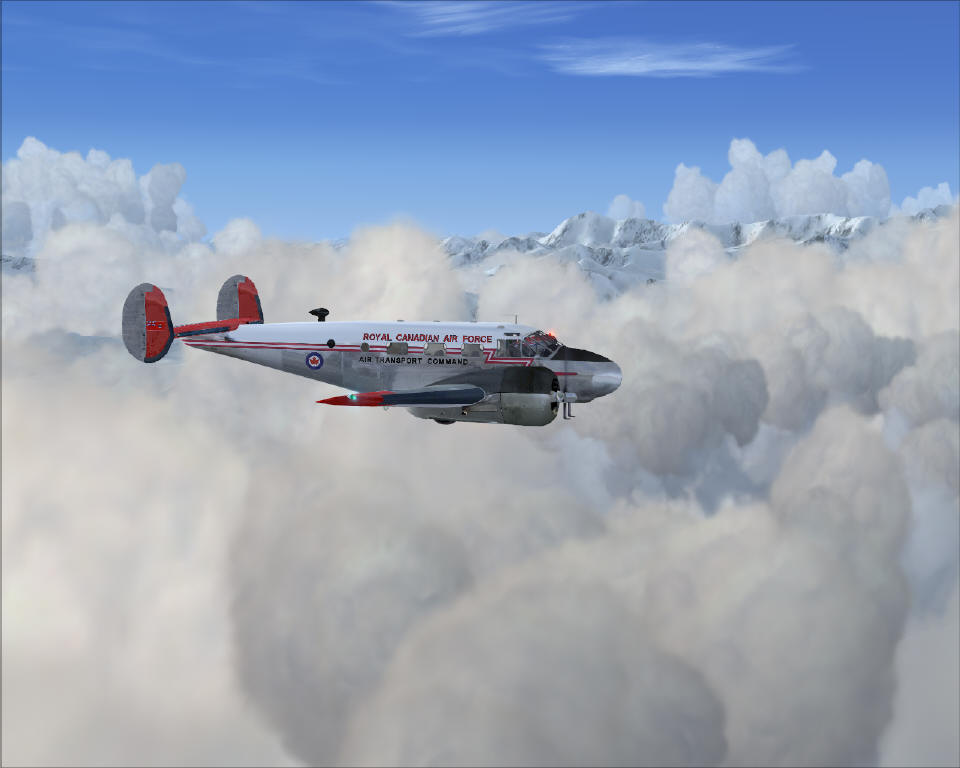
departing east from Fairbanks, AK, real-weather updates, Beechcraft D18. very surprised at the amount of clouds today. i think these shots coulda been better with a more colorful sky and perhaps the moon in the background as well....and perhaps the plane tilting a bit...need to remember these things in the future!

Image

Image
Last edited by themoon7x on Wed Aug 05, 2009 8:56 pm, edited 1 time in total.
themoon7x
Ground hog
Ground hog
 
Posts: 39
Joined: Fri Jul 31, 2009 10:26 pm

Re: extra cloudy

Postby patchz » Wed Aug 05, 2009 9:51 pm

Great plane and livery, beautiful scenery. Overall, nice shots. But, you can post up to 1024 x 768 if your monitor resolution is that or higher and not compress quite so much. That really hurt the 2nd shot, too much compression. What program are you using to resize the shots? I'm sure someone will tell you about some good freeware programs if you don't have something. I just can't remember the names of them right now since I don't use them.
Image
If God intended aircraft engines to have horizontally opposed engines, Pratt and Whitney would have made them that way.
User avatar
patchz
Colonel
Colonel
 
Posts: 10424
Joined: Wed Mar 11, 2009 7:33 pm
Location: IN THE FUNNY PAPERS

Re: extra cloudy

Postby themoon7x » Wed Aug 05, 2009 10:52 pm

Great plane and livery, beautiful scenery. Overall, nice shots. But, you can post up to 1024 x 768 if your monitor resolution is that or higher and not compress quite so much. That really hurt the 2nd shot, too much compression. What program are you using to resize the shots? I'm sure someone will tell you about some good freeware programs if you don't have something. I just can't remember the names of them right now since I don't use them.

thanks for the info patchz...i'm using the software that came with my canon camera (bring on the l33t comments). i had set it up to resize them to 1024x768 (my monitor rez is 1280x1024). the ratio is a little bit different (5:4 and 4:3), so the resizing kept the 768 measurement, and shortened the 1024. i really didn't wanna fool with it much though....i'm no professional, and i'll just have to admire my .bmps on the ol' hdd since i can't share those!
themoon7x
Ground hog
Ground hog
 
Posts: 39
Joined: Fri Jul 31, 2009 10:26 pm

Re: extra cloudy

Postby patchz » Thu Aug 06, 2009 2:04 am

Great plane and livery, beautiful scenery. Overall, nice shots. But, you can post up to 1024 x 768 if your monitor resolution is that or higher and not compress quite so much. That really hurt the 2nd shot, too much compression. What program are you using to resize the shots? I'm sure someone will tell you about some good freeware programs if you don't have something. I just can't remember the names of them right now since I don't use them.

thanks for the info patchz...i'm using the software that came with my canon camera (bring on the l33t comments). i had set it up to resize them to 1024x768 (my monitor rez is 1280x1024). the ratio is a little bit different (5:4 and 4:3), so the resizing kept the 768 measurement, and shortened the 1024. i really didn't wanna fool with it much though....i'm no professional, and i'll just have to admire my .bmps on the ol' hdd since i can't share those!


[color=#000000]I'm not a pro either, but I've learned a lot over the years and quite a bit since I started coming here. My monitor is 1280 x 1024 also, and if I don't crop, my resize is to 1024 x 768. Using Paint Shop Pro 7.
Image
If God intended aircraft engines to have horizontally opposed engines, Pratt and Whitney would have made them that way.
User avatar
patchz
Colonel
Colonel
 
Posts: 10424
Joined: Wed Mar 11, 2009 7:33 pm
Location: IN THE FUNNY PAPERS

Re: extra cloudy

Postby EJW » Thu Aug 06, 2009 8:00 am

The second shot is really nice!
EJW
Major
Major
 
Posts: 2760
Joined: Sun Apr 12, 2009 7:06 am
Location: Lincolnshire, UK

Re: extra cloudy

Postby Jisco » Thu Aug 06, 2009 8:04 am

Wow they are cool!
F16!
Image
User avatar
Jisco
1st Lieutenant
1st Lieutenant
 
Posts: 482
Joined: Tue Jul 28, 2009 1:06 pm
Location: KCVG

Re: extra cloudy

Postby yancovitch » Thu Aug 06, 2009 10:52 am

love that beech!
i7-7700k ....msi geforce gtx 1060....msi z270 gaming m5 lga 1151 motherboard....CORSAIR Vengeance LPX 16GB (2 x 8GB) ram.....
User avatar
yancovitch
Major
Major
 
Posts: 3530
Joined: Sat Aug 02, 2003 12:48 pm
Location: born montreal, lived vancouver, now live in burns lake bc.

Re: extra cloudy

Postby Brando14100 » Thu Aug 06, 2009 12:43 pm

Great shots. The plane and weather look great.

8-)
Brando14100
 

Re: extra cloudy

Postby themoon7x » Thu Aug 06, 2009 2:55 pm

[quote]
[color=#000000]I'm not a pro either, but I've learned a lot over the years and quite a bit since I started coming here. My monitor is 1280 x 1024 also, and if I don't crop, my resize is to 1024 x 768. Using Paint Shop Pro 7.
themoon7x
Ground hog
Ground hog
 
Posts: 39
Joined: Fri Jul 31, 2009 10:26 pm


Return to Simulation Screenshots Showcase

Who is online

Users browsing this forum: No registered users and 489 guests