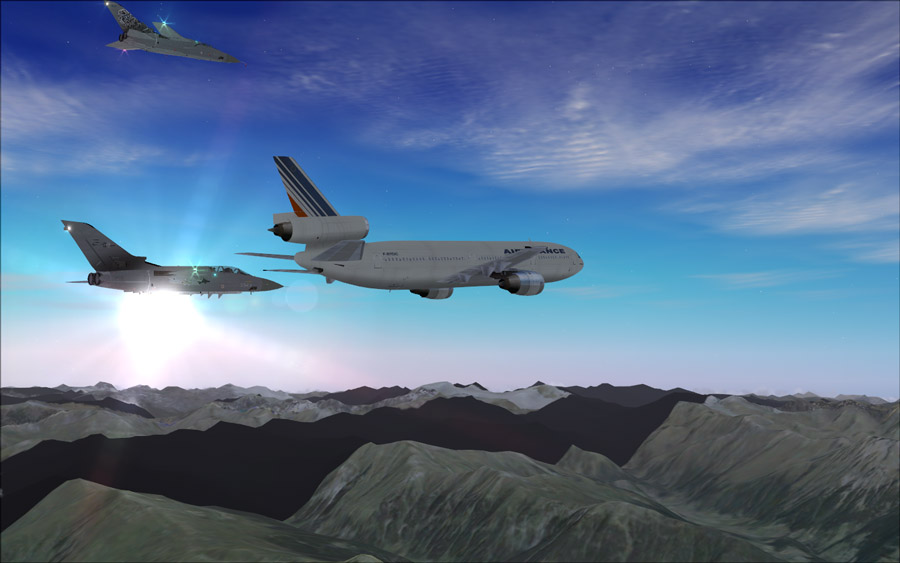
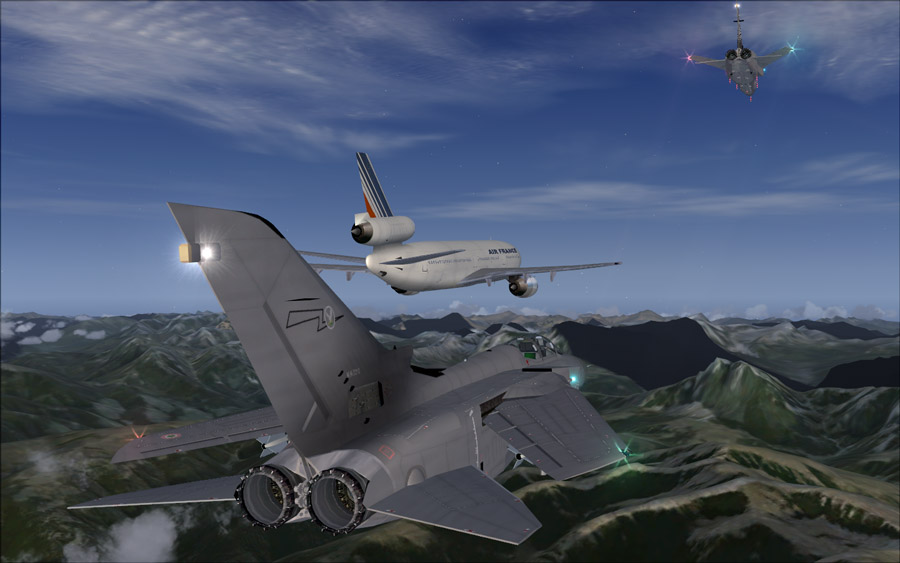
Trying to get some shots for the contest...

Flight Simulation Screenshots displaying your Flight Simulation Experience. MSFS, FSX, Prepar3D, XPlane and other Flight Simulators. Focus is your Flight Simulator Experience. Please upload to Simviation (Button at top right)

Trying to get some shots for the contest...

Postby Meck » Wed May 27, 2009 10:55 am

As you can see, my system can't even handle 3 a/c and photorealistic scenery (even if the graphics are turned low, there are black spots where the scenery won't load - even after giving the system time to load...)

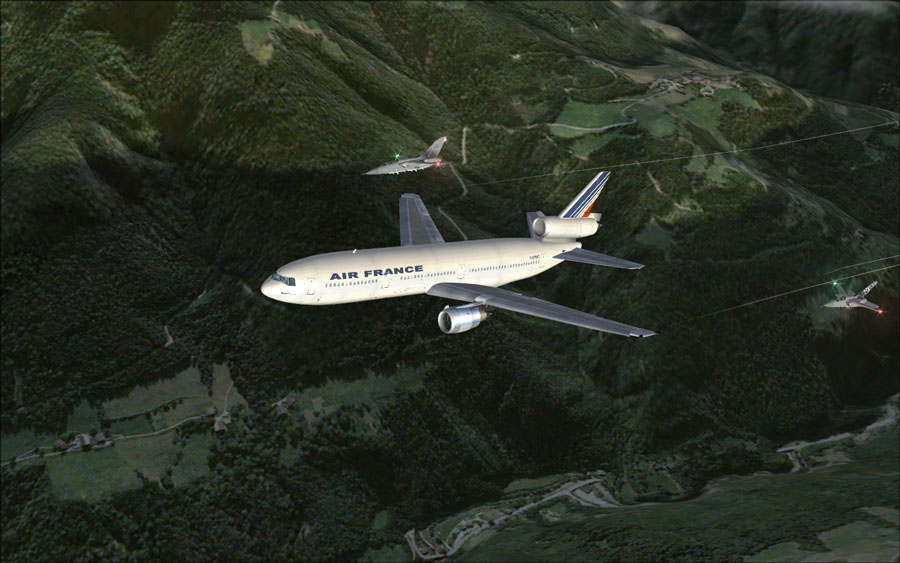
Here are some efforts - second one would have made it in the contest if not the scenery wasn't loaded!  :'(

Image


Image


Image
Image

excuse bad grammar; "I' bin Bayer..."
User avatar
Meck
Major
Major
 
Posts: 1656
Joined: Sat Apr 21, 2007 12:07 pm
Location: Bavaria

Re: Trying to get some shots for the contest...

Postby Cyprus » Wed May 27, 2009 11:48 am

you think your graphics are bad mine look like fs98 Niceee, nice shots though
Cyprus
Ground hog
Ground hog
 
Posts: 12
Joined: Wed Apr 15, 2009 1:38 pm
Location: United Kingdom Heathrow!

Re: Trying to get some shots for the contest...

Postby Brando14100 » Wed May 27, 2009 3:11 pm

If I were you, I would do something more like the last for the contest. It's more focused on the fighter than the airline.

8-)
Brando14100
 

Re: Trying to get some shots for the contest...

Postby lunitic_8 » Wed May 27, 2009 4:40 pm

If you cropped the ground out of the second one it would be perfect ;)
Last edited by lunitic_8 on Wed May 27, 2009 4:41 pm, edited 1 time in total.
Image

I7-7700HQ | GTX 1060 | 16GB DDR4-2400MHz | 1TB HDD + 256GB SSD
User avatar
lunitic_8
Major
Major
 
Posts: 3163
Joined: Sun Sep 28, 2008 8:05 pm
Location: Houston, Texas (KHOU)

Re: Trying to get some shots for the contest...

Postby Meck » Thu May 28, 2009 8:07 am

If you cropped the ground out of the second one it would be perfect ;)


I would have to crop out all of the ground... And since cropping isn't allowed in the contests I have to think about something different!  :-/
Image

excuse bad grammar; "I' bin Bayer..."
User avatar
Meck
Major
Major
 
Posts: 1656
Joined: Sat Apr 21, 2007 12:07 pm
Location: Bavaria

Re: Trying to get some shots for the contest...

Postby JakesF14 » Fri Jun 19, 2009 8:10 am

hi there
call me a stupid simpilot or anything, but i have to ask this question: how did you do this flying formation with other planes? is there addons for this? it is AWESOME! i saw another screenshot as well flying formation?  PLEASE can you give me any info?
Image
User avatar
JakesF14
Major
Major
 
Posts: 1866
Joined: Wed May 13, 2009 5:42 am
Location: South Africa

Re: Trying to get some shots for the contest...

Postby Brando14100 » Fri Jun 19, 2009 8:26 am

[quote]hi there
call me a stupid simpilot or anything, but i have to ask this question: how did you do this flying formation with other planes? is there addons for this? it is AWESOME! i saw another screenshot as well flying formation?
Brando14100
 

Re: Trying to get some shots for the contest...

Postby JakesF14 » Fri Jun 19, 2009 8:32 am

it must be a long friday for me, but i do not understand? how does FS Recorder help for formation flying? (i am not talking about how to make a screenshot)
is there any software that add a wingman/another plane flying with you the same route? OK i will check out FS Recorder anyway.?

thanks for the quick reply!
Image
User avatar
JakesF14
Major
Major
 
Posts: 1866
Joined: Wed May 13, 2009 5:42 am
Location: South Africa

Re: Trying to get some shots for the contest...

Postby Travis » Fri Jun 19, 2009 8:47 am

FS Recorder has the ability to record a flight and then play it back as an AI aircraft.  So you could fly a specified route with the recorder on, then fly the same route again with the original recording as AI, and just fly as it's wingman.  Takes a bit of practice, but you can get some incredible shots using it.

I've seen some with 6 aircraft all flying in formation and some where the aircraft are doing acrobatics together.  Pretty cool stuff, if you have time and patience!
Image
User avatar
Travis
Major
Major
 
Posts: 4381
Joined: Thu Feb 06, 2003 3:17 am
Location: KAUS - 30 MI NW

Re: Trying to get some shots for the contest...

Postby Brando14100 » Fri Jun 19, 2009 9:00 am

[quote]FS Recorder has the ability to record a flight and then play it back as an AI aircraft.
Brando14100
 

Re: Trying to get some shots for the contest...

Postby ShaneG_old » Fri Jun 19, 2009 9:04 am

it must be a long friday for me, but i do not understand? how does FS Recorder help for formation flying? (i am not talking about how to make a screenshot)
is there any software that add a wingman/another plane flying with you the same route? OK i will check out FS Recorder anyway.?

thanks for the quick reply!


Read this thread:
Last edited by ShaneG_old on Fri Jun 19, 2009 9:05 am, edited 1 time in total.
ShaneG_old
Lieutenant Colonel
Lieutenant Colonel
 
Posts: 9700
Joined: Tue Mar 11, 2008 11:52 am

Re: Trying to get some shots for the contest...

Postby olderndirt » Fri Jun 19, 2009 9:06 am

Speaking of dumb questions, here's one.
[img]http://www.simviation.com/yabbuploads/oldrt18.jpg
User avatar
olderndirt
Major
Major
 
Posts: 3495
Joined: Sat Dec 20, 2008 3:07 pm
Location: Rochester, WA

Re: Trying to get some shots for the contest...

Postby ShaneG_old » Fri Jun 19, 2009 9:12 am

[quote]Speaking of dumb questions, here's one.
ShaneG_old
Lieutenant Colonel
Lieutenant Colonel
 
Posts: 9700
Joined: Tue Mar 11, 2008 11:52 am

Re: Trying to get some shots for the contest...

Postby olderndirt » Fri Jun 19, 2009 9:27 am

Is this correctable without reaching too deeply into your wallet?
[img]http://www.simviation.com/yabbuploads/oldrt18.jpg
User avatar
olderndirt
Major
Major
 
Posts: 3495
Joined: Sat Dec 20, 2008 3:07 pm
Location: Rochester, WA

Re: Trying to get some shots for the contest...

Postby ShaneG_old » Fri Jun 19, 2009 9:36 am

Yes, but some consider it a compromise, while I call it a 'step toward realism'. ;)


The best way, without having to spend a dime, is to lower the visibility, and increase the cloud cover.

I know that someone will say, "Clouds are one of the biggest performance killers", but, only with unlimited visibility. ;)


Go to advanced weather, choose the Visibility tab, and set the tops to 99,999ft, and then set the slider to 20-40nm, NEVER MORE THAN 40!!

In real life you NEVER have unlimited visibility. So why give it to yourself in a "simulated reality'?

Increasing the cloud coverage within this reduced visibility also helps, if you're down to a 20-40 mile vis, then set the clouds to the lowest draw distance and set density to medium or Max and give yourself a nice 20,000ft tall cumulus layer to fly in.


Or best yet, always use Real world Weather. You'll soon see what I mean about NEVER having unlimited visibility, even on perfectly clear days. 8-)

The less ground texture it has to render, the less a weaker system will struggle to do so. (PERSONALLY TESTED METHOD)

This is very similar to MOUSY's 'limited focus' tip. : http://www.simviation.com/cgi-bin/yabb2 ... 1154675513
Last edited by ShaneG_old on Fri Jun 19, 2009 9:46 am, edited 1 time in total.
ShaneG_old
Lieutenant Colonel
Lieutenant Colonel
 
Posts: 9700
Joined: Tue Mar 11, 2008 11:52 am

Next

Return to Simulation Screenshots Showcase

Who is online

Users browsing this forum: No registered users and 564 guests