
Invisible Corsair

Flight Simulation Screenshots displaying your Flight Simulation Experience. MSFS, FSX, Prepar3D, XPlane and other Flight Simulators. Focus is your Flight Simulator Experience. Please upload to Simviation (Button at top right)

Invisible Corsair

Postby patchz » Sun May 24, 2009 10:30 am

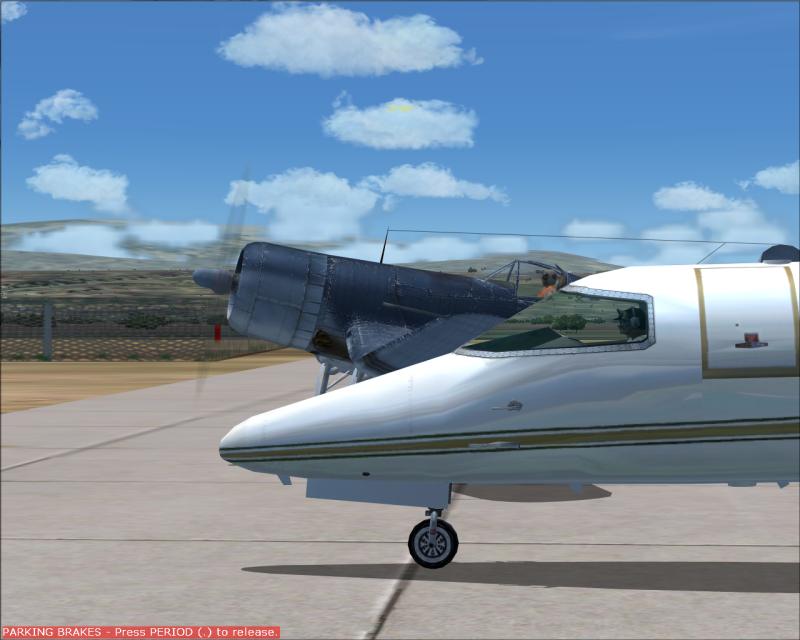
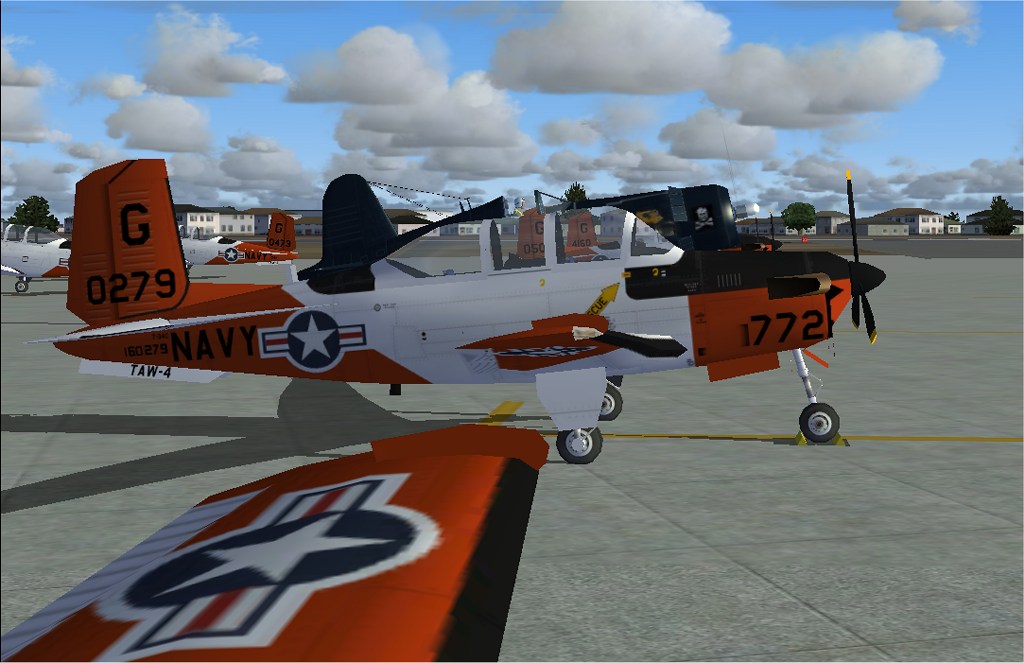
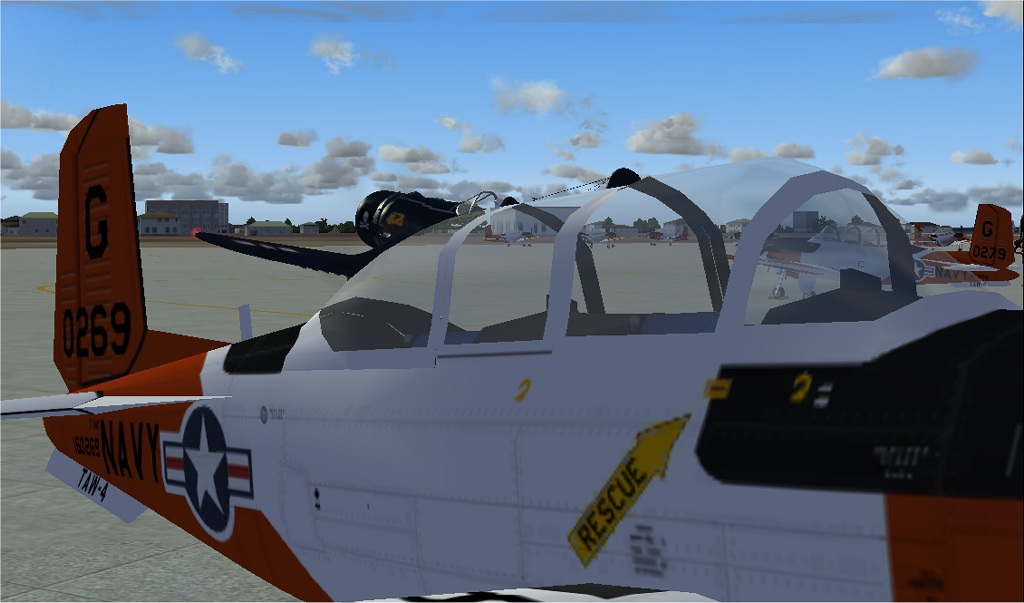
This is just weird. While messing around at Corpus Christi NAS I observed this phenomena. The Corsair becomes invisible when viewing through the canopy of a parked T-34. Can anybody explain this? :o


Image

Image
Image
If God intended aircraft engines to have horizontally opposed engines, Pratt and Whitney would have made them that way.
User avatar
patchz
Colonel
Colonel
 
Posts: 10424
Joined: Wed Mar 11, 2009 7:33 pm
Location: IN THE FUNNY PAPERS

Re: Invisible Corsair

Postby garryrussell » Sun May 24, 2009 10:36 am

Are you using FS.X with FS9 aircraft......I'm thinking like when clouds dissappear behind prop due I guess to some different transparency order.......

Just a thought off the top of my head.

Garry

garryrussell
Captain
Captain
 
Posts: 706
Joined: Sat Mar 22, 2008 10:58 am

Re: Invisible Corsair

Postby Daube » Sun May 24, 2009 10:40 am

Are you using FS.X with FS9 aircraft......I'm thinking like when clouds dissappear behind prop due I guess to some different transparency order.......

Just a thought off the top of my head.

Garry


I think you are absolutely right, this must be the same transparency problem that make the cloud dissapear behind the prop, or the prop dissapear behind some scenery objects.
User avatar
Daube
Lieutenant Colonel
Lieutenant Colonel
 
Posts: 6611
Joined: Wed Oct 05, 2005 8:34 am
Location: Nice (FR)

Re: Invisible Corsair

Postby patchz » Sun May 24, 2009 10:42 am

Are you using FS.X with FS9 aircraft......I'm thinking like when clouds dissappear behind prop due I guess to some different transparency order.......

Just a thought off the top of my head.

Garry


Nope. FS9 aircraft in FS9, MAIW Corpus Christi NAS package, Guy Hulin Corsair.
Image
If God intended aircraft engines to have horizontally opposed engines, Pratt and Whitney would have made them that way.
User avatar
patchz
Colonel
Colonel
 
Posts: 10424
Joined: Wed Mar 11, 2009 7:33 pm
Location: IN THE FUNNY PAPERS

Re: Invisible Corsair

Postby jrom » Sun May 24, 2009 9:34 pm

I've had the same problem whan trying to make props in FSDS. Everything is fine until you look from the front through the prop disk, the part of the plane visible inside the disk is invisible. So I think it's the T-34.

Does the same thing happen to all your planes?
43 6F 6E 67 72 61 74 73 20 6F 6E 20 64 65 63 6F 64 69 6E 67 20 6D 79 20 73 65 63 72 65 74 20 63 6F 64 65 21 0D 0A 0D 0A 48 65 72 65 20 69 73 20 79 6F 75 72 20 72 65 77 61 72 64 3A 0D 0A 0D 0A 68 74 74 70 3A 2F 2F 79 6F 75 74 75 2E 62 65 2F 64 51 77 34 77
User avatar
jrom
2nd Lieutenant
2nd Lieutenant
 
Posts: 196
Joined: Wed Mar 18, 2009 10:32 am
Location: Location: Earth

Re: Invisible Corsair

Postby patchz » Sun May 24, 2009 11:41 pm

I've had the same problem whan trying to make props in FSDS. Everything is fine until you look from the front through the prop disk, the part of the plane visible inside the disk is invisible. So I think it's the T-34.

Does the same thing happen to all your planes?


Don't know. That's the first time I've seen it. But based on what you said, it bears further investigation. Thanks.
Image
If God intended aircraft engines to have horizontally opposed engines, Pratt and Whitney would have made them that way.
User avatar
patchz
Colonel
Colonel
 
Posts: 10424
Joined: Wed Mar 11, 2009 7:33 pm
Location: IN THE FUNNY PAPERS

Re: Invisible Corsair

Postby Ospreyluvr » Mon May 25, 2009 12:06 am

Edit:Never mind, I see it now! ::)
Last edited by Ospreyluvr on Mon May 25, 2009 12:25 am, edited 1 time in total.
User avatar
Ospreyluvr
2nd Lieutenant
2nd Lieutenant
 
Posts: 93
Joined: Tue Feb 17, 2009 10:42 am
Location: Virginia

Re: Invisible Corsair

Postby MIKE JG » Mon May 25, 2009 12:07 am

It's a limitation of FS9.  The canopy is both transparent and reflective at the same time.  My theory is that FS9 doesn't know how to handle this situation graphically and you get transparency holes when looking through these objects.

If you put that AI plane or many of our other recent designs inside a scenery structure, a hangar for example, you'll get the same effect.
-Mike G.

Image

Military AI traffic packages and scenery for the Microsoft Flight Simulator series.
User avatar
MIKE JG
Captain
Captain
 
Posts: 844
Joined: Wed Apr 07, 2004 5:46 pm
Location: Ohio

Re: Invisible Corsair

Postby Alejandro Rhodes » Mon May 25, 2009 1:38 am

[quote]It's a limitation of FS9.
Last edited by Alejandro Rhodes on Mon May 25, 2009 1:40 am, edited 1 time in total.
Alejandro Rhodes
Ground hog
Ground hog
 
Posts: 0
Joined: Sun Jan 27, 2013 6:33 am

Re: Invisible Corsair

Postby garryrussell » Mon May 25, 2009 2:35 am

I've had the same problem whan trying to make props in FSDS. Everything is fine until you look from the front through the prop disk, the part of the plane visible inside the disk is invisible. So I think it's the T-34.

Does the same thing happen to all your planes?


That sounds like earlier versions of FSDS where this happens unless you make sure the transparent parts are at the bottom of your parts hirachy list.

Garry
garryrussell
Captain
Captain
 
Posts: 706
Joined: Sat Mar 22, 2008 10:58 am

Re: Invisible Corsair

Postby MIKE JG » Mon May 25, 2009 1:02 pm

I stand corrected I see.  That is good information to know. I will pass this along to our modelers and see if that fixes the problem.
-Mike G.

Image

Military AI traffic packages and scenery for the Microsoft Flight Simulator series.
User avatar
MIKE JG
Captain
Captain
 
Posts: 844
Joined: Wed Apr 07, 2004 5:46 pm
Location: Ohio

Re: Invisible Corsair

Postby tcco94 » Mon May 25, 2009 8:07 pm

It must be Harry Potter's Cloak
User avatar
tcco94
Major
Major
 
Posts: 3946
Joined: Mon Apr 07, 2008 1:41 am
Location: Bay Area, California

Re: Invisible Corsair

Postby MIKE JG » Tue May 26, 2009 12:19 pm

Wait a minute....
Last edited by MIKE JG on Tue May 26, 2009 12:21 pm, edited 1 time in total.
-Mike G.

Image

Military AI traffic packages and scenery for the Microsoft Flight Simulator series.
User avatar
MIKE JG
Captain
Captain
 
Posts: 844
Joined: Wed Apr 07, 2004 5:46 pm
Location: Ohio

Re: Invisible Corsair

Postby Alejandro Rhodes » Tue May 26, 2009 1:06 pm

[quote]Wait a minute....
Last edited by Alejandro Rhodes on Tue May 26, 2009 1:08 pm, edited 1 time in total.
Alejandro Rhodes
Ground hog
Ground hog
 
Posts: 0
Joined: Sun Jan 27, 2013 6:33 am

Re: Invisible Corsair

Postby Hagar » Tue May 26, 2009 1:28 pm

Yes, you right this is weird ,Although this is original CFS2 brough By Microsoft into Flight Simulator 9 ,so is not big deal its not the T-34 is the Default FS2004 model issue ..But let's face it ,who need to see the Corsair thru other airplane's windows and from the outside.

I can't remember very well ,I install my original FS2004 then I made a CD which install everything ,airplanes and a software freeware (can't remember the name that make it more real lands scapes clouds landiing lights etc, ) all included in a CD I hit replace all the original files .
My point is I can't remember very well if this is the original that comes in the CDs of MSFS9..
I think it is ,but not 100% sure ,I stop using FS9 a while ago ,I only use it for design ,to compare some older models for FSX

     Image

You might have something there Alex. The CFS2 default Corsair was included with FS2002, not FS9. I didn't know it works in FSX.

PS. That's not the same Corsair that patchz has the problem with.
Last edited by Hagar on Tue May 26, 2009 1:29 pm, edited 1 time in total.
Image

Founder & Sole Member - Grumpy's Over the Hill Club for Veteran Virtual Aviators
Member of the Fox Four Group
My Google Photos albums
My Flickr albums
User avatar
Hagar
Colonel
Colonel
 
Posts: 30869
Joined: Wed Jun 19, 2002 7:15 am
Location: Costa Geriatrica

Next

Return to Simulation Screenshots Showcase

Who is online

Users browsing this forum: No registered users and 502 guests