
Trouble posting

Flight Simulation Screenshots displaying your Flight Simulation Experience. MSFS, FSX, Prepar3D, XPlane and other Flight Simulators. Focus is your Flight Simulator Experience. Please upload to Simviation (Button at top right)

Trouble posting

Postby Flt4ever » Thu Apr 16, 2009 10:06 am

I have tried several times to post a screen shot.  I have followed the guide but I must be missing something a I can not get anything to post. All help is very welcomed.
I7 980X
ASUS P6X58D
12 gig Patriot ddr3 2000 mhz
Windows 7 64 bit
Nvidia GTX 470
User avatar
Flt4ever
2nd Lieutenant
2nd Lieutenant
 
Posts: 131
Joined: Sat Jan 31, 2009 9:57 am
Location: VB, Virginia

Re: Trouble posting

Postby Hagar » Thu Apr 16, 2009 10:21 am

Hi there. Posting images should be quite straightforward.

1. First make sure your image is saved in JPEG (.jpg) format & within the forum limits (max width 1024 pixels & below 150 Kb). Save the image with a file name unique to you so it doesn't conflict with previously uploaded images. (I use a da- prefix on all images I upload here.)

2. Then upload the image to the Simviation server from the Upload Images link on the forum Menu Bar. http://www.simviation.com/yabbupload.html

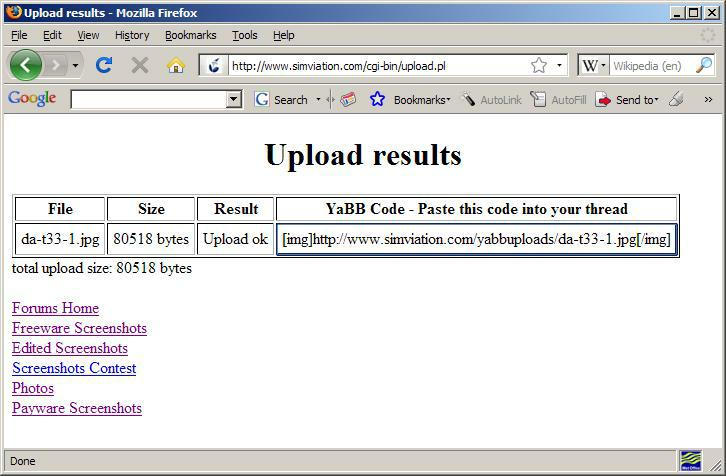
3. When the image has been successfully uploaded you will be given a link to it including the code to paste into your post. (There is no need to click the
Last edited by Hagar on Thu Apr 16, 2009 10:24 am, edited 1 time in total.
Image

Founder & Sole Member - Grumpy's Over the Hill Club for Veteran Virtual Aviators
Member of the Fox Four Group
My Google Photos albums
My Flickr albums
User avatar
Hagar
Colonel
Colonel
 
Posts: 30869
Joined: Wed Jun 19, 2002 7:15 am
Location: Costa Geriatrica

Re: Trouble posting

Postby Flt4ever » Thu Apr 16, 2009 3:32 pm

Thanks!  I will give it a try again.  My problem may have been the insert function.  I could upload the pictures but then coyuld not get them to post.  Thanks again
I7 980X
ASUS P6X58D
12 gig Patriot ddr3 2000 mhz
Windows 7 64 bit
Nvidia GTX 470
User avatar
Flt4ever
2nd Lieutenant
2nd Lieutenant
 
Posts: 131
Joined: Sat Jan 31, 2009 9:57 am
Location: VB, Virginia

Re: Trouble posting

Postby Hagar » Thu Apr 16, 2009 3:58 pm

The URL you paste into your topic should look like this complete with the [img ] brackets. (This example is a shot I just posted in another topic.)

Code: Select all
[img]http://www.simviation.com/yabbuploads/da-t33-1.jpg[/img]

Image
Last edited by Hagar on Thu Apr 16, 2009 3:58 pm, edited 1 time in total.
Image

Founder & Sole Member - Grumpy's Over the Hill Club for Veteran Virtual Aviators
Member of the Fox Four Group
My Google Photos albums
My Flickr albums
User avatar
Hagar
Colonel
Colonel
 
Posts: 30869
Joined: Wed Jun 19, 2002 7:15 am
Location: Costa Geriatrica


Return to Simulation Screenshots Showcase

Who is online

Users browsing this forum: No registered users and 506 guests
