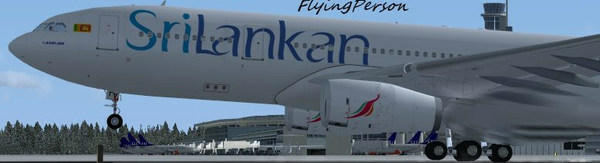
My first screenshot here..

Flight Simulation Screenshots displaying your Flight Simulation Experience. MSFS, FSX, Prepar3D, XPlane and other Flight Simulators. Focus is your Flight Simulator Experience. Please upload to Simviation (Button at top right)

Re: My first screenshot here..

Postby scalper_old » Sun Jan 04, 2009 3:30 am

Welcome!
scalper_old
Major
Major
 
Posts: 1431
Joined: Mon Dec 31, 1990 8:00 pm

Re: My first screenshot here..

Postby FlyingPerson » Sun Jan 04, 2009 8:06 am

Harold: You mean going to "Resize/Resample" in IrfanView then resizing it to 800x600 and then check "Preserve aspect ratio"?

Sorry, i'm new to this :-[ :-/
Specs
Intel M C2D P8400 2.26 GhZ
nVidia GeForce 9600M GT
4 GB DDR3
320 GB HD
Windows Vista Home Premium SP1 32

Image


Flown: B
User avatar
FlyingPerson
Captain
Captain
 
Posts: 573
Joined: Sun Nov 09, 2008 3:54 pm
Location: Near Oslo, Norway

Re: My first screenshot here..

Postby Anxyous » Sun Jan 04, 2009 10:29 am

Almost, check 'Preserve aspect ratio' first, then set the width of the pic to whatever you want.

The height should follow automatically :)
Image
User avatar
Anxyous
Major
Major
 
Posts: 2593
Joined: Mon Dec 25, 2006 4:04 pm

Re: My first screenshot here..

Postby FlyingPerson » Sun Jan 04, 2009 10:52 am

Thanks Anxyous, but it doesen't work correctly. If I check the "Preserve Aspect Ratio" first, then try resizing, and I put the widht of the screenie to 800, the height automatically goes to 450. Then I can't put it to 600. It really seems like I have to put it to 800x600 first, then check the Preserve aspect ratio. That's the only way I can make it stay at 800x600. Is it correct that it's supposed to go to 800x450 automatically when I have checked Preserve Aspect Ratio? :-/
Specs
Intel M C2D P8400 2.26 GhZ
nVidia GeForce 9600M GT
4 GB DDR3
320 GB HD
Windows Vista Home Premium SP1 32

Image


Flown: B
User avatar
FlyingPerson
Captain
Captain
 
Posts: 573
Joined: Sun Nov 09, 2008 3:54 pm
Location: Near Oslo, Norway

Re: My first screenshot here..

Postby Anxyous » Sun Jan 04, 2009 11:26 am

Yeah, otherwise the pic will get squished :)
Image
User avatar
Anxyous
Major
Major
 
Posts: 2593
Joined: Mon Dec 25, 2006 4:04 pm

Re: My first screenshot here..

Postby haroldkip » Sun Jan 04, 2009 5:33 pm

Is it correct that it's supposed to go to 800x450 automatically when I have checked Preserve Aspect Ratio?

Like Anxyous said 'Yes' ... if you preserve the aspect ratio of the original image (say 1280x1024 (like my setup)) then - when you resize -  the resized image will have the same width/height ratio as the original.

If I resize an image of 1280x1024 (aspect ratio = 1,25 (1280 divided by 1024)) to the max allowed width on SimV (1024 pixels wide), the height of the image would be 1024:1,25 = 819,2 pixels.

Let's take a step back ... what's your 'native resolution'; the resolution of your desktop? And is it the same as the resolution of your sim?
User avatar
haroldkip
Lieutenant Colonel
Lieutenant Colonel
 
Posts: 5906
Joined: Wed Apr 12, 2006 5:13 am
Location: Amsterdam, The Netherlands

Re: My first screenshot here..

Postby FlyingPerson » Mon Jan 05, 2009 6:12 am

It's not a desktop. I'm using a laptop as I prefer it faaaaaaaaaaar over desktops. FSX actually runs smoothly on high enough graphics for me to take, so I don't want any "blah blah FSX doesen't work on laptops", ok? Thanks :-X

An image of 1280x1024.. i'll check my FSX.

My full screen resolution on FSX is 1366x768x32.

My native resolution.. hmm.. sorry, but how do I find out that? :-[ Sorry, i'm still pretty tired. My screen is 16", though, but i'm not sure if that matters. How do I find out the resolution?

Thanks for all your help guys, I appreciate it :D
Specs
Intel M C2D P8400 2.26 GhZ
nVidia GeForce 9600M GT
4 GB DDR3
320 GB HD
Windows Vista Home Premium SP1 32

Image


Flown: B
User avatar
FlyingPerson
Captain
Captain
 
Posts: 573
Joined: Sun Nov 09, 2008 3:54 pm
Location: Near Oslo, Norway

Re: My first screenshot here..

Postby Hagar » Mon Jan 05, 2009 7:01 am

It's not a desktop. I'm using a laptop as I prefer it faaaaaaaaaaar over desktops. FSX actually runs smoothly on high enough graphics for me to take, so I don't want any "blah blah FSX doesen't work on laptops", ok? Thanks :-X

An image of 1280x1024.. i'll check my FSX.

My full screen resolution on FSX is 1366x768x32.
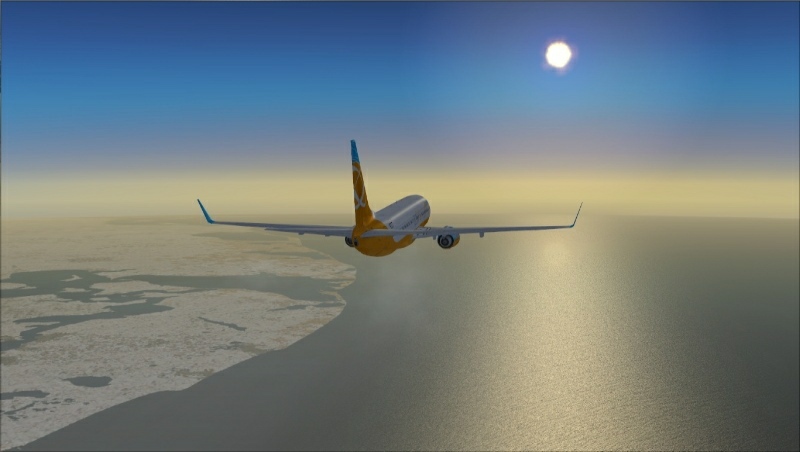
That sounds like a wide-screen resolution. In that case your resized image should be 800 x 452 or 1024 x 579. When resizing your screenshots in IrfanView make sure the "Preserve aspect ratio" option is checked. Don't worry about the Height (vertical dimension) as that will be automatically set when you type in the required pixel width.

This is how your shot looks at the correct aspect ratio of 800 x 452. It would look even better at the forum maximum width of 1024 (x 579).
Image

My native resolution.. hmm.. sorry, but how do I find out that? :-[ Sorry, i'm still pretty tired. My screen is 16", though, but i'm not sure if that matters. How do I find out the resolution?

To find your Desktop screen resolution right-click on your Desktop & select Properties/Settings. You can find the native resolution of your monitor in the user manual or on the manufacturer's website.
Last edited by Hagar on Mon Jan 05, 2009 7:20 am, edited 1 time in total.
Image

Founder & Sole Member - Grumpy's Over the Hill Club for Veteran Virtual Aviators
Member of the Fox Four Group
My Google Photos albums
My Flickr albums
User avatar
Hagar
Colonel
Colonel
 
Posts: 30869
Joined: Wed Jun 19, 2002 7:15 am
Location: Costa Geriatrica

Re: My first screenshot here..

Postby haroldkip » Mon Jan 05, 2009 7:46 am

This is how your shot looks at the correct aspect ratio of 800 x 452.

Hey look!! A round sun!! ;D

That's what I thought ... at 1366x768 you have a widescreen. And don't worry; it's very common for modern laptops!

Anything else than 1,25 aspect ratio is considered widescreen.

For example my desktop has a 'regular' native resolution of 1280x1024 (1,25 or 4:3) and your laptop has a native resolution of  366x768 (1,78 or 16:9).

I hope this clears things up ;)
User avatar
haroldkip
Lieutenant Colonel
Lieutenant Colonel
 
Posts: 5906
Joined: Wed Apr 12, 2006 5:13 am
Location: Amsterdam, The Netherlands

Re: My first screenshot here..

Postby FlyingPerson » Mon Jan 05, 2009 8:07 am

Thanks Harold and Hagar, my next screenies here will most likely be at 800x452 or 1024x579. Thanks for all help :)

PS: I still think it was a good screenie for a beginner myself :P

PPS: My screen resolution appears to be 1920x1080.
Specs
Intel M C2D P8400 2.26 GhZ
nVidia GeForce 9600M GT
4 GB DDR3
320 GB HD
Windows Vista Home Premium SP1 32

Image


Flown: B
User avatar
FlyingPerson
Captain
Captain
 
Posts: 573
Joined: Sun Nov 09, 2008 3:54 pm
Location: Near Oslo, Norway

Re: My first screenshot here..

Postby haroldkip » Mon Jan 05, 2009 8:11 am

PS: I still think it was a good screenie for a beginner myself.

Yeah it was! Like I said ... you should see one of my firsts. They weren't anything as nice as your first ;)

PPS: My screen resolution appears to be 1920x1080.

Sh*t that is large! I would love to see some shots in its original resolution :o
Last edited by haroldkip on Mon Jan 05, 2009 8:11 am, edited 1 time in total.
User avatar
haroldkip
Lieutenant Colonel
Lieutenant Colonel
 
Posts: 5906
Joined: Wed Apr 12, 2006 5:13 am
Location: Amsterdam, The Netherlands

Previous

Return to Simulation Screenshots Showcase

Who is online

Users browsing this forum: No registered users and 494 guests