Flight Simulation Screenshots displaying your Flight Simulation Experience. MSFS, FSX, Prepar3D, XPlane and other Flight Simulators. Focus is your Flight Simulator Experience. Please upload to Simviation (Button at top right)
 by NitroPower » Tue Sep 23, 2008 2:45 pm
Take a look at the prop, and you'll see.
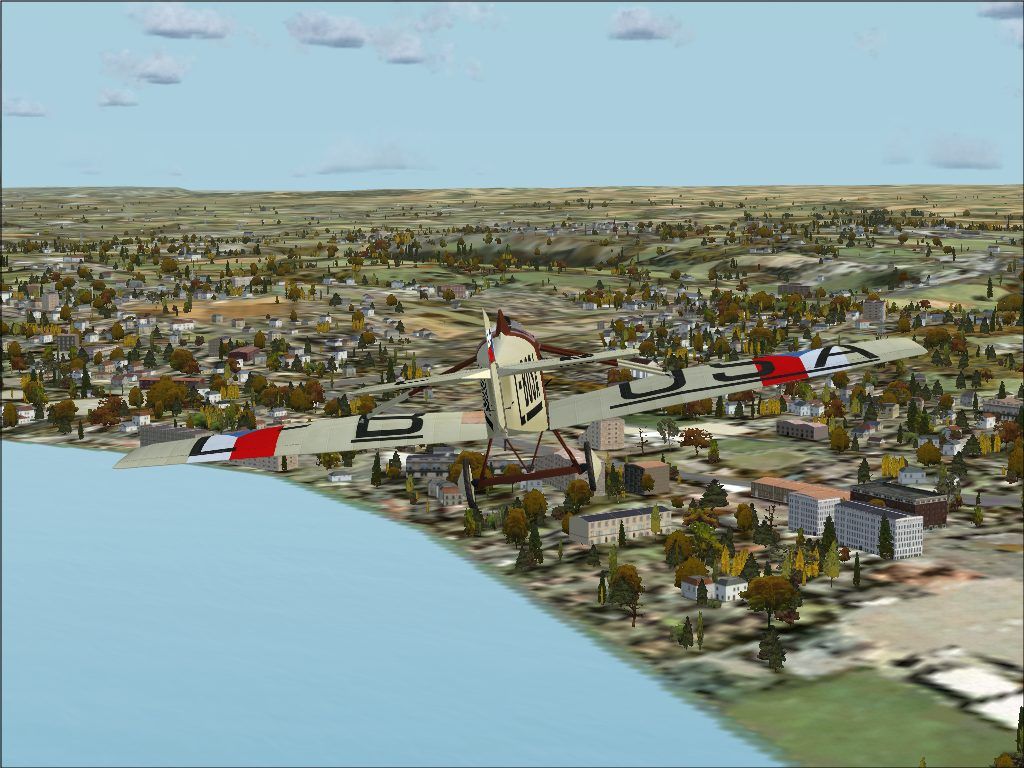
What must i do to fix it?
-

NitroPower
- Captain

-
- Posts: 712
- Joined: Wed Jun 25, 2008 12:45 pm
- Location: North Carolina, USA
-
by NitroPower » Tue Sep 23, 2008 4:50 pm
Come on help me! Please?
-
NitroPower
- Captain
-
- Posts: 712
- Joined: Wed Jun 25, 2008 12:45 pm
- Location: North Carolina, USA
-
by MIKE JG » Tue Sep 23, 2008 5:06 pm
Come on help me! Please?
I don't think any of us have any clue what you are talking about. I don't even see the prop for starters. Is that your issue?
-Mike G.

Military AI traffic packages and scenery for the
Microsoft Flight Simulator series.
-

MIKE JG
- Captain
-
- Posts: 844
- Joined: Wed Apr 07, 2004 5:46 pm
- Location: Ohio
by NitroPower » Tue Sep 23, 2008 5:06 pm
What prop

that, and no scenery in front or behind the prop-disk
-
NitroPower
- Captain
-
- Posts: 712
- Joined: Wed Jun 25, 2008 12:45 pm
- Location: North Carolina, USA
-
by todayshorse » Tue Sep 23, 2008 5:12 pm
Hmmm dont you need to reverse the alpha for the prop or somthing? I dont have fsx (yet) but i think thats the soloution.
-

todayshorse
- Major

-
- Posts: 2808
- Joined: Fri Mar 28, 2008 5:10 pm
- Location: England
by Daube » Wed Sep 24, 2008 7:24 am
There's nothing you can do. It's a problem with the model because it's from FS9. Sometime it's the prop that dissapear behind the clouds and scenery, and sometimes it's the contrary, just like in your case. No solution.
-

Daube
- Lieutenant Colonel

-
- Posts: 6611
- Joined: Wed Oct 05, 2005 8:34 am
- Location: Nice (FR)
Return to Simulation Screenshots Showcase
Who is online
Users browsing this forum: No registered users and 337 guests