Night Flying--FIXED

Flight Simulation Screenshots displaying your Flight Simulation Experience. MSFS, FSX, Prepar3D, XPlane and other Flight Simulators. Focus is your Flight Simulator Experience. Please upload to Simviation (Button at top right)

Night Flying--FIXED

Postby tcco94 » Wed Aug 20, 2008 1:05 am

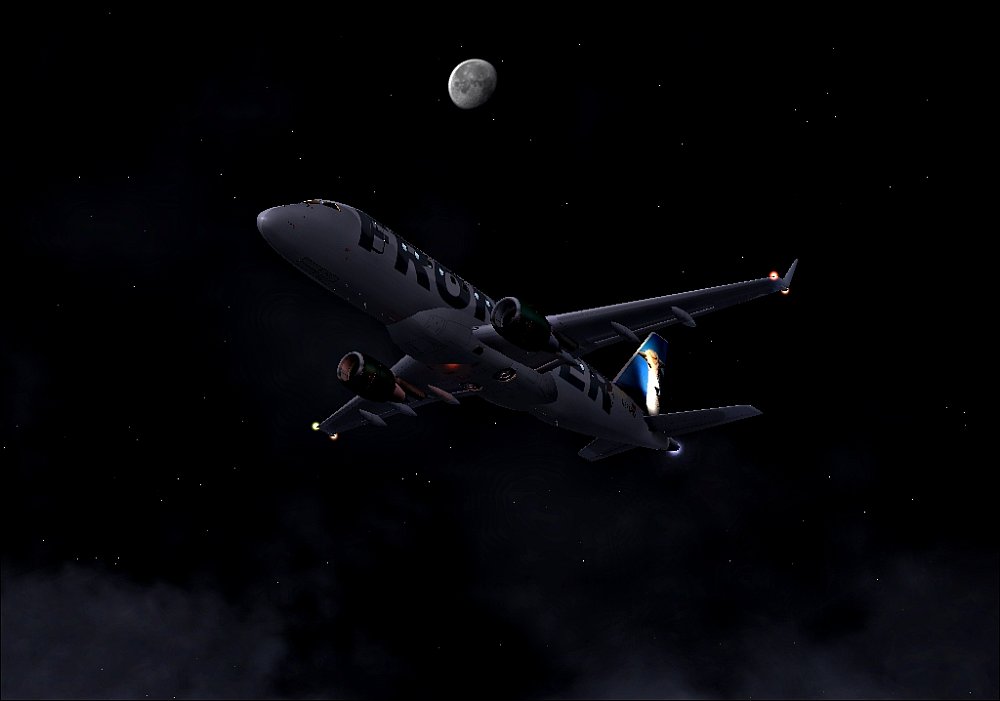
A Frontier Virtual Flight I was doing before the early morning sunset came up..

Image

Let me know what you think ;)
Last edited by tcco94 on Wed Aug 20, 2008 8:14 pm, edited 1 time in total.
User avatar
tcco94
Major
Major
 
Posts: 3946
Joined: Mon Apr 07, 2008 1:41 am
Location: Bay Area, California

Re: Night Flying

Postby todayshorse » Wed Aug 20, 2008 8:28 am
Great shot! Would be even better if it was sharper/less 'jaggies', is that how it appears in the sim or due to resizing and so on?
Image
User avatar
todayshorse
Major
Major
 
Posts: 2808
Joined: Fri Mar 28, 2008 5:10 pm
Location: England

Re: Night Flying

Postby Anxyous » Wed Aug 20, 2008 9:41 am

Compression hurt this one badly...
Image
User avatar
Anxyous
Major
Major
 
Posts: 2593
Joined: Mon Dec 25, 2006 4:04 pm

Re: Night Flying

Postby tcco94 » Wed Aug 20, 2008 9:46 am

No my sim is fine its the resizing..  :-/

I use infranview but it still compresses it alot :-?
User avatar
tcco94
Major
Major
 
Posts: 3946
Joined: Mon Apr 07, 2008 1:41 am
Location: Bay Area, California

Re: Night Flying

Postby Hagar » Wed Aug 20, 2008 9:50 am

No my sim is fine its the resizing..  :-/

I use infranview but it still compresses it alot :-?

Why did you compress it so much? Your image is less than 30 Kb. You're allowed 150 Kb.
Image

Founder & Sole Member - Grumpy's Over the Hill Club for Veteran Virtual Aviators
Member of the Fox Four Group
My Google Photos albums
My Flickr albums
User avatar
Hagar
Colonel
Colonel
 
Posts: 30869
Joined: Wed Jun 19, 2002 7:15 am
Location: Costa Geriatrica

Re: Night Flying--FIXED

Postby tcco94 » Wed Aug 20, 2008 8:16 pm

I found my problem..
When I resized it, it was set on faster load and not slower load and best quality..
I still had to resize it the normal edition was like barely over the max..

So now let me know what you think ;)
User avatar
tcco94
Major
Major
 
Posts: 3946
Joined: Mon Apr 07, 2008 1:41 am
Location: Bay Area, California

Re: Night Flying--FIXED

Postby Bob70 » Wed Aug 20, 2008 11:27 pm

I found my problem..
When I resized it, it was set on faster load and not slower load and best quality..
I still had to resize it the normal edition was like barely over the max..

So now let me know what you think ;)

It's still only 33K. Way under the 150K allowed.
Image
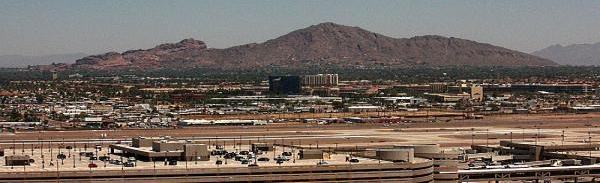
Camelback Mountain....Looking north from Sky Harbor Int.
User avatar
Bob70
Global Moderator
Global Moderator
 
Posts: 3069
Joined: Thu Nov 30, 2006 12:23 pm
Location: Phoenix Arizona , USA

Re: Night Flying--FIXED

Postby Hagar » Thu Aug 21, 2008 4:55 am

I found my problem..
When I resized it, it was set on faster load and not slower load and best quality..
I still had to resize it the normal edition was like barely over the max..

So now let me know what you think ;)

Still way below the limit. No point in trying to improve the first shot you posted. You need to go back to your original uncompressed screenshot. If you're using Irfanview you can adjust the amount of compression from the File/Save As option. This is a matter of guesswork & might need several goes to get right. It gets easier with practice.

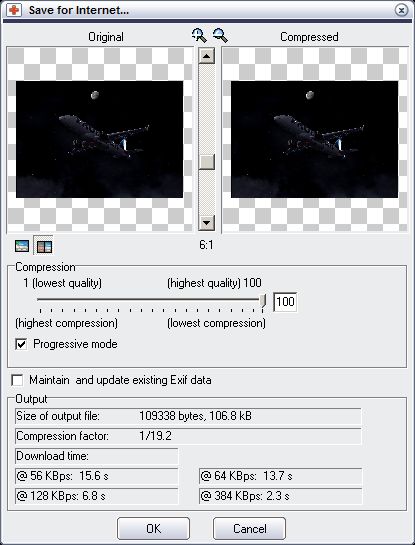
Alternatively you could use a different program for resizing/saving shots. Magix Xtreme Photo Designer 6 is free & has the same Save for Internet option as expensive software like Photoshop. This tells you what the file size of the saved image will be at different amounts of compression.
Image

There are other similar free graphics editing programs available.
Last edited by Hagar on Thu Aug 21, 2008 5:13 am, edited 1 time in total.
Image

Founder & Sole Member - Grumpy's Over the Hill Club for Veteran Virtual Aviators
Member of the Fox Four Group
My Google Photos albums
My Flickr albums
User avatar
Hagar
Colonel
Colonel
 
Posts: 30869
Joined: Wed Jun 19, 2002 7:15 am
Location: Costa Geriatrica

Re: Night Flying--FIXED

Postby ShaneG_old » Thu Aug 21, 2008 10:33 am

Alternatively you could use a different program for resizing/saving shots. Magix Xtreme Photo Designer 6 is free & has the same Save for Internet option as expensive software like Photoshop. This tells you what the file size of the saved image will be at different amounts of compression.

;D Yes! Thank you so much for that link! ;D
ShaneG_old
Lieutenant Colonel
Lieutenant Colonel
 
Posts: 9700
Joined: Tue Mar 11, 2008 11:52 am

Re: Night Flying--FIXED

Postby Anxyous » Thu Aug 21, 2008 11:36 am

For IrfanView, mess around with the quality of the JPEG you save.

Quality from 85-98 should do the trick (different for every shot).
Image
User avatar
Anxyous
Major
Major
 
Posts: 2593
Joined: Mon Dec 25, 2006 4:04 pm


Return to Simulation Screenshots Showcase

Who is online

Users browsing this forum: No registered users and 422 guests