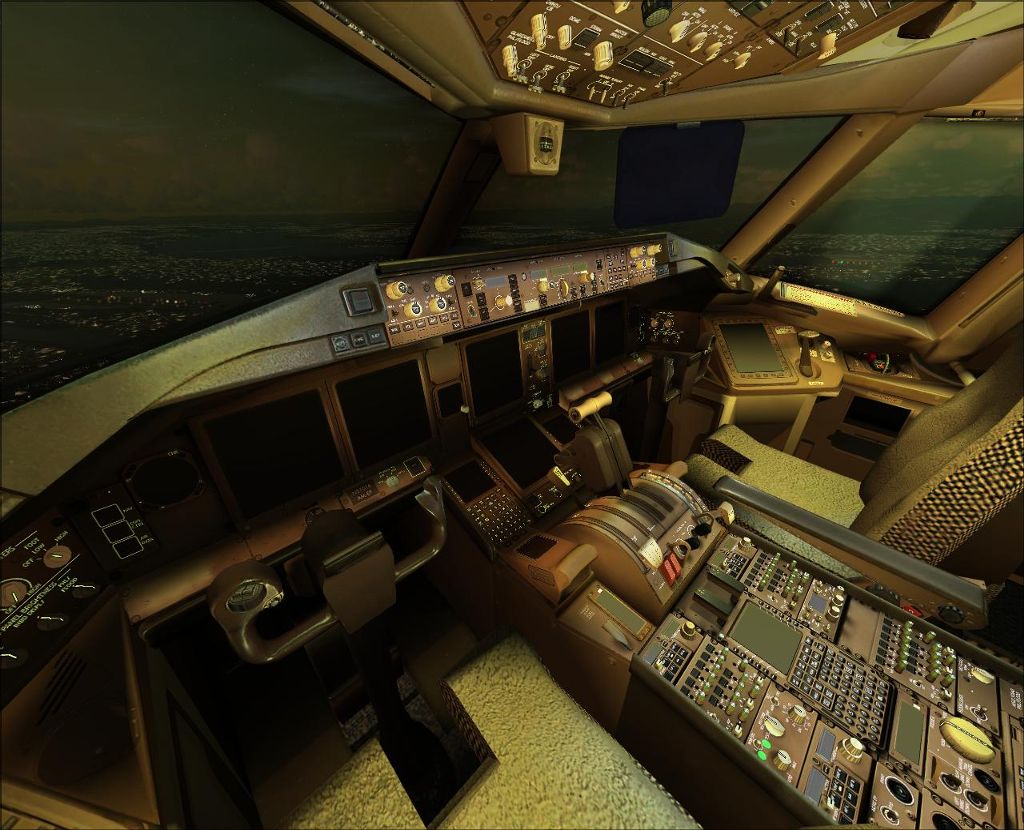
This rocks!

Flight Simulation Screenshots displaying your Flight Simulation Experience. MSFS, FSX, Prepar3D, XPlane and other Flight Simulators. Focus is your Flight Simulator Experience. Please upload to Simviation (Button at top right)

This rocks!

Postby fabiane » Mon Aug 04, 2008 2:25 pm

Haven't managed to get the gauges to work but I'm working on it.....

EDIT: Hurrah, VC works now  :)!

Cheers,
Fabian
---
Image

Image
Last edited by fabiane on Mon Aug 04, 2008 2:37 pm, edited 1 time in total.
fabiane
 

Re: This rocks!

Postby Brando14100 » Mon Aug 04, 2008 2:38 pm

OOOOOOOOOOOOOOO. What plane is that in/for? This can't be freeware...

8-)
Last edited by Brando14100 on Mon Aug 04, 2008 2:38 pm, edited 1 time in total.
Brando14100
 

Re: This rocks!

Postby Daube » Mon Aug 04, 2008 2:42 pm

Maaaaaaaaan !!!! How the hell did you manage to get the VC working ?
I've been struggling with gauges (tried the 737 gauges in replacement), and VC textures transparency etc... for more than an hour, with no success at all  :-X
What did you do to display those gauges finally ? What was the origin of the problem ?
User avatar
Daube
Lieutenant Colonel
Lieutenant Colonel
 
Posts: 6611
Joined: Wed Oct 05, 2005 8:34 am
Location: Nice (FR)

Re: This rocks!

Postby fabiane » Mon Aug 04, 2008 2:43 pm

Of course it is. Posky 777 VC edition, really rocking.

Don't know. Downloaded the latest panel.cfg, changed the viewpoint und added the other Posky XML codes to get the animations to work.

Need help anyone?
Last edited by fabiane on Mon Aug 04, 2008 2:45 pm, edited 1 time in total.
fabiane
 

Re: This rocks!

Postby a1 » Mon Aug 04, 2008 2:45 pm

Do all the knobs and switches work? :o
Image
790i : QX9650 : 4Gb DDR3 : GeForce 8800 GTX : 1 WD Raptor : 1 WD VelociRaptor 150
User avatar
a1
Lieutenant Colonel
Lieutenant Colonel
 
Posts: 7608
Joined: Thu Jan 04, 2007 9:16 pm

Re: This rocks!

Postby Daube » Mon Aug 04, 2008 2:53 pm

Of course it is. Posky 777 VC edition, really rocking.

Don't know. Downloaded the latest panel.cfg, changed the viewpoint und added the other Posky XML codes to get the animations to work.

Need help anyone?


Where did you get that panel.cfg ? I have downloaded one of the VC packages on the posky site, plus the vc textures packages, and still it does not work...
User avatar
Daube
Lieutenant Colonel
Lieutenant Colonel
 
Posts: 6611
Joined: Wed Oct 05, 2005 8:34 am
Location: Nice (FR)

Re: This rocks!

Postby fabiane » Mon Aug 04, 2008 2:55 pm

Try this:
Panel.cfg for FS2004:
//Project Opensky 777v2 Virtual Cockpit Panel cfg
//Built Friday, June 27, 2008 at 16:09 Jacob Kubique

[Window Titles]
Window00=Main Panel
Window01=Radio Stack
Window02=GPS
Window03=Throttle Quadrant
Window04=Compass
Window05=Mini Panel
Window06=Posky_Debug
Window07=Posky_Util
Window08=Posky_AutoBrake


//--------------------------------------------------------
[Window00]
file=Forward_640.bmp
file_1024=Forward_1024.bmp
size_mm=640
position=7
visible=1
ident=MAIN_PANEL

gauge00=Boeing777-300!Anti_Ice_Switch,
Last edited by fabiane on Mon Aug 04, 2008 3:06 pm, edited 1 time in total.
fabiane
 

Re: This rocks!

Postby Brando14100 » Mon Aug 04, 2008 3:05 pm

Do the MFDs work? I can't get my 777 to work in FSX.  :'(

8-)
Brando14100
 

Re: This rocks!

Postby Daube » Mon Aug 04, 2008 3:07 pm

Ah ok Fabian, you're running FS2004, and not FSX, right ?  :-[
User avatar
Daube
Lieutenant Colonel
Lieutenant Colonel
 
Posts: 6611
Joined: Wed Oct 05, 2005 8:34 am
Location: Nice (FR)

Re: This rocks!

Postby fabiane » Mon Aug 04, 2008 3:27 pm

Yep, that's right in a way. I'm running both, FSX and FS2004, havn't tried in FSX untill now, but will do tomorrow or so.

Maybe then someone else already managed to get ist to work in FSX  ;) :).

Cheers,
Fabian
fabiane
 

Re: This rocks!

Postby Daube » Mon Aug 04, 2008 3:43 pm

I think it's not possible, at least in FSX SP2.
I have tried everything, using gauges from the default 737-800 will not do. Somehow, it's like this VC refuses to admit any gauges, anywhere.... I do not understand...

EDIT: Ok, it works. I was just too stupid to write the name of the 737_800 gauge correctly (wrote "737-800")  :P
FPS killer, though. Strange, when everything is switched off, the FPS are high, but as soon as I switch the engines on, I loose 10 FPS...
Last edited by Daube on Mon Aug 04, 2008 4:09 pm, edited 1 time in total.
User avatar
Daube
Lieutenant Colonel
Lieutenant Colonel
 
Posts: 6611
Joined: Wed Oct 05, 2005 8:34 am
Location: Nice (FR)

Re: This rocks!

Postby gtirob01 » Mon Aug 04, 2008 4:55 pm

[quote]I think it's not possible, at least in FSX SP2.
I have tried everything, using gauges from the default 737-800 will not do. Somehow, it's like this VC refuses to admit any gauges, anywhere.... I do not understand...

EDIT: Ok, it works. I was just too stupid to write the name of the 737_800 gauge correctly (wrote "737-800")
My specs... A hard drive, motherboard, graphics card, some memory, a keyboard, mouse, and monitor - in other words, nothing special.

Image

My Posky
User avatar
gtirob01
Major
Major
 
Posts: 3605
Joined: Fri Jul 20, 2007 11:10 pm
Location: Ft. Walton Beach, FL

Re: This rocks!

Postby Daube » Mon Aug 04, 2008 5:05 pm

1- I removed (placed '//' in front) the gauge in the VCockpit.3 section, because it's displaying some non-transparent textures over the MFDs, preventing you to see them
2- I changed the MFD/PFD lines from "Boeing777-300..." to "B737_800..." in the VCockpit.1 section
3- for the rest of the gauges like autopilot or so, it does not display properly, and also you'll have to find the corresponding gauges names in the 737. But at least for getting the MFDs, it's easy.
4- you'll have to save the original panel.cfg of the plane (the one which had no VC) in order to copy the lines that contains those posky777.... gauges that control the animations (they were in the VCockpit.2 if I remember well). Paste them somewhere, in the VCockpit.3 for example.
Last edited by Daube on Mon Aug 04, 2008 5:08 pm, edited 1 time in total.
User avatar
Daube
Lieutenant Colonel
Lieutenant Colonel
 
Posts: 6611
Joined: Wed Oct 05, 2005 8:34 am
Location: Nice (FR)

Re: This rocks!

Postby Daube » Mon Aug 04, 2008 5:09 pm

I think it will be easier like that:
Code: Select all
//--------------------------------------------------------
[Vcockpit01]
file=$vc_01.bmp
Background_color=0,0,0
size_mm=1024,1024
visible=1
pixel_size=1024,1024
texture=$vc_01

gauge00=B737_800!PFD,  1,5,432,482
gauge01=B737_800!MFD,  431,3,428,483
gauge02=B737_800!MFD,  431,488,428,483
gauge03=B737_800!MFD,  2,488,428,483
gauge04=Boeing777-300!Pitch_Trim_Ind,  886,4,100,374
gauge05=Boeing777-300!Beacon_Nav_Light_Switch,  861,466,163,102
gauge06=Boeing777-300!Master_Caution,  883,909,117,112
gauge07=Boeing777-300!Autostart,  862,376,80,91
gauge08=Magnetic_Compass!Magnetic-Compass,  869,756,148,150


//--------------------------------------------------------
[Vcockpit02]
file=$vc_02.bmp
Background_color=0,0,0
size_mm=1024,1024
visible=1
pixel_size=1024,1024
texture=$vc_02

gauge00=Posky777!Pky_AdvInit, 140,80,140,80
gauge01=Posky777!PkyNosegearheight, 140,80,140,80
gauge02=Posky777!PkyLeftgearheight, 140,80,140,80
gauge03=Posky777!PkyLeftgearboggie, 140,80,140,80
gauge04=Posky777!PkyRightgearheight, 140,80,140,80
gauge05=Posky777!PkyRightgearboggie, 140,80,140,80
gauge06=Posky777!PkyCALC, 140,80,140,80
gauge07=Posky777!PkyWINGROOTFLEX, 140,80,140,80
gauge08=Posky777!PkyRWINGMIDFLEX, 140,80,140,80
gauge09=Posky777!PkyLWINGMIDFLEX, 140,80,140,80
gauge10=Posky777!PkyRWINGTIPFLEX, 140,80,140,80
gauge11=Posky777!PkyLWINGTIPFLEX, 140,80,140,80
gauge12=Posky777!PkyNosegearsteerling, 140,80,140,80
gauge13=Posky777!PkyRudder, 140,80,140,80
gauge14=Posky777!Pky2Rudder, 140,80,140,80
gauge15=Posky777!PkyflaperonL, 140,80,140,80
gauge16=Posky777!PkyflaperonR, 140,80,140,80
gauge17=Posky777!PkyLSAileronL, 140,80,140,80
gauge18=Posky777!PkyLSAileronR, 140,80,140,80
gauge19=Posky777!PkySpoiler, 140,80,140,80
gauge20=Posky777!PkyElev, 140,80,140,80
gauge21=Posky777!PkyAPUDoor, 140,80,140,80
gauge22=Posky777!PkyEngRev, 140,80,140,80
gauge23=Boeing777-300!Backup_Attitude,  441,848,174,174
gauge24=B737_800!Clock,  619,854,170,168
gauge25=B737_800!Autopilot,  332,528,689,78
gauge26=Boeing777-300!Rudder_Trim_Ind,  845,611,179,75
gauge27=fs9gps!gps_500,  386,-1,637,527
gauge28=Boeing777-300!Comm 1,  2,494,202,84
gauge29=Boeing777-300!Comm 2,  2,583,200,83
gauge30=Boeing777-300!Transponder,  1,841,200,76
gauge31=Boeing777-300!Nav 1,  3,670,200,82


//--------------------------------------------------------
[Vcockpit03]
file=$vc_03.bmp
Background_color=0,0,0
size_mm=1024,1024
visible=0
pixel_size=1024,1024
texture=$vc_03

//gauge00=Pky_glassdirt!Pky_glassdirt,  0,0,1024,1024


Now, if anybody could tell me which one of those gauges is eating my FPS, I would be very glad...
User avatar
Daube
Lieutenant Colonel
Lieutenant Colonel
 
Posts: 6611
Joined: Wed Oct 05, 2005 8:34 am
Location: Nice (FR)

Re: This rocks!

Postby Ferrari308guy » Mon Aug 04, 2008 5:13 pm

Hey Fabian, is this FS9 or FSX?

I'm currently trying to get it to work with FSX. Have default FS9 777 gauges in there and all. My problem is that that gauges are flickering between the gauge and the glass dirt image....Really annoying and I'm not sure how to fix it...Didn't know if anybody else experienced this issue.
Image
| Intel Q6600 2.9 Ghz | EVGA GTX260 896MB | 4GB 1066 Mhz DDR2 RAM | Nvidia 780i Mobo |
User avatar
Ferrari308guy
Captain
Captain
 
Posts: 574
Joined: Sat Aug 04, 2007 7:09 pm

Next

Return to Simulation Screenshots Showcase

Who is online

Users browsing this forum: No registered users and 525 guests